1. Wprowadzenie
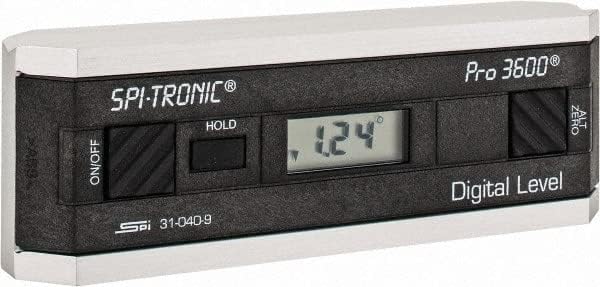
The SPI 31-040-9 Digital Protractor PRO3600 is a revolutionary tool designed to provide immediate digital indications of level, plumb, and angles. It features a light, rigid, and ultra-precise platform, utilizing a state-of-the-art sensor and microprocessor circuit for accurate readings. This instrument is built for durability, precision, and reliability, making it an essential tool for various metalworking and laboratory applications.
Główne cechy:
- Floating zero provides zero selection anywhere within its 360° range.
- PRO 3600 features SPC output and excellent accuracy.
- Instant LCD Display with resolution of 0.1° up to +/-10°.
- Deviation from the true plane is measurable through full 360° (4x90°).
- Supplied in a protective plastic case.
- Top plate has a V-groove for accurate registration on curved or cylindrical surfaces.

2. Koniec produktuview
Familiarize yourself with the main components and controls of your SPI PRO3600 Digital Protractor.


3. Konfiguracja
3.1 Instalacja baterii
The SPI PRO3600 is battery powered. To install or replace batteries:
- Znajdź pokrywę komory baterii, zazwyczaj na spodzie lub z boku urządzenia.
- Open the cover using a small screwdriver or coin if necessary.
- Insert the required batteries (refer to the battery type indicated inside the compartment, usually AAA or button cell) ensuring correct polarity (+/-).
- Dokładnie zamknij pokrywę komory baterii.
3.2 Pierwsze włączenie zasilania
Po zainstalowaniu baterii naciśnij przycisk WŁ./WYŁ. button to power on the device. The LCD display should illuminate and show a reading.
4. Instrukcja obsługi
4.1 Włączanie/wyłączanie zasilania
- Aby włączyć jednostkę ON, naciśnij WŁ./WYŁ. przycisk.
- Aby włączyć jednostkę WYŁĄCZONY, naciśnij WŁ./WYŁ. naciśnij przycisk ponownie.
- The unit will automatically shut off after 6 minutes of non-use to conserve battery life.
4.2 Zeroing (ALT ZERO)
The floating zero feature allows you to set a reference point anywhere within the 360° range.
- Place the unit on your chosen reference surface.
- Wait approximately 5 seconds for the reading to stabilize.
- Naciśnij ALT ZERO button. The display will reset to 0.0°, establishing this as your new reference.
- To return to the original absolute reference (factory zero), press the ALT ZERO naciśnij przycisk ponownie.
4.3 Holding a Reading
Aby zamrozić aktualny odczyt na wyświetlaczu:
- Naciśnij TRZYMAĆ button. The displayed reading will be frozen.
- To unfreeze the display and resume live readings, press the TRZYMAĆ naciśnij przycisk ponownie.
4.4 SPC Output
The PRO3600 features an SPC (Statistical Process Control) output port. This allows for data transfer to external devices for analysis. Refer to the manual for your specific SPC data collection system for connection and usage instructions.
4.5 Measuring Angles
Place the base of the protractor firmly on the surface you wish to measure. The digital display will show the angle relative to the last set zero point. For absolute measurements, ensure the unit is zeroed on a true horizontal surface.
4.6 Using the V-Groove
The top plate of the protractor features a V-groove. This design allows for accurate registration and measurement on curved or cylindrical surfaces, such as pipes or shafts. Simply align the V-groove with the cylindrical object to obtain a stable and accurate reading.
5. Konserwacja
5.1 Czyszczenie
- Wytrzyj urządzenie miękką, suchą ściereczką.
- W przypadku uporczywych zabrudzeń, należy użyć lekkiego detergentu.amp Można użyć ściereczki zwilżonej łagodnym mydłem i natychmiast wysuszyć.
- Nie należy używać środków czyszczących o właściwościach ściernych ani rozpuszczalników, ani zanurzać urządzenia w wodzie.
5.2 Przechowywanie
- Store the protractor in its supplied plastic case when not in use to protect it from dust, dirt, and physical damage.
- Store in a dry environment, away from extreme temperatures and direct sunlight.
- Jeśli urządzenie będzie przechowywane przez dłuższy czas, należy wyjąć baterie, aby zapobiec ich wyciekowi.
6. Rozwiązywanie Problemów
- Jednostka nie włącza się: Sprawdź instalację baterii i upewnij się, że nie są rozładowane. W razie potrzeby wymień je.
- Niedokładne odczyty: Ensure the measurement surface is clean and stable. Perform an ALT ZERO calibration on a known true reference surface.
- Urządzenie niespodziewanie się wyłącza: The unit has an automatic shut-off feature after 6 minutes of non-use. This is normal operation. If it shuts off during active use, check battery levels.
- Wyświetlacz jest przyciemniony lub migocze: Baterie mogą być rozładowane. Wymień je.
7. Specyfikacje
| Atrybut | Wartość |
|---|---|
| Producent | MSC Industrial |
| Numer części | 03883782 |
| Waga przedmiotu | 6.5 funta |
| Wymiary produktu | 6 x 1.2 x 2.3 cala |
| Numer modelu przedmiotu | 31-040-9 |
| Rozmiar | Jeden rozmiar |
| Kolor | Czarny |
| Tworzywo | Złożony |
| Źródło zasilania | Zasilany bateryjnie |
| Ilość w opakowaniu przedmiotu | 1 |
| Zawarte komponenty | Fitted Case |
8. Gwarancja i wsparcie
8.1 Informacje o gwarancji
SPI measuring instruments are backed by an industry-leading 2-Year warranty, ensuring their durability, precision, and reliability. Please retain your proof of purchase for warranty claims.
8.2 Obsługa klienta
For technical assistance, warranty service, or inquiries regarding your SPI PRO3600 Digital Protractor, please contact SPI customer support through their official webwitrynę lub sprzedawcę, u którego kupiłeś produkt.


