1. Wprowadzenie
This manual provides detailed instructions for the safe and effective use of your Insta360 Quick Release Mount 2.0. This accessory is designed to enhance your camera setup by offering quick and secure attachment options for various compatible Insta360 cameras, including the X5, X4, X3, ONE RS, X, X2, ACE, ACE PRO, and ACE PRO 2.
2. Koniec produktuview
The Insta360 Quick Release Mount 2.0 features a robust design for reliable performance. Key features include:
- Szybki i łatwy montaż: Facilitates rapid attachment and detachment of your camera.
- Double-Locked System: Incorporates a strong magnet and a secure clasp for enhanced protection against accidental detachment.
- Elastyczna kompatybilność: Offers both a standard 1/4-inch screw interface and a 2-prong mount, allowing use with a wide range of accessories.
- Ultracienka konstrukcja: Engineered to be minimally intrusive, ensuring it remains invisible in 360-degree shots.

Image: The Quick Release Mount 2.0 displaying its versatile 1/4-inch screw and folding 2-prong mount.
3. Konfiguracja
3.1 Attaching the Base Plate to Your Camera
- Locate the 1/4-inch screw on the top part of the Quick Release Mount.
- Align this screw with the 1/4-inch threaded hole on the bottom of your Insta360 camera.
- Carefully screw the mount onto the camera until it is finger-tight. Ensure a snug fit to prevent wobbling.

Image: Demonstrating the attachment of the quick release base to an Insta360 camera.
3.2 Attaching the Mount to an Accessory
The Quick Release Mount offers two primary ways to connect to accessories:
- Otwór gwintowany 1/4 cala: For tripods, monopods, or other accessories with a 1/4-inch screw.
- Locate the 1/4-inch threaded hole on the bottom of the Quick Release Mount.
- Screw your accessory's 1/4-inch screw into this hole until secure.
- Folding 2-Prong Mount: For action camera accessories (e.g., GoPro mounts).
- Extend the folding fingers from the bottom of the Quick Release Mount.
- Align these fingers with the corresponding slots on your 2-prong compatible accessory.
- Insert the fingers and secure with a thumb screw if required by the accessory.

Image: The Quick Release Mount 2.0 with its folding fingers extended, ready for attachment to 2-prong accessories.
3.3 Video: Versatile Mounting Options
Video: This video demonstrates the versatile mounting options of a quick release mount, including attachment to a selfie stick and tripod, showcasindzięki kompaktowej i przenośnej konstrukcji.
4. Instrukcja obsługi
4.1 Attaching Your Camera to the Quick Release Mount
- Ensure the Quick Release Mount is securely attached to your desired accessory (selfie stick, tripod, etc.).
- Align the camera (with the base plate attached) with the Quick Release Mount. The strong magnets will guide the connection.
- Press the camera firmly onto the mount until you hear a distinct "click," indicating the clasp system has engaged.
- For added security, slide the lock switch on the side of the Quick Release Mount to the locked position (indicated by a closed padlock icon).
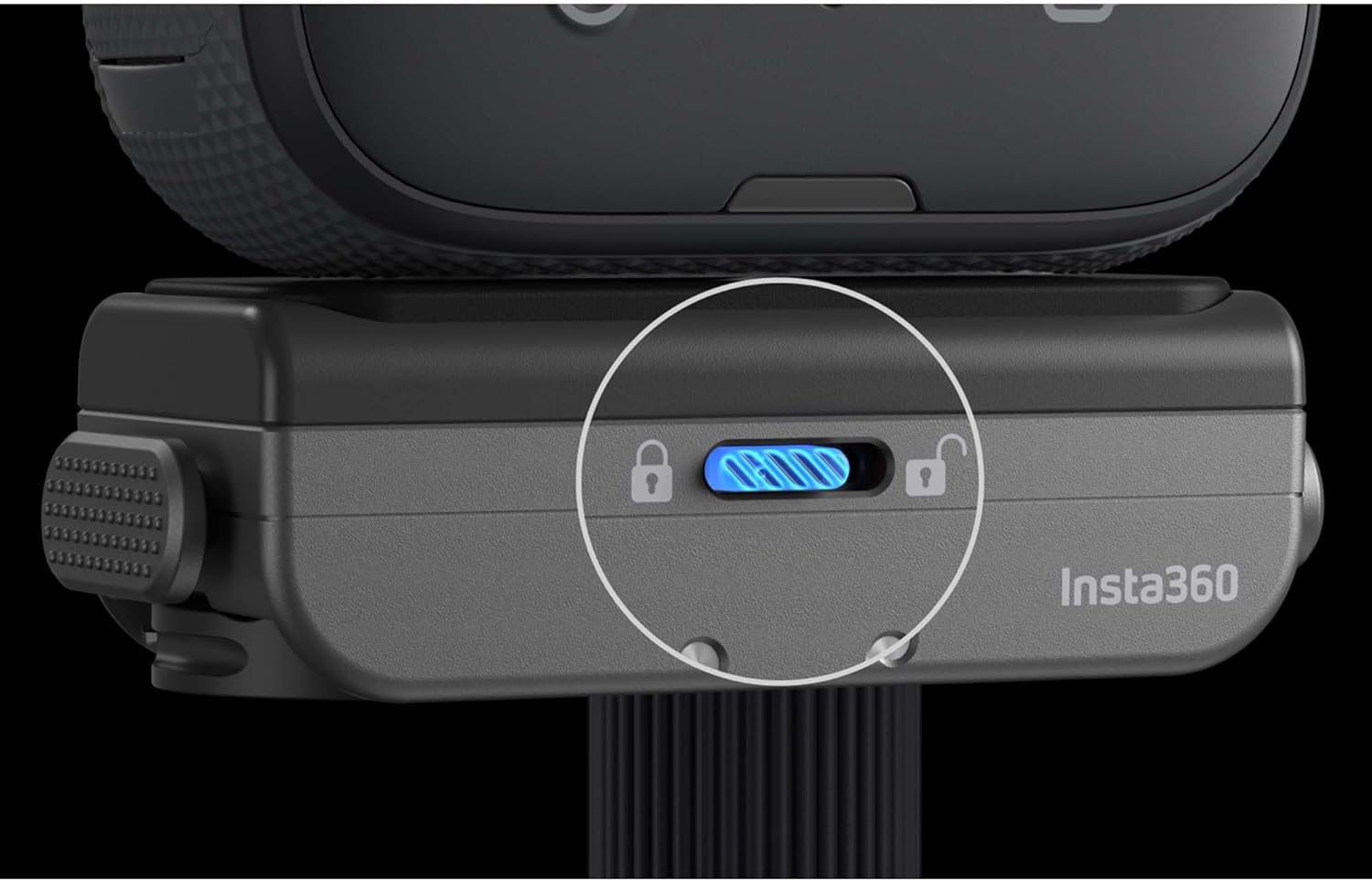
Obraz: Zbliżenie view of the Quick Release Mount's lock switch, highlighting its secure position.
4.2 Detaching Your Camera from the Quick Release Mount
- If the lock switch is engaged, slide it to the unlocked position (indicated by an open padlock icon).
- Press the two side release buttons simultaneously.
- Gently lift the camera away from the Quick Release Mount.
4.3 Video: Quick Release Mount for Ace Pro
Video: This video demonstrates the quick release mount's compatibility and ease of use with the Insta360 Ace Pro camera, showing attachment and detachment from various accessories.
5. Konserwacja
- Keep the magnetic surfaces and clasp mechanism clean and free from dust, dirt, or debris to ensure optimal performance.
- Unikaj wystawiania uchwytu na działanie ekstremalnych temperatur i substancji żrących.
- Regularly inspect the mount for any signs of wear or damage. Discontinue use if any damage is observed.
6. Rozwiązywanie Problemów
- Camera wobbles or feels loose:
- Ensure the 1/4-inch screw attaching the base plate to the camera is tightened securely.
- Verify that the Quick Release Mount is fully engaged with the accessory and the lock switch is in the locked position.
- Check for any debris on the magnetic surfaces or within the clasp mechanism that might prevent a tight fit.
- Trudności z odłączeniem kamery:
- Ensure the lock switch is in the unlocked position.
- Press both side release buttons firmly and simultaneously.
7. Specyfikacje
| Wymiary produktu: | 3 x 4 x 2 cala |
| Waga przedmiotu: | 3.2 uncji |
| Numer modelu przedmiotu: | CINSAAVH-ALT1 |
| Kolor: | Czarny |
| Cechy szczególne: | Obrotowy |
| Zgodne urządzenia: | Insta360 X5, X4, X3, ONE RS, X, X2, ACE, ACE PRO, ACE PRO 2 Cameras |
8. Gwarancja i wsparcie
This product is manufactured by Insta360. For warranty information and customer support, please refer to the official Insta360 website or contact their customer service directly. Purchasing from EVO Gimbals supports a small Oregon business, with customer service based in Bend, OR, offering replies within 24 hours.
Aby uzyskać dodatkową pomoc, odwiedź stronę Sklep Insta360 na Amazon.


