1. Wprowadzenie
The Algo 8188 is a Power over Ethernet (PoE) Wideband Voice over IP ceiling speaker designed for various communication and audio applications. This device facilitates voice paging, notification alerting for safety, security, emergency events, and OSHA compliance, as well as background music playback. It functions as a third-party SIP device, registering within hosted or premise Unified Communications (UC) environments.
The speaker is suitable for installation in air handling spaces within drop ceilings, commonly found in schools, hospitals, and offices, adhering to UL2043 standards. It can also be suspended in open ceiling environments, such as retail and grocery stores. The Algo 8188 supports RTP multicast, Poly Group Page, and Syn-Apps SA-Announce, allowing for comprehensive large-scale enterprise or campus deployments when combined with other Algo IP speakers, paging adapters, and strobes. Key features include full zoning capabilities, two-way communication (talkback), and ambient noise monitoring for automatic volume adjustment based on background sound levels.

Przód view of the Algo 8188 PoE SIP Ceiling Speaker, showing the white grille and the Algo logo at the top.
2. Co znajduje się w pudełku
Upon unpacking your Algo 8188, please verify that all components are present:
- Algo 8188 PoE SIP Ceiling Speaker (quantity: 2)
3. Instalacja
3.1 Montaż
The Algo 8188 speaker is designed for versatile installation. It can be mounted in a drop ceiling, complying with UL2043 standards for use in air handling spaces. Alternatively, it can be suspended in open ceiling environments using appropriate hardware (e.g., an eye bolt and cable, sold separately).
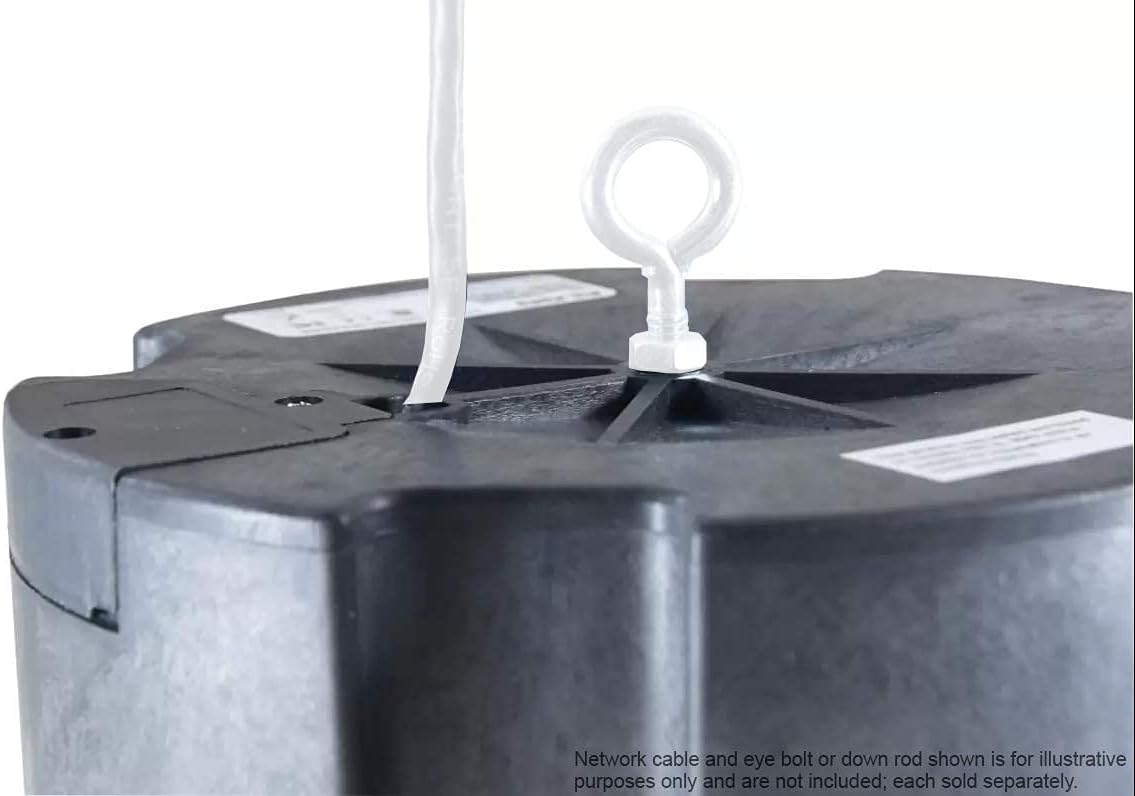
Z bliska view of the top of the Algo 8188 speaker, illustrating the central mounting point with an installed eye bolt for suspended installation. A network cable is also visible.
3.2 Połączenia
The Algo 8188 requires Power over Ethernet (PoE) for operation. Connect a standard Ethernet cable from a PoE-enabled switch or a PoE injector (if a PoE switch is not available) to the Ethernet port on the speaker. The device does not support direct power connection.
The speaker also features programmable relay (dry contact) input and output ports, which can be used for integration with external devices such as call buttons (e.g., Algo 1202 / 1203) or other control systems.
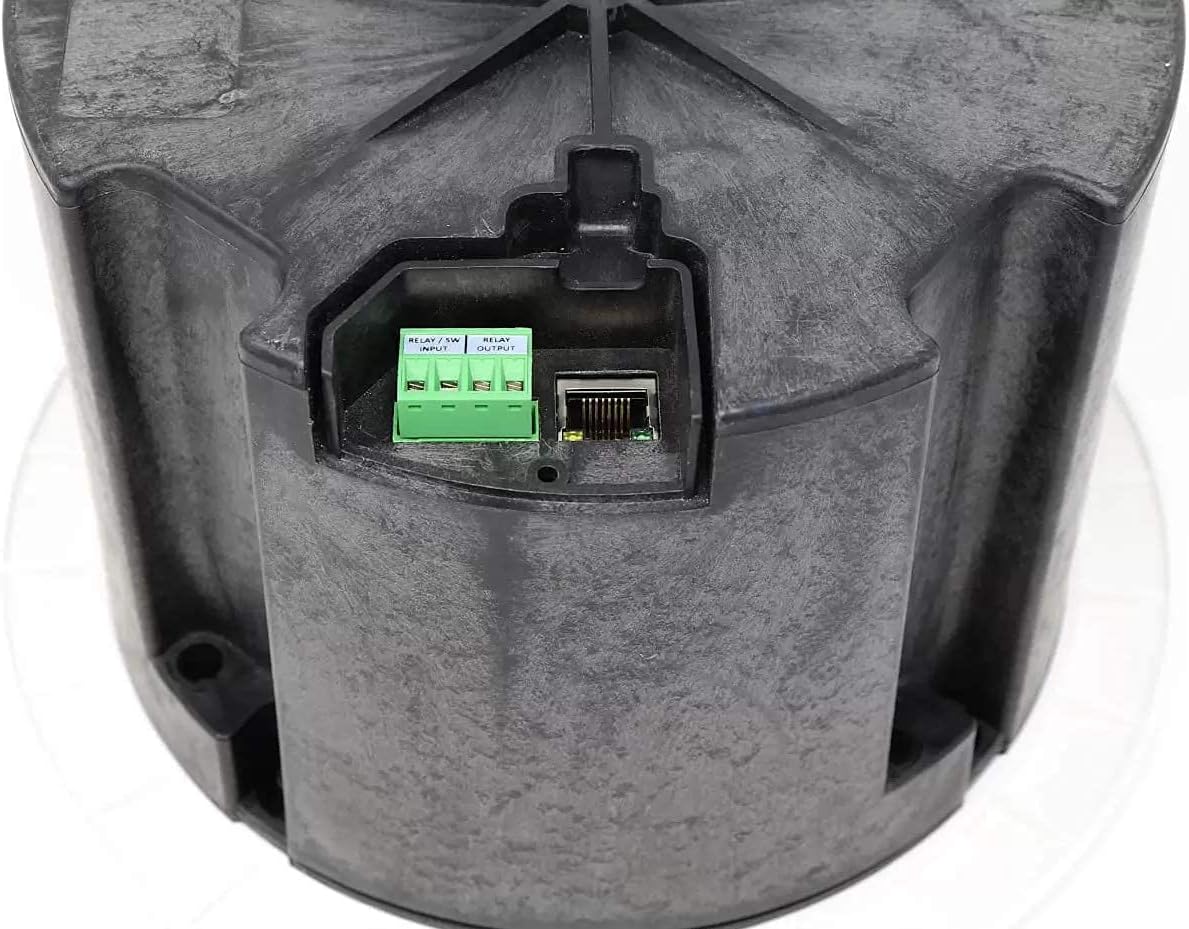
Szczegółowy view of the connectivity panel on the Algo 8188 speaker, showing the green terminal blocks for 'RELAY / SW INPUT' and 'RELAY OUTPUT', alongside the Ethernet port for Power over Ethernet (PoE).

Tył view of the Algo 8188 speaker, displaying the product label with manufacturing details and certifications. The Ethernet port and relay connections are visible on the side.
4. Konfiguracja i konfiguracja
4.1 Początkowa konfiguracja sieci
Ensure the speaker is connected to a network with PoE. The device will power on automatically. A basic understanding of computer networking is recommended for initial setup.
4.2 Rejestracja SIP
The Algo 8188 registers as a third-party SIP device. Configuration can be performed manually or via remote provisioning through its web-based programming user interface (UI). It supports multiple SIP registrations for ring (up to 10 extensions) and page (up to 50 extensions).
4.3 aktualizacji oprogramowania sprzętowego
It is recommended to periodically check the manufacturer's webwitryna z najnowszymi aktualizacjami oprogramowania sprzętowego, która zapewnia optymalną wydajność i dostęp do nowych funkcji.
5. Działanie
5.1 Paging and Notification
The speaker supports voice paging and various notification alerts. It integrates with multicast systems, Poly Group Page, and Syn-Apps SA-Announce for efficient message delivery across multiple devices.
5.2 Background Music
The Algo 8188 is capable of playing background music. It features internal memory for uploaded WAV files or recorded messages, which can be triggered via separate SIP extensions for page or loud ringer notifications.
5.3 Funkcje zaawansowane
- Odpowiedź: Supports two-way communication for interactive paging scenarios.
- Ambient Noise Monitoring: Automatically adjusts the speaker's volume based on the detected background noise levels, ensuring messages are always audible.
- Możliwości strefowania: Offers full zoning capabilities, allowing for targeted audio delivery to specific areas.
- Wideband G.722 Codec: Supports HD Voice for clear audio quality.
6. Konserwacja
To ensure the longevity and optimal performance of your Algo 8188 speaker, consider the following maintenance guidelines:
- Czyszczenie: Gently wipe the exterior surfaces with a soft, dry cloth. Avoid using harsh chemicals or abrasive cleaners.
- Oprogramowanie sprzętowe: Regularly check the Algo webodwiedź naszą witrynę, aby sprawdzić dostępne aktualizacje oprogramowania sprzętowego i zastosuj je zgodnie z zaleceniami.
- Warunki środowiskowe: Ensure the speaker operates within its specified environmental conditions to prevent damage.
7. Rozwiązywanie Problemów
If you encounter issues with your Algo 8188 speaker, refer to the following common troubleshooting steps:
- Brak zasilania: Verify that the Ethernet cable is securely connected and that the PoE source (switch or injector) is active and providing power.
- Brak wyjścia audio:
- Check SIP registration status via the web UI. Ensure the speaker is successfully registered to your UC environment.
- Confirm network connectivity.
- Verify volume settings on the speaker's web UI.
- Ensure the audio source (paging system, music server) is correctly configured and sending audio.
- Słaba jakość dźwięku:
- Check network conditions for latency or packet loss.
- Ensure the G.722 wideband codec is being utilized if HD Voice is desired.
- Adjust ambient noise monitoring sensitivity if automatic volume changes are problematic.
- Problemy z konfiguracją: Refer to the detailed documentation available on the Algo manufacturer's website for specific configuration guides and advanced settings. A basic understanding of Voice over IP (VoIP) is highly recommended for advanced configurations.
8. Specyfikacje
| Funkcja | Specyfikacja |
|---|---|
| Nazwa modelu | Algo 8188 |
| Typ głośnika | Sufit |
| Typ montażu | Montaż sufitowy |
| Źródło zasilania | PoE (zasilanie przez Ethernet) |
| Technologia łączności | Sieć Ethernetowa |
| Tryb wyjścia audio | Mono lub Stereo |
| Typ sterownika audio | Dynamiczny sterownik |
| Rozmiar głośnika | 1 cali |
| Metoda kontroli | App (via web Interfejs użytkownika) |
| Kompatybilne urządzenia | Desktop, Laptop, Smartphone, Tablet (for web UI access) |
| Waga przedmiotu | 2.78 kilogramów (6.12 funty) |
| Wymiary opakowania | 11.81 x 11.38 x 10.75 cala |
| Zgodność z UL | UL2043 (for air handling spaces) |
| UPC | 850058188058 |
9. Gwarancja i wsparcie
The Algo 8188 PoE SIP Ceiling Speaker comes with a Limited Warranty. For specific details regarding warranty coverage, duration, and terms, please refer to the documentation provided with your product or visit the official Algo webstrona.
For technical support, troubleshooting assistance beyond this manual, or inquiries about product features and updates, please contact Algo customer support directly through their official website. Ensure you have your product model number (ALGO-8188) available when seeking support.


