1. Koniec produktuview
The SYLVOX 75-inch Deck Pro 2.0 Smart Outdoor TV is designed for outdoor entertainment, offering a 4K Ultra HD display with 1000 nits brightness for clear viewing in partial sun and shaded areas. It features an IP55 waterproof rating and a durable all-metal casing to withstand various outdoor conditions. Powered by Android 11.0, it provides access to a wide range of applications and supports Google Assistant and Chromecast for seamless content streaming.

Rycina 1.1: Przód view of the SYLVOX 75-inch Deck Pro 2.0 Smart Outdoor TV.
2. Informacje dotyczące bezpieczeństwa
Przed instalacją i uruchomieniem produktu należy uważnie przeczytać wszystkie instrukcje bezpieczeństwa. Nieprzestrzeganie tych instrukcji może spowodować porażenie prądem, pożar lub uszkodzenie produktu.
- Bezpieczeństwo elektryczne: Ensure the power outlet meets the TV's voltage requirements. Do not overload power outlets. Disconnect power during lightning storms or when unused for long periods.
- Montowanie: Use appropriate mounting hardware and ensure the mounting surface can support the TV's weight. Professional installation is recommended for outdoor wall mounts.
- Wentylacja: Nie zasłaniaj otworów wentylacyjnych. Zapewnij odpowiedni przepływ powietrza wokół telewizora, aby zapobiec przegrzaniu.
- Temperatura: The TV is designed to operate within a specific temperature range (-22°F to 122°F). Avoid exposing it to temperatures outside this range.
- Czyszczenie: Przed czyszczeniem odłącz zasilanie. Użyj miękkiej, miękkiej szczoteczki.amp szmatką. Unikaj silnych środków chemicznych i ściernych środków czyszczących.
3. Co znajduje się w pudełku
Przed przystąpieniem do instalacji sprawdź, czy wszystkie komponenty są obecne.
- 75-inch Outdoor Smart TV
- Pilot zdalnego sterowania głosem (w zestawie 2 baterie AAA)
- Instrukcja obsługi
- Karta gwarancyjna
- Przewód zasilający
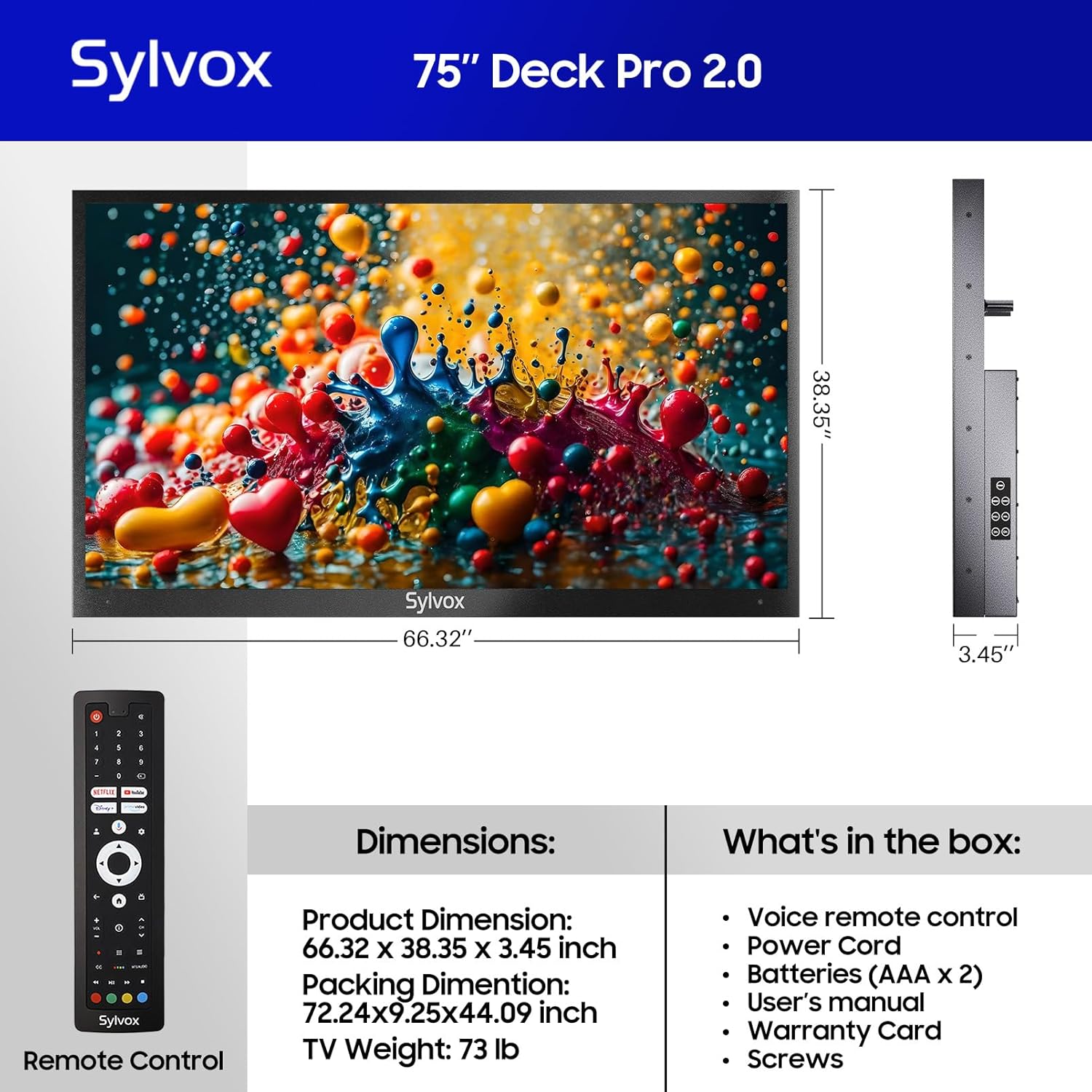
Figure 3.1: Included components and dimensions of the TV.
Video 3.1: Unboxing the Deck Pro 2.0 Series Outdoor TV, showing how components are packaged.
4. Konfiguracja
4.1 Fizyczna instalacja
The SYLVOX Deck Pro 2.0 TV is designed for outdoor installation. It features a robust all-metal body for enhanced durability and weather resistance.

Rysunek 4.1: Strona view illustrating the durable all-metal casing.
For wall mounting, ensure you use a compatible VESA mount (not included) and secure it to a sturdy structure. The TV's back panel is designed to accommodate standard VESA mounting patterns.

Rysunek 4.2: Tył view of the TV with VESA mounting points.
4.2 Połączenia
The TV offers multiple connectivity options. Access the ports by removing the protective cover on the back of the unit.
- HDMI: For connecting external devices like gaming consoles or media players.
- USB: Do odtwarzania multimediów z dysków USB.
- Ethernet: Do przewodowego połączenia internetowego.
- Bezprzewodowy: Built-in WiFi and Bluetooth for network and accessory connections.

Figure 4.3: Rear input panel with various connectivity ports.
4.3 Pierwsze włączenie zasilania
Connect the power cord to the TV and a suitable outdoor-rated power outlet. Press the power button on the remote control or the TV's side panel to turn on the unit. Follow the on-screen instructions to complete the initial setup, including network connection and Google account login.
5. Instrukcja obsługi
5.1 Pilot zdalnego sterowania
The included voice remote control allows for easy navigation and control of your TV. It features dedicated buttons for popular streaming services and Google Assistant.

Figure 5.1: Voice remote control for the SYLVOX Outdoor TV.
5.2 Interfejs Google TV
The TV runs on the Android 11.0 system with the Google TV interface, offering personalized recommendations and easy access to over 10,000 apps including YouTube, Netflix, Prime Video, Hulu, and Disney+.

Figure 5.2: Google TV interface with access to numerous applications.
Video 5.1: Demonstration of the Sylvox Smart Google Outdoor TV interface and features.
5.3 Główne cechy
- Rozdzielczość 4K Ultra HD: Enjoy crystal-clear images with stunning detail.
- Dolby Atmos: Immerse yourself in a panoramic sound experience.
- Jasność 1000 nitów: Provides optimal visibility in outdoor environments with partial sun.
- Wbudowany Chromecast: Łatwe przesyłanie treści z urządzeń mobilnych na telewizor.
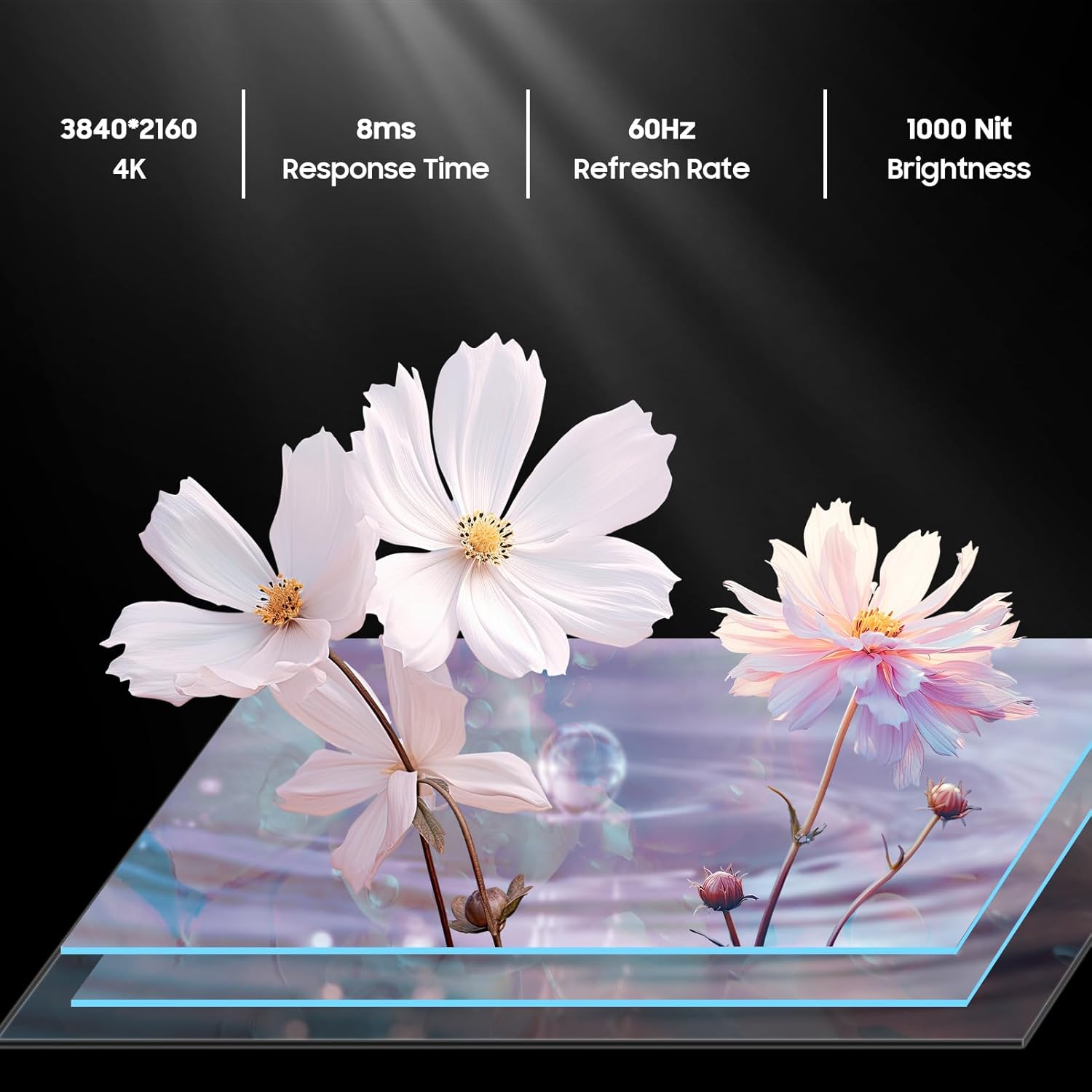
Figure 5.3: Visual representation of 4K resolution and 1000 nit brightness.
Wideo 5.2: Ponadview of the Deck Pro 2.0 Outdoor TV, highlighting Google TV and Dolby Atmos features.
5.4 Outdoor Use Considerations
The TV is IP55 waterproof, meaning it is protected against dust and low-pressure water jets from any direction. This makes it suitable for use in various outdoor weather conditions, including rain and snow.

Figure 5.4: The TV operating effectively during rainfall, showcasinposiada klasę wodoodporności IP55.
Video 5.3: A short clip demonstrating the TV's ability to function in various weather conditions.
6. Konserwacja
- Czyszczenie ekranu: Delikatnie przetrzyj ekran miękką, niepozostawiającą włókien ściereczką. W przypadku uporczywych zabrudzeń delikatnie przetrzyjampNamocz ściereczkę wodą. Nie rozpylaj środków czyszczących bezpośrednio na ekran.
- Czyszczenie Casing: Użyj miękkiego, damp cloth to clean the all-metal casing. Avoid abrasive materials that could scratch the surface.
- Osłony portów: Ensure all port covers on the back of the TV are securely closed when not in use to maintain its waterproof rating.
- Magazynowanie sezonowe: While designed for all-weather use, consider covering the TV during prolonged periods of extreme weather or when not in use for extended periods to prolong its lifespan.
7. Rozwiązywanie Problemów
- Brak zasilania: Sprawdź, czy przewód zasilający jest prawidłowo podłączony do telewizora i gniazdka elektrycznego. Upewnij się, że gniazdko jest sprawne.
- Brak obrazu/dźwięku: Verify the correct input source is selected. Check all cable connections (HDMI, etc.).
- Pilot nie odpowiada: Replace the AAA batteries in the remote control. Ensure there are no obstructions between the remote and the TV.
- Słabe połączenie Wi-Fi: Ensure the TV is within range of your Wi-Fi router. Try restarting your router.
- Image Glare in Sunlight: While the TV has 1000 nits brightness, direct, intense sunlight can still cause glare. Adjust the TV's position or consider additional shading for optimal viewing.
8. Specyfikacje
| Funkcja | Opis |
|---|---|
| Marka | SYLVOX |
| Nazwa modelu | Deck Pro 2.0 |
| Rozmiar ekranu | 75 cali |
| Rezolucja | 4K Ultra HD (3840x2160) |
| Jasność | 1000 nitów |
| Częstotliwość odświeżania | 60 Hz |
| System operacyjny | Android 11.0 with Google TV |
| Stopień wodoodporności | IP55 |
| Cechy specjalne | Dolby Atmos, Google Assistant, Chromecast Built-in |
| Łączność | Ethernet, Wireless (Wi-Fi), Bluetooth, HDMI, USB |
| Wymiary produktu | 3.45" gł. x 66.32" szer. x 38.35" wys. |
| Waga przedmiotu | 100.8 funta |
| Kolor | Czarny |
| Baterie | Wymagane 2 baterie AAA (w zestawie) |
9. Gwarancja i wsparcie
The SYLVOX 75-inch Deck Pro 2.0 Smart Outdoor TV comes with a one-year warranty. For technical assistance, troubleshooting, or warranty claims, please contact SYLVOX customer service. Keep your purchase receipt and warranty card for reference.
Obsługa klienta: Available 24/7. Refer to the warranty card for contact details or visit the official SYLVOX webstrona.


