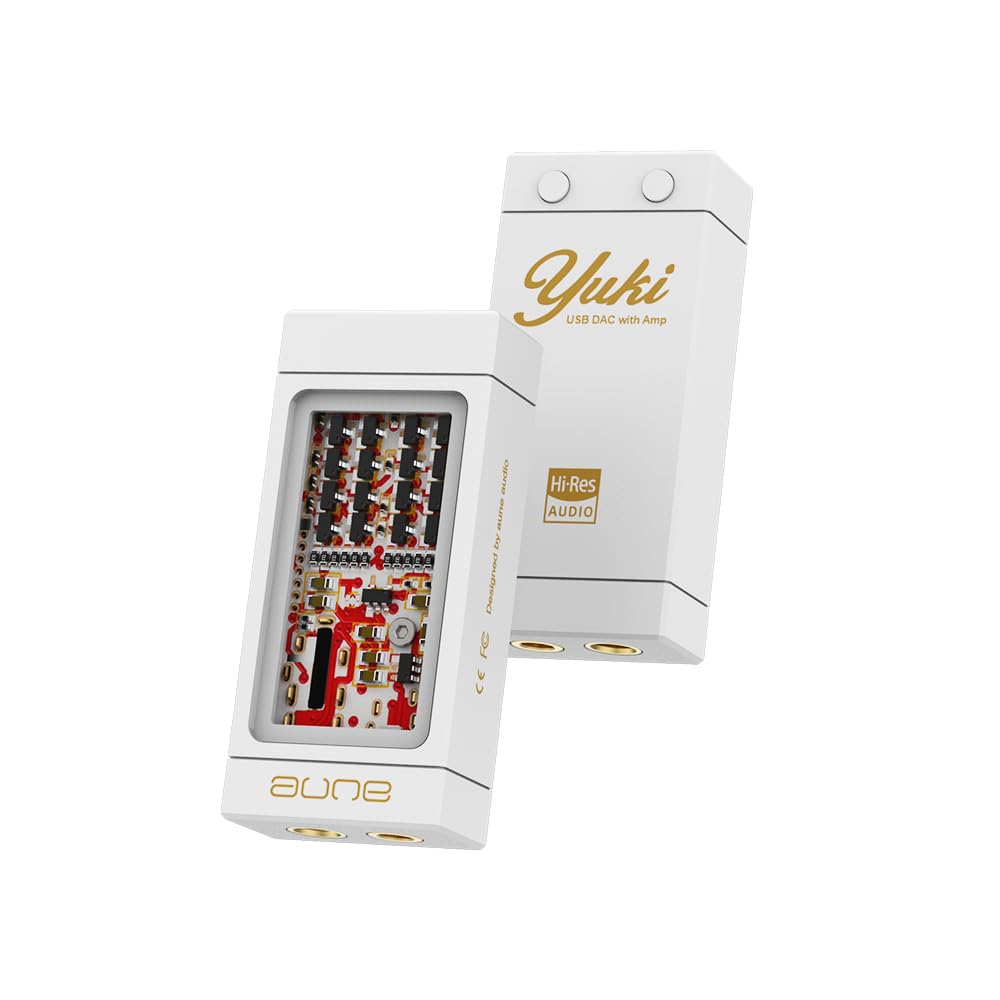
Model: YUKI | Brand: Aune
The Aune Yuki is a portable Digital-to-Analog Converter (DAC) with an integrated headphone amplifier, designed to enhance the audio experience for smartphones, PCs, and laptops. It features a unique dual-layer structure, separating the DAC and amplifier circuits for optimal sound quality. With support for high-resolution audio up to 32bit/768kHz and DSD256, and both 3.5mm and 4.4mm outputs, the Yuki aims to deliver a high-fidelity listening experience.

Figure 1: Illustration of the Aune Yuki's dual DAC chip architecture with independent channels.

Figure 2: Visual representation of the ±5V boost converter for the headphone amp and the hybrid ceramic PCB for improved high frequencies.

Figure 3: Aune Yuki connected to a smartphone, transforming it into a high-resolution audio player.

Figure 4: Aune Yuki connected to a laptop, enabling high-resolution audio playback up to 32bit/768kHz DSD256.
The Aune Yuki features two buttons on its back for volume adjustment. The button with the dot is for Volume Up, and the other button is for Volume Down. These buttons control the device's internal volume.
To switch between high gain and low gain modes, press and hold both Volume Up and Volume Down buttons simultaneously for 2 seconds. You will notice a change in volume, indicating the gain level has been adjusted. High gain is suitable for harder-to-drive headphones, while low gain is ideal for sensitive IEMs.
For devices that support UAC1.0 (such as the Nintendo Switch), please hold down the Volume Up button on the Yuki and do not release it until the two devices are connected by cable and the Yuki is powered on. This ensures proper recognition and functionality.
Video 1: Demonstrates volume control and gain level adjustment on the Aune Yuki, along with UAC1.0 device connection instructions. This video is provided by Wuhan Aune Acoustics Co.,Ltd.
| USB Input Max Bit Depth: | 32 bit |
| Maksym Sampstawka lingwistyczna: | 768kHz |
| Max DSD Rate (Native): | DSD512 |
| Single-Ended 3.5mm Output: | |
| Poziom wyjściowy: | 2.0Vrms |
| Poziom hałasu: | 2.6μV |
| THD+N: | 0.00036% @1kHz |
| Moc wyjściowa: | 90mW przy 30Ω |
| Balanced 4.4mm Output: | |
| Poziom wyjściowy: | 4.0Vrms |
| Poziom hałasu: | 2.9μV |
| THD+N: | 0.00033% @1kHz |
| Moc wyjściowa: | 160mW przy 30Ω |
| Wymiary: | 53.5*24*13 (mm) |
| Wymiary produktu: | 4.02 x 3.98 x 0.1 cala; 4.16 uncji |
| Typ interfejsu: | USB |
| Maksymalna objętość dostawtage: | 5 wolty |

Figure 5: Detailed specifications and port layout of the Aune Yuki.
For warranty information and technical support, please refer to the official Aune webOdwiedź stronę internetową lub skontaktuj się bezpośrednio z działem obsługi klienta. Zachowaj paragon zakupu na wypadek reklamacji.
 |
Instrukcja obsługi Aune S9c Pro: DAC i słuchawki AmpPrzewodnik po lifierze Kompleksowa instrukcja obsługi Aune S9c Pro, przetwornika cyfrowo-analogowego o wysokiej wierności i słuchawek amplifier. Dowiedz się więcej o jego funkcjach, specyfikacji, układzie panelu przedniego i tylnego oraz trybach pracy, w tym USB DAC, parowaniu transportu cyfrowego, słuchawkach ampłączność, wejście zewnętrznego zegara i łączność Bluetooth. |
 |
słuchawki aune X7s Pro Class-A AmpInstrukcja obsługi lifier Instrukcja obsługi słuchawek aune X7s Pro, wysokiej jakości słuchawek z wyjściem symetrycznym klasy A amplifier. Dowiedz się więcej o jego funkcjach, specyfikacjach i instrukcji obsługi, aby używać go jako słuchawek. amplifier lub pre-ampliyfikator. |
 |
Instrukcja obsługi odtwarzacza muzyki sieciowej Aune S10N – funkcje, specyfikacje i połączenia Kompleksowa instrukcja obsługi sieciowego odtwarzacza muzyki Aune S10N. Dowiedz się więcej o jego funkcjach, specyfikacji, połączeniach, pilocie, ustawieniach i możliwościach przesyłania strumieniowego. |
 |
Instrukcja obsługi przetwornika cyfrowo-analogowego Aune X8 XVIII 18th Anniversary Edition Instrukcja obsługi przetwornika cyfrowo-analogowego Aune X8 XVIII 18th Anniversary Edition zawierająca szczegółowe informacje na temat jego funkcji, specyfikacji, obsługi przez USB, złącze koncentryczne, optyczne i Bluetooth, a także wyjścia zbalansowanego. |
 |
Słuchawki Aune S17 w pełni dyskretne, w pełni zbalansowane, klasy A AmpInstrukcja obsługi lifier Instrukcja obsługi słuchawek Aune S17, flagowych, całkowicie dyskretnych słuchawek klasy A, w pełni zbalansowanych amplifier. Szczegółowe informacje o funkcjach, specyfikacjach, działaniu i bezpieczeństwie dla entuzjastów audio. |
 |
aune USB DAC Driver Installation and DSD Playback Guide Comprehensive guide for installing aune USB DAC drivers and configuring professional audio players like Foobar2000, JRiver Media Center, Audirvana Plus, and Amarra for DSD native playback. |