Produkt ponadview
The Cisco Catalyst 1200-48T-4X Smart Switch is designed to provide robust network performance, security, and reliability for small to medium-sized businesses. This switch features 48 Gigabit Ethernet ports and 4x10GE SFP+ uplinks, offering flexible connectivity options.
Główne cechy obejmują:
- 48 ports 10/100/1000 + 4x 10GE SFP+ for high-speed connectivity.
- Intuitive management via the Cisco Business mobile app and local web interfejs.
- Integrated IEEE 802.1X port security, Denial-of-Service (DoS) attack prevention, and Access Control Lists (ACLs).
- Energy-efficient design compliant with IEEE 802.3az.
- Limited lifetime hardware warranty with complimentary 1-year technical support.
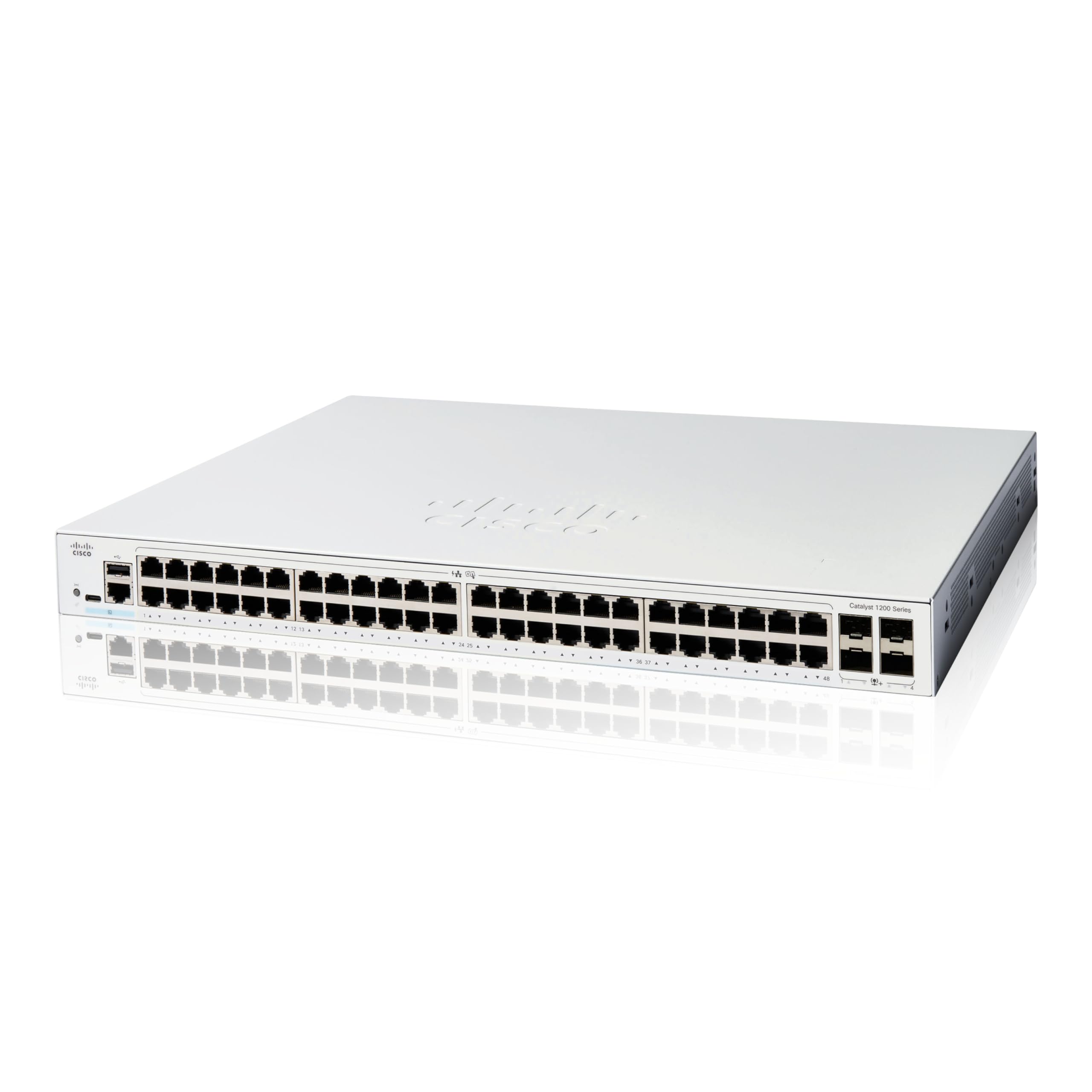
Image: Various models of the Cisco Catalyst 1200 Series Smart Switches, showcasing different port configurations.
Cisco Catalyst Series Introduction
Wideo: Wprowadzenieview of the Cisco Catalyst 1200 and 1300 Series Switches, highlighting seamless connectivity and simple management across different business environments.
Konfiguracja i instalacja
Unboxing the Switch
Before beginning installation, ensure all components are present. The package typically includes:
- Przełącznik inteligentny Cisco Catalyst 1200-48T-4X
- Przewód zasilający lub adapter
- Kabel USB typu C
- Sprzęt montażowy

Obraz: Przód view of the Cisco Catalyst 1200-48T-4X Smart Switch, showing the 48 Gigabit Ethernet ports and 4 SFP+ uplink ports.
Cisco Catalyst 1200 Series Switches Unboxing Video
Video: A detailed unboxing and initial setup guide for the Cisco Catalyst 1200 Series Switches, demonstrating how to connect the switch to power and a router, and how to use the mobile app for configuration.
Połączenia początkowe
- Podłączenie zasilania: Connect the provided power cord or adapter to the switch and a power outlet.
- Połączenie routera: Connect an Ethernet cable from your router's LAN port to any of the Gigabit Ethernet ports on the switch.
- Połączenia urządzeń: Connect your network devices (computers, servers, access points) to the remaining Gigabit Ethernet ports on the switch.
Konfiguracja aplikacji mobilnej
The Cisco Business mobile app simplifies setup and management:
- Pobierz aplikację: Download the Cisco Business mobile app from your device's app store (available for Android and iOS).
- Utwórz witrynę: Launch the app and create a new site, providing your site's name and address.
- Configure Credentials: Answer a few questions to configure site credentials (username and password).
- Dodaj urządzenia: Follow the in-app instructions to add your wired and wireless devices to the network.

Image: A person interacting with the Cisco Business mobile app on a smartphone, demonstrating the ease of network management.
Obsługa przełącznika
The Cisco Catalyst 1200-48T-4X Smart Switch offers flexible management options to monitor and configure your network.
Cisco Business Mobile App
The mobile app allows you to monitor your network from anywhere. It provides real-time device status, allows you to perform actions like rebooting devices or upgrading firmware, and gives insights into connected clients and network usage.
Web User Interface (UI) and Cisco Business Dashboard
For advanced configuration and comprehensive network management, utilize the local web UI or the Cisco Business Dashboard. These tools provide detailed settings for VLANs, QoS, security, and other network parameters.

Zdjęcie: Dwie osoby reviewing network data on a computer screen, illustrating collaborative use of the Cisco Business Dashboard for network management.
Konserwacja i bezpieczeństwo
Maintaining your switch ensures optimal performance and network security.
Efektywność energetyczna
The switch is designed with energy-efficient features, compliant with IEEE 802.3az Energy Efficient Ethernet, to help reduce operational costs. Ensure proper ventilation to maintain efficient cooling.
Bezpieczeństwo sieci
The Cisco Catalyst 1200-48T-4X includes robust security features:
- IEEE 802.1X Port Security: Controls access to your network by authenticating devices connected to switch ports.
- Zapobieganie atakom typu DoS (DoS): Increases network uptime by protecting against common DoS attacks.
- Listy kontroli dostępu (ACL): Protects the network from unauthorized users and traffic by filtering packets based on defined rules.
Regularnie ponownieview and update your security configurations to protect your network from evolving threats.
Rozwiązywanie problemów
If you encounter issues with your Cisco Catalyst 1200-48T-4X Smart Switch, consider the following basic troubleshooting steps:
- Sprawdź połączenia fizyczne: Ensure all power and Ethernet cables are securely connected.
- Cykl zasilania: Disconnect the power, wait 10 seconds, and then reconnect the power to restart the switch.
- Sprawdź wskaźniki LED: Consult the Quick Start Guide or the Documentation Portal (accessible via QR code on the product packaging) to understand the meaning of LED indicators, which can help diagnose connection or operational issues.
- Review Konfiguracja: Użyj aplikacji mobilnej Cisco Business lub web UI to check your network configuration settings.
- Zapoznaj się z dokumentacją: Refer to the comprehensive documentation available on the Cisco webwitryna zawierająca szczegółowe przewodniki rozwiązywania problemów.
Specyfikacje
| Atrybut | Wartość |
|---|---|
| Numer modelu | C1200-48T-4X |
| Liczba portów | 48 |
| Typ interfejsu | SFP+ |
| Szybkość przesyłu danych | 1000 megabitów na sekundę |
| Tomtage | 13.6 V (AC) |
| Waga przedmiotu | 9.83 funta (4.47 kilograma) |
| Wymiary produktu (dł. x szer. x wys.) | 17.5 x 11.34 x 1.73 cala |
| Zawarte komponenty | Switch, power cord or adapter, USB Type C cable, and mounting hardware |
| Producent | Cisco |
| UPC | 889728521772 |
Gwarancja i wsparcie
Cisco provides comprehensive support for the Catalyst 1200-48T-4X Smart Switch.
- Ograniczona dożywotnia gwarancja na sprzęt: The product is covered by a limited lifetime hardware warranty.
- Complimentary Technical Support: Enjoy one year of complimentary technical support to assist with any operational queries or issues.
For further assistance, please refer to the official Cisco support channels or the Cisco Business mobile app.

Image: A Cisco support professional wearing a headset, smiling while working at a computer, symbolizing available technical assistance.