1. Wprowadzenie
Thank you for choosing the KIWI design Charging Dock, an accessory developed under the Made for Meta program. This vertical charging stand is designed to provide a convenient and organized solution for charging and displaying your Meta Quest 3S, Meta Quest 3, Meta Quest 2, or Meta Quest Pro VR headset. Its sleek design and customizable RGB lighting enhance your gaming setup while ensuring your devices are always ready for use.
The dock features an effortless magnetic connector for secure headset charging and adjustable holders for your controllers. Please note that this charging stand is designed for the headset and does not charge the controllers directly.
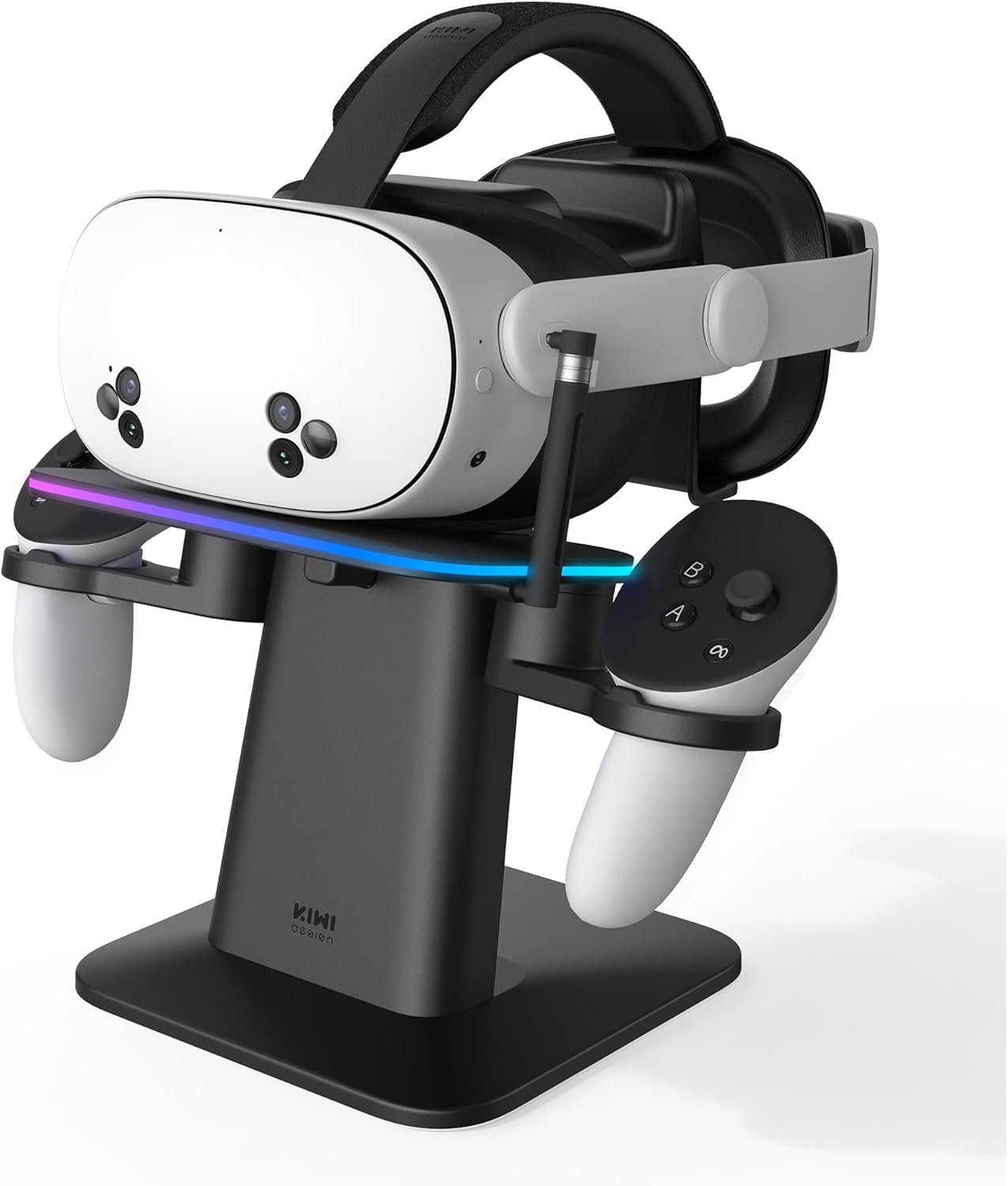
Figure 1: KIWI design Charging Dock with a Meta Quest headset and controllers.
2. Co znajduje się w pudełku
Przed przystąpieniem do montażu należy upewnić się, że wszystkie elementy są obecne:
- Stacja dokująca ładująca
- Kolumna wsparcia
- Headset Platform with RGB Lighting
- Adjustable Controller Holders (2x)
- Magnetic USB-C Charging Connector
- USB-C to USB-A Charging Cable (for the dock)
- Instrukcja obsługi (ten dokument)
Note: A certified power adapter (DC 5V output) is recommended but not included with this product.
3. Konfiguracja
3.1. Montaż
- Ostrożnie wypakuj wszystkie elementy z pudełka.
- Slide the headset platform onto the support column.
- Snap the assembled support column with the platform onto the charging dock base.
- Slide the two controller holders onto the sides of the headset platform.
- Attach the magnetic charging connector to the designated port on the side of the headset platform.
3.2. Połączenie początkowe
- Plug the USB-C end of the provided charging cable into the back USB port of the charging dock.
- Connect the USB-A end of the cable to a certified power adapter (not included) and plug it into a wall outlet.
- Insert the small USB-C magnetic tip into your Meta Quest headset's charging port. This tip is designed to remain in the headset for convenient magnetic charging.

Figure 2: Effortless magnetic charging of the Meta Quest headset.
4. Instrukcja obsługi
4.1. Ładowanie zestawu słuchawkowego
- With the magnetic USB-C tip inserted into your headset, simply place your Meta Quest headset onto the headset platform of the charging dock.
- The magnetic connector on the dock will automatically align and attach to the tip in your headset, initiating the charging process.
- A charging indicator light on your headset will confirm it is charging.
4.2. Organizing Controllers
- Place your Meta Quest controllers into the adjustable holders on either side of the headset platform. The holders are designed to accommodate controllers even with protective covers or other accessories.
- Note: The charging dock does not provide charging functionality for the controllers.
4.3. Sterowanie oświetleniem RGB
- The headset platform features 16 multicolor ambient RGB lights.
- Use the two buttons located on the underside of the main platform to cycle through different colors and lighting patterns to customize your display.

Figure 3: Customize your setup with 16 RGB lighting options.
5. Zgodność
The KIWI design Charging Dock is compatible with the following Meta Quest VR headsets:
- Zadanie meta 3S
- Zadanie meta 3
- Zadanie meta 2
- Meta Quest Pro

Figure 4: The charging dock supports various Meta Quest headset models.
6. Konserwacja
- Utrzymuj stację ładującą w czystości, przecierając ją miękką, suchą ściereczką.
- Unikaj stosowania środków czyszczących o właściwościach ściernych i rozpuszczalników, które mogą uszkodzić powierzchnię.
- Ensure the magnetic charging connector and headset port are free from dust and debris for optimal connection.
7. Rozwiązywanie Problemów
- Zestaw słuchawkowy nie ładuje się: Ensure the magnetic USB-C tip is securely inserted into the headset and the headset is properly seated on the dock, allowing the magnetic connector to attach. Verify the charging cable is firmly plugged into the dock and the power adapter is connected to a live outlet.
- Światła RGB nie działają: Check if the dock is powered on. Press the control buttons on the underside of the platform to cycle through lighting modes and ensure they are not turned off.
- Loose connection with headset: If using a thick silicone face shield cover on your headset, it might slightly alter the height, potentially affecting the magnetic connection. Ensure the headset is positioned correctly to establish a firm connection.
8. Specyfikacje
- Marka: Projekt KIWI
- Numer modelu: QC03BlackHJT-482
- Tworzywo: Plastikowy
- Kolor: Czarny
- Źródło zasilania: DC
- Objętość wyjściatage: 5 wolty
- Typ złącza: Złącze magnetyczne
- Waga przedmiotu: 3.89 funta
- Wymiary opakowania: 11.93 x 8.62 x 4.25 cala
9. Oficjalne filmy o produktach
KIWI design RGB Charging Stand Overview
Wideo 1: Sędziaview of the KIWI design RGB Charging Stand, highlighting its features and design.
Produkt ponadview Wideo
Wideo 2: Zwięzły produktview showcasing the charging dock's functionality and aesthetic.
10. Gwarancja i wsparcie
For warranty information and customer support, please refer to the documentation included with your purchase or visit the official KIWI design webZachowaj dowód zakupu na wypadek roszczeń gwarancyjnych.


