1. Wprowadzenie
The CERES HT340S RF Smart Wireless Wi-Fi Programmable Room Thermostat is designed to provide intelligent control over your heating system, enhancing comfort and energy efficiency in your home. This device allows you to manage your heating remotely via a mobile application, offering various modes and programming options to suit your lifestyle.
This manual provides detailed instructions for the installation, operation, and maintenance of your CERES HT340S thermostat. Please read it carefully before use to ensure proper functionality and to maximize the benefits of your smart thermostat.
2. Funkcje produktu
- Kontrola aplikacji mobilnej: Manage your heating system from anywhere using the G-Life SMART mobile application.
- Połączenie bezprzewodowe: RF (Radio Frequency) communication between the thermostat and the receiver unit for flexible placement.
- Łączność Wi-Fi: Connects to your home Wi-Fi network for internet-based control.
- 4 Different Mode Options: Choose from Economy, Comfort, Holiday, and Program modes.
- Daily and Weekly Programming: Create customized heating schedules for optimal comfort and energy savings.
- Wykrywanie otwartego okna: Automatically detects sudden temperature drops caused by open windows to prevent energy waste.
- Hysteresis (Adjustable Operating Sensitivity): Fine-tune the temperature differential for heating activation.
- Przyciski dotykowe: Intuitive control directly on the thermostat unit.
- Blokada klawiszy: Zapobiega niezamierzonym zmianom ustawień.
- Backlight Screen: Clear visibility of display in various lighting conditions.
- Kalibracja temperatury: Dostosuj odczyty temperatury, aby zapewnić ich dokładność.
- Wskaźnik baterii: Wyświetla aktualny poziom naładowania baterii.
- Sterowanie włączaniem/wyłączaniem: Simple power management.

This image outlines the various features of the CERES HT340S Smart Room Thermostat. It highlights wireless connectivity, mobile app integration (G-Life, Tuya), open window detection, adjustable hysteresis, touch-sensitive buttons, a key lock function, daily and weekly programming options, multiple mode selections, a backlit screen, temperature calibration, a battery indicator, and simple on/off control.
3. Zawartość opakowania
Upon unpacking your CERES HT340S thermostat, please ensure all the following items are present:
- CERES HT340S Smart Room Thermostat Unit
- Wireless Receiver (Modem)
- Stojak na stół
- Alkaline Batteries (AAA)
- Dowels and Screws for wall mounting

This image details the items included in the CERES HT340S Smart Room Thermostat package. It shows the main thermostat unit, a separate modem, a table stand for flexible placement, alkaline batteries for power, and dowels and screws for wall mounting.
4. Konfiguracja i instalacja
4.1 Umiejscowienie termostatu
Place the thermostat unit in a central location within the room, away from direct sunlight, drafts, or heat sources that could affect temperature readings. The table stand allows for flexible positioning.
4.2 Instalacja jednostki odbiorczej
The receiver unit should be installed near your heating system (e.g., boiler). Consult a qualified electrician for wiring if you are unsure. Ensure the receiver is within the wireless range of the thermostat unit.

Na tym zdjęciu widać bok view of the CERES HT340S Smart Room Thermostat alongside its wireless receiver unit. The receiver unit connects to the heating system, while the thermostat communicates wirelessly with it, offering flexible placement within the room.
4.3 Mobile Application Setup
- Pobierz G-Life SMART application from the App Store (iOS) or Google Play Store (Android).
- Zarejestruj nowe konto lub zaloguj się, jeśli już je posiadasz.
- Follow the in-app instructions to add your CERES HT340S thermostat. This typically involves putting the thermostat into pairing mode and connecting it to your home Wi-Fi network.
- The G-Life SMART app is compatible with Tuya, Google Assistant, and Amazon Alexa for integrated smart home control.
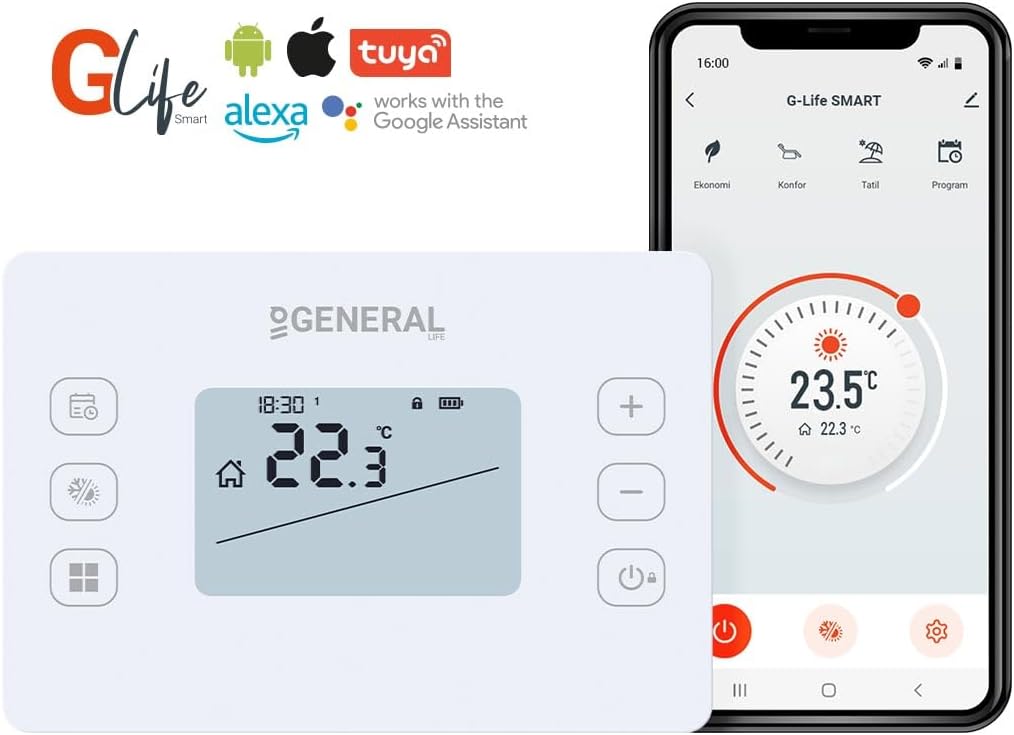
This image displays the CERES HT340S RF Smart Room Thermostat alongside a smartphone screen showing the G-Life SMART mobile application. The thermostat features a digital display showing temperature and time, with control buttons. The app interface shows current temperature settings and various smart home integrations.
5. Tryby pracy
The CERES HT340S offers four distinct operating modes to optimize your home's heating based on your needs:
- Tryb ekonomiczny: Designed for energy saving, typically maintaining a lower temperature.
- Tryb komfortowy: Maintains a comfortable temperature, ideal for when you are at home.
- Tryb wakacyjny: Sets a minimum temperature to protect your home from freezing while you are away for an extended period.
- Tryb programu: Follows your customized daily and weekly heating schedule.
You can switch between these modes using the thermostat's buttons or through the G-Life SMART mobile application.

This image illustrates the weekly programming capabilities of the G-Life SMART application. It highlights four distinct modes: Comfort, Economy, Holiday, and Program, allowing users to schedule temperature changes automatically throughout the day and week. The thermostat display is also visible, showing current settings.

This image illustrates how the G-Life SMART app can adapt to various lifestyle needs. It shows three different temperature settings (18.0°C for economy/sleep, 22.0°C for comfort/relaxing, and 5.0°C for holiday/away) controlled via the app, allowing users to optimize heating for different situations.
6. Daily and Weekly Programming
The Program Mode allows you to set specific temperature schedules for different times of the day and days of the week. This feature helps automate your heating, ensuring your home is warm when you need it and saving energy when you don't.
To set up your daily and weekly programs, navigate to the 'Program' section within the G-Life SMART application. You can define multiple time periods and corresponding target temperatures for each day. The thermostat will automatically adjust the heating to follow your set schedule.
7. Wykrywanie otwartego okna
The CERES HT340S thermostat includes an intelligent 'Open Window Detection' feature. This function monitors the indoor air temperature for sudden and significant drops, which typically occur when a window or door is opened.
When an open window is detected, the thermostat will temporarily pause heating to prevent unnecessary energy consumption. Heating will resume automatically once the temperature stabilizes or after a set period. This feature contributes to significant energy savings by avoiding heating an open space.

This image focuses on the 'Open Window Detection' feature of the G-Life SMART app. It explains that the smart room thermostat measures sudden drops in indoor air temperature, identifying them as an open window. This feature helps prevent energy waste when a window is open while the heating system is operating.
8. Specyfikacje
| Specyfikacja | Wartość |
|---|---|
| Marka | Ogólny |
| Numer modelu | CERESHT340SSMART |
| Kolor | Biały |
| Wymiary produktu | Wymiary 2 x 12.5 x 8.5 cm |
| Cechy specjalne | Programowalny |
| Producent | ISIPARK A.S. |
| Pierwsza dostępna data | 6 września 2023 r. |
9. Rozwiązywanie Problemów
If you encounter issues with your CERES HT340S thermostat, please refer to the following common problems and solutions:
- Termostat nie odpowiada: Check battery levels. Ensure the receiver unit is powered and within range.
- Brak ogrzewania: Verify the thermostat is in a heating mode (e.g., Comfort or Program). Check the receiver unit's connection to the boiler.
- Problemy z łącznością aplikacji: Ensure your home Wi-Fi network is active and the thermostat is connected. Restart your router and the thermostat.
- Nieprawidłowy odczyt temperatury: Perform temperature calibration through the thermostat settings or mobile app. Ensure the thermostat is not exposed to direct heat sources or drafts.
W przypadku powtarzających się problemów prosimy o kontakt z obsługą klienta.
10. Konserwacja
To ensure the longevity and optimal performance of your CERES HT340S thermostat, follow these maintenance guidelines:
- Czyszczenie: Przetrzyj powierzchnię termostatu miękką, suchą ściereczką. Nie używaj środków czyszczących ani rozpuszczalników o działaniu ściernym.
- Wymiana baterii: Replace batteries when the low battery indicator appears on the display. Use only alkaline batteries of the specified type (AAA).
- Aktualizacje oprogramowania: Keep the G-Life SMART application updated to the latest version to benefit from new features and improvements.
11. Gwarancja i wsparcie
Your CERES HT340S RF Smart Wireless Wi-Fi Programmable Room Thermostat comes with a standard manufacturer's warranty. Please refer to the warranty card included in your product packaging for specific terms and conditions.
For technical support, warranty claims, or any other inquiries, please contact the manufacturer or your local distributor. Contact information can typically be found on the product packaging or the manufacturer's official webstrona.


