1. Wprowadzenie
Dziękujemy za zakupasing the Emerson EDS-1200 Portable Bluetooth Party Speaker. This manual provides essential information for the safe and efficient operation of your device. Please read it thoroughly before use and retain it for future reference.

Rycina 1: Przód view of the Emerson EDS-1200 speaker with microphone and remote.
2. Co znajduje się w pudełku
- Przenośny głośnik imprezowy Bluetooth Emerson EDS-1200
- Mikrofon przewodowy
- Zdalne sterowanie
- Zasilacz UL
- Instrukcja obsługi (ten dokument)
3. Koniec produktuview & Cechy
The Emerson EDS-1200 is designed for versatile audio playback and entertainment. Key features include:
- 12" Full-Frequency Speaker: Delivers powerful sound with deep bass and clear highs.
- Technologia bezprzewodowa Bluetooth: Seamlessly stream audio from compatible devices.
- Żywe oświetlenie LED: Multicolor LED lights that pulse with the music, enhancing atmosphere.
- Funkcja TWS: Pair with another TWS-enabled speaker for true stereo sound.
- Wbudowany akumulator: Provides portable power for extended playtime.
- Dołączony przewodowy mikrofon: Ideal for karaoke, speeches, or announcements.
- Wszechstronne odtwarzanie multimediów: Supports USB, TF card, and AUX inputs.
- Radio FM: Built-in tuner for local radio stations.
- Przenośna konstrukcja: Integrated carry handle and wheels for easy transport.
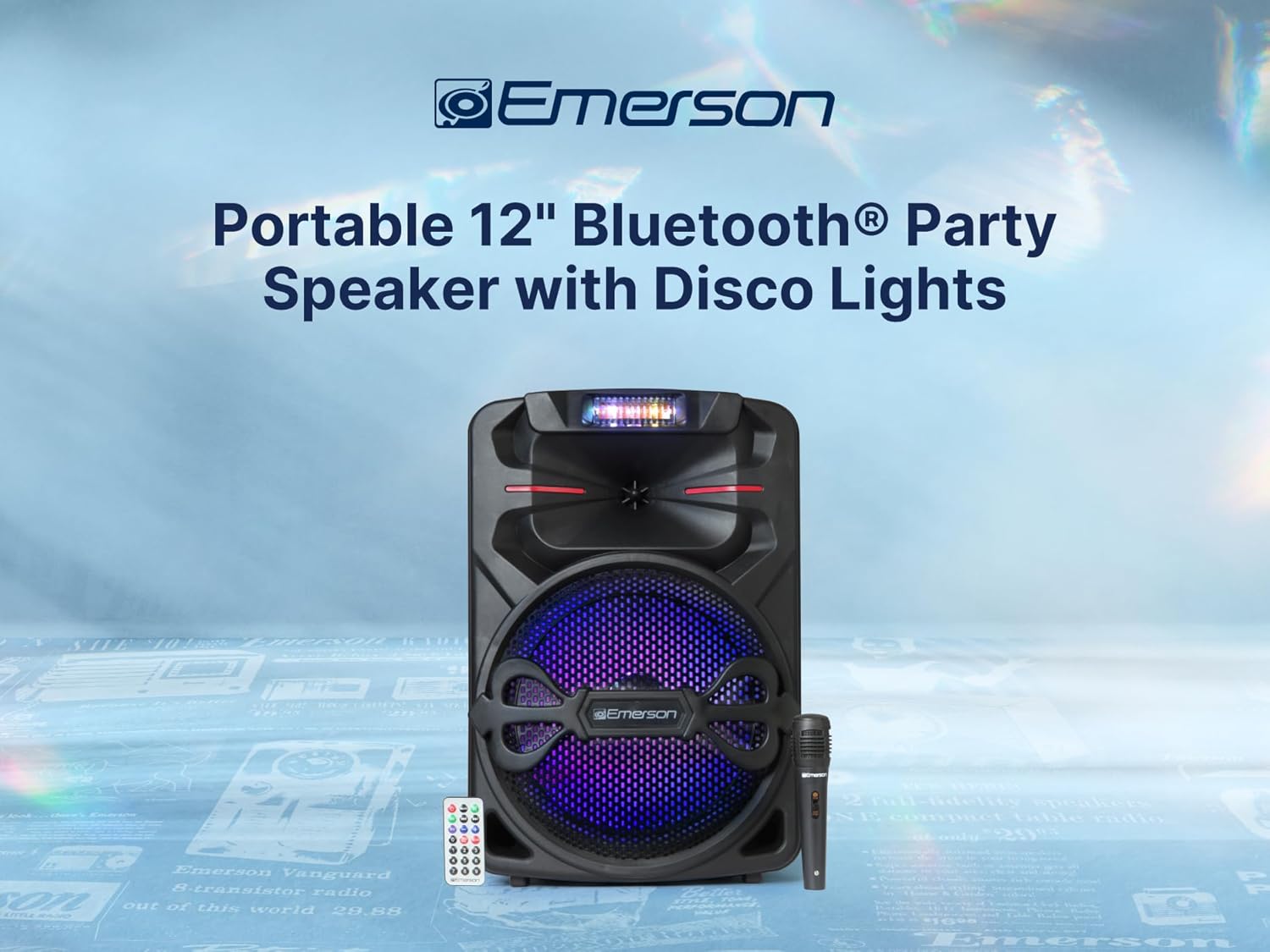
Rycina 2: Przód view mówcy, pokażasing the 12-inch full-frequency driver.

Rysunek 3: Strona view of the speaker, illustrating its compact and portable design.
4. Konfiguracja
4.1 Ładowanie akumulatora
- Connect the UL Power Adapter to the DC 9V input port on the speaker's control panel.
- Podłącz adapter do standardowego gniazdka ściennego.
- The "CHARGE LED" indicator will illuminate during charging. It will change color or turn off when fully charged.
4.2 Włączanie/wyłączanie
Locate the "POWER" switch on the control panel. Flip it to the "ON" position to power on the speaker, and to "OFF" to power it down.
4.3 Podłączanie mikrofonu
Insert the wired microphone's plug into the "MIC IN" port on the control panel. Ensure the microphone's on/off switch is in the "ON" position when in use.

Figure 4: The included wired microphone for karaoke and announcements.
5. Instrukcja obsługi
5.1 Panel sterowania ponadview
The top panel of the speaker features various controls and inputs:
- Wyświetlacz LED: Shows current mode, track information, and battery status.
- Przycisk trybu: Cycles through input modes (Bluetooth, FM, USB, TF, AUX).
- Pokrętło głośności: Reguluje główną głośność.
- Pokrętła basów/wysokich tonów: Reguluje poziom basów i sopranów.
- Gałka echa: Dostosowuje efekt echa mikrofonu.
- Mic Vol Knob: Reguluje głośność mikrofonu.
- Gniazda na karty USB/TF: Do odtwarzania multimediów.
- Wejście AUX: Wejście 3.5 mm dla zewnętrznych urządzeń audio.
- LED-SW (Light Switch): Toggles the LED disco lights.
Video 1: A 360-degree product overview of the Emerson EDS-1200 speaker, showcasinjego projekt i panel sterowania.
5.2 parowanie Bluetooth
- Power on the speaker. The LED display will show "BLUE" or similar, indicating Bluetooth mode. If not, press the "MODE" button until Bluetooth mode is selected.
- Włącz Bluetooth w swoim smartfonie, tablecie lub innym urządzeniu.
- Szukaj "Emerson EDS-1200" (or similar name) in your device's Bluetooth list and select it to pair.
- Once paired, the speaker will emit an audible confirmation, and you can begin streaming audio.

Figure 5: Seamless music streaming via Bluetooth wireless technology.
Funkcja 5.3 TWS (prawdziwe bezprzewodowe stereo)
To achieve true stereo sound, you can pair two EDS-1200 speakers together:
- Ensure both EDS-1200 speakers are powered on and in Bluetooth mode.
- On one speaker (this will be the master), press and hold the "TWS" button (or a similar button indicated in the manual, if available, otherwise assume it's part of the mode button functionality or automatic pairing).
- The speakers will attempt to pair with each other. A confirmation tone will sound once connected.
- Now, connect your Bluetooth device to the master speaker as described in section 5.2. Audio will play in stereo across both speakers.

Figure 6: Two speakers paired using TWS function for expanded sound coverage.
5.4 Odtwarzanie z karty USB/TF
- Włóż dysk flash USB lub kartę TF (Micro SD) zawierającą dźwięk MP3 files do odpowiedniego gniazda na panelu sterowania.
- The speaker will automatically switch to USB/TF mode and begin playback. If not, press the "MODE" button to select the correct input.
- Use the "PREV" and "NEXT" buttons to skip tracks, and the "PLAY/PAUSE" button to control playback.

Figure 7: USB input for playing stored music files.
5.5 Radio FM
- Naciśnij przycisk „MODE”, aby przełączyć na tryb radia FM.
- Naciśnij i przytrzymaj przycisk „PLAY/PAUSE”, aby automatycznie przeskanować i zapisać dostępne stacje FM.
- Use the "PREV" and "NEXT" buttons to navigate through the saved stations.

Figure 8: Enjoying local radio stations with the built-in FM tuner.
5.6 Wejście AUX
Connect an external audio device (e.g., MP3 player, laptop) to the "AUX IN" port using a 3.5mm audio cable. The speaker will automatically switch to AUX mode, or you may need to select it using the "MODE" button.
5.7 LED Disco Lights
Toggle the "LED-SW" switch on the control panel to turn the vibrant multicolor LED lights on or off. The lights will pulse with the rhythm of the music.

Figure 9: Dynamic LED lighting effects that dance along with the music.
6. Specyfikacje
| Funkcja | Opis |
|---|---|
| Numer modelu | EDS-1200 |
| Marka | Emerson |
| Typ montażu | Stały podłogowe |
| Źródło zasilania | Przewodowy elektryczny, zasilany bateryjnie |
| Typ złącza | Pomocniczy |
| Tworzywo | Plastikowy |
| Waga przedmiotu | 6.5 funta |
| Liczba kanałów | 2 |
| Wejście audio | Bluetooth, AUX, USB, SD Card |
| Wymiary produktu (dł. x szer. x wys.) | 13.19 x 18.9 x 11.02 cala |
| Technologia łączności | AUX, Bluetooth, USB |
| Kolor | Czarny |
| Kompatybilne urządzenia | Headset, Laptop, MP3 Player, Smartphone, Tablet |

Figure 10: Dimensions and weight of the Emerson EDS-1200 speaker.
7. Konserwacja
- Czyszczenie: Do czyszczenia obudowy głośnika należy używać miękkiej, suchej ściereczki. Nie należy używać środków czyszczących o właściwościach ściernych ani rozpuszczalników.
- Składowanie: Przechowuj głośnik w chłodnym, suchym miejscu, z dala od bezpośredniego światła słonecznego i ekstremalnych temperatur.
- Pielęgnacja baterii: To prolong battery life, fully charge the speaker before long periods of storage and recharge it every 3-6 months.
- Unikaj wody: This speaker is not waterproof. Keep it away from water and excessive moisture.
8. Rozwiązywanie Problemów
- Brak zasilania: Ensure the speaker is charged or connected to the power adapter. Check the power switch.
- Brak dźwięku: Sprawdź poziom głośności zarówno głośnika, jak i podłączonego urządzenia. Upewnij się, że wybrano prawidłowy tryb wejściowy.
- Problemy z parowaniem Bluetooth: Make sure the speaker is in Bluetooth mode and your device's Bluetooth is enabled. Try unpairing and re-pairing the device. Ensure no other devices are connected to the speaker.
- Mikrofon nie działa: Check if the microphone is properly plugged into the "MIC IN" port and its on/off switch is in the "ON" position. Adjust the "MIC VOL" knob.
- Oświetlenie LED nie działa: Ensure the "LED-SW" switch is in the "ON" position.
9. Gwarancja i wsparcie
For warranty information and technical support, please refer to the documentation included with your purchase or visit the official Emerson webZachowaj dowód zakupu na wypadek roszczeń gwarancyjnych.


