1. Informacje dotyczące bezpieczeństwa
Please read this manual carefully before installation and use. Keep this manual for future reference.
- Ensure the wall structure can safely support the weight of the mount and the monitor.
- Use a stud finder to locate wood studs for secure mounting. Avoid drilling into electrical wires or pipes.
- Nie przekraczać maksymalnego udźwigu wynoszącego 8 kg (17.6 funtów).
- Sprawdź, czy wszystkie śruby są mocno dokręcone, jednak nie dokręcaj ich zbyt mocno.
- Podczas instalacji należy trzymać dzieci i zwierzęta z daleka.
- Handle the gas spring arm with care as it is under tension. Follow instructions for tension adjustment.
2. Zawartość opakowania
Verify all parts are present before beginning installation. If any parts are missing or damaged, contact customer support.
- Montaż ramienia ściennego monitora
- Płyta montażowa VESA
- Płyta ścienna
- Hardware Kit (various screws, washers, anchors for different wall types)
- Allen Key / Hex Wrench for adjustments
- Instrukcja obsługi
3. Specyfikacje
| Funkcja | Szczegół |
|---|---|
| Marka | suptek |
| Model | WM01A |
| Kompatybilność z rozmiarem ekranu | 17 do 32 cala |
| Zgodność ze standardem VESA | 75x75mm, 100x100mm |
| Nośność | 4.4 - 17.6 funta (2 - 8 kg) |
| Kąt nachylenia | ±80° |
| Kąt obrotu | ±90° |
| Obrót | 360° |
| Maksymalne rozszerzenie | 20.39 cali |
| Regulacja wysokości | 310mm |
| Tworzywo | Stal stopowa |
| Kompatybilne typy ścian | Concrete Wall, Brick Wall, Wood Studs |
4. Instrukcje konfiguracji
4.1. Mounting the VESA Plate to Your Monitor
- Ostrożnie połóż monitor ekranem do dołu na miękkiej i czystej powierzchni.
- Identify the VESA mounting holes on the back of your monitor. These are typically in a square pattern (75x75mm or 100x100mm).
- Select the appropriate screws (M4 or M5) and washers from the hardware kit that fit your monitor's VESA holes. Ensure screws are not too long to avoid damaging internal components.
- Attach the VESA mounting plate to the back of your monitor using the selected screws and washers. Tighten securely.

Image: VESA plate securely attached to the back of a monitor, showing the screw points.
Video: Demonstrates the installation process of the Suptek Gas Spring Single Monitor Wall Mount, including attaching the VESA plate to the monitor.
4.2. Mounting the Arm to the Wall
- Determine the desired mounting location on your wall. Use a stud finder to locate a wood stud for optimal support. For concrete or brick walls, use appropriate anchors (provided in the hardware kit).
- Hold the wall plate against the wall at the desired height and mark the drill holes.
- Drill pilot holes according to the recommended drill bit size for your wall type.
- Secure the wall plate to the wall using the lag bolts and washers. Ensure it is firmly attached and level.

Image: Illustration of compatible wall types for mounting: concrete, brick, and wood studs.
Video: Demonstrates the installation process of the Suptek Gas Spring Single Monitor Wall Mount, including securing the wall plate.
4.3. Attaching the Monitor to the Arm
- Carefully lift the monitor (with the VESA plate attached) and align it with the arm's mounting head.
- Slide the VESA plate onto the arm's mounting head until it clicks into place or is securely seated.
- Install any safety screws or locking mechanisms as indicated in the manual to prevent accidental detachment.
Video: Shows the process of attaching a monitor to the wall mount arm.
4.4. Regulacja naprężenia
The gas spring tension needs to be adjusted according to your monitor's weight to ensure smooth and stable movement.
- Za pomocą dołączonego klucza imbusowego wyreguluj śrubę naciągu znajdującą się na ramieniu.
- Turn clockwise for lighter monitors (to increase tension).
- Turn counter-clockwise for heavier monitors (to decrease tension).
- Adjust until the monitor stays in position when moved and can be adjusted with minimal effort.

Image: Visual guide for adjusting the gas spring tension: clockwise for lighter monitors, counter-clockwise for heavier monitors.
5. Instrukcja obsługi
The suptek WM01A monitor arm offers full motion adjustability for optimal viewkomfort.
- Przechylenie: Adjust the monitor screen up or down by ±80° to reduce glare and find your preferred viewkąt.
- Obracać: Rotate the monitor left or right by ±90° to share your screen with others or change your viewpozycja.
- Obrót: Obróć monitor o 360°, aby przełączać się między orientacją poziomą i pionową.
- Wydłużenie/Cofnięcie: Extend the arm up to 20.39 inches or retract it to save space, folding to 3.15 inches from the wall.
- Regulacja wysokości: The gas spring allows for smooth vertical height adjustments of up to 310mm.

Image: Visual representation of the monitor arm's full motion capabilities, including 360° rotation, tilt, and swivel.
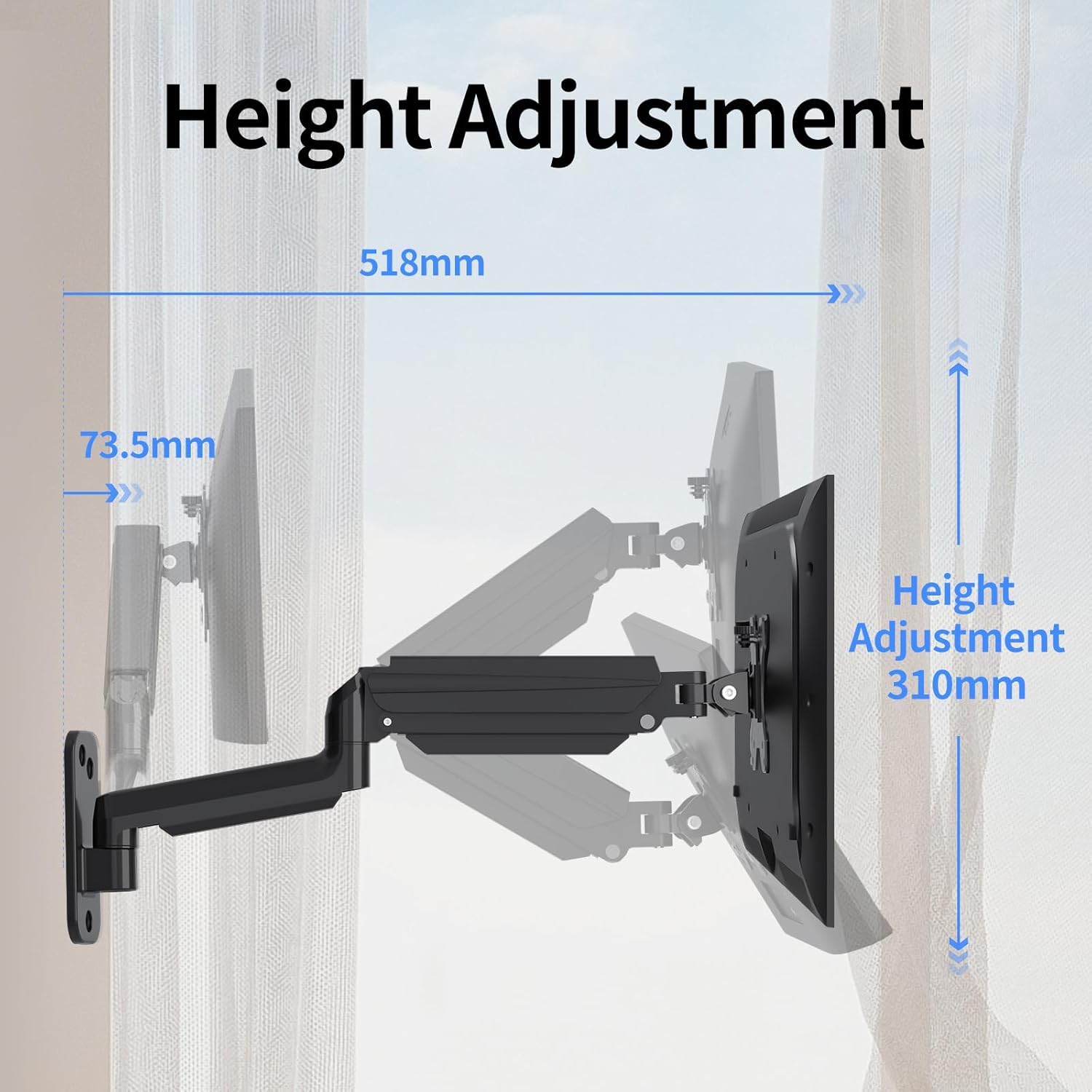
Image: Illustration detailing the height adjustment range of 310mm and the maximum extension of the arm.
Video: Demonstrates the various movements and adjustments possible with the Suptek Wall Monitor Mount (WM01A).
6. Zarządzanie kablami
The integrated cable management system helps keep your workspace tidy and organized.
- Route your monitor's power and video cables through the clips or channels provided along the arm.
- Upewnij się, że kable mają wystarczająco dużo luzu, aby umożliwić pełen zakres ruchu bez naprężeń.
- Secure cables to prevent them from snagging or interfering with arm movement.

Image: Close-up of the monitor arm demonstrating how cables are neatly managed through the integrated system.
7. Konserwacja
- Regularnie sprawdzaj wszystkie śruby i połączenia, aby mieć pewność, że są dobrze dokręcone.
- Wyczyść uchwyt miękką ściereczką.amp płótno. Unikaj ściernych środków czyszczących.
- Nie smaruj mechanizmu sprężyny gazowej, chyba że producent zaleci inaczej.
8. Rozwiązywanie Problemów
- Monitor sags or does not hold position: The gas spring tension may be too low for your monitor's weight. Increase tension by turning the adjustment screw clockwise with the provided Allen key.
- Monitor jest trudny do przesuwania lub zbyt sztywny: The gas spring tension may be too high. Decrease tension by turning the adjustment screw counter-clockwise.
- Góra wydaje się niestabilna: Recheck all wall mounting screws and VESA plate screws to ensure they are securely tightened. Confirm the wall type is appropriate for the installation method used.
9. Gwarancja i pomoc techniczna
Aby uzyskać informacje dotyczące gwarancji lub pomocy technicznej, zapoznaj się z oficjalną instrukcją producenta webOdwiedź stronę internetową lub skontaktuj się bezpośrednio z działem obsługi klienta. Zachowaj paragon zakupu na wypadek reklamacji.
Manufacturer: suptek
Kontakt: Visit the suptek Store on Amazon


