1. Wprowadzenie
Thank you for choosing the ikuai 11-Port Hybrid USB Hub. This manual provides essential information for setting up, operating, and maintaining your device. This hub is designed to expand your device's connectivity, offering high-speed data transfer and efficient power delivery for a wide range of peripherals.
2. Koniec produktuview
The ikuai 11-Port Hybrid USB Hub features a robust aluminum shell and a versatile 2-in-1 connector cable, supporting both USB-C/Thunderbolt 3/4 and USB-A ports for broad compatibility.

Figure 2.1: ikuai 11-Port Hybrid USB Hub and included accessories.
The hub is equipped with a variety of ports to meet your connectivity needs:
- 3 porty USB 3.2: Offers data transfer speeds up to 10Gbps.
- 7 porty USB 3.0: Provides data transfer speeds up to 5Gbps.
- 1x USB-C 20W Power Delivery (PD) Charging Port: Dedicated for rapid charging of compatible devices.

Rysunek 2.2: Szczegółowy view of the 11-Port Hybrid USB Hub's various ports and their specifications.
Each USB 3.0 port features an individual ON/OFF switch and an LED indicator for convenient control over connected devices.

Figure 2.3: Individual ON/OFF switches and LED indicators for each USB 3.0 port.
3. Funkcje
- Szybki transfer danych: The hub includes 3x USB 3.2 ports (up to 10Gbps) and 7x USB 3.0 ports (up to 5Gbps), enabling rapid transfer of large files and smooth operation of high-bandwidth devices.
- 2-in-1 Connector Cable: The integrated cable supports both USB-C/Thunderbolt 3/4 and USB-A host ports, ensuring broad compatibility with various laptops, desktop computers, tablets, and smartphones.
- 20W Power Delivery (PD) Charging: The dedicated USB-C PD charging port delivers rapid charging for your devices, minimizing downtime and keeping your essential electronics powered.
- Szeroka kompatybilność: Compatible with a broad range of operating systems and devices, including PC, Laptop, MacBook Pro/Air, Mac mini, iMac Pro, iPad Pro, iPad mini, and more. OTG function is supported.
- Reliable & Robust 60W Power Adapter: The included universal DC 12V/5A power adapter ensures stable data transfers and optimal performance for all connected devices, even under heavy load.

Figure 3.1: Illustration of SuperSpeed data transfer capabilities.
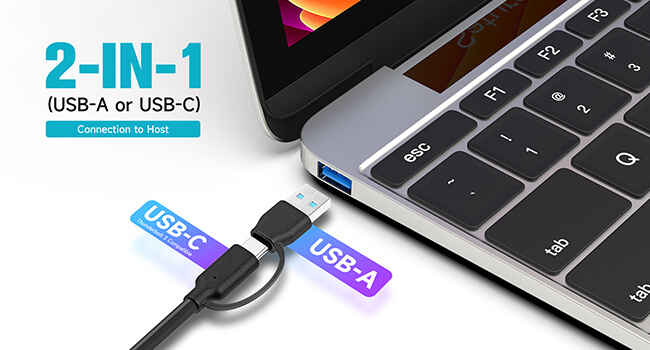
Figure 3.2: The versatile 2-in-1 connector for USB-A and USB-C host devices.

Figure 3.3: Fast charging a smartphone using the 20W USB-C PD port.

Figure 3.4: The hub's extensive compatibility with systems and devices.
4. Konfiguracja
- Podłącz zasilacz: Plug the provided 60W (DC 12V/5A) power adapter into the DC IN port on the hub and then into a wall outlet.
- Połącz z urządzeniem hosta: Use the integrated 2-in-1 connector cable to connect the hub to your computer's (PC, Laptop, MacBook, etc.) available USB-A or USB-C/Thunderbolt port.
- Podłącz urządzenia peryferyjne: Plug your USB devices (external hard drives, flash drives, keyboards, mice, printers, etc.) into the available USB 3.2 (10Gbps) or USB 3.0 (5Gbps) ports on the hub.
- Urządzenia ładujące: For rapid charging, connect your compatible device (e.g., smartphone, tablet) to the dedicated USB-C 20W PD charging port.
The hub is plug-and-play and does not require any driver installation for most operating systems.
5. Instrukcja obsługi
- Indywidualna kontrola portu: Each USB 3.0 port has an individual ON/OFF switch.
- To turn a port ON: Briefly press the button next to the desired port. The blue LED indicator will light up.
- To turn a port OFF: Press and hold the button next to the desired port for approximately 2 seconds. The blue LED indicator will turn off.
- Transfer danych: Connect your USB storage devices to any of the USB 3.2 or USB 3.0 ports for high-speed data transfer. Ensure your host device and connected peripherals support the respective USB standards for optimal performance.
- Dostawa energii: The USB-C PD port is solely for charging and does not support data transfer. Use this port to quickly charge devices that support USB Power Delivery.
- Funkcjonalność OTG: The hub supports On-The-Go (OTG) functionality, allowing compatible smartphones and tablets to act as a host for USB peripherals.
6. Konserwacja
- Czyszczenie: Use a soft, dry cloth to clean the surface of the hub. Avoid using liquid cleaners or aerosols, as they may damage the device.
- Składowanie: Gdy piasta nie jest używana, należy ją przechowywać w chłodnym, suchym miejscu, z dala od bezpośredniego światła słonecznego i ekstremalnych temperatur.
- Obsługiwanie: Handle the hub with care. Avoid dropping it or subjecting it to strong impacts, which could damage internal components.
- Odłączenie zasilania: Always disconnect the power adapter from the wall outlet when the hub is not in use for extended periods.
7. Rozwiązywanie Problemów
| Problem | Możliwa przyczyna | Rozwiązanie |
|---|---|---|
| Komputer nie rozpoznaje koncentratora. | Loose connection, faulty cable, or insufficient power. | Ensure the 2-in-1 connector cable is securely plugged into both the hub and the host computer. Try a different USB port on your computer. Verify the power adapter is connected and functioning. |
| Podłączone urządzenia nie działają. | Port is off, device requires more power than available, or faulty device. | Check if the individual ON/OFF switch for the specific port is activated (LED lit). Ensure the hub's power adapter is connected. Try connecting the device directly to your computer to rule out a faulty device. |
| Niska prędkość przesyłu danych. | Device connected to a lower speed port, or high power consumption. | Ensure high-speed devices are connected to the USB 3.2 (10Gbps) ports. Disconnect other high-power consumption devices if not in use. |
| USB-C PD port not charging. | Device not compatible with PD, or cable issue. | Verify your device supports USB Power Delivery. Try a different USB-C charging cable. Ensure the power adapter is securely connected to the hub. |
8. Specyfikacje
- Marka: ikuai
- Model: 11-Port 10Gbps
- Wymiary produktu: 7.7 x 1.5 x 0.9 cala
- Waga przedmiotu: 1.1 funta
- Kolor: Czarny
- Interfejs sprzętowy: Thunderbolt, USB, USB 3.0
- Cechy szczególne: 2-in-1 Connector to PC or Laptop, 20W PD Charging Port, Powered Hybrid USB Hub
- Zgodne urządzenia: Desktops, Gaming Consoles, Hard Disk Drive, Laptops, Tablets
- Zasilacz: Prąd stały 12V/5A (60W)
- Data pierwszej dostępności: 16 sierpnia 2023 r.
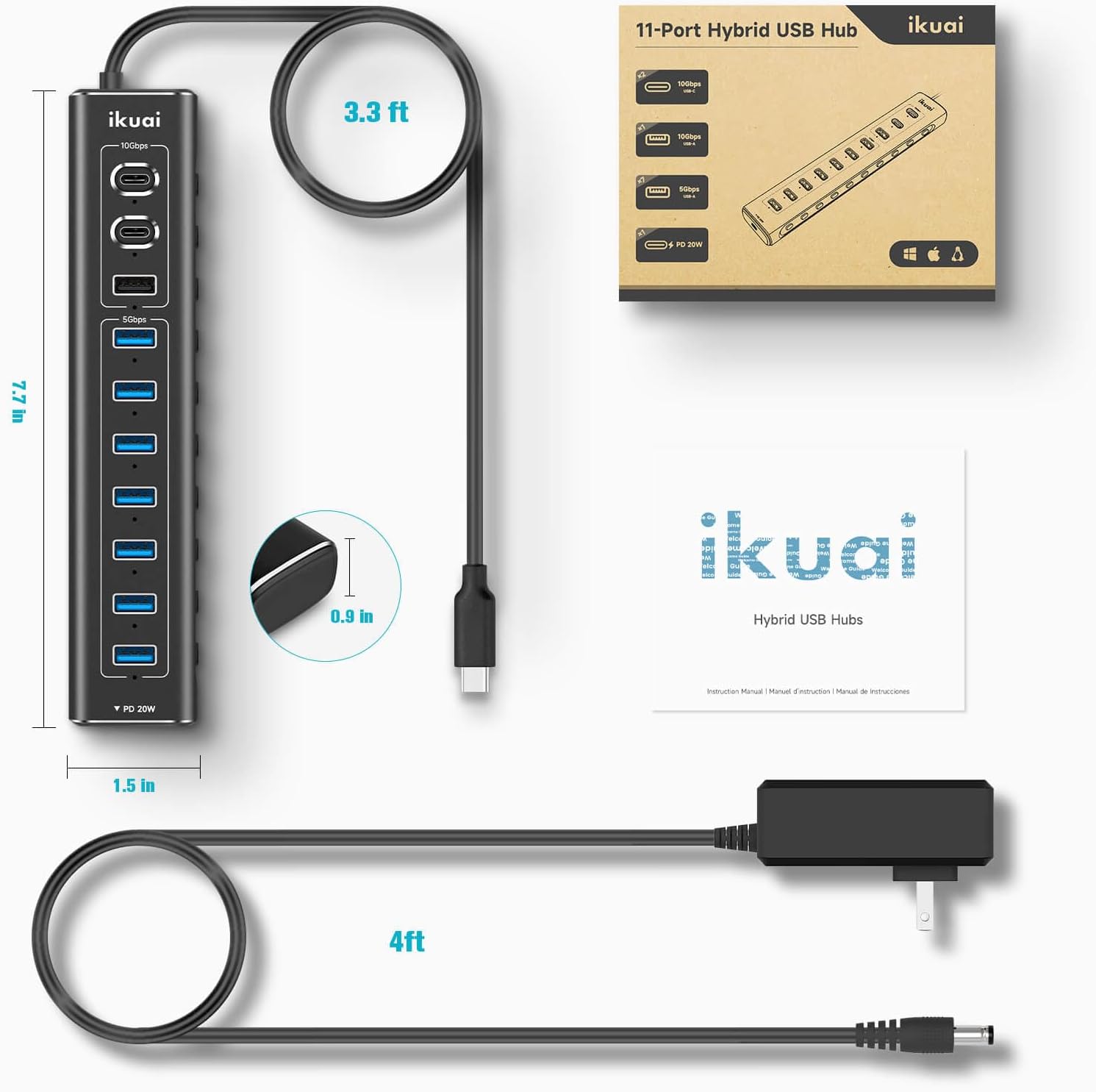
Rysunek 8.1: Wymiary produktu i długości kabli.
9. Gwarancja i wsparcie
ikuai products are designed for reliability and performance. For any questions, technical support, or warranty inquiries, please contact ikuai customer service through the retailer's platform or the official ikuai webStrona. Zachowaj dowód zakupu na wypadek roszczeń gwarancyjnych.
Więcej informacji znajdziesz na oficjalnej stronie ikuai Store.


