1. Wprowadzenie
This manual provides essential information for the safe and efficient operation of your HYUNDAI Smart TV 42-inch Full HD. Please read this manual thoroughly before using the television and retain it for future reference. This television features a 42-inch Full HD (1920x1080p) display, VIDAA operating system, and integrated smart applications such as Netflix, YouTube, and Prime Video. It also supports Screencast functionality for content sharing from mobile devices.
2. Informacje dotyczące bezpieczeństwa
Always follow basic safety precautions when using this television to reduce the risk of fire, electric shock, and injury. Ensure the television is placed on a stable surface. Do not block ventilation openings. Avoid exposing the television to rain or moisture. Disconnect the power cord during lightning storms or when unused for long periods. Refer to the full safety guidelines in the included safety sheet.
3. Konfiguracja
3.1 Rozpakowanie i instalacja stojaka
Carefully remove the television from its packaging. Attach the included stands to the bottom of the television using the provided screws. Ensure the stands are securely fastened before placing the TV upright.

Przód view of the HYUNDAI 42-inch Smart TV with its stand, displaying the VIDAA smart interface.
3.2 Podłączanie urządzeń zewnętrznych
Your television is equipped with multiple ports for connecting various devices:
- Porty HDMI (3x): Podłącz odtwarzacze Blu-ray, konsole do gier i dekodery.
- Porty USB (2x): Podłącz urządzenia pamięci masowej USB w celu odtwarzania multimediów.
- Gniazdo CI+: Wstaw moduł CI+ dla kodowanych kanałów cyfrowych.
- RJ45 (Ethernet): Połącz się z siecią domową, aby uzyskać dostęp do Internetu.
- Wyjście optyczne: Podłącz do zewnętrznego systemu audio.
- Wyjście słuchawkowe: Podłącz słuchawki do prywatnego słuchania.

Strona view of the HYUNDAI 42-inch Smart TV, showing various input and output ports including HDMI and USB.
3.3 Kreator konfiguracji początkowej
Upon first power-on, the TV will guide you through an initial setup process. This includes selecting your language, connecting to a Wi-Fi network, and scanning for available channels.
4. Obsługa
4.1 Podstawowe funkcje telewizora
- Moc: Press the power button on the remote control to turn the TV on or off.
- Tom: Użyj przycisków VOL +/-, aby dostosować poziom dźwięku.
- Kanały: Use the CH +/- buttons to change channels or the number buttons for direct channel selection.
- Źródło sygnału wejściowego: Press the SOURCE button to select between HDMI, USB, TV, and other inputs.
4.2 Funkcje Smart TV (system operacyjny VIDAA)
Your HYUNDAI Smart TV runs on the VIDAA operating system, providing access to a variety of applications and features.

The HYUNDAI Smart TV displaying the VIDAA smart interface with various streaming app icons like Netflix, YouTube, Prime Video, and Disney+.
- Zainstalowane aplikacje: Access popular streaming services like Netflix, YouTube, and Prime Video directly from the home screen.
- Sklep z aplikacjami: Explore and download additional applications from the VIDAA App Store.
- Prezentacja ekranu: Use the Screencast feature to mirror content from your compatible smartphone or tablet to the TV screen.

A smartphone displaying a city skyline next to the HYUNDAI Smart TV, which is mirroring the same image, illustrating the Screencast feature.
5. Konserwacja
5.1 Czyszczenie telewizora
Przed czyszczeniem odłącz przewód zasilający od gniazdka ściennego. Do przetarcia ekranu i obudowy użyj miękkiej, suchej ściereczki. W przypadku uporczywych zabrudzeń delikatnie przetrzyj.ampen the cloth with water or a mild, non-abrasive cleaner specifically designed for electronics. Never spray liquid directly onto the screen or cabinet.
5.2 Aktualizacje oprogramowania
The television may receive software updates to improve performance and add new features. Ensure your TV is connected to the internet to receive automatic updates. You can also check for updates manually through the TV's settings menu.
6. Rozwiązywanie Problemów
Jeśli masz problemy z telewizorem, zapoznaj się z poniższymi typowymi rozwiązaniami:
- Brak zasilania: Check if the power cord is securely plugged into both the TV and the wall outlet. Ensure the power outlet is functional.
- Brak obrazu/dźwięku: Verify the correct input source is selected. Check all cable connections (HDMI, antenna). Try another channel or input device.
- Brak połączenia z internetem: Ensure your Wi-Fi router is on and functioning. Reconnect to the Wi-Fi network in the TV settings. For wired connections, check the Ethernet cable.
- Pilot nie działa: Wymień baterie w pilocie. Upewnij się, że między pilotem a czujnikiem podczerwieni telewizora nie ma żadnych przeszkód.
- Problemy z jakością obrazu: Dostosuj ustawienia obrazu (jasność, kontrast, ostrość) w menu telewizora. Upewnij się, że źródło sygnału wejściowego zapewnia wysoką jakość.
If problems persist, consider performing a factory reset through the TV's settings menu (note: this will erase all personalized settings and data). For further assistance, contact customer support.
7. Specyfikacje
| Funkcja | Specyfikacja |
|---|---|
| Numer modelu | HY-TV42SFHD-001 |
| Rozmiar ekranu | 42 cali (105 cm) |
| Rezolucja | Full HD (1920 x 1080p) |
| System operacyjny | WIDAA |
| Porty HDMI | 3 (version 1.4, 1x ARC) |
| Porty USB | 2 (wersja 2.0) |
| Łączność | Wi-Fi, RJ45 (Ethernet) |
| Cechy specjalne | Smart TV, Netflix, YouTube, Prime Video, Screencast, CI+ |
| Tomtage | 230 wolty |
| Wymiary produktu (szer. x gł. x wys.) | 96.8 x 23.1 x 62.2 cm (z podstawką) |
| Waga | 6.15 kilogramów |
| Klasa efektywności energetycznej | E |
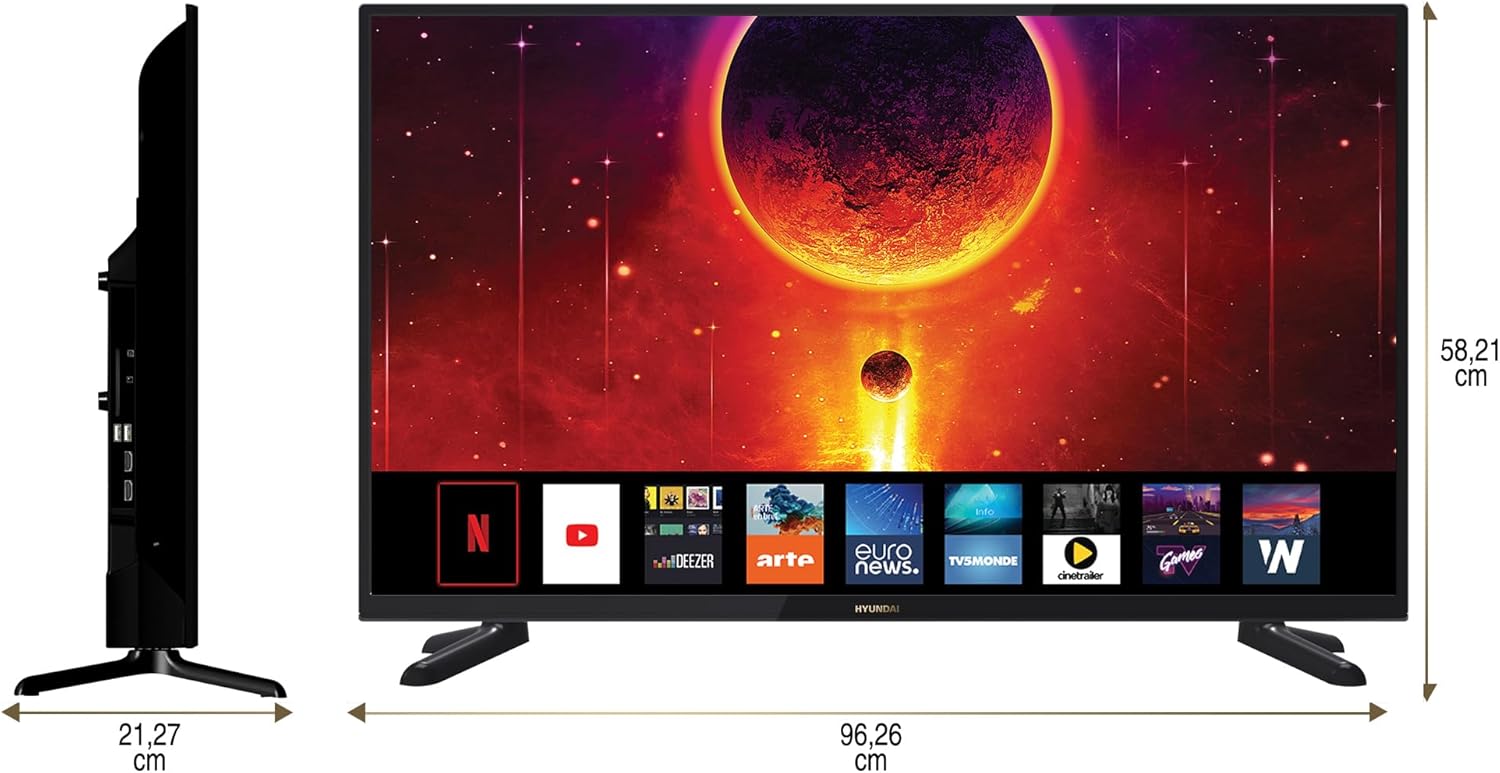
Diagram showing the dimensions of the HYUNDAI 42-inch Smart TV, with a width of 96.26 cm and a height of 58.21 cm.
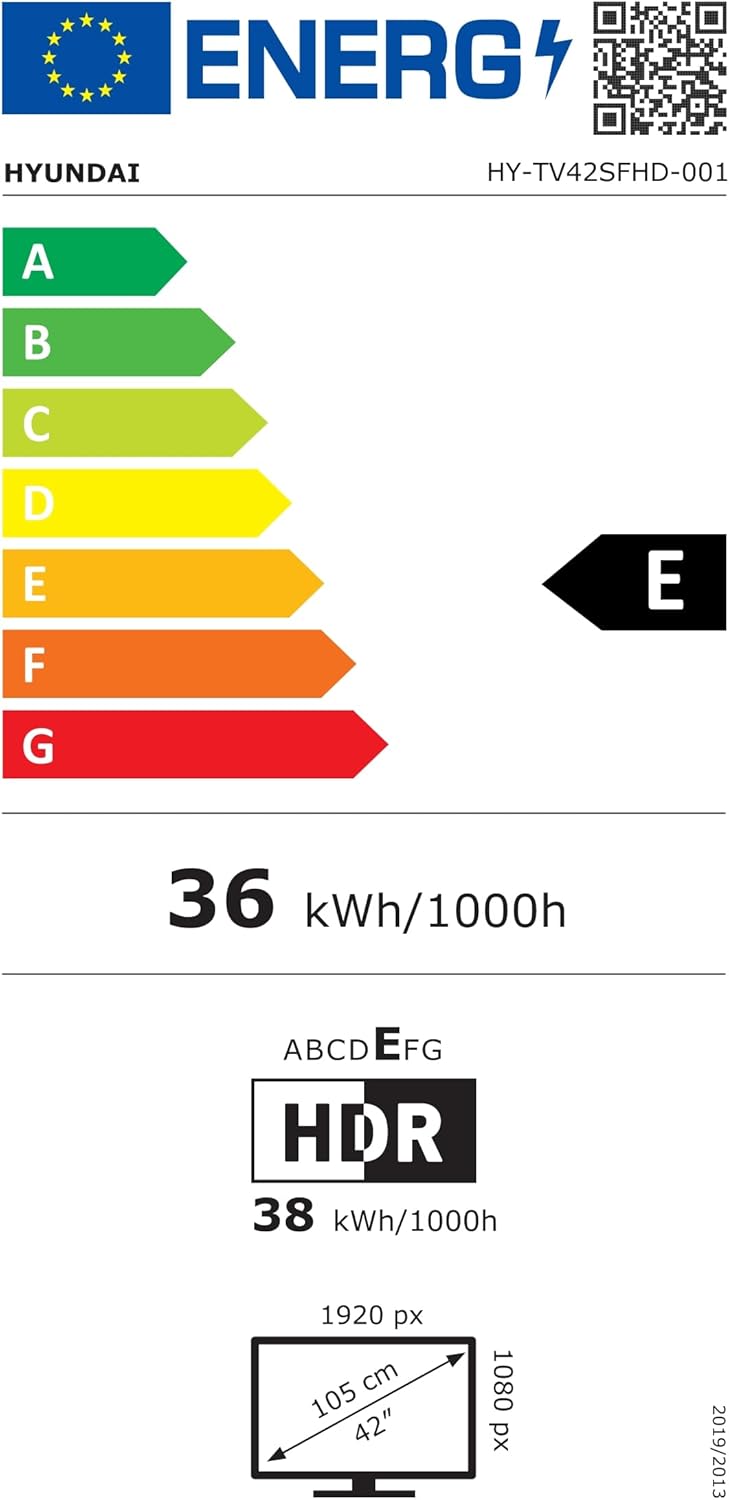
EU Energy Label for the HYUNDAI HY-TV42SFHD-001 television, showing an energy efficiency class of E and energy consumption of 36 kWh/1000h. For more details, visit eprel.ec.europa.eu/qr/1598831.
8. Gwarancja i wsparcie
8.1 Informacje o gwarancji
Your HYUNDAI Smart TV is covered by a manufacturer's warranty. The specific terms and duration of the warranty may vary by region. Please refer to the warranty card included with your product or visit the official HYUNDAI webStrona zawiera szczegółowe informacje o gwarancji.
8.2 Obsługa klienta
For technical assistance, troubleshooting not covered in this manual, or warranty claims, please contact HYUNDAI customer support. Contact details can typically be found on the official HYUNDAI webznajdziesz na stronie lub w dokumentacji dołączonej do telewizora.


