Wstęp
Dziękujemy za zakupasing the JTEMAN Cell Phone Stand with Wireless Bluetooth Speaker and Alarm Clock. This multi-functional device is designed to enhance your daily routine by combining essential features into one compact and stylish unit. It serves as a high-quality Bluetooth speaker, a reliable alarm clock with a clear display, and a stable, adjustable stand for your mobile devices. Please read this manual carefully to ensure proper use and optimal performance.
Informacje dotyczące bezpieczeństwa
- Nie wystawiaj urządzenia na działanie ekstremalnych temperatur, bezpośredniego światła słonecznego i wysokiej wilgotności.
- Unikaj upuszczania i narażania urządzenia na silne uderzenia.
- Keep away from water and other liquids. If the device comes into contact with liquid, disconnect it immediately and allow it to dry completely before reuse.
- Nie próbuj samodzielnie demontować, naprawiać ani modyfikować urządzenia. Wszelkie czynności serwisowe zlecaj wykwalifikowanemu personelowi.
- Należy używać wyłącznie dołączonego kabla ładującego lub certyfikowanego odpowiednika.
- Przechowywać w miejscu niedostępnym dla dzieci.
Zawartość opakowania
- JTEMAN Cell Phone Stand with Wireless Bluetooth Speaker and Alarm Clock (Model: JT-L36)
- Kabel ładujący typu C.
- Instrukcja obsługi
Produkt ponadview
Familiarize yourself with the components and controls of your JTEMAN device:
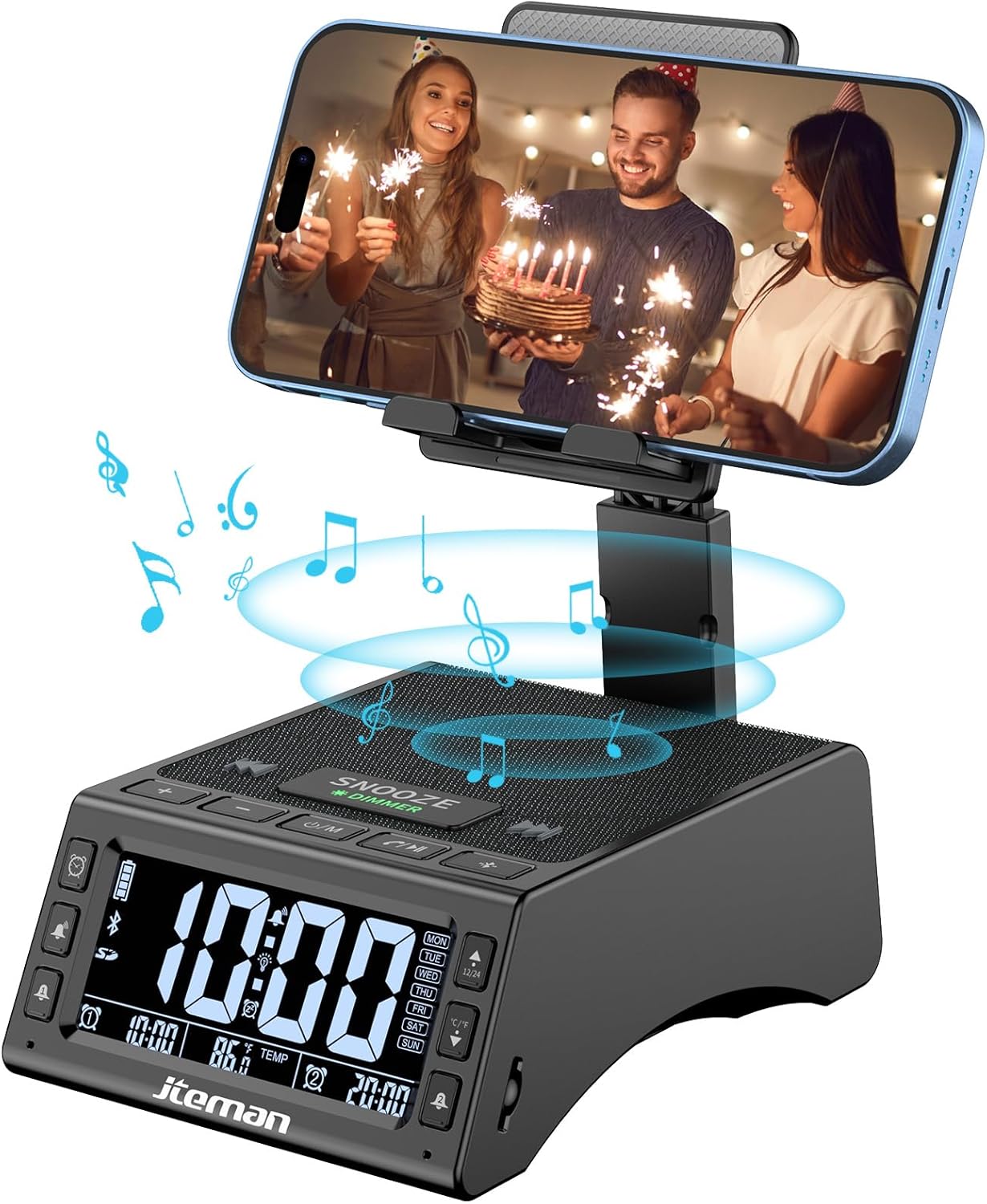
Rycina 1: Przód view of the JTEMAN device with a smartphone on the adjustable stand, displaying the time and temperature.

Rysunek 2: Koniecview highlighting the multi-functional aspects including Bluetooth speaker, 12/24H time display, temperature display, foldable phone stand, TF card support, microphone, charging station, dual alarm clocks, and 9 ringtones.
Sterowanie i porty:
- Ekran wyświetlacza: Shows time, temperature, day of the week, and alarm indicators.
- Przycisk DRZEMKA/ŚCIEMNIANIE: Press to snooze an active alarm (5 minutes); long press to adjust display brightness (4 levels).
- Power On/Off/Mode Button: Long press to power on/off; short press to cycle through modes (Bluetooth, TF Card).
- Play/Pause/Answer Button: Controls music playback; answers/ends calls.
- Przycisk zwiększania głośności/następnego utworu: Increases volume; short press for next track.
- Przycisk zmniejszania głośności/poprzedniego utworu: Decreases volume; short press for previous track.
- Przycisk parowania Bluetooth: Inicjuje tryb parowania Bluetooth.
- Alarm 1 & Alarm 2 Buttons: For setting and managing dual alarms.
- Mikrofon: Do połączeń bez użycia rąk.
- Port wejściowy typu C: Do ładowania urządzenia.
- Port wyjściowy typu C: Do ładowania urządzeń zewnętrznych.
- Gniazdo karty TF: Do odtwarzania muzyki bezpośrednio z karty TF.
- Adjustable Phone Stand: Foldable and extendable for various viewing angles. Features anti-slip pads and base for stability.
Organizować coś
1. Ładowanie początkowe
- Podłącz dostarczony kabel ładujący typu C do Port wejściowy typu C na urządzeniu.
- Connect the other end of the cable to a compatible USB power adapter (not included) and plug it into a wall outlet.
- The display will indicate charging status. Fully charge the device before first use.

Figure 3: The device connected via Type-C for charging itself and an external phone.
2. Ustawianie czasu i daty
- Upon powering on, the device should automatically synchronize the current time.
- If manual adjustment is needed, refer to the detailed instructions in the full user manual (included in the package).
- To switch between 12/24 hour format or °F/°C temperature display, use the dedicated buttons or refer to the full manual.

Figure 4: The HD display showing time, temperature, and alarm settings with brightness adjustment levels.
Instrukcja obsługi
1. Using the Phone Stand
- The integrated phone stand can be pulled up from the back of the unit.
- Dostosuj wysokość i kąt nachylenia stojaka do swoich preferencji viewing position. The stand is designed to be stable and strong, accommodating devices from 4.0 to 13 inches.
- When not in use, the stand can be folded back into the unit for a compact form factor.

Figure 5: Demonstrates the adjustable height and angle of the phone stand, along with its anti-slip features and foldable design.
2. Funkcja głośnika Bluetooth
- Włączanie: Long press the Power On/Off/Mode button. The device will enter Bluetooth pairing mode, indicated by a flashing Bluetooth icon on the display.
- Łączenie w pary: On your smartphone or other Bluetooth-enabled device, search for “JT-L36” in the Bluetooth settings and select it to pair. A confirmation sound will indicate successful pairing.
- Odtwarzanie muzyki: Once paired, you can play audio from your device through the JTEMAN speaker. Use the Play/Pause, Volume Up/Next Track, and Volume Down/Previous Track buttons to control playback.
3. Odtwarzanie z karty TF
- Insert a TF card (not included) with audio fileWłóż kartę TF do gniazda karty.
- The device will automatically switch to TF Card mode and begin playing music. If not, short press the Mode button to select TF Card mode.
4. Alarm Clock Features
- Ustawianie alarmów: Use the Alarm 1 and Alarm 2 buttons to set up to two independent alarms. Follow the on-screen prompts to set the time and alarm frequency (e.g., Mon-Fri, Sat-Sun, Mon-Sun).
- Funkcja drzemki: When an alarm sounds, press the large SNOOZE button on top to activate a 5-minute snooze.
- Regulacja jasności: Long press the SNOOZE/DIMMER button to cycle through four levels of display brightness, including an off setting for minimal light disturbance.
5. Dzwonienie bez użycia rąk
- When a call comes in while your phone is connected via Bluetooth, press the Play/Pause/Answer button to answer the call.
- Użyj wbudowanego mikrofonu, aby zapewnić wyraźną komunikację.
- Press the Play/Pause/Answer button again to end the call.
6. Ładowanie urządzeń zewnętrznych
- Connect your external device (e.g., smartphone, tablet) to the Port wyjściowy typu C on the JTEMAN unit using a compatible charging cable.
- The JTEMAN device will provide power to charge your external device.
Konserwacja
- Czyść urządzenie miękką, suchą ściereczką. Nie używaj środków czyszczących o właściwościach ściernych ani rozpuszczalników.
- Upewnij się, że wszystkie porty są wolne od kurzu i zanieczyszczeń.
- Przechowuj urządzenie w chłodnym i suchym miejscu, jeśli nie będziesz go używać przez dłuższy czas.
Rozwiązywanie problemów
| Problem | Możliwa przyczyna | Rozwiązanie |
|---|---|---|
| Urządzenie nie włącza się. | Low battery; power adapter/cable issue. | Charge the device fully. Check power adapter and cable connections. |
| Brak dźwięku z głośnika. | Volume too low; not paired correctly; wrong mode. | Increase volume on both device and connected phone. Re-pair Bluetooth. Ensure correct mode (Bluetooth/TF Card). |
| Parowanie Bluetooth nie powiodło się. | Urządzenie znajduje się za daleko; tryb parowania nieaktywny; zakłócenia. | Ensure device is in pairing mode and within 10 meters. Turn off other Bluetooth devices. Try restarting both devices. |
| Alarm nie włącza się. | Alarm not set; alarm volume too low; alarm disabled. | Verify alarm settings and ensure it's enabled. Increase alarm volume. |
| Phone not charging via output port. | Cable issue; device battery low; incompatible device. | Ensure the JTEMAN device is charged. Try a different charging cable. Confirm your phone is compatible with Type-C charging. |
Specyfikacje
| Marka | JTEMAN |
| Numer modelu | JT-L36 |
| Wymiary produktu | 6.1 x 4.3 x 2.1 cala |
| Waga przedmiotu | 1.26 funta |
| Kolor | Czarny |
| Interfejs sprzętowy | USB 2.0 |
| Łączna liczba portów USB | 2 (Type-C Input, Type-C Output) |
| Zgodność | 4.0-13 inch devices |
Gwarancja i wsparcie
JTEMAN products are manufactured with high standards of quality. For specific warranty information, please refer to the warranty card included in your product packaging or visit the official JTEMAN website. If you encounter any issues or have questions not covered in this manual, please contact JTEMAN customer support through the contact information provided on the product packaging or webstrona.
Proszę zachować dowód zakupu na potrzeby roszczeń gwarancyjnych.


