Wstęp
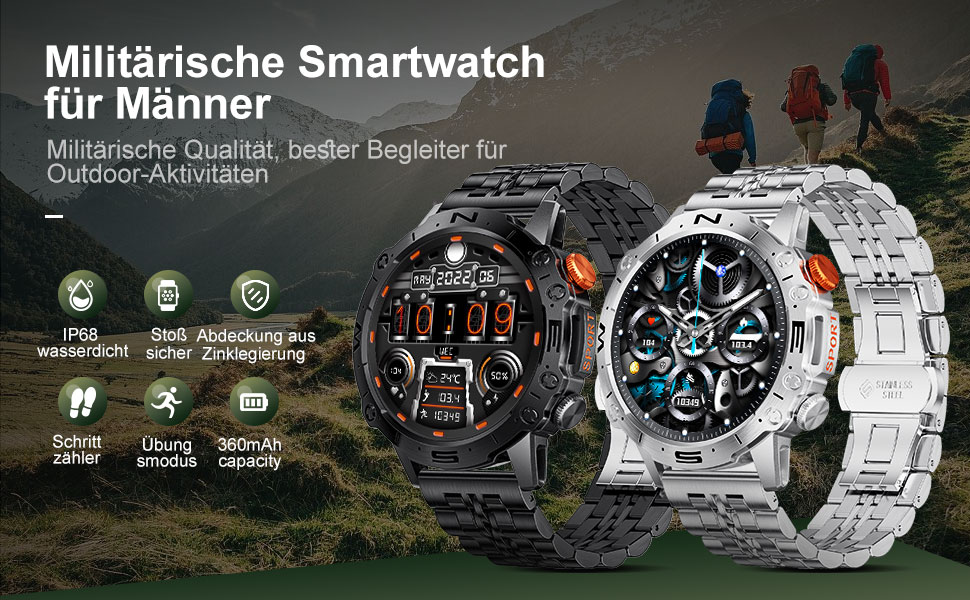
This manual provides detailed instructions for the setup, operation, and maintenance of your LIGE ST19-A Smartwatch. Designed for durability and functionality, this smartwatch features a 1.43-inch AMOLED touchscreen, Bluetooth calling, comprehensive health monitoring, and multiple sports modes. Please read this manual carefully to ensure proper use and to maximize your device's potential.
1. Konfiguracja
1.1 Ładowanie smartwatcha
Before first use, fully charge your LIGE ST19-A Smartwatch. Use the provided magnetic charging cable.
- Connect the magnetic end of the charging cable to the charging contacts on the back of the smartwatch.
- Connect the USB end of the cable to a standard USB power adapter (5V/1A recommended) or a computer's USB port.
- Wyświetlacz zegarka pokaże stan naładowania. Pełne naładowanie trwa zazwyczaj 2-3 godziny.
- Once fully charged, the watch offers approximately 3-7 days of working time and up to 30 days of standby time.
1.2 Instalacja aplikacji i parowanie urządzeń
Aby w pełni korzystać z funkcjonalności smartwatcha, należy zainstalować aplikację towarzyszącą na smartfonie i sparować urządzenia.
- Włącz Bluetooth: Na swoim smartfonie przejdź do ustawień i upewnij się, że Bluetooth jest włączony.
- Pobierz aplikację: Scan the QR code provided in the watch's packaging or search for "FitCloudPro" in your smartphone's app store (Google Play Store for Android, Apple App Store for iOS). Alternatively, you can visit ten link for download options.
- Zainstaluj i otwórz: Install the "FitCloudPro" app and open it.
- Dodaj urządzenie: In the app, navigate to the "Device" or "Add Device" section. The app will search for available devices. Select "ST19-A" from the list to initiate pairing.
- Potwierdź parowanie: Follow the on-screen prompts on both your phone and smartwatch to confirm the pairing request.
- Włącz powiadomienia: Grant the necessary permissions for the app to display notifications from your phone on the smartwatch.
- Funkcja połączenia Bluetooth: After successful connection, you can enable or disable the call function on the watch. If the connection is successful, you can add/answer calls and play music.

2. Instrukcja obsługi
2.1 Podstawowa nawigacja
- Ekran dotykowy: Przesuwaj w lewo, w prawo, w górę lub w dół, aby poruszać się po menu i funkcjach. Dotknij, aby wybrać.
- Przyciski boczne: The smartwatch features physical buttons for quick access to functions or to return to the home screen. Refer to the watch's interface for specific button assignments.
Połączenia Bluetooth 2.2
Po sparowaniu ze smartfonem możesz wykonywać i odbierać połączenia bezpośrednio za pomocą smartwatcha.
- Dzwonić: Access the dialer on your watch or select a contact from your synced phonebook.
- Odbieranie połączeń: When a call comes in, the watch will display the caller ID. You can answer or decline the call directly from your wrist.
- The watch includes a microphone and speaker for hands-free communication.

2.3 Inteligentne powiadomienia
Receive instant notifications for incoming calls, text messages, and alerts from various social media applications directly on your wrist.
- Ensure notification permissions are granted in the "FitCloudPro" app for desired applications.
- Supported apps include Line, Messenger, Facebook, Twitter, Kakao Talk, Skype, and WhatsApp.

2.4 Śledzenie stanu zdrowia
The smartwatch provides 24-hour real-time monitoring of various health metrics.
- Monitorowanie częstości akcji serca: Monitoruje tętno na bieżąco przez cały dzień.
- Pomiar ciśnienia krwi: Umożliwia pomiar ciśnienia krwi.
- Monitorowanie tlenu we krwi (SpO2): Mierzy poziom nasycenia krwi tlenem.
- Monitorowanie snu: Analizuje wzorce snu, w tym fazę snu głębokiego, płytkiego i porę wybudzenia.
- Krokomierz: Counts your daily steps, distance, and estimated calorie burn.
- Trening oddechowy: Ćwiczenia oddechowe pomagające radzić sobie ze stresem.
Note: Health data provided by this device is for reference only and should not be used for medical diagnosis or treatment. Consult a medical professional for health concerns.

2.5 trybów sportowych
The smartwatch supports over 100 sports modes to track your workout data accurately.
- Select your desired sport mode from the watch's menu to begin tracking.
- The watch records data such as duration, distance, calories burned, and heart rate during your activity.
- Examples of supported activities include walking, running, cycling, swimming, and various gym exercises.

2.6 dodatkowych funkcji
- Wyświetlacz pogody: Get real-time weather updates directly on your watch face.
- Sterowanie muzyką: Control music playback on your smartphone (play, pause, skip tracks) from your wrist.
- Zawsze na wyświetlaczu (AOD): The 1.43-inch AMOLED screen supports an Always On Display feature, providing continuous time visibility.
- Asystent głosowy AI: Interact with your smartwatch using voice commands for various tasks.


3. Konserwacja
- Czyszczenie: Regularnie przecieraj ekran i pasek zegarka miękką, suchą ściereczką. W razie potrzeby użyj lekko szorowatego detergentu.amp Wytrzyj szmatką i dokładnie osusz. Unikaj silnych środków chemicznych i materiałów ściernych.
- Wodoodporność: The LIGE ST19-A Smartwatch is IP68 rated, meaning it is resistant to dust and can withstand immersion in water up to 1.5 meters for 30 minutes. It is suitable for daily use, hand washing, and rain exposure. However, it is not recommended for hot showers, saunas, or diving, as steam and hot water can compromise the seals.
- Pielęgnacja baterii: Aby przedłużyć żywotność baterii, unikaj częstego całkowitego rozładowywania zegarka. Ładuj go, gdy poziom naładowania baterii jest niski. Przechowuj zegarek w chłodnym, suchym miejscu, gdy nie jest używany przez dłuższy czas.
- Unikaj ekstremalnych temperatur: Nie wystawiaj zegarka na działanie ekstremalnie wysokich lub niskich temperatur, gdyż może to spowodować uszkodzenie baterii i wewnętrznych podzespołów.
4. Rozwiązywanie Problemów
| Problem | Możliwe rozwiązanie |
|---|---|
| Zegarek się nie włącza | Upewnij się, że zegarek jest w pełni naładowany. Podłącz go do ładowarki na co najmniej 30 minut. |
| Nie można sparować ze smartfonem |
|
| Nie otrzymano żadnych powiadomień |
|
| Niedokładne dane dotyczące zdrowia |
|
| Krótki czas pracy baterii |
|
5. Specyfikacje
| Funkcja | Szczegół |
|---|---|
| Nazwa modelu | ST19-A |
| Marka | LIGA |
| Rozmiar ekranu | 1.43 cali |
| Typ wyświetlacza | Ekran dotykowy AMOLED |
| Technologia łączności | Bluetooth |
| Pojemność baterii | 360 mAh (litowo-jonowy) |
| Typowy czas użytkowania | 3-7 dni |
| Czas czuwania | Około. 30 dni |
| Odporność na wodę | IP68 (Dustproof, Water resistant up to 1.5m for 30 min) |
| Cechy specjalne | Voice Call, Music Player, Heart Rate Monitor, Activity Tracker, Blood Pressure Monitor, Blood Oxygen Monitor, Sleep Monitor, GPS (integrated) |
| Zgodność | Android, iOS |
| Waga | 290 gramów |
6. Gwarancja i wsparcie
LIGE prioritizes customer satisfaction. Your LIGE ST19-A Smartwatch comes with the following support:
- Zwrot w ciągu 30 dni: If any issues arise during use, you are eligible for a refund within 30 days of purchase.
- 2-Year Repair Service: A 2-year repair service is provided after the sale for manufacturing defects.
- For any problems or inquiries, please contact LIGE customer support. Your satisfaction is important to us.


