1. Wprowadzenie
The OWON CM2100B is a compact, smart, and portable digital AC/DC clamp meter designed for precise electrical measurements. Featuring 20000 counts and True RMS capabilities, it accurately measures AC/DC current, AC/DC voltage, resistance, capacitance, diode, and frequency. Its Bluetooth communication function allows for remote data viewing and instrument control via Android and Apple phones, supporting data recording and analysis.
2. Informacje dotyczące bezpieczeństwa
OSTRZEŻENIE:
- To avoid electrical shock, do not remove the test leads before replacing the battery.
- Przed dokonaniem pomiarów należy zawsze upewnić się, że miernik jest ustawiony na właściwą funkcję i zakres.
- Nie należy przekraczać maksymalnych wartości wejściowych w żadnym zakresie.
- Inspect the test leads for damage before each use. Do not use if insulation is compromised.
- Adhere to all local and national safety codes.
This device is designed for use by qualified personnel. Read and understand all instructions before operation.
3. Konfiguracja
3.1 Zawartość opakowania

Image: The CM2100B clamp meter and its accessories laid out, including the multimeter leads, a small screwdriver, the quick guide, and a soft carrying bag.
Sprawdź, czy w opakowaniu znajdują się wszystkie elementy:
- 1 x OWON CM2100B Digital AC/DC Clamp Metr
- 1 x Multimeter Test Leads (Red and Black)
- 1 x Bolt Driver (Screwdriver)
- 1 x Quick Guide / User Manual
- 1 x Soft Carrying Bag
3.2 Produkt powyżejview

Obraz: Czysty front view of the Owon CM2100B clamp meter, showing the clamp jaws, rotary dial, display screen, and function buttons.
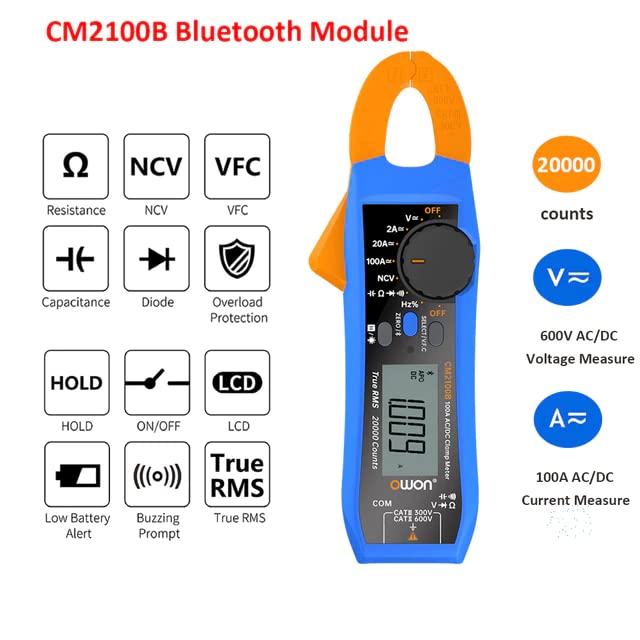
Image: An infographic detailing the CM2100B's capabilities such as Resistance, NCV, VFC, Capacitance, Diode, Overload Protection, Data Hold, On/Off, LCD, Low Battery Alert, Buzzing Prompt, True RMS, 20000 counts, 600V AC/DC Voltage, and 100A AC/DC Current.
The CM2100B features a compact design with an intuitive rotary dial for function selection and a clear LCD display. Key components include:
- Clamp Szczęki: Do bezkontaktowego pomiaru prądu AC/DC.
- Pokrętło obrotowe: Wybiera funkcje pomiarowe (objętośćtagnp. prąd, opór, itp.).
- Wyświetlacz LCD: Pokazuje odczyty pomiarów, jednostki i wskaźniki.
- Przyciski funkcyjne: Include ZERO/℃/℉, SELECT/VFC, HOLD, and NCV.
- Gniazda wejściowe: Do podłączania przewodów pomiarowych do pomiaru objętościtage, pomiary rezystancji, pojemności i diod.
3.3 Instalacja baterii

Image: The rear of the CM2100B meter, displaying the battery compartment cover and a warning label regarding battery replacement.
The CM2100B requires 2 x AAA 3V Lithium Metal batteries (included). To install or replace batteries:
- Ensure the meter is turned OFF and disconnect all test leads from the meter and the circuit being measured.
- Znajdź pokrywę komory baterii znajdującą się z tyłu miernika.
- Use the provided bolt driver (screwdriver) to loosen the screw securing the battery cover.
- Zdejmij pokrywę baterii.
- Insert the 2 x AAA batteries, observing the correct polarity (+/-) as indicated inside the compartment.
- Załóż pokrywę baterii i dokręć śrubę.
4. Instrukcja obsługi
4.1 Włączanie/wyłączanie i wybór funkcji
To power on the meter, rotate the central dial from the 'OFF' position to the desired measurement function. To power off, rotate the dial back to 'OFF'.
4.2 Funkcje pomiarowe

Image: A visual representation of the CM2100B's capabilities, including Resistance, NCV, VFC, HOLD, ON/OFF, LCD, Capacitance, Diode, Overload Protection, Low Battery Alert, Buzzing Prompt, and True RMS.

Image: Four practical application scenarios for the CM2100B: Capacitance measurement, NCV (Non-Contact Voltage) inductive measurement, Circuit board resistance measurement, and Diode measurement.
The CM2100B offers a wide range of measurement capabilities:
- Prąd przemienny/stały (A): Użyj clamp jaws to measure current without breaking the circuit. Ensure the conductor is centered within the jaws. Max 100A.
- AC/DC Objętośćtage (v): Connect test leads to the appropriate input jacks and across the circuit. Max 600V.
- Rezystancja (Ω): Podłącz przewody pomiarowe do elementu.
- Pojemność (F): Podłącz przewody pomiarowe do kondensatora.
- Test diody: Connect test leads across the diode to check forward voltagkropla.
- Objętość bezkontaktowatage (NCV): Wykryj objętość prądu przemiennegotage without physical contact by bringing the meter's NCV sensor close to the conductor.
- VFC (Variable Frequency Control): For accurate measurements on variable frequency drives.
- Częstotliwość (Hz): Zmierz częstotliwość sygnałów prądu przemiennego.
- Prawdziwa wartość skuteczna: Zapewnia dokładne odczyty przebiegów niesinusoidalnych.
- Funkcja HOLD: Naciśnij przycisk „HOLD”, aby zamrozić aktualny odczyt na wyświetlaczu. Naciśnij ponownie, aby zwolnić.
4.3 Bluetooth Connectivity and Data Recording
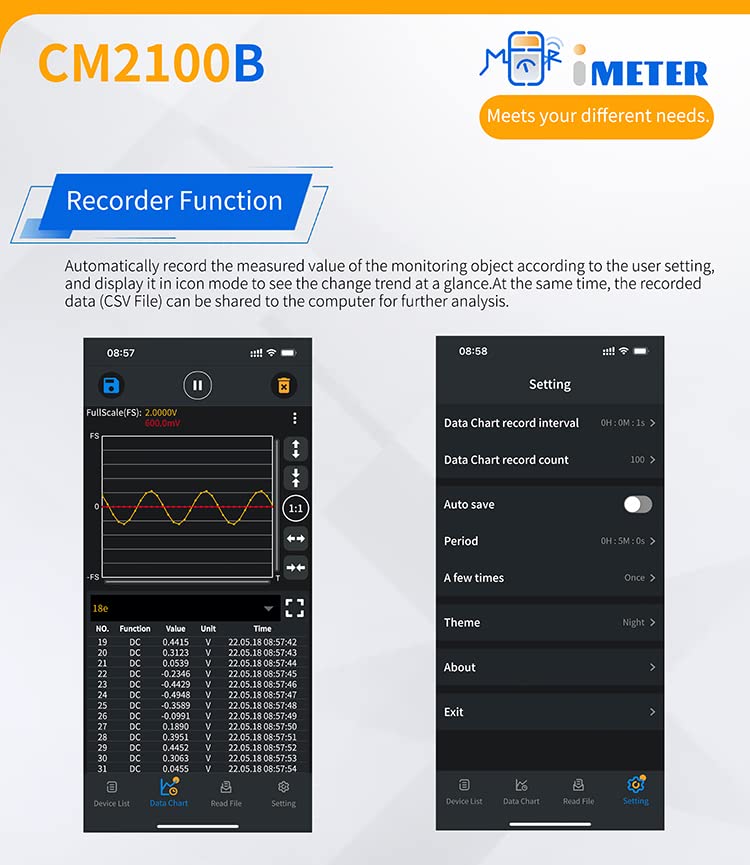
Image: A split image showing the CM2100B's recorder function interface on a mobile app, with a data chart on the left and settings for data chart interval, count, auto save, and theme on the right.
The CM2100B features Bluetooth connectivity for enhanced functionality:
- Pobierz aplikację: Scan the QR code in the quick guide or visit https://files.owon.com.cn/i-meter/ to download the official OWON i-Meter app for Android or Apple devices.
- Łączenie w pary: Enable Bluetooth on your mobile device and open the i-Meter app. Follow the in-app instructions to connect to your CM2100B meter.
- Remote Control & Viewing: Po połączeniu możesz view real-time measurements, change settings, and control the meter remotely from your phone.
- Rejestracja danych: The app supports a recording function, allowing you to log measured values over time. This data can be analyzed within the app or exported (e.g., as a CSV file) for further analysis on a computer.
- Udostępnianie danych: Share recorded data with colleagues or for documentation purposes directly from the app.
5. Konserwacja
- Czyszczenie: Wytrzyj licznikasing z reklamąamp Ściereczką i łagodnym detergentem. Nie używaj środków ściernych ani rozpuszczalników. Przed użyciem upewnij się, że miernik jest suchy.
- Składowanie: Jeśli miernik nie będzie używany przez dłuższy czas, wyjmij baterie, aby zapobiec wyciekowi. Przechowuj w chłodnym, suchym miejscu, z dala od bezpośredniego światła słonecznego.
- Kalibrowanie: W przypadku zastosowań profesjonalnych zaleca się okresową kalibrację w wykwalifikowanym punkcie serwisowym w celu zapewnienia dokładności.
6. Rozwiązywanie Problemów
| Problem | Możliwa przyczyna | Rozwiązanie |
|---|---|---|
| Miernik się nie włącza. | Rozładowane lub nieprawidłowo zainstalowane baterie. | Sprawdź biegunowość baterii. W razie potrzeby wymień baterie. |
| No reading or unstable reading. | Incorrect function selected; poor test lead connection; out of range. | Ensure correct function is selected. Check test lead connections. Verify measurement is within meter's range. |
| Problemy z połączeniem Bluetooth. | Bluetooth not enabled on device; app not installed; meter too far from device. | Ensure Bluetooth is on. Download and install the i-Meter app. Keep meter and device within Bluetooth range. |
| Wskaźnik niskiego poziomu naładowania baterii. | Baterie są słabe. | Aby zapewnić dokładność odczytów, należy natychmiast wymienić baterie. |
7. Specyfikacje
| Funkcja | Specyfikacja |
|---|---|
| Numer modelu | QD-CM2100B |
| Wyświetl liczniki | 20000 |
| Typ pomiaru | Prawdziwy RMS |
| Zakres prądu AC/DC | Do 100A |
| AC/DC Objętośćtage Zakres | Do 600V |
| Odpowiedź częstotliwościowa prądu przemiennego | Do 1000 Hz |
| Łączność | Bluetooth (Android & Apple support) |
| Źródło zasilania | 2 x AAA 3V Lithium Metal batteries (included) |
| Wymiary produktu | 9.84 x 5.91 x 7.09 cala |
| Waga przedmiotu | 0.5 kilograma (1.1 funta) |
| Kolor | Wielobarwny |
| Producent | OWON |
| Data pierwszej dostępności | 14 lipca 2023 r. |
8. Gwarancja i wsparcie
For warranty information and technical support, please refer to the official OWON webOdwiedź witrynę lub skontaktuj się z autoryzowanym dealerem. Zachowaj paragon jako dowód zakupu na wypadek roszczeń gwarancyjnych.
For the latest software updates and additional resources, visit the OWON support page or the i-Meter app download link provided in Section 4.3.


