1. Wprowadzenie
This manual provides detailed instructions for the installation, operation, maintenance, and troubleshooting of your XPG CORE Reactor II VE 650W Power Supply Unit (PSU). Please read this manual thoroughly before using the product to ensure proper functionality and safety.
2. Informacje dotyczące bezpieczeństwa
- Przed instalacją, wyjęciem lub czyszczeniem zasilacza należy zawsze odłączyć przewód zasilający od gniazdka ściennego.
- Nie otwierać zasilacza casing. Wysoka objętośćtages are present inside, which can cause electric shock. The warranty will be void if the casing jest otwarty.
- Zasilacz należy zainstalować w dobrze wentylowanym pomieszczeniu, z dala od źródeł ciepła, bezpośredniego światła słonecznego i wilgoci.
- Ensure all cables are securely connected. Loose connections can cause damage to components.
- Use only the modular cables provided with this PSU. Using third-party cables may cause damage and void the warranty.
- Ten produkt jest przeznaczony wyłącznie do użytku w systemach komputerowych. Nie należy go używać do żadnych innych celów.
3. Zawartość opakowania
Sprawdź, czy w opakowaniu produktu znajdują się wszystkie elementy wymienione poniżej:
- XPG CORE Reactor II VE 650W Power Supply Unit
- Modular Cable Set (including 12V-2x6 cable)
- Przewód zasilający AC
- Śruby montażowe
- Szybki przewodnik

Image: The XPG CORE Reactor II VE 650W power supply unit shown with its retail box, modular cables, AC power cord, and quick start guide.
4. Koniec produktuview
The XPG CORE Reactor II VE 650W is an 80 PLUS Gold certified power supply compliant with Intel's ATX 3.1 specifications. It features a fully modular design and an FDB (Fluid Dynamic Bearing) fan for efficient and quiet operation.

Obraz: Awers view of the XPG CORE Reactor II VE 650W power supply, showcasing its fan grille and XPG branding.

Image: The rear panel of the XPG CORE Reactor II VE 650W power supply, featuring the AC power inlet and the main power switch.

Image: A close-up of the modular cable connection panel on the XPG CORE Reactor II VE 650W PSU, showing labeled ports for Motherboard, CPU & VGA, 12V-2x6, and SATA & Molex connectors.
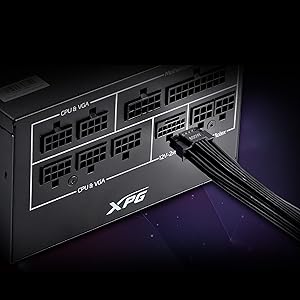
Obraz: szczegółowy view of the 12V-2x6 connector port on the XPG CORE Reactor II VE 650W PSU, designed for next-generation graphics cards.
5. Konfiguracja i instalacja
Follow these steps to properly install your XPG CORE Reactor II VE 650W PSU into your computer system:
- Przygotuj swój system: Upewnij się, że komputer jest całkowicie wyłączony i odłączony od gniazdka ściennego. Otwórz obudowę komputera.
- Wyjmij stary zasilacz (jeśli dotyczy): Odłącz wszystkie kable od starego zasilacza i wyjmij go z obudowy.
- Zamontuj nowy zasilacz: Insert the XPG CORE Reactor II VE 650W PSU into the designated PSU bay in your computer case. Secure it with the provided mounting screws.
- Podłącz niezbędne kable:
- Podłącz 24-pinowy kabel ATX do płyty głównej.
- Connect the 4+4-pin or 8-pin EPS/CPU cable(s) to your motherboard's CPU power connector(s).
- Connect the appropriate PCI-E (6+2-pin) or 12V-2x6 cable(s) to your graphics card(s).
- Podłącz kable zasilające SATA do dysków pamięci masowej (HDD, SSD) i napędów optycznych.
- Connect Molex cables to any peripherals requiring them.
Ensure all modular cables are firmly seated into both the PSU and the respective components.
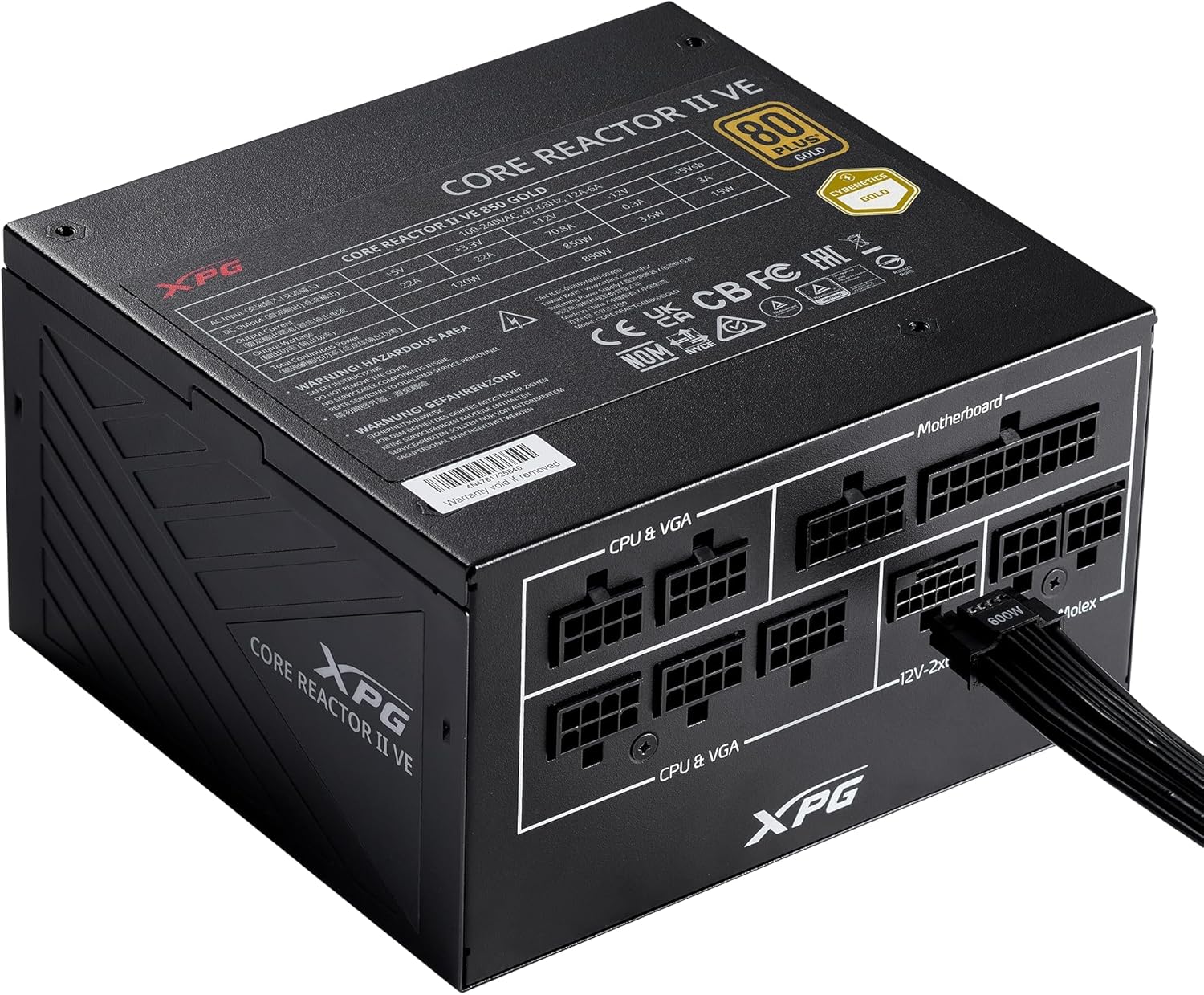
Image: The XPG CORE Reactor II VE 650W power supply with a 12V-2x6 cable connected to its modular port, illustrating a typical cable connection.
- Zarządzanie kablami: Ułóż kable w uporządkowany sposób, aby poprawić przepływ powietrza i estetykę obudowy.
- Zamknij obudowę i podłącz zasilanie: Close your computer case. Connect the AC power cord to the PSU's inlet and then to a wall outlet.
- Włączanie: Flip the power switch on the back of the PSU to the 'ON' position and power on your computer.
6. Instrukcja obsługi
The XPG CORE Reactor II VE 650W PSU operates automatically once installed and powered on. It features an FDB fan with intelligent fan control, which adjusts its speed based on the PSU's temperature and load to maintain optimal cooling and minimize noise.
The PSU is designed to provide stable and reliable power to your system. No user intervention is typically required during normal operation.
7. Konserwacja
To ensure the longevity and optimal performance of your XPG CORE Reactor II VE 650W PSU, consider the following maintenance tips:
- Usuwanie kurzu: Periodically clean the fan grille and the interior of your computer case to prevent dust buildup. Dust can impede airflow and lead to overheating. Use compressed air for this purpose, ensuring the system is powered off and unplugged.
- Kontrola kabla: Od czasu do czasu należy sprawdzać wszystkie połączenia kabli modułowych, aby mieć pewność, że są bezpieczne.
- Środowisko: Operate the PSU in a clean, dry, and well-ventilated environment.
8. Rozwiązywanie Problemów
If you encounter issues with your XPG CORE Reactor II VE 650W PSU, refer to the following common troubleshooting steps:
- Brak zasilania:
- Upewnij się, że przewód zasilający jest prawidłowo podłączony do zasilacza i gniazdka ściennego.
- Sprawdź, czy wyłącznik zasilania z tyłu zasilacza jest w pozycji „ON”.
- Sprawdź, czy gniazdko ścienne działa prawidłowo, podłączając do niego inne urządzenie.
- Confirm that the 24-pin ATX and 4+4-pin/8-pin EPS/CPU cables are correctly and firmly connected to the motherboard.
- Niestabilność systemu/losowe wyłączanie się systemu:
- Ensure all power cables to components (motherboard, CPU, GPU, drives) are securely connected.
- Check for proper ventilation within your computer case. Overheating can cause instability.
- If you have recently added new components, ensure the 650W output is sufficient for your total system load.
- Wentylator nie kręci się:
- The FDB fan features intelligent control and may not spin at low loads or temperatures. This is normal operation.
- If the fan does not spin under heavy load and the PSU feels excessively hot, contact support.
- Nietypowe dźwięki:
- A slight coil whine can sometimes occur under specific loads; this is generally not indicative of a fault.
- If you hear grinding or scraping noises, power off the system immediately and contact support.
Jeśli wykonanie tych czynności nie pomoże w rozwiązaniu problemu, zapoznaj się z sekcją Gwarancja i wsparcie techniczne, aby uzyskać dalszą pomoc.
9. Specyfikacje
Key technical specifications for the XPG CORE Reactor II VE 650W PSU:
| Funkcja | Specyfikacja |
|---|---|
| Numer modelu | COREREACTORIIVE650G-BKCUS |
| Moc wyjściowatage | 650 watów |
| Certyfikacja efektywności | 80 PLUS Gold, CYBENETICS Gold |
| Standard ATX | ATX 3.1 / EPS v2.92 |
| Współczynnik kształtu | ATX |
| Metoda chłodzenia | Air (FDB 120mm Fan) |
| Projekt zasilacza | Pełny modułowy |
| Wymiary produktu (dł. x szer. x wys.) | 5.86 x 5.9 x 3.38 cali (140 x 150 x 86 mm) |
| Waga przedmiotu | 5.07 funta |
| Typy złączy | ATX, Molex, PCI Express, SATA, 12V-2x6 |
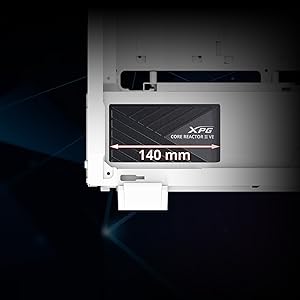
Image: A diagram illustrating the compact 140mm length of the XPG CORE Reactor II VE power supply, highlighting its compatibility with various PC cases.

Image: Visual representation of the multiple protection mechanisms integrated into the PSU, including OPP (Over Power Protection), OVP (Over Voltage Protection), SIP (Surge & Inrush Protection), SCP (Short Circuit Protection), UVP (Under Voltage Protection), OCP (Over Current Protection), OTP (Over Temperature Protection), and NLO (No Load Operation).
10. Gwarancja i wsparcie
For warranty information, technical support, or service inquiries regarding your XPG CORE Reactor II VE 650W PSU, please visit the official XPG website or contact their customer support directly. Details can typically be found on the product packaging or the manufacturer's official support pages.
Zachowaj dowód zakupu na potrzeby roszczeń gwarancyjnych.


