Wstęp
This manual provides comprehensive instructions for the Silvergear XL Smartwatch. It covers setup, operation, maintenance, and troubleshooting to ensure you get the most out of your device. The Silvergear XL Smartwatch features a large 2.41-inch IPS display, integrated cameras, 4G connectivity, and extensive fitness tracking capabilities.
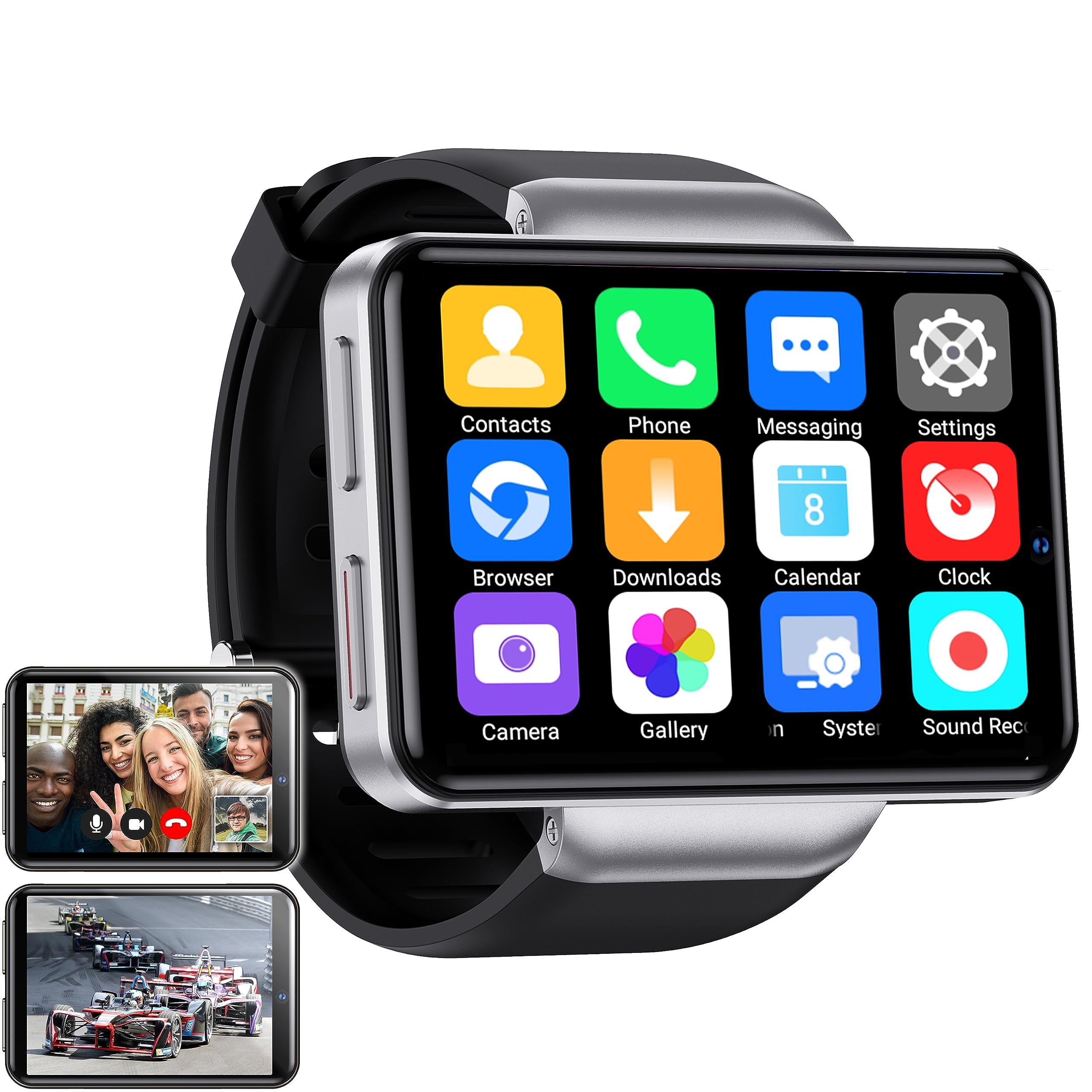
Figure 1: Silvergear XL Smartwatch overview.

Figure 2: The Silvergear XL Smartwatch offers a perfect balance of style, functionality, and advanced technology, including a 2.41-inch IPS display, live video streaming, app downloads, fitness tracking, and communication features.
1. Konfiguracja
1.1 Rozpakowanie i zawartość opakowania
Carefully unpack your Silvergear XL Smartwatch and verify all contents.

Figure 3: Package contents including the Smartwatch XL, charging base, screen protector, and two screwdrivers. Dimensions are also shown: 4.5 cm height, 6.5 cm width, 1.5 cm thickness for the watch body, and strap lengths of 8.5 cm and 12 cm. The watch weighs 120 grams.
- Smartwatch Silvergear XL
- Baza ładująca
- Folia ochronna na ekran
- 2x Screwdrivers (for SIM card tray)
- Instrukcja obsługi (ten dokument)
1.2 Ładowanie smartwatcha
Przed pierwszym użyciem należy całkowicie naładować smartwatch.
- Connect the charging base to a USB power adapter (not included) or a computer's USB port.
- Place the smartwatch onto the charging base, ensuring the charging pins align.
- Wyświetlacz zegarka wskaże stan ładowania. Pełne naładowanie zajmie około 2-3 godzin.
1.3 Instalacja karty SIM
To enable 4G connectivity, calls, and internet access, install a Nano SIM card.

Figure 4: Illustration of how to insert a Nano SIM card into the smartwatch. The image also shows the watch's ability to download apps from the Play Store.
- Znajdź tackę na kartę SIM znajdującą się z boku smartwatcha.
- Use the provided screwdriver to open the SIM card tray.
- Carefully insert a Nano SIM card into the tray, ensuring correct orientation.
- Close the SIM card tray securely with the screwdriver.
1.4 Pierwsze włączenie i konfiguracja
Press and hold the power button until the Silvergear logo appears. Follow the on-screen prompts to complete the initial setup, including language selection, time zone, and network connection.
2. Obsługa smartwatcha
2.1 Podstawowa nawigacja
- Ekran dotykowy: Przesuwaj palcem w lewo, w prawo, w górę lub w dół, aby poruszać się po menu i ekranach. Dotknij, aby wybrać elementy.
- Przycisk zasilania: Naciśnij, aby wybudzić/uśpić ekran. Naciśnij i przytrzymaj, aby włączyć/wyłączyć lub ponownie uruchomić.
- Back Button (if applicable): Some watches have a dedicated back button or gesture. Refer to on-screen prompts.
2.2 Funkcje komunikacyjne
With a Nano SIM card installed, you can make and receive calls and messages directly from your smartwatch.
- Połączenia: Tap the "Phone" icon to access the dialer or contacts.
- Wiadomości: Tap the "Messaging" icon to send and receive text messages.
- Aplikacje: Download communication apps from the Play Store for additional functionality.
Funkcjonalność kamery 2.3
The smartwatch is equipped with both front and side cameras for capturing photos and videos.

Figure 5: The smartwatch features a 5MP front camera and a 2MP side camera, allowing you to capture photos and videos directly from your wrist.
- Dostęp do kamery: Tap the "Camera" icon on the home screen or app drawer.
- Zmień kamerę: Use the on-screen icon to switch between the 5MP front camera and the 2MP side camera.
- Schwytać: Naciśnij przycisk migawki, aby zrobić zdjęcie lub rozpocząć/zatrzymać nagrywanie wideo.
2.4 Rozrywka multimedialna
Enjoy videos, TV programs, series, and music directly on your smartwatch's extra-large screen.

Figure 6: The extra-large screen allows you to enjoy multimedia content such as sport competitions, TV programmes, series, videos, and music.
- Video/TV: Use pre-installed apps or download streaming services from the Play Store.
- Muzyka: Play music stored on the device or stream from compatible apps.
2.5 Monitorowanie kondycji fizycznej i zdrowia
Monitor your physical activity and health metrics with the integrated sensors.

Figure 7: The smartwatch offers pedometer and fitness tracking for various activities including running, hiking, cycling, basketball, football, jumping rope, and badminton.
- Krokomierz: Monitoruje codzienne kroki, pokonany dystans i spalone kalorie.
- Monitor pracy serca: Provides accurate heart rate readings.
- Tryby treningu: Select from 9 pre-defined exercise types (e.g., running, walking, cycling, swimming) to track your performance.
- Monitorowanie snu: Monitors your sleep patterns (if supported by the device's software).
2.6 Pobieranie aplikacji
Expand your smartwatch's functionality by downloading applications from the Play Store.
- Ensure your smartwatch is connected to Wi-Fi or has an active 4G data connection.
- Tap the "Play Store" icon and browse or search for desired applications.
- Follow on-screen instructions to download and install apps.
3. Konserwacja
3.1 Czyszczenie
Aby zachować wygląd i funkcjonalność swojego smartwatcha:
- Przetrzyj ekran i obudowę miękką, niepozostawiającą włókien ściereczką.
- W przypadku uporczywych plam, delikatnieampPrzetrzyj szmatkę wodą. Unikaj silnych środków chemicznych i materiałów ściernych.
- Przed ładowaniem sprawdź, czy styki ładowania są czyste i suche.
3.2 Odporność na wodę i kurz
The Silvergear XL Smartwatch is rated IP67 for water and dust resistance.

Figure 8: The smartwatch is IP67 water- and dustproof, designed to withstand various weather conditions. This includes IP67 splashproof and IP67 dustproof ratings.
- Stopień ochrony IP67: This means the device is protected from dust ingress and can withstand immersion in water up to 1 meter for up to 30 minutes.
- It is suitable for splashes, rain, and incidental exposure to water.
- Avoid prolonged immersion, hot water, or high-pressure water jets.
- Ensure the SIM card tray is properly sealed to maintain water resistance.
3.3 Aktualizacje oprogramowania
Okresowo sprawdzaj dostępność aktualizacji oprogramowania, aby zapewnić optymalną wydajność i dostęp do nowych funkcji.
- Connect your smartwatch to Wi-Fi.
- Navigate to "Settings" > "About Watch" > "Software Update" (or similar path).
- Follow on-screen instructions to download and install any available updates.
4. Rozwiązywanie Problemów
| Problem | Możliwa przyczyna | Rozwiązanie |
|---|---|---|
| Smartwatch nie włącza się. | Niski poziom naładowania baterii; urządzenie zawiesza się. | Ładuj urządzenie przez co najmniej 30 minut. Naciśnij i przytrzymaj przycisk zasilania przez 10–15 sekund, aby wymusić ponowne uruchomienie. |
| Nie można wykonywać/odbierać połączeń. | No SIM card; SIM card not properly inserted; no network signal; incorrect network settings. | Ensure SIM card is correctly installed and activated. Check network signal strength. Verify network settings in the smartwatch. |
| Ekran nie reaguje. | Błąd oprogramowania; zakłócenia ze strony osłony ekranu. | Restart the smartwatch. Remove and reapply the screen protector if it's causing issues. |
| Fitness tracking data is inaccurate. | Improper fit; sensor obstruction; software calibration needed. | Ensure the watch is worn snugly on your wrist. Clean the sensor area. Check for software updates. |
| Nie można połączyć się z siecią Wi-Fi. | Nieprawidłowe hasło; poza zasięgiem; problem z routerem. | Zweryfikuj hasło Wi-Fi. Podejdź bliżej routera Wi-Fi. Uruchom ponownie router. |
If you encounter issues not listed here, or if the suggested solutions do not resolve the problem, please refer to the support section.
5. Specyfikacje
Below are the technical specifications for the Silvergear XL Smartwatch (Model: 8711568088660).

Figure 9: Key technical specifications of the Silvergear XL Smartwatch, including Android 7.1.1 OS, MT6739 Quad-Core CPU (1.5 GHz), 2.41-inch full screen, 640x480 resolution, and 4G & WiFi connectivity.
| Funkcja | Szczegół |
|---|---|
| Marka | Srebrny sprzęt |
| Numer modelu | 8711568088660 |
| System operacyjny | Android (version 7.1.1 from image) |
| Rozmiar ekranu | 2.41 cali |
| Typ wyświetlacza | LCD (IPS from description) |
| Rezolucja | 640x480 (from image) |
| Edytor | MT6739 Quad-Core CPU, 1.5 GHz (from image) |
| Łączność | 4G, Wi-Fi |
| Przednia kamera | 5 megapiksela |
| Kamera boczna | 2 megapiksela |
| Pojemność pamięci masowej | 500 MB |
| Odporność na wodę i kurz | IP67 |
| GPS | Brak GPS-u |
| Kompatybilne urządzenia | Smartfon |
6. Informacje o gwarancji
The Silvergear XL Smartwatch comes with a manufacturer's warranty.
- Gwarancja producenta: 2 lat.
- Gwarancja obejmuje wady materiałowe i wykonawcze powstałe w wyniku normalnego użytkowania.
- It does not cover damage caused by misuse, accidents, unauthorized modifications, or normal wear and tear.
- Proszę zachować dowód zakupu na potrzeby roszczeń gwarancyjnych.
7. Wsparcie
For further assistance, technical support, or warranty claims, please contact Silvergear customer service.
- Refer to the Silvergear official webstrona dla danych kontaktowych.
- Have your product model number (8711568088660) and proof of purchase ready when contacting support.


