1. Wprowadzenie
The Haltech Elite 1500 Engine Control Unit (ECU) is an advanced, fully programmable engine management system designed to provide precise control over various engine functions. This manual offers essential information for the proper installation, configuration, and operation of your Elite 1500 ECU, ensuring optimal performance and reliability. Please read this manual thoroughly before attempting any installation or configuration.
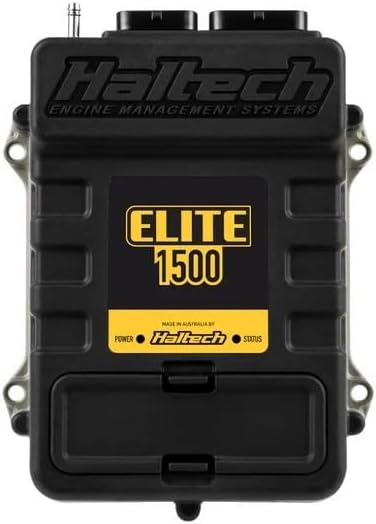
Image 1.1: Haltech Elite 1500 Engine Control Unit. The unit is black with the Haltech logo and 'Elite 1500' prominently displayed in yellow. It features connection ports at the top and mounting points on the sides.
2. Zawartość opakowania
Sprawdź, czy w przesyłce znajdują się wszystkie wymienione poniżej elementy:
- Haltech Elite 1500 ECU (HT-150900)
- Szybki przewodnik
- Associated wiring harness (if included in kit)
- Kabel komunikacyjny USB
- Software CD or download instructions
3. Konfiguracja i instalacja
The Haltech Elite 1500 ECU is designed for a Plug'n'Play installation in many applications, allowing for a relatively quick setup. Refer to the included Quick Start Guide for detailed, step-by-step instructions specific to your vehicle or application.
3.1. Kontrole przed instalacją
- Przed rozpoczęciem instalacji należy upewnić się, że akumulator pojazdu jest odłączony.
- Confirm compatibility of the Elite 1500 ECU with your engine and vehicle system.
- Gather all necessary tools and additional components (e.g., sensors, relays) as required by your specific setup.
3.2. Mounting the ECU
Mount the ECU in a secure location away from excessive heat, moisture, and vibration. Ensure adequate airflow around the unit if possible. Use the provided mounting points on the ECU casing.
3.3. Połączenia okablowania
Connect the wiring harness to the ECU and to the vehicle's engine and electrical system according to the wiring diagrams provided in the comprehensive installation guide. Pay close attention to power, ground, sensor, and injector connections. Incorrect wiring can cause damage to the ECU or vehicle components.
3.4. Instalacja oprogramowania
Install the Haltech ESP (Elite Software Programmer) software on your computer. This software is essential for configuring and tuning your Elite 1500 ECU. Follow the on-screen instructions during installation.
4. Instrukcja obsługi
Once the Elite 1500 ECU is physically installed and the software is ready, you can proceed with initial configuration and operation.
4.1. Connecting to the ECU
Connect the ECU to your computer using the supplied USB cable. Ensure the vehicle's ignition is on (but the engine is not necessarily running) to power the ECU. Launch the Haltech ESP software.
4.2. Initial Configuration and Base Map Loading
Within the ESP software, establish communication with the ECU. Load an appropriate base map for your engine configuration. This base map provides a starting point for engine operation. Carefully review and adjust basic settings such as engine type, sensor calibrations, and injector data before attempting to start the engine.
4.3. Engine Start-up and Tuning
After initial configuration, attempt to start the engine. Monitor all engine parameters within the ESP software. Professional tuning is highly recommended to optimize engine performance, fuel efficiency, and reliability. The Elite 1500 offers extensive tuning capabilities for fuel, ignition, boost, and auxiliary functions.
4.4. Rejestrowanie i monitorowanie danych
Utilize the data logging features of the ESP software to record engine parameters during operation. This data is crucial for diagnostics, tuning, and identifying potential issues. Real-time monitoring allows for immediate feedback on engine behavior.
5. Konserwacja
The Haltech Elite 1500 ECU is designed for durability and requires minimal maintenance. However, adhering to the following guidelines can prolong its lifespan and ensure consistent performance:
- Regularna kontrola: Periodically check all wiring connections to the ECU for tightness and corrosion.
- Czystość: Keep the ECU and its connectors free from dirt, dust, and moisture. Use a soft, dry cloth for cleaning. Avoid using harsh chemicals.
- Aktualizacje oprogramowania: Regularnie sprawdzaj Haltech website for firmware and software updates for your Elite 1500 ECU. Keeping the software up-to-date ensures access to the latest features and bug fixes.
- Ochrona środowiska: Ensure the ECU remains protected from extreme temperatures, direct water exposure, and excessive vibrations.
6. Rozwiązywanie Problemów
If you encounter issues with your Elite 1500 ECU, consider the following troubleshooting steps:
- No Communication with ECU:
- Sprawdź połączenie kabla USB.
- Ensure ECU is powered (ignition on).
- Sprawdź sterowniki urządzeń na swoim komputerze.
- Spróbuj użyć innego portu USB lub kabla.
- Engine Not Starting/Running Poorly:
- Sprawdź, czy wszystkie połączenia okablowania są prawidłowe i bezpieczne.
- Check for proper sensor readings in the ESP software.
- Verify that the correct base map is loaded and basic settings are configured.
- Inspect fuel pressure and ignition system components.
- Consult the comprehensive Haltech documentation or a qualified tuner.
- Kody błędów:
Refer to the Haltech ESP software for specific error code definitions and recommended actions. Diagnostic Trouble Codes (DTCs) can provide valuable clues to the source of a problem.
For persistent issues, it is recommended to contact Haltech technical support or a certified Haltech dealer.
7. Specyfikacje
| Producent | Haltech |
| Marka | Haltech |
| Model | HT-150900 |
| Waga przedmiotu | 2.36 funta |
| Wymiary opakowania | 9.25 x 8.74 x 2.28 cala |
| Numer modelu przedmiotu | HT-150900 |
| Zewnętrzny | Obrobiony maszynowo |
| Numer części producenta | HT-150900 |
| ASIN | B0C95L7RNN |
| Data pierwszej dostępności | 23 czerwca 2023 r. |
| Typ dopasowania samochodowego | Uniwersalne dopasowanie |
8. Gwarancja i wsparcie
For detailed warranty information, please refer to the warranty card included with your product or visit the official Haltech website. Haltech provides technical support and resources to assist with installation, configuration, and troubleshooting.
Official Haltech Webstrona: www.haltech.com
It is recommended to register your product on the Haltech website to receive updates and access support resources.


