Wstęp
The Nonstop NSA2-BK Station A is a versatile bedside companion designed to enhance your daily routine. This device integrates a wireless Bluetooth speaker, an alarm clock, and a multi-functional charging station, providing convenience and relaxation in one compact unit. It features soothing soundscapes for improved sleep and multiple charging options for your devices.

Rycina 1: Przód view of the Nonstop NSA2-BK Station A, displaying the digital clock, alarm settings, and charging indicators.
Główne cechy
- Wireless Bluetooth Speaker: Enjoy enhanced stereo sound for music, videos, and apps from your Bluetooth-enabled devices.
- Relaxation Soundscapes: Improve sleep quality with built-in soothing sounds, including gentle ocean waves, calming rain, and noise-masking ambient sounds.
- Wireless Qi Charging: Conveniently charge Qi-compatible smartphones by simply placing them on the top surface of the unit.
- Dual USB Universal Charging: Equipped with two USB ports to charge a variety of devices, including smartphones, iPads, Kindles, and wireless headphones.

Figure 2: Illustration of the relaxation sound features, showing icons for Gentle Waves, Soothing Rain, and White Noise.
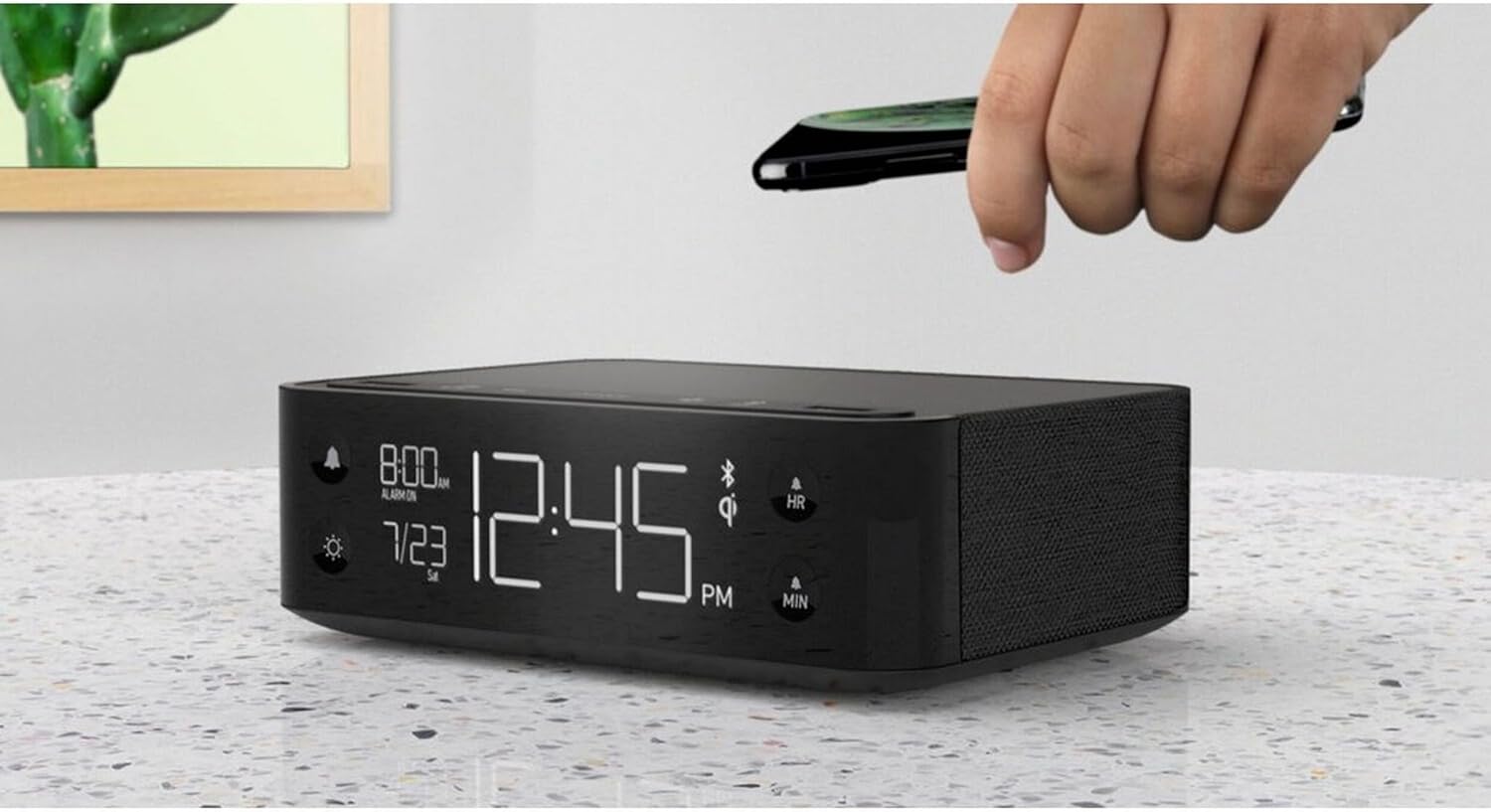
Figure 3: A smartphone being placed on the top surface of the Station A for wireless charging.
Organizować coś
1. Podłączenie zasilania
- Unpack the Nonstop NSA2-BK unit and all accessories from the packaging.
- Connect the provided power adapter to the DC input port on the back of the unit.
- Plug the power adapter into a standard electrical outlet. The display will illuminate, indicating the unit is powered on.
2. Początkowe ustawienie zegara
Upon first power-up, the clock may display a default time. Refer to the "Operating Instructions" section for detailed steps on setting the current time and date.
3. Parowanie Bluetooth
- Sprawdź, czy Bluetooth jest włączony w Twoim urządzeniu mobilnym (smartfonie, tablecie itp.).
- On the Nonstop NSA2-BK, press the Bluetooth pairing button (refer to button layout in "Operating Instructions" if available, otherwise assume a standard Bluetooth icon button). The Bluetooth indicator on the display will flash.
- On your mobile device, search for available Bluetooth devices. Select "Nonstop NSA2-BK" from the list.
- Once paired, the Bluetooth indicator on the unit will become solid, and you will hear an audible confirmation.
4. Wireless Qi Charging Setup
No specific setup is required for wireless charging beyond connecting the unit to power. Simply place your Qi-compatible device on the designated charging pad on top of the unit. Ensure the device is centered for optimal charging.
Instrukcja obsługi
Ustawianie czasu i daty
- Naciśnij i przytrzymaj USTAWIENIE CZASU button (or equivalent, often combined with HR/MIN buttons).
- Użyj HR (Godzina) i MIN Przyciski (minuty) do regulacji czasu.
- Naciśnij USTAWIENIE CZASU button again to confirm and move to date setting (if applicable).
- Użyj HR I MIN buttons to adjust the month and day.
- Naciskać USTAWIENIE CZASU wyjść.
Ustawianie i używanie alarmu
- Naciśnij i przytrzymaj ZESTAW ALARMU button (bell icon). The alarm time will flash.
- Użyj HR I MIN przyciski umożliwiające ustawienie żądanej godziny alarmu.
- Naciskać ZESTAW ALARMU jeszcze raz, aby potwierdzić.
- Aby aktywować/dezaktywować alarm, naciśnij przycisk WŁĄCZANIE / WYŁĄCZANIE ALARMU button (bell icon). An alarm indicator will appear/disappear on the display.
- Gdy zabrzmi alarm, naciśnij DRZEMKA button (if available, or any button except alarm off) for a temporary pause. Press the WŁĄCZANIE / WYŁĄCZANIE ALARMU button to turn off the alarm completely.
Using Bluetooth Speaker
- Ensure the unit is paired with your device (see "Bluetooth Pairing" in Setup).
- Play audio from your paired device. Sound will be output through the NSA2-BK speaker.
- Adjust volume using the volume controls on your paired device or on the NSA2-BK unit (if available).
Playing Relaxation Sounds
- Naciśnij DŹWIĘK button (or similar, possibly a wave/rain icon).
- Press repeatedly to cycle through available soundscapes (Ocean Waves, Rain, Ambient Sounds).
- Naciśnij i przytrzymaj DŹWIĘK button to turn off the soundscape.
Using Charging Functions
- Wireless Qi Charging: Place your Qi-compatible smartphone centrally on the top charging pad. A charging indicator on the display will illuminate.
- Ładowanie przez USB: Connect your device's USB charging cable to one of the two USB ports on the back or side of the unit. Charging will begin automatically.
Regulacja jasności wyświetlacza
- Naciśnij OPORNIK button (sun icon).
- Press repeatedly to cycle through different brightness levels for the display.
Konserwacja
- Czyszczenie: Przed czyszczeniem odłącz zasilanie. Do przecierania zewnętrznej części urządzenia użyj miękkiej, suchej ściereczki. Nie używaj płynnych środków czyszczących ani materiałów ściernych.
- Składowanie: Jeśli urządzenie będzie przechowywane przez dłuższy czas, należy odłączyć je od zasilania i przechowywać w chłodnym, suchym miejscu.
- Unikaj płynów: Trzymaj urządzenie z dala od wody i nadmiernej wilgoci.
- Wentylacja: Zapewnij odpowiednią wentylację wokół urządzenia, aby zapobiec przegrzaniu. Nie blokuj otworów wentylacyjnych.
Rozwiązywanie problemów
| Problem | Możliwa przyczyna | Rozwiązanie |
|---|---|---|
| Urządzenie nie włącza się. | Zasilacz nie jest podłączony lub gniazdko jest nieaktywne. | Sprawdź, czy zasilacz jest prawidłowo podłączony do urządzenia i czy gniazdko elektryczne jest sprawne. |
| Nie można sparować urządzenia Bluetooth. | Unit is not in pairing mode; device is too far; another device is already connected. | Ensure the NSA2-BK is in pairing mode. Move device closer. Disconnect any previously paired devices. |
| Ładowanie bezprzewodowe nie działa. | Device is not Qi-compatible; device not centered; foreign objects on pad; thick phone case. | Verify device supports Qi wireless charging. Re-position device centrally. Remove foreign objects or thick phone cases. |
| Ładowanie przez USB nie działa. | Cable is faulty; device is not compatible; unit is overloaded. | Try a different USB cable. Ensure device is compatible. Avoid charging too many high-power devices simultaneously. |
| Alarm nie włącza się. | Alarm nie jest włączony; głośność jest zbyt niska. | Ensure the alarm is set and activated (alarm indicator visible). Increase the unit's volume. |
Specyfikacje
- Marka: Nieprzerwanie
- Model: NSA2-BK
- Kolor: Black, Ocean
- Waga przedmiotu: 3 funta
- Interfejs sprzętowy: USB
- Zgodne urządzenia: iPad, Smartphones, Kindle, Wireless Headphones (via USB/Qi)
- Całkowita liczba portów USB: 2
- Cotage: 10 watts (for charging)
- Kod UPC: 840148709171
- ASIN: B0C8LDWF57
- Pierwsza dostępna: 29 lipca 2024 r.
Gwarancja i wsparcie
Specific warranty details for the Nonstop NSA2-BK are typically provided with the product packaging or on the manufacturer's official website. Please refer to these sources for comprehensive warranty information.
For technical support, troubleshooting assistance beyond this manual, or inquiries regarding parts and service, please contact Nonstop customer support through their official website or the contact information provided in your product's original documentation.
Uwaga: Zawsze zachowaj dowód zakupu na wypadek reklamacji.


