1. Wprowadzenie
Thank you for choosing the Carpuride Steering Wheel Control (SWC) accessory. This device is designed to enhance your driving experience by providing convenient control over your compatible Carpuride 701Pro/901Pro system directly from your steering wheel. Please read this manual carefully before use to ensure proper installation and operation.
2. Koniec produktuview
The Carpuride SWC is a compact, infrared-controlled device that allows you to manage various functions of your Carpuride display unit without taking your hands off the steering wheel. It features essential buttons for media control and call management.

Rycina 2.1: Przód View of the SWC Unit
This image displays the main control unit with its circular button layout, including play/pause, track skip, volume, and call answer/end buttons. The Carpuride logo is visible on the side attachment.
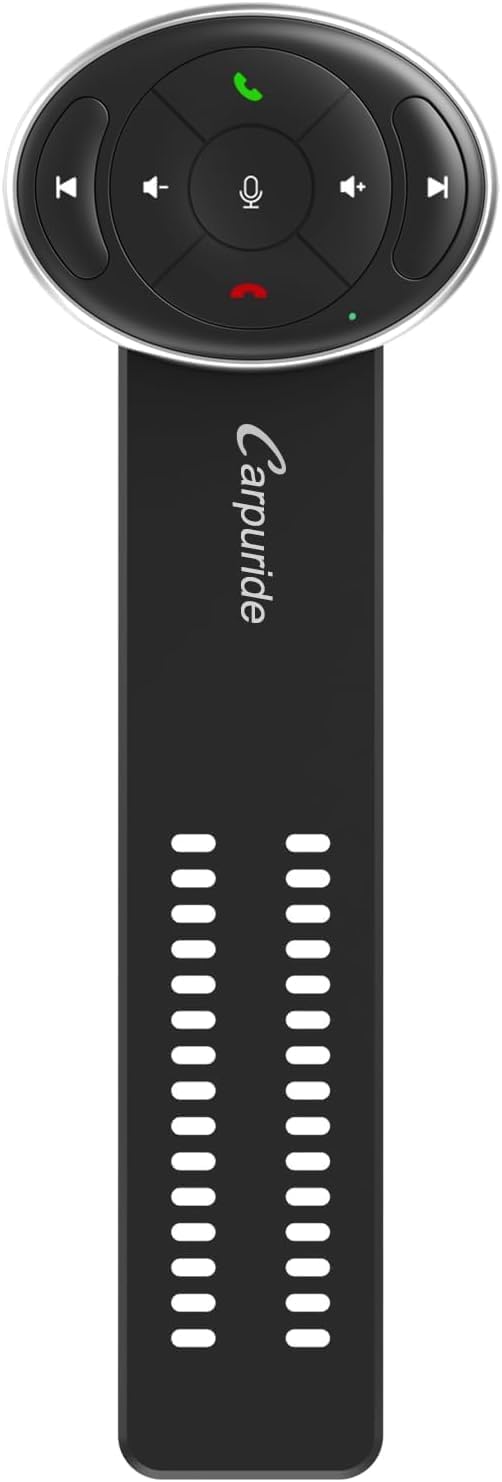
Rysunek 2.2: Strona View with Attachment Strap
This image shows the control unit attached to its flexible strap, designed for secure mounting on a steering wheel. The strap features multiple perforations for adjustable fitting.
Zawartość opakowania:
- Carpuride Steering Wheel Control Unit (Model AGF)
- Pasek mocujący
- Instrukcja obsługi (ten dokument)
3. Konfiguracja
3.1 Attaching the SWC to Your Steering Wheel
- Identify a suitable position on your steering wheel that allows for easy access to the SWC buttons without obstructing your grip or view deski rozdzielczej.
- Thread the attachment strap around the steering wheel at the chosen position.
- Securely fasten the strap through the buckle or designated slots on the SWC unit. Ensure it is tight enough to prevent movement during driving but not so tight as to damage the steering wheel or the unit.
- Verify that the SWC unit is stable and does not interfere with the safe operation of your vehicle.
3.2 Pairing with Carpuride 701Pro/901Pro
The Carpuride SWC uses infrared (IR) technology to communicate with your compatible Carpuride display unit. No complex pairing process is typically required beyond ensuring line-of-sight and proper function of the IR receiver on your main unit.
- Ensure your Carpuride 701Pro or 901Pro unit is powered on.
- Point the SWC unit towards the IR receiver on your Carpuride display. The effective range is up to 10 meters, but direct line-of-sight is crucial for optimal performance.
- Test the functionality by pressing various buttons (e.g., volume up/down, play/pause) to confirm communication.
- If the unit does not respond, refer to the Troubleshooting section.
4. Instrukcja obsługi
The Carpuride SWC provides intuitive control over your Carpuride system. The buttons are designed for quick and easy access to common functions.
| Button Icon/Description | Funkcjonować |
|---|---|
| ► / ∙∙ (Play/Pause) | Plays or pauses current media playback. |
| ◀◀ (Previous Track) | Skips to the beginning of the current track or to the previous track. |
| ►► (Next Track) | Przeskakuje do następnego utworu. |
| + (Zwiększenie głośności) | Zwiększa głośność dźwięku. |
| - (Zmniejszenie głośności) | Zmniejsza głośność dźwięku. |
| ☎ (Green Phone Icon) | Answers an incoming call or initiates a call (if supported by the main unit). |
| ✖ (Red Phone Icon) | Ends an active call or rejects an incoming call. |
| 🎤 (Microphone Icon) | Activates voice assistant or mute microphone (functionality depends on main unit). |
5. Konserwacja
To ensure the longevity and optimal performance of your Carpuride SWC, follow these simple maintenance guidelines:
- Czyszczenie: Wipe the unit with a soft, dry cloth. For stubborn dirt, slightly dampPrzetrzyj szmatkę wodą. Nie używaj silnych środków chemicznych, ściernych środków czyszczących ani rozpuszczalników.
- Bateria: The unit is not rechargeable and likely uses a replaceable coin-cell battery. If the unit stops responding, replace the battery. Refer to the battery compartment for type and replacement instructions (typically on the back or side).
- Składowanie: When not in use for extended periods, store the SWC in a cool, dry place away from direct sunlight and extreme temperatures.
- Unikaj uderzenia: Protect the unit from drops and strong impacts, which can damage internal components or the IR emitter.
6. Rozwiązywanie Problemów
If you encounter issues with your Carpuride SWC, please refer to the following common problems and solutions:
| Problem | Możliwa przyczyna / rozwiązanie |
|---|---|
| SWC does not respond to button presses. |
|
| Buttons respond intermittently. |
|
| SWC is physically loose on the steering wheel. |
|
7. Specyfikacje
| Funkcja | Szczegół |
|---|---|
| Marka | KARPURID |
| Nazwa modelu | AGF |
| Technologia łączności | Podczerwieni (IR) |
| Kompatybilne urządzenia | Carpuride 701Pro/901Pro (Television, streaming device, or other system entertainment devices) |
| Liczba przycisków | 4 (plus directional pad with central button) |
| Maksymalny zasięg | 10 metrów |
| Akumulator ładowalny | NIE |
| Producent | Karpuryd |
8. Gwarancja i wsparcie
Carpuride products are manufactured to high-quality standards. While specific warranty details are not provided in this manual, please retain your proof of purchase for any warranty claims.
Obsługa klienta:
For technical support, troubleshooting assistance beyond this manual, or warranty inquiries, please contact Carpuride customer service through their official website or the retailer where you purchased the product. Please have your product model (AGF) and purchase details ready.
Note: Information regarding spare parts availability and software updates is not available at the time of printing this manual.