1. Wprowadzenie
The COMFAST CF-726B is a versatile 2-in-1 USB adapter designed to provide both Bluetooth 4.2 and dual-band Wi-Fi connectivity to your computer. This device allows you to connect to wireless networks at speeds up to 650Mbps and pair with various Bluetooth peripherals, enhancing your system's wireless capabilities.
This manual provides essential information for the proper setup, operation, and maintenance of your CF-726B adapter.
2. Funkcje produktu
- Funkcjonalność 2 w 1: Combines Wi-Fi and Bluetooth capabilities in a single USB device.
- Dwuzakresowe Wi-Fi: Supports 2.4GHz and 5.8GHz frequencies for flexible network connections.
- High Speed Data Transfer: Achieves Wi-Fi speeds up to 650Mbps.
- Bluetooth 4.2: Enables stable and efficient connection with Bluetooth devices.
- Kompaktowa konstrukcja: Niewielki rozmiar zapewniający mobilność i dyskretne użytkowanie.
- Szeroka kompatybilność: Obsługuje systemy operacyjne Windows, macOS i Linux.
3. Konfiguracja i instalacja
Before using your COMFAST CF-726B adapter, driver installation is required. The product is supplied with documentation and an installation CD. It is recommended to use the provided CD for driver installation or download the latest drivers from the official COMFAST webstrona.
3.1 Wymagania systemowe
- Systemy operacyjne: Windows 7/8/8.1/10 (32 or 64-bit), MacOS 10.6~10.11, Linux Kernel 2.6.18~3.10.
- Notatka: The Bluetooth driver is nie compatible with Windows XP/Vista.
- Interfejs: Dostępny port USB 2.0.
3.2 Driver Installation Steps
- Insert the COMFAST CF-726B adapter into an available USB port on your computer.
- Insert the provided installation CD into your computer's CD/DVD drive.
- Follow the on-screen instructions to install the Wi-Fi and Bluetooth drivers. If an auto-run feature does not start, navigate to the CD drive in 'My Computer' or 'This PC' and run the setup executable (e.g., 'setup.exe' or 'install.exe').
- Alternatively, download the latest drivers from the official COMFAST support website. Ensure you select the correct model (CF-726B) and operating system.
- Po zainstalowaniu systemu, jeżeli zostaniesz o to poproszony, uruchom ponownie komputer.

Figure 1: COMFAST CF-726B USB adapter. This image shows the compact blue casing of the adapter with its USB connector, ready for insertion into a computer's USB port.
4. Instrukcja obsługi
4.1 Łączenie z siecią Wi-Fi
- Ensure the CF-726B adapter is securely plugged into a USB port.
- On Windows, click the Wi-Fi icon in the system tray (usually bottom-right corner). On macOS, click the Wi-Fi icon in the menu bar (top-right corner). For Linux, consult your distribution's network manager.
- Wybierz interesującą Cię sieć Wi-Fi z listy dostępnych sieci.
- Jeśli zostaniesz o to poproszony, wprowadź klucz bezpieczeństwa sieci (hasło).
- Click 'Connect'. The adapter will establish a connection to the Wi-Fi network.
4.2 Podłączanie urządzeń Bluetooth
- Ensure the CF-726B adapter is securely plugged into a USB port.
- On Windows, go to 'Settings' > 'Devices' > 'Bluetooth & other devices'. On macOS, go to 'System Preferences' > 'Bluetooth'. For Linux, use your desktop environment's Bluetooth settings.
- Włącz Bluetooth na swoim komputerze.
- Przełącz urządzenie Bluetooth (np. słuchawki, mysz, klawiaturę) w tryb parowania. Szczegółowe instrukcje znajdziesz w instrukcji obsługi urządzenia.
- On your computer, click 'Add Bluetooth or other device' (Windows) or wait for the device to appear in the Bluetooth settings (macOS/Linux).
- Wybierz swoje urządzenie z listy i postępuj zgodnie z instrukcjami wyświetlanymi na ekranie, aby dokończyć proces parowania.
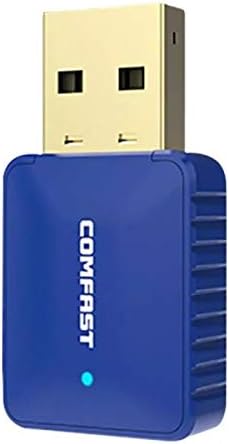
Rysunek 2: Strona view of the COMFAST CF-726B adapter. This image highlights the compact profile of the device, making it suitable for various USB ports.
5. Konserwacja
The COMFAST CF-726B adapter is designed for durability. To ensure its longevity and optimal performance, consider the following maintenance tips:
- Zachowaj czystosc: Periodically clean the USB connector with a dry, lint-free cloth to remove dust or debris.
- Unikaj uszkodzeń fizycznych: Do not bend, drop, or expose the adapter to excessive force. Avoid pulling the adapter out by its casing; always grasp the USB connector firmly.
- Chronić przed płynami: Keep the adapter away from water and other liquids.
- Składowanie: Gdy adapter nie jest używany, należy go przechowywać w chłodnym i suchym miejscu, z dala od bezpośredniego światła słonecznego i ekstremalnych temperatur.

Rysunek 3: Przód i bok view of the COMFAST CF-726B adapter. This perspective shows the overall dimensions and the blue LED indicator light.
6. Rozwiązywanie Problemów
If you encounter issues with your COMFAST CF-726B adapter, refer to the following common troubleshooting steps:
- Adapter nie został wykryty:
- Spróbuj podłączyć adapter do innego portu USB.
- Uruchom ponownie komputer.
- Ensure drivers are correctly installed. Reinstall drivers if necessary.
- Brak połączenia Wi-Fi:
- Sprawdź, czy Twoja sieć Wi-Fi jest aktywna i nadaje.
- Sprawdź, czy wpisałeś prawidłowe hasło Wi-Fi.
- Ensure the Wi-Fi function is enabled on your computer.
- Spróbuj ponownie uruchomić router/modem.
- Bluetooth nie działa:
- Sprawdź, czy Bluetooth jest włączony w ustawieniach komputera.
- Confirm your Bluetooth device is in pairing mode.
- Remember that the Bluetooth driver is nie compatible with Windows XP/Vista.
- Odłącz i ponownie sparuj urządzenie Bluetooth.
- Niska prędkość Wi-Fi:
- Ensure you are connected to the optimal frequency band (5.8GHz generally offers faster speeds if your router supports it).
- Reduce interference by moving closer to your Wi-Fi router or away from other electronic devices.
- Check for updated drivers.

Rysunek 4: Eksplodowany view of the COMFAST CF-726B adapter. This image illustrates the internal chip (RTL8821CU) responsible for its dual Wi-Fi and Bluetooth functionalities.
7. Specyfikacje
| Marka | COMFAST |
| Model | CF-726B |
| Główny składnik | RTL8821CU |
| Standardy bezprzewodowe | IEEE802.11a/b/g/n/ac |
| Wersja Bluetooth | 4.2 |
| Interfejs | USB 2.0 |
| Pasma częstotliwości | 2.4GHz / 5.8GHz (Dual Frequency) |
| Maksymalna szybkość transmisji danych | 650 Mb/s |
| Bezpieczeństwo danych | WPA-PSK/WPA2-PSK, WPA/WPA2, WEP |
| Wymiary | 36mm x 19mm x 9mm |
| Kolor | Niebieski |
| Obsługiwany system operacyjny | Windows 7/8/8.1/10 (32/64-bit), MacOS 10.6~10.11, Linux Kernel 2.6.18~3.10 |
| Kompatybilne urządzenia | Komputer stacjonarny |
8. Gwarancja i wsparcie
8.1 Informacje o gwarancji
The COMFAST CF-726B adapter comes with a 12-miesięczna gwarancja od daty zakupu. Niniejsza gwarancja obejmuje wady produkcyjne i zapewnia, że produkt działa zgodnie z opisem przy normalnym użytkowaniu. Prosimy zachować dowód zakupu na wypadek roszczeń gwarancyjnych.
8.2 Obsługa klienta
For technical assistance, driver updates, or further inquiries, please refer to the official COMFAST website or contact their customer support channels. The product is supplied with additional documentation that may contain specific support contact details.


