Wstęp
This manual provides detailed instructions for the TELE System 27-inch Full HD LED TV, model palco hevc s2. Please read this manual carefully before using the product to ensure proper operation, maximize its lifespan, and understand its features. Keep this manual for future reference.
1. Konfiguracja
1.1 Rozpakowanie
Carefully remove the TV and all accessories from the packaging. Ensure all components are present:
- TELE System 27-inch Full HD LED TV
- Zdalne sterowanie
- Kabel zasilający
- Instrukcja obsługi (ten dokument)
- Elementy stojaka pod telewizor (jeśli dotyczy)
1.2 Montaż stojaka lub montaż na ścianie
Do montażu na stojaku:
- Aby zapobiec porysowaniu telewizora, należy go położyć ekranem do dołu na miękkiej i czystej powierzchni.
- Dopasuj elementy stojaka do otworów montażowych znajdujących się na spodzie telewizora.
- Zamocuj stojak za pomocą dołączonych śrub. Nie dokręcaj ich zbyt mocno.
Do montażu na ścianie:
This TV supports wall mounting. Refer to the specific instructions provided with your wall mount kit for proper installation. Ensure the wall mount is compatible with the TV's VESA mounting pattern and weight.
1.3 Podłączanie zasilania
Connect the power cable to the TV's power input, then plug the other end into a suitable electrical outlet. The TV will enter standby mode.
1.4 Podłączanie urządzeń zewnętrznych
Use the available ports on the TV to connect your external devices:
- HDMI: Do obrazu i dźwięku wysokiej rozdzielczości z urządzeń takich jak odtwarzacze Blu-ray, konsole do gier i dekodery.
- USB: Do podłączania urządzeń pamięci masowej USB w celu odtwarzania multimediów files.
- Antena/kabel: Connect your DVB-T2 antenna for digital terrestrial television reception.
1.5 Pierwsza konfiguracja
Po pierwszym włączeniu telewizor przeprowadzi Cię przez proces konfiguracji początkowej. Zazwyczaj obejmuje on:
- Wybór języka.
- Wybór kraju/regionu.
- Automatic channel scanning for DVB-T2 broadcasts.
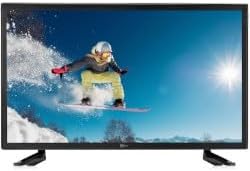
Na tym zdjęciu widać przód view of the TELE System 27-inch Full HD LED TV, model palco hevc s2, with its stand attached. The screen displays a vibrant image of a snowboarder in action, highlighting the display quality.
2. Instrukcja obsługi
2.1 Podstawowe sterowanie
Use the remote control to operate your TV. Key functions include:
- Przycisk zasilania: Włącza lub wyłącza telewizor (tryb czuwania).
- Zwiększanie/zmniejszanie głośności: Reguluje poziom dźwięku.
- Kanał w górę/w dół: Zmienia kanały telewizyjne.
- Przyciski numeryczne (0-9): Bezpośredni wybór kanału.
- Niemy: Silences the TV sound.
2.2 Wybór wejścia
Naciśnij ŹRÓDŁO or WEJŚCIE button on your remote control to cycle through available input sources (e.g., HDMI1, HDMI2, USB, DVB-T2). Select the desired input for your connected device.
2.3 Nawigacja po menu
Naciśnij MENU button to access the TV's main menu. Use the arrow buttons (Up, Down, Left, Right) to navigate through options and the OK or WCHODZIĆ button to confirm selections. The menu allows you to adjust picture settings, sound settings, channel settings, and more.
2.4 DVB-T2 Tuner Usage
After completing the channel scan during initial setup, you can access digital terrestrial channels. Use the Channel Up/Down buttons or direct number input to switch channels. The TV supports DVB-T2 for high-quality digital broadcast reception.
2.5 Odtwarzanie multimediów USB
Insert a USB storage device into the TV's USB port. The TV should automatically detect the device and prompt you to open the media browser. You can then navigate and play supported video, audio, and image files zapisane na urządzeniu USB.
3. Konserwacja
3.1 Cleaning the Screen and Casing
- Ekran: Delikatnie przetrzyj ekran miękką, niepozostawiającą włókien ściereczką. W przypadku uporczywych zabrudzeń delikatnie przetrzyjampPrzetrzyj ściereczkę wodą lub specjalnym środkiem do czyszczenia ekranów. Nigdy nie spryskuj ekranu bezpośrednio płynem.
- Casing: Do czyszczenia telewizora należy używać miękkiej, suchej ściereczki.asing. Unikaj stosowania środków czyszczących o właściwościach ściernych, wosków i rozpuszczalników, gdyż mogą one uszkodzić wykończenie.
Ważny: Przed czyszczeniem zawsze odłączaj telewizor od gniazdka elektrycznego.
3.2 Aktualizacje oprogramowania
The TV's software may receive updates to improve performance or add new features. Check the TV's menu for a 'Software Update' or 'System Update' option. Follow the on-screen instructions carefully if an update is available. (Note: Software update guarantee information is not available for this model.)
3.3 Środki ostrożności
- Nie blokuj otworów wentylacyjnych.
- Nie wystawiaj telewizora na działanie deszczu ani wilgoci.
- Unikaj umieszczania telewizora w bezpośrednim świetle słonecznym lub w pobliżu źródeł ciepła.
- Nie otwieraj telewizoraasing; wszelkie prace serwisowe należy zlecać wykwalifikowanemu personelowi.
4. Rozwiązywanie Problemów
Przed skontaktowaniem się z pomocą techniczną wypróbuj poniższe rozwiązania typowych problemów:
| Problem | Możliwe rozwiązanie |
|---|---|
| Brak zasilania | Ensure the power cable is securely plugged into both the TV and the wall outlet. Check if the outlet is working by plugging in another device. |
| Brak obrazu, ale dźwięk jest obecny | Sprawdź źródło sygnału wejściowego. Naciśnij ŹRÓDŁO button on the remote to ensure the correct input (e.g., HDMI1) is selected. |
| Brak dźwięku, ale obraz jest | Check the volume level and ensure the TV is not muted. If using external audio, ensure it is correctly connected and powered on. |
| Pilot nie działa | Wymień baterie w pilocie. Upewnij się, że między pilotem a czujnikiem podczerwieni telewizora nie ma żadnych przeszkód. |
| Poor DVB-T2 Signal/No Channels | Check your antenna connection. Try repositioning the antenna or performing a new channel scan in the TV's menu. |
| USB Media Not Playing | Ensure the USB device is formatted correctly (e.g., FAT32) and the media files are in a supported format. Try another USB device. |
5. Specyfikacje
The following are the technical specifications for the TELE System 27-inch Full HD LED TV (Model: palco hevc s2):
- Nazwa modelu: palco hevc s2
- Rozmiar ekranu: 27 cali
- Technologia wyświetlania: PROWADZONY
- Rezolucja: 1080p (Pełna rozdzielczość HD)
- Częstotliwość odświeżania: 120 herców
- Technologia tunera: DVB-T2
- Interfejs sprzętowy: HDMI
- Całkowita liczba portów USB: 1
- Proporcje obrazu: 16:9
- Tryb wyjścia audio: Stereofoniczny
- Surround Configuration: 2.0
- Typ montażu: Montaż ścienny
- Dodatek specjalny: Ekran płaski
- Rok modelowy: 2010
Specifications are subject to change without notice. For the most up-to-date information, please refer to the product packaging or manufacturer's webstrona.
6. Informacje o gwarancji
This TELE System TV comes with a manufacturer's warranty. The specific terms and duration of the warranty may vary by region and retailer. Please retain your proof of purchase for warranty claims. For detailed warranty information, refer to the warranty card included with your product or visit the official TELE System webstrona.
7. Obsługa klienta
If you encounter issues that cannot be resolved using the troubleshooting guide, or if you require further assistance, please contact TELE System customer support. Contact details can typically be found on the official TELE System webmiejscu lub na opakowaniu produktu.
Wsparcie online: Visit the official TELE System webwitryna z odpowiedziami na często zadawane pytania, artykułami pomocy i formularzami kontaktowymi.
Wsparcie telefoniczne: Check the TELE System webwitryna z regionalnymi numerami kontaktowymi.


