1. Wprowadzenie
The TRENDnet TEG-S25D is a 24-Port Gigabit Desktop Switch designed to provide high bandwidth performance, ease of use, and reliability for your network. This unmanaged switch is ideal for boosting office network efficiency and eliminating network congestion with its gigabit speeds and a total switching capacity of 48Gbps in full-duplex mode.
Główne cechy obejmują:
- 24 Gigabit RJ-45 Ports: Zapewnia szybkie połączenia przewodowe dla wielu urządzeń.
- Przepustowość przełączania 48 Gb/s: Ensures smooth data flow and reduces bottlenecks.
- Projekt bez wentylatora: Offers silent operation, suitable for quiet environments.
- Sturdy Metal Enclosure: Trwała konstrukcja zapewniająca długotrwałą niezawodność.
- Wewnętrzny zasilacz: Reduces cable clutter and simplifies installation.
- Diagnostyczne diody LED: Aids in quick network troubleshooting.

Obraz 1.1: Przód view of the TRENDnet TEG-S25D 24-Port Gigabit Desktop Switch, showcasing its 24 RJ-45 ports and LED indicators.
2. Zawartość opakowania
Sprawdź, czy w przesyłce znajdują się następujące elementy:
- TRENDnet TEG-S25D 24-Port Gigabit Desktop Switch
- Szybki przewodnik instalacji
- Zestaw do montażu w szafie
- Przewód zasilający (1.5 m / 4.9 stóp)
3. Konfiguracja
The TRENDnet TEG-S25D switch is designed for plug-and-play installation, requiring no software for setup. Follow these steps to integrate the switch into your network:
- Umieszczenie: Place the switch on a stable, flat surface or mount it in a 1U rack using the included rackmount brackets. Ensure adequate ventilation around the device.
- Podłącz zasilanie: Connect the included power cord to the AC LINE port on the rear of the switch and then to a standard electrical outlet.
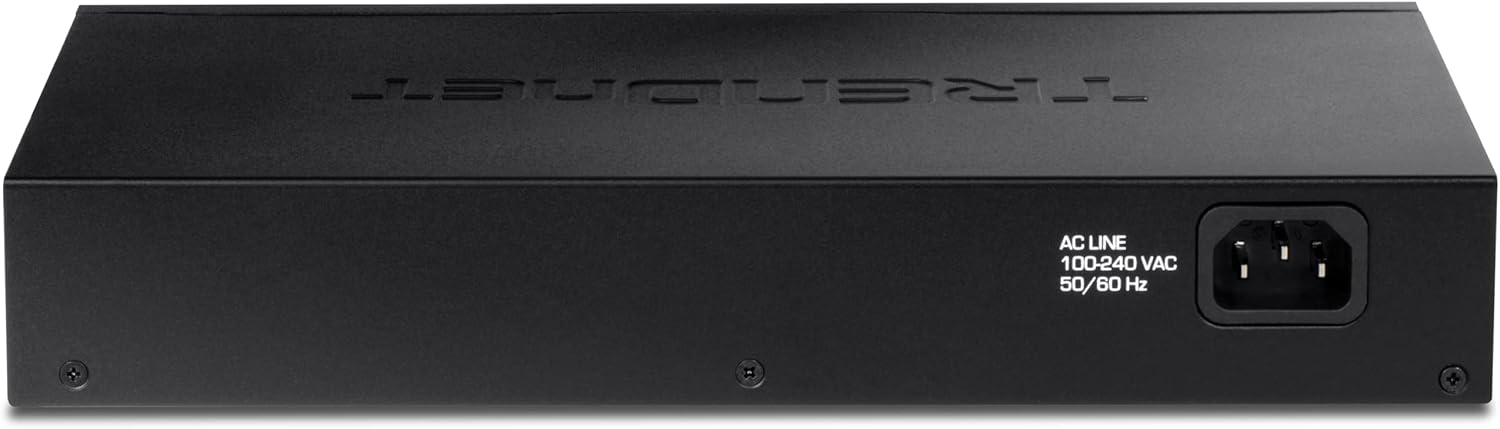
Obraz 3.1: Tył view of the TRENDnet TEG-S25D switch, highlighting the internal power supply connection point.
- Podłącz urządzenia sieciowe: Connect your network devices (computers, servers, network-attached storage, etc.) to any of the 24 Gigabit RJ-45 ports on the front panel using standard Ethernet cables. The switch automatically detects the speed and duplex mode of the connected devices.

Image 3.2: The TRENDnet TEG-S25D switch shown with rackmount brackets, illustrating its suitability for rack installations.
3.1. Energy Efficiency (GREENnet Technology)
TRENDnet's GREENnet technology is an embedded energy-saving feature that reduces power consumption without affecting performance. This technology helps lower electricity bills and contributes to environmental conservation.
4. Obsługa przełącznika
Once powered on and connected, the TRENDnet TEG-S25D switch operates automatically. It is an unmanaged switch, meaning it requires no configuration. Data transfer begins immediately upon connecting devices.
4.1. Wskaźniki LED
The front panel of the switch features LED indicators that provide real-time status information for each port and the device itself. These LEDs are crucial for monitoring network activity and troubleshooting.
- Dioda PWR (zasilanie): Wskazuje stan zasilania przełącznika.
- LINK/ACT (Link/Activity) LEDs: For each port, a solid light indicates a successful network link, and a blinking light indicates data activity.
- 10/100/1000 (Speed) LEDs: For each port, indicates the connection speed (e.g., green for Gigabit, amber for Fast Ethernet).

Rysunek 4.1: Szczegółowy view of the front panel, showing the LED indicators for power, link/activity, and speed for each of the 24 Gigabit RJ-45 ports.
5. Specyfikacje
| Funkcja | Opis |
|---|---|
| Model | TEG-S25D |
| Porty | 24 x Gigabit RJ-45 |
| Przełączanie pojemności | 48 Gb/s |
| Szybkość przekazywania | 35.71 Mpps (rozmiar pakietu 64 bajty) |
| Szybkość przesyłu danych | Ethernet: 10/20 Mbps (half/full duplex) Fast Ethernet: 100/200 Mbps (half/full duplex) Gigabit: 2000 Mbps (full duplex) |
| Materiał obudowy | Metal |
| Wymiary (dł. x szer. x wys.) | 10.51 x 6.38 x 1.65 cala |
| Waga przedmiotu | 2.93 funta |
| Zasilacz | Internal, 100-240 VAC, 50/60 Hz |
| Projekt | Fanless, Desktop/Rackmount |
6. Konserwacja
To ensure optimal performance and longevity of your TRENDnet TEG-S25D switch, consider the following maintenance tips:
- Wentylacja: Upewnij się, że przełącznik znajduje się w dobrze wentylowanym pomieszczeniu. Nie blokuj otworów wentylacyjnych po bokach urządzenia.
- Czyszczenie: Regularnie czyść zewnętrzną część przełącznika miękką, suchą ściereczką. Unikaj stosowania środków czyszczących w płynie lub aerozolu.
- Zarządzanie kablami: Keep network cables organized to prevent accidental disconnections and improve airflow.
- Ochrona zasilania: Connect the switch to a surge protector or an Uninterruptible Power Supply (UPS) to protect against power fluctuations.
7. Rozwiązywanie Problemów
If you encounter issues with your TRENDnet TEG-S25D switch, try the following basic troubleshooting steps:
- Brak zasilania: Check if the power cord is securely connected to both the switch and the electrical outlet. Verify the power outlet is functional.
- Brak światła łącza: Ensure the Ethernet cable is securely connected to both the switch port and the network device. Try a different cable or port. Verify the connected device is powered on and functioning correctly.
- Wolne połączenie: Check the speed LED for the connected port to confirm it's operating at the expected speed (e.g., 1000Mbps for Gigabit). Ensure your Ethernet cables are rated for Gigabit speeds (Cat5e or higher).
- Przeciążenie sieci: If multiple devices are experiencing slow speeds, ensure your internet service provider (ISP) connection is adequate for your usage. Consider upgrading network infrastructure if consistently experiencing high traffic.
8. Gwarancja i wsparcie
This TRENDnet TEG-S25D switch is a renewed item and comes with a 90-day TRENDnet Renewed Guarantee. This guarantee covers inspection and approval by TRENDnet for a period of 90 days from the date of purchase.
For new TRENDnet Switches, lifetime protection is typically offered. Please refer to the official TRENDnet website or contact their customer support for detailed warranty terms and conditions for renewed products.
For technical support, product registration, and additional resources, please visit the official TRENDnet website or consult the Quick Installation Guide included in your package.


