Produkt ponadview
The Wahoo ELEMNT ROAM GPS bike computer is designed for cyclists seeking advanced navigation and performance tracking. It features smart navigation capabilities, including "Back on Track" re-routing, ensuring you stay on course. The device boasts a color screen with a durable 2.7" Gorilla Glass display, enhancing visibility of routes and data. An ambient light sensor automatically adjusts screen brightness and LED lights for optimal viewing in various conditions. With a battery life of up to 17 hours, it supports extended exploration. The ELEMNT ROAM simplifies navigation and integrates powerful features to enhance your riding experience.
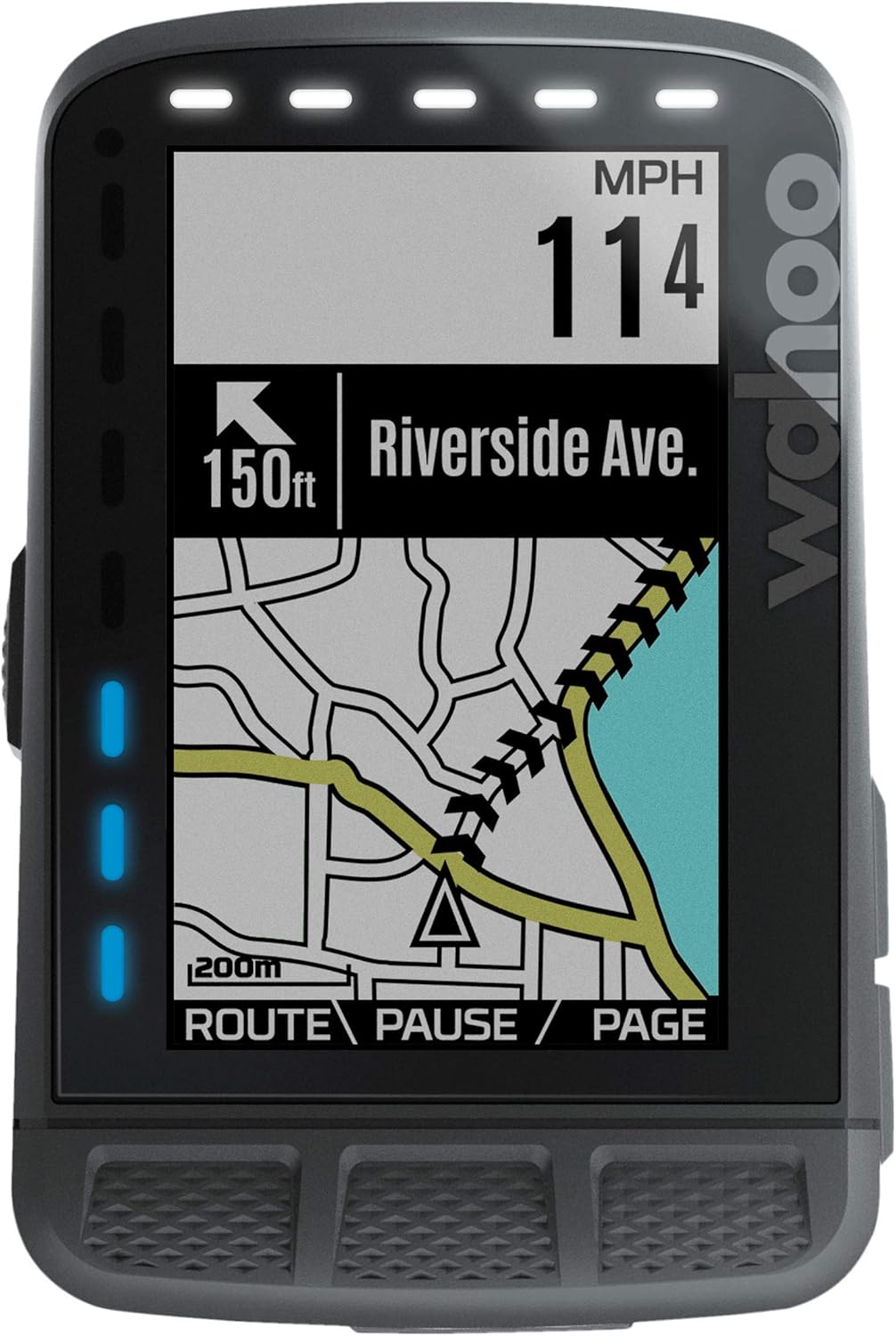
Rycina 1: Przód view of the Wahoo ELEMNT ROAM displaying turn-by-turn navigation.
Co jest w pudełku
- Wahoo ELEMNT ROAM GPS Cycling Computer
- Aero Out-Front Mount
- Mocowanie na trzpieniu
- Śruba blokująca
- Kabel ładujący
Organizować coś
Follow these steps for initial setup of your ELEMNT ROAM:
- Naładuj urządzenie: Connect the provided charging cable to the USB port on the device and a power source. Ensure the device is fully charged before first use.
- Montowanie: Choose between the Aero Out-Front mount or the Stem mount based on your preference. Securely attach the chosen mount to your bicycle handlebars or stem. The device attaches to the mount with a quarter-turn twist.
- Download the ELEMNT Companion App: Szukaj "ELEMNT Companion App" on your smartphone's app store and install it.
- Sparuj ze smartfonem: Open the ELEMNT Companion App and follow the on-screen instructions to pair your ELEMNT ROAM. This typically involves scanning a QR code displayed on the ROAM's screen.
- Dostosuj ustawienia: Use the app to customize data pages, connect external sensors (heart rate, cadence, speed, power meters), and set up Wi-Fi for automatic ride uploads and software updates.
Video 1: Official guide on the simple setup process for the ELEMNT ROAM.

Figure 2: The settings screen within the ELEMNT Companion App, showing options for backlight, location, LEDs, planned workouts, and sensor management.
Instrukcja obsługi
Nawigacja
The ELEMNT ROAM offers robust on-device turn-by-turn navigation. You can generate routes by selecting a location directly on the map page using pan and zoom, or by choosing from saved locations. Routes can also be created in the ELEMNT Companion App by entering a destination, address, or point of interest, then synced to the ROAM via Bluetooth. Top LEDs and audible cues provide real-time guidance for turns and off-course alerts.
Video 2: Official demonstration of the Smart Navigation features of the ELEMNT ROAM.

Figure 3: The cue sheet display on the ELEMNT ROAM, providing detailed turn-by-turn directions for a planned route.
Wyświetlanie i personalizacja danych
The ELEMNT ROAM allows extensive customization of its data pages. You can select which metrics are most important to you and how they are displayed. The ambient light sensor automatically adjusts the screen backlight and LED lights for optimal visibility in various lighting conditions.
Wideo 3: Oficjalny koniecview of the color display features on the ELEMNT ROAM.

Figure 4: The ELEMNT ROAM showing detailed training data, including target watts, heart rate, and interval progress with a graphical representation.
Key data features include:
- Doskonały View Brzęczenie: Use the side buttons to zoom in and out of data fields, allowing you to focus on specific metrics.
- Wskaźniki LED Quicklook: Customizable LED lights on the side and top provide at-a-glance information for speed, heart rate, power zones, and turn-by-turn navigation.
- ANT+ Radar Integration: Pair with an ANT+ Rearview radar to receive real-time alerts about approaching vehicles, displayed directly on the screen and via LED indicators.
- Alerty niestandardowe: Configure reminders for hydration, nutrition, or motivational messages based on time, distance, or calories burned.

Figure 5: The ELEMNT ROAM with green LEDs and a clear radar display, indicating no vehicles approaching from behind.

Figure 6: The ELEMNT ROAM with orange LEDs and a single vehicle icon, indicating a vehicle approaching from behind.

Figure 7: The ELEMNT ROAM with red LEDs and multiple vehicle icons, indicating several vehicles approaching from behind.
Connectivity and Training
The ELEMNT ROAM seamlessly integrates with popular training platforms like TrainerRoad, TrainingPeaks, and Today’s Plan. Saved routes are automatically downloaded, and completed rides are wirelessly uploaded to authorized third-party accounts. Smart notifications provide on-screen alerts for calls, texts, and emails when paired with your smartphone, which can be disabled with "Do Not Disturb" mode. Live Tracking allows you to share your ride progress with others.

Figure 8: The ELEMNT ROAM showing Strava Live Segments data, including time ahead/behind and personal record, with a visual progress bar.
Konserwacja
- Czyszczenie: Przetrzyj urządzenie miękką, damp szmatką. Unikaj silnych środków chemicznych i materiałów ściernych.
- Pielęgnacja baterii: The device has a 17-hour battery life. For optimal battery longevity, avoid fully discharging the battery regularly. Charge using the provided USB cable.
- Aktualizacje oprogramowania: Ensure your ELEMNT ROAM's firmware is up-to-date by connecting it to Wi-Fi via the Companion App. Updates often include performance improvements and new features.
- Składowanie: Przechowuj urządzenie w chłodnym, suchym miejscu, gdy nie jest używane.
Rozwiązywanie problemów
- Urządzenie nie włącza się: Upewnij się, że urządzenie jest w pełni naładowane. Jeśli problem nadal występuje, spróbuj użyć innego kabla ładującego lub zasilacza.
- Problemy z sygnałem GPS: Upewnij się, że znajdujesz się na otwartej przestrzeni z czystym powietrzem. view of the sky. Allow a few minutes for the device to acquire a signal.
- Sensor Connectivity Problems: Check that sensors are properly installed and have fresh batteries. Re-pair sensors through the ELEMNT Companion App.
- Problemy z synchronizacją aplikacji: Ensure Bluetooth is enabled on your smartphone and the ELEMNT Companion App is open and running in the foreground.
- Reakcja ekranu: If the screen appears sluggish, ensure the device has the latest firmware update.
Aby uzyskać dalszą pomoc, zapoznaj się z pomocą techniczną Wahoo Fitness webodwiedź witrynę lub skontaktuj się z obsługą klienta.
Specyfikacje
| Funkcja | Szczegół |
|---|---|
| Marka | Wahoo Fitness |
| Numer modelu | WFCC4 |
| Kolor | Czarny |
| Wymiary produktu | 2.2" dł. x 0.85" szer. x 3" wys. |
| Waga przedmiotu | 0.09 kilograma (3.17 uncji) |
| Rozmiar ekranu | 2.24 cali |
| Typ wyświetlacza | PROWADZONY |
| Żywotność baterii | 17 godzin |
| Typ czujnika | Czujnik GPS |
| Skład ogniw baterii | Litowo-jonowy |
| Technologia łączności | ANT, Bluetooth |
| Międzynarodowa Ocena Ochrony | IPX7 (wodoodporny) |
| Wejście interfejsu ludzkiego | Pikolak |
| Rozdzielczość skanera | 240 x 400 pikseli |
Gwarancja i wsparcie
Wahoo Fitness provides a manufacturer's warranty for the ELEMNT ROAM GPS Cycling Computer. For detailed information regarding warranty terms, registration, and support, please visit the official Wahoo Fitness webodwiedź witrynę lub skontaktuj się bezpośrednio z działem obsługi klienta.
You can find additional resources and FAQs on the Sklep Wahoo Fitness na Amazon.


