1. Wprowadzenie
Thank you for choosing the Donner DEK-610S 61-Key Electric Keyboard Piano. This comprehensive kit is designed for beginners and hobbyists, offering a rich musical experience with its versatile features and included accessories. This manual provides detailed instructions for setup, operation, maintenance, and troubleshooting to ensure you get the most out of your instrument.
2. Zawartość opakowania
Upon opening your Donner DEK-610S kit, please verify that all the following items are included:
- Donner DEK-610S Keyboard Piano (1 unit)
- Adjustable Keyboard Stand (1 unit)
- Adjustable Piano Stool (1 unit)
- Sheet Music Stand (1 unit)
- Microphone (1 unit)
- Zasilacz (1 sztuka)

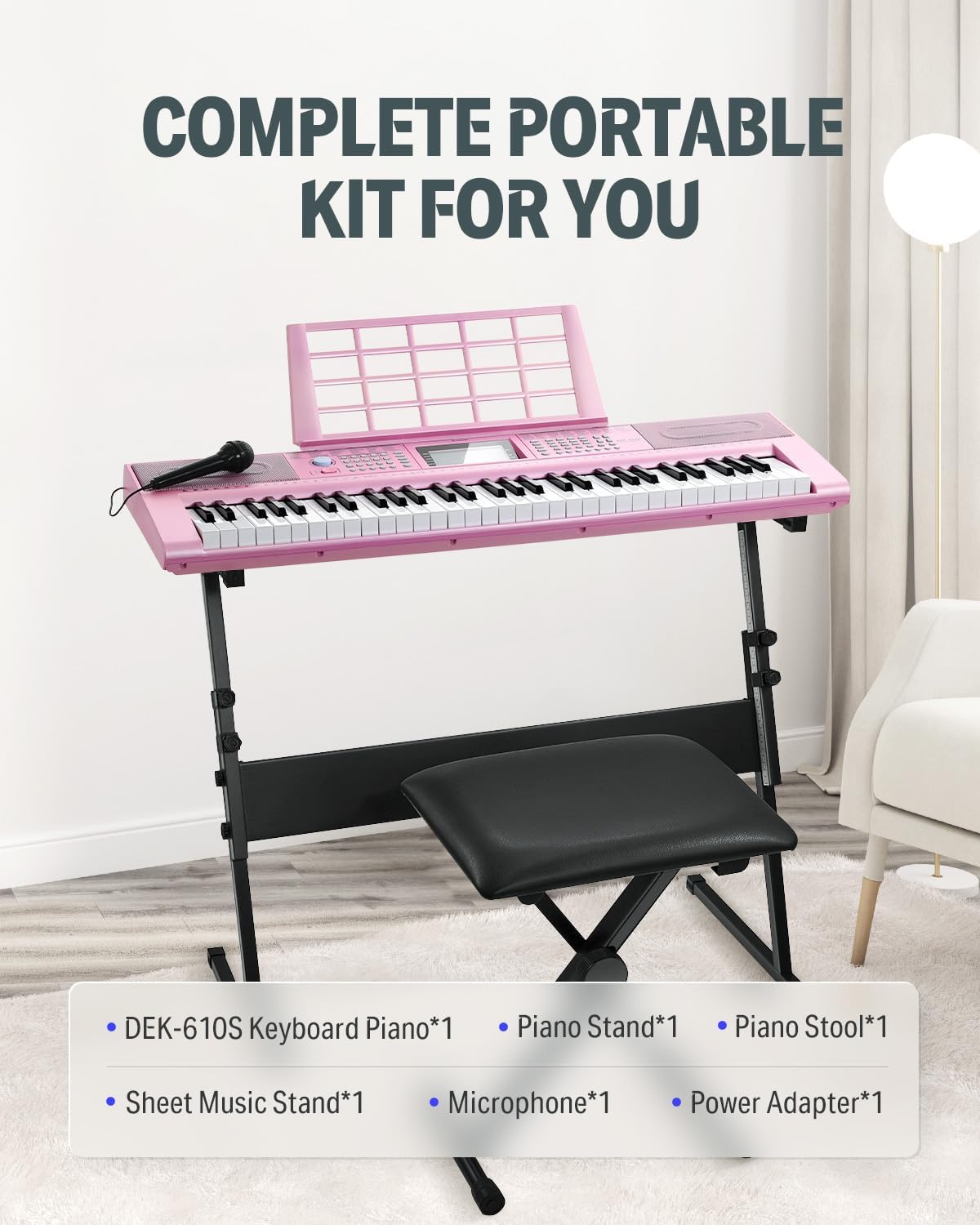
3. Instrukcje konfiguracji
- Złóż stojak pod klawiaturę: Unfold the keyboard stand and adjust its height to a comfortable playing position. Ensure all locking mechanisms are securely fastened.
- Umieść klawiaturę: Ostrożnie umieść klawiaturę DEK-610S na zmontowanym stojaku. Upewnij się, że jest stabilna i wyśrodkowana.
- Assemble the Piano Stool: Unfold the piano stool and adjust its height as needed for comfortable seating while playing.
- Attach the Sheet Music Stand: Włóż pulpit na nuty do przeznaczonego na to gniazda w górnym panelu klawiatury.
- Podłącz zasilanie: Plug the power adapter into the DC9V-12V input jack on the rear panel of the keyboard. Then, plug the adapter into a standard electrical outlet.
- Podłącz mikrofon (opcjonalnie): If using the microphone, plug its 3.5mm jack into the MIC input on the rear panel of the keyboard.
- Podłącz słuchawki (opcjonalnie): For private practice, plug headphones with a 3.5mm jack into the PHONES output on the rear panel.

4. Instrukcja obsługi
4.1 Włączanie/wyłączanie zasilania
Naciśnij MOC przycisk znajdujący się na panelu sterowania, służący do włączania i wyłączania klawiatury.
Wyświetlacz LCD 4.2
The integrated LCD display panel provides clear visual feedback on current functions, selected voices, rhythms, tempo, and other operational parameters.

4.3 Voices and Rhythms
The DEK-610S features 249 voices and 249 rhythms. Use the dedicated buttons and numeric keypad on the control panel to select your desired voice (instrument sound) or rhythm (accompaniment style).

4.4 Demo Songs and Teaching Functions
Explore the 50 built-in demo songs. The keyboard also includes 3 teaching functions to assist beginners in learning to play. Refer to the on-screen prompts and specific teaching modes for guided lessons.

4.5 Recording Feature
Use the "Record" function to capture your performances. This allows for playback and self-correction, aiding in practice and improvement. Consult the manual's specific section on recording for detailed steps.
4.6 Audio Output and Speakers
The DEK-610S is equipped with two built-in 10W speakers for clear, room-filling sound. For private practice, connect headphones to the 3.5mm PHONES jack.


5. Konserwacja i pielęgnacja
- Czyszczenie: Do czyszczenia powierzchni klawiatury użyj miękkiej, suchej ściereczki. W przypadku uporczywych zabrudzeń delikatnie przetrzyjampen the cloth with water and a mild soap solution, then wipe dry immediately. Avoid using abrasive cleaners, solvents, or waxes.
- Składowanie: When not in use, store the keyboard in a cool, dry place away from direct sunlight, extreme temperatures, and high humidity. If storing for extended periods, consider covering it with a dust cover.
- Obsługiwanie: Always handle the keyboard with care. Avoid dropping it or subjecting it to strong impacts, which can damage internal components.
- Zasilacz: Disconnect the power adapter from the wall outlet and the keyboard when not in use or during electrical storms.
6. Rozwiązywanie Problemów
| Problem | Możliwa przyczyna | Rozwiązanie |
|---|---|---|
| Brak dźwięku z głośników. | Volume is too low or muted. Headphones are plugged in. | Increase the master volume. Unplug headphones if connected. |
| Klawiatura się nie włącza. | Power adapter not connected or faulty. Power outlet not working. | Ensure power adapter is securely connected to both keyboard and outlet. Try a different outlet. |
| Klawisze nie reagują. | Keyboard may be in a specific mode (e.g., demo mode) that disables key input. | Restart the keyboard. Check the selected mode on the LCD display and switch to a standard playing mode. |
| Mikrofon nie działa. | Mikrofon nie jest prawidłowo podłączony. Głośność mikrofonu jest zbyt niska. | Ensure microphone is fully plugged into the MIC input. Adjust microphone volume settings on the keyboard. |
7. Specyfikacje
| Funkcja | Szczegół |
|---|---|
| Marka | Donner |
| Nazwa modelu | DEK-610S |
| Liczba kluczy | 61 |
| Głosy | 249 |
| Rytmy | 249 |
| Utwory demonstracyjne | 50 |
| Funkcje dydaktyczne | 3 |
| Polifonia | 32-notatka |
| Wyświetlacz | LCD |
| Głośniki | 2 x 10W Built-in |
| Łączność | 3.5mm Jack (Headphones, Mic, Audio Input), USB, MIDI |
| Źródło zasilania | Corded Electric (DC9V-12V) |
| Waga przedmiotu | 23.9 funta |
| Wymiary opakowania | 39 x 14.6 x 12 cala |
| Kolor | Pink Kit |
| Poziom umiejętności | Początkujący |
| Funkcja specjalna | Przenośny |
8. Gwarancja i wsparcie
For warranty information, product support, or technical assistance, please contact Donner customer service. Details regarding warranty coverage and support channels can typically be found on the official Donner webna stronie lub w dokumentacji zakupu.
Visit the official Donner Store for more information: Sklep Donner na Amazonie


