1. Wprowadzenie
Welcome to the user manual for your new DEERC DE28S RC Helicopter. This remote-controlled helicopter is designed for both indoor and outdoor use, featuring a durable, anti-collision design with a stable aluminum frame and flexible ABS blades. It incorporates advanced features such as 3.5-channel control, 2.4 GHz interference-free connection, automatic altitude hold, and LED lights for enhanced visibility. This manual provides essential information for safe operation, setup, maintenance, and troubleshooting to ensure you get the most out of your DE28S helicopter.
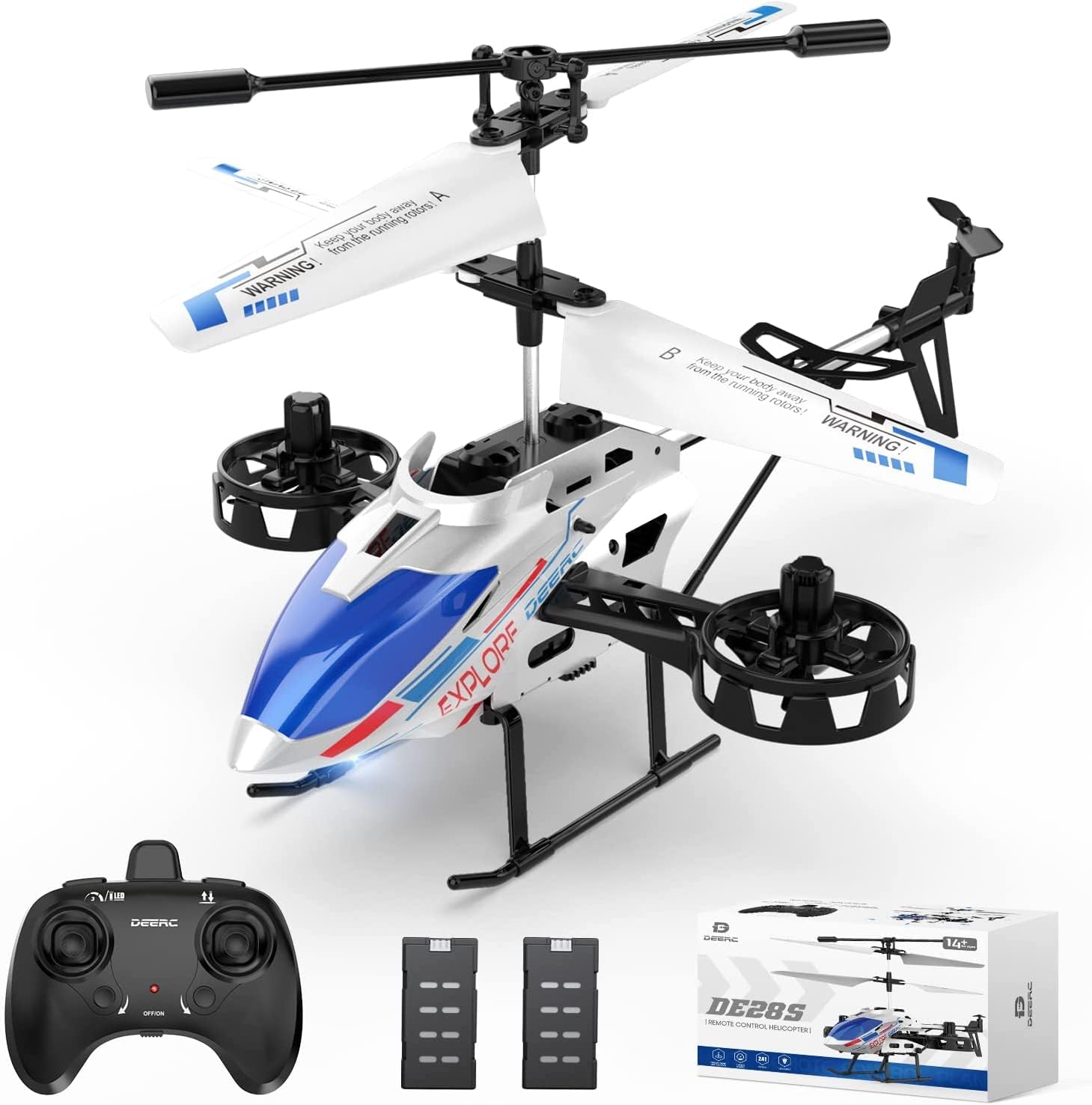
Figure 1: DEERC DE28S RC Helicopter, remote control, and two modular batteries.
2. Zawartość opakowania
Before first use, please verify that all items are present in the package.
- DEERC DE28S RC Helicopter
- Pilot zdalnego sterowania 2.4 GHz
- Modular Lithium-ion Batteries (Quantity: 2)
- Kabel ładujący USB
- Spare Blades (if included)
- Screwdriver (if included)
- Instrukcja obsługi (ten dokument)

Figure 2: All components included in the DEERC DE28S package.
3. Konfiguracja
3.1 Ładowanie akumulatora helikoptera
- Upewnij się, że helikopter jest wyłączony.
- Wyjmij modułowy akumulator z helikoptera.
- Podłącz kabel ładujący USB do akumulatora.
- Plug the USB cable into a standard USB power adapter (e.g., computer USB port, wall charger).
- The charging indicator light on the USB cable will show charging status (refer to cable's specific indicator behavior).
- Charging typically takes approximately 60-90 minutes for a full charge, providing up to 11-12 minutes of flight time per battery.
- Once fully charged, disconnect the battery from the USB cable.

Figure 3: The DE28S comes with two modular batteries for extended flight time.
3.2 Montaż akumulatora helikoptera
- Carefully insert the charged modular battery into the battery compartment of the helicopter.
- Ensure it clicks securely into place.
3.3 Instalowanie baterii pilota zdalnego sterowania
- Otwórz komorę baterii z tyłu pilota.
- Włóż 3 baterie AAA (nie ma ich w zestawie) zgodnie z oznaczeniami biegunowości (+/-).
- Zamknij pokrywę komory baterii.
3.4 Pairing the Helicopter and Remote Controller
- Umieść helikopter na płaskiej, równej powierzchni.
- Włącz zasilanie helikoptera. Diody LED na helikopterze zaczną migać.
- Turn on the remote controller's power switch. The indicator light on the remote will flash.
- Przesuń lewy joystick (przepustnicę) do końca w górę, a następnie pociągnij go do końca w dół.
- The helicopter and remote controller lights will become solid, indicating successful pairing.
4. Instrukcja obsługi
4.1 Pilot zdalnego sterowania ponadview
Familiarize yourself with the remote controller's layout and functions.

Figure 4: The remote controller allows selection of 3 different speed modes.
- Lewy joystick (przepustnica): Kontroluje wysokość (w górę/w dół).
- Prawy joystick (kierunkowy): Kontroluje ruch do przodu/do tyłu oraz ruch w lewo/prawo.
- Przycisk startu/lądowania jednym klawiszem: Inicjuje automatyczny start lub lądowanie.
- Przycisk trybu prędkości: Cycles through 3 speed levels (low, medium, high).
- Przyciski przycinania: Used to correct unwanted drifting (e.g., if the helicopter drifts left, press the right trim button).
4.2 Start i lądowanie
- Start jednym klawiszem: Po sparowaniu naciśnij przycisk startu/lądowania One-Key. Helikopter automatycznie wzniesie się i zawiśnie na stabilnej wysokości.
- Ręczny start: Slowly push the left joystick (throttle) upwards to make the helicopter ascend.
- Lądowanie jednym klawiszem: During flight, press the One-Key Take-off/Landing button. The helicopter will automatically descend and land gently.
- Lądowanie ręczne: Slowly pull the left joystick (throttle) downwards to make the helicopter descend. Once on the ground, hold the joystick down for a few seconds until the rotors stop.

Figure 5: The helicopter features Altitude Hold and One-Key Take-off/Landing for ease of use.
4.3 Funkcja utrzymywania wysokości
The DE28S is equipped with an automatic altitude hold function. After take-off, release the throttle joystick, and the helicopter will maintain its current altitude, making it easier to control for beginners.
4.4 Drifting Movement
Unlike many other RC helicopters, the DE28S can perform side-to-side drifting movements in addition to standard forward, backward, and rotational movements. Use the right joystick to control these directional movements.

Figure 6: The DE28S helicopter is capable of unique side-to-side drifting movements.
4.5 tryby prędkości
The helicopter offers 3 speed modes to suit different skill levels and flying environments. Press the speed mode button on the remote to switch between low, medium, and high speeds. Low speed is recommended for beginners and indoor flying, while high speed is suitable for experienced pilots and outdoor conditions.
5. Konserwacja
5.1 Czyszczenie
To maintain optimal performance, regularly clean your helicopter. Use a soft, dry cloth to wipe down the body and blades. Avoid using water or chemical cleaners, as they can damage electronic components.
5.2 Kontrola i wymiana ostrza
Periodically inspect the main and tail rotor blades for any signs of damage, cracks, or deformation. Damaged blades can affect flight stability and safety. If a blade is damaged, replace it with a genuine DEERC spare part. Refer to the package contents for included spare blades or contact DEERC support for replacements.

Figure 7: The DE28S features durable and flexible blades.
5.3 Przechowywanie
When not in use, store the helicopter and remote controller in a cool, dry place, away from direct sunlight and extreme temperatures. Remove batteries from the remote controller if storing for extended periods to prevent leakage.
6. Rozwiązywanie Problemów
If you encounter issues with your DEERC DE28S helicopter, refer to the table below for common problems and solutions.
| Problem | Możliwa przyczyna | Rozwiązanie |
|---|---|---|
| Śmigłowiec nie reaguje na pilota. | Not paired, low battery in remote or helicopter, out of range. | Re-pair the helicopter and remote. Charge helicopter battery. Replace remote batteries. Ensure helicopter is within 2.4 GHz range. |
| Śmigłowiec nie może wystartować lub lata słabo. | Low helicopter battery, damaged blades, motor issue. | Fully charge the helicopter battery. Inspect and replace damaged blades. If motor issue persists, contact support. |
| Śmigłowiec dryfuje w czasie lotu. | Needs trimming, uneven surface for take-off. | Use the trim buttons on the remote to correct drift. Always take off from a flat, level surface. |
| Oświetlenie LED nie działa. | Problem z zasilaniem, uszkodzona dioda LED. | Ensure helicopter is powered on and battery is charged. Contact support if lights remain non-functional. |
7. Specyfikacje
| Funkcja | Szczegół |
|---|---|
| Nazwa modelu | DE28S |
| Marka | DEERC |
| Wymiary (dł. x szer. x wys.) | Wymiary 20.5 x 14 x 12.5 cm |
| Waga | 350 gramów |
| Tworzywo | Akrylonitryl-butadien-styren (ABS), aluminium |
| Kanały sterujące | 3.5 kanały |
| Częstotliwość | 2.4 GHz |
| Typ akumulatora (helikopter) | Litowo-jonowy (w zestawie) |
| Typ baterii (pilot) | AAA (nie dołączone) |
| Czas lotu | Up to 12 minutes per battery (approx. 22 minutes with two batteries) |
| Cechy specjalne | Altitude Hold, One-Key Take-off/Landing, 3 Speed Modes, LED Lights, Gyroscope System, Drifting Movement |
8. Gwarancja i wsparcie
DEERC products are manufactured to high quality standards and undergo rigorous testing. Your DEERC DE28S RC Helicopter is covered by a manufacturer's warranty against defects in materials and workmanship. For specific warranty terms and conditions, please refer to the warranty card included in your product packaging or visit the official DEERC webstrona.
If you experience any issues or have questions regarding your DEERC DE28S, please do not hesitate to contact DEERC customer support. Our dedicated team is ready to assist you with troubleshooting, spare parts, or any other inquiries.
Informacje kontaktowe:
Please refer to the contact details provided on the DEERC official webAby uzyskać najbardziej aktualne informacje dotyczące pomocy technicznej, odwiedź witrynę lub opakowanie produktu.