1. Wprowadzenie
Thank you for choosing the Earmor M20T Electronic Hearing Protection Earplugs. These advanced earplugs are designed to provide superior hearing protection in noisy environments while enhancing situational awareness and communication. Featuring active noise reduction, Bluetooth connectivity, and multiple operating modes, the M20T is ideal for shooting, hunting, industrial use, and other high-decibel activities.
Przed użyciem produktu należy dokładnie przeczytać instrukcję, aby mieć pewność, że będzie on działał prawidłowo i będzie podlegał konserwacji.
2. Zawartość opakowania
- Earmor M20T Electronic Earplugs (1 pair)
- Przenośne etui ładujące (1)
- Kabel do ładowania USB (1)
- Silicone Ear Tips (S, M, L - 1 pair each)
- Foam Ear Tips (S, M, L - 1 pair each)
- Anti-loss Lanyard (1)
- Instrukcja obsługi (ten dokument)
3. Koniec produktuview

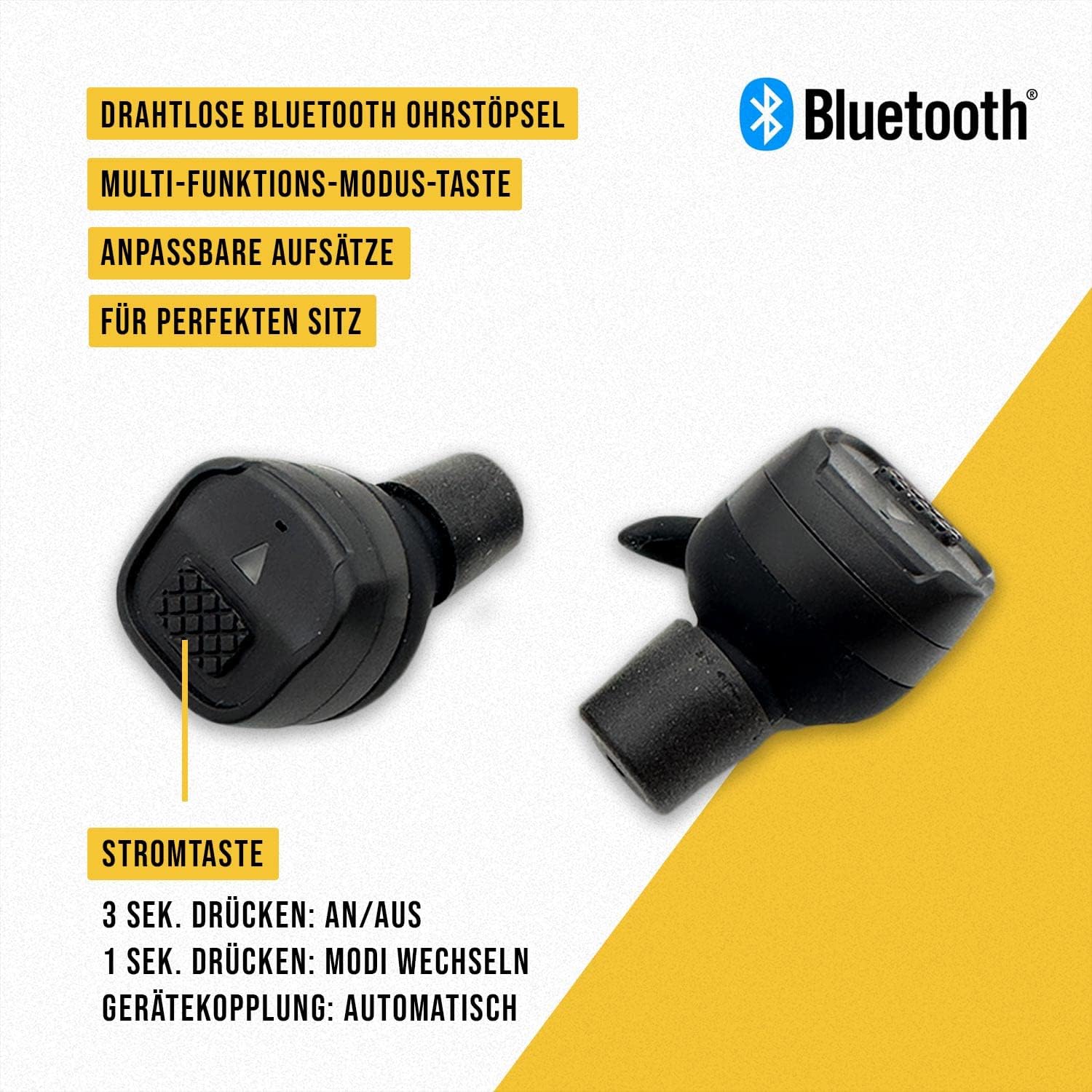

Earplug Components:
- Przycisk zasilania / trybu: Controls power and switches between noise modes.
- Wskaźnik LED: Displays power status, charging status, and mode.
- Mikrofon: Captures ambient sound for amplification and noise reduction.
- Głośnik: Dostarcza amplified sound and audio from connected devices.
- Końcówka ucha: Provides a seal in the ear canal for optimal noise reduction and comfort.
Elementy etui ładującego:
- Gniazda ładowania: Securely holds and charges the earplugs.
- Charging Case LED Indicators: Shows the charging status of the case and earplugs.
- Port ładowania USB-C: Do ładowania etui.
- Anti-loss Lanyard Attachment Point: For securing the lanyard.
4. Konfiguracja
4.1 Pierwsze ładowanie
Before first use, fully charge both the earplugs and the charging case.
- Connect the USB charging cable to the charging port on the case and to a power source (e.g., computer USB port, wall adapter).
- Place the earplugs into their respective charging slots in the case. Ensure they are correctly seated.
- The LED indicators on the case and earplugs will show charging progress. Refer to the LED indicator section for details.
- Charging is complete when all indicators show a full charge. The charging case can provide up to 3 full charges for the earplugs, and the case itself offers up to 6.5 hours of power on a full charge.
4.2 Fitting the Earplugs
Proper fit is crucial for effective noise reduction and comfort. The M20T comes with various sizes of silicone and foam ear tips.
- Select the ear tip size (S, M, L) that provides a snug and comfortable seal in your ear canal. Experiment with both silicone and foam tips to find the best fit.
- Gently insert the earplug into your ear canal, twisting slightly until it feels secure and comfortable.
- Test the seal by speaking or listening to ambient sounds. If sounds are not adequately attenuated or if the earplug feels loose, try a different size or type of ear tip.
4.3 Attaching the Anti-loss Lanyard
For added security, especially during active use, attach the anti-loss lanyard to the designated attachment points on the earplugs or charging case as desired.
5. Działanie
5.1 Włączanie/wyłączanie zasilania
- Włączanie: Press and hold the power button on each earplug for approximately 3 seconds until the LED indicator illuminates and you hear an audible prompt.
- Wyłączone: Press and hold the power button on each earplug for approximately 3 seconds until the LED indicator turns off and you hear an audible prompt. Alternatively, placing the earplugs back into the charging case will automatically power them off.

5.2 Noise Reduction and Amplifikacja
The Earmor M20T features active noise reduction with an NRR of 26 dB, effectively suppressing harmful impulse noises above 82 dB, such as gunshots. It also amplifies quiet sounds to improve situational awareness.


5.3 Switching Noise Modes
The M20T offers three distinct noise modes to adapt to different environments:
- Tryb wewnętrzny: Optimized for indoor shooting ranges or environments with reflective surfaces.
- Tryb zewnętrzny: Best for open-air environments, such as outdoor ranges or hunting.
- Tryb cichy: Provides maximum passive noise attenuation without sound amplifikacja.
To switch between modes, short press the power button on either earplug (approximately 1 second). The earplugs will provide an audible prompt indicating the current mode.

5.4 Łączność Bluetooth (BT 5.3)
The M20T earplugs feature Bluetooth 5.3 for wireless audio streaming and call management.
- Łączenie w pary: When the earplugs are powered on for the first time or are not connected to a device, they will automatically enter pairing mode. The LED indicator will flash.
- On your device (smartphone, tablet, etc.), enable Bluetooth and search for "Earmor M20T" in the list of available devices.
- Select "Earmor M20T" to connect. Once connected, the LED indicator will stop flashing, and you will hear an audible confirmation.
- Odtwarzanie muzyki: Once paired, you can stream audio from your device. Use your device's controls for volume, play/pause, and track skipping.
- Zarządzanie połączeniami: When a call comes in, the earplugs will ring. Press the power button once to answer/end a call.
6. Konserwacja
6.1 Czyszczenie
- Regularnie czyść końcówki douszne miękką szczoteczką.amp szmatką. Przed ponownym założeniem upewnij się, że są całkowicie suche.
- Wipe the earplug bodies and charging case with a dry, lint-free cloth.
- Do not use abrasive cleaners, solvents, or immerse the earplugs or case in water.
6.2 Przechowywanie
- When not in use, store the earplugs in their charging case to protect them and keep them charged.
- Przechowywać produkt w chłodnym, suchym miejscu, z dala od bezpośredniego światła słonecznego i ekstremalnych temperatur.
7. Rozwiązywanie Problemów
| Problem | Możliwa przyczyna | Rozwiązanie |
|---|---|---|
| Earplugs do not power on. | Niski poziom naładowania baterii. | Place earplugs in the charging case and ensure the case is charged. |
| Brak dźwięku lub słaba jakość dźwięku. | Improper fit; ear tips clogged; low battery; incorrect mode. | Adjust earplug fit; clean ear tips; charge earplugs; switch to appropriate mode (Indoor/Outdoor). |
| Parowanie Bluetooth nie powiodło się. | Earplugs not in pairing mode; device Bluetooth off; too far from device. | Ensure earplugs are powered on and not connected to another device; enable Bluetooth on your device; move closer to your device. |
| Etui ładujące nie ładuje. | Kabel nie jest prawidłowo podłączony; kabel/adapter jest uszkodzony. | Check USB cable connection; try a different USB cable or power adapter. |
| Earplugs not charging in case. | Earplugs not seated correctly; charging contacts dirty; case battery low. | Ensure earplugs are properly seated; clean charging contacts on earplugs and case; charge the case. |
8. Specyfikacje
- Model: M20T-01
- Ocena redukcji szumów (NRR): 26dB
- Czas reakcji: 0.5 milisekund
- Wersja Bluetooth: 5.3
- Earplug Battery Life: (Specific duration not provided, but case offers 3 charges)
- Żywotność baterii etui ładującego: Up to 6.5 hours (additional power for earplugs)
- Port ładowania: USB-C
- Tryby pracy: Indoor, Outdoor, Silent
9. Gwarancja i wsparcie
The Earmor M20T Electronic Hearing Protection Earplugs come with an 18-miesięczna gwarancja od daty zakupu. Niniejsza gwarancja obejmuje wady produkcyjne i wykonawcze przy normalnym użytkowaniu.
The warranty does not cover damage caused by misuse, accident, unauthorized modification, or improper maintenance. Please retain your proof of purchase for warranty claims.
For technical support, warranty claims, or any questions regarding your Earmor M20T earplugs, please contact Earmor customer service through the retailer where you purchased the product or visit the official Earmor webwitryna do informacji kontaktowych.


