1. Wprowadzenie
Dziękujemy za zakupasing the PONER SAUND H69 Projector. This device is designed to provide a high-quality visual experience with its 1080P Full HD resolution and 500 ANSI lumens brightness. Equipped with advanced features like WiFi, Bluetooth 5.2, electric focus, auto keystone correction, and a versatile 360° adjustable stand, this projector offers flexibility and ease of use for various entertainment and presentation needs. Please read this manual carefully before operating the projector to ensure proper use and optimal performance.
2. Informacje dotyczące bezpieczeństwa
- Nie patrz bezpośrednio w obiektyw projektora, gdyamp jest włączony.
- Zapewnij odpowiednią wentylację wokół projektora, aby zapobiec przegrzaniu. Nie blokuj otworów wentylacyjnych.
- Używaj wyłącznie zasilacza dołączonego do projektora.
- Nie wystawiaj projektora na działanie deszczu, wilgoci ani ekstremalnych temperatur.
- Unikaj umieszczania projektora na niestabilnych powierzchniach.
- Nie próbuj samodzielnie demontować ani naprawiać projektora. Skontaktuj się z wykwalifikowanym personelem serwisowym w celu uzyskania pomocy.
- Trzymaj projektor z dala od wody i innych płynów.
3. Zawartość opakowania
Sprawdź, czy wszystkie przedmioty są obecne i w dobrym stanie:
- PONER SAUND H69 Projector
- Zasilacz
- Pilot zdalnego sterowania (baterie nie są dołączone)
- Kabel AV
- Instrukcja obsługi
4. Koniec produktuview
Familiarize yourself with the components and ports of your PONER SAUND H69 Projector.
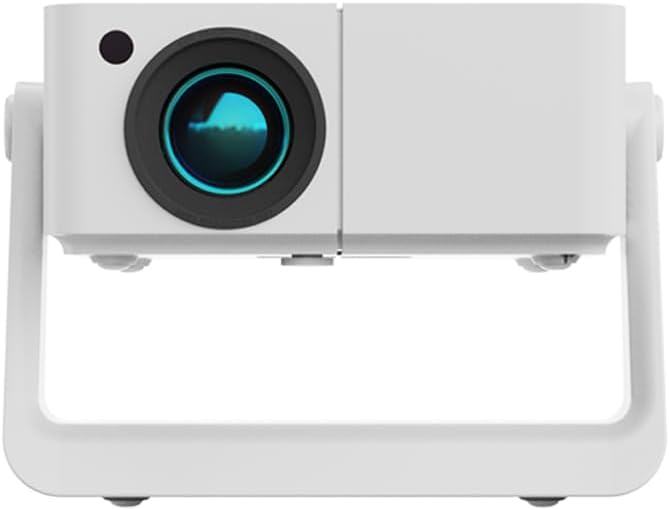
Rycina 4.1: Przód view of the PONER SAUND H69 Projector, showing the lens and sensor.

Rysunek 4.2: Tył i bok view of the projector, highlighting the Headset jack, USB port, IR receiver, HDMI port, Power input, and Power button with F+/- controls.
Porty i elementy sterujące:
- Obiektyw: Wyświetla obraz.
- Odbiornik IR: Do sygnałów zdalnego sterowania.
- Gniazdo słuchawkowe: Wyjście audio 3.5 mm do podłączenia słuchawek lub głośników zewnętrznych.
- Port USB: Do podłączania urządzeń pamięci masowej USB.
- Port HDMI: For connecting HDMI-enabled devices like laptops, gaming consoles, or TV sticks.
- Pobór mocy: Łączy się z zasilaczem.
- Przycisk zasilania: Włącza/wyłącza projektor.
- F+/- Buttons: Adjust focus manually if needed.
5. Konfiguracja
5.1 Pierwsze włączenie zasilania
- Connect the power adapter to the projector's power input port and then to a power outlet.
- Naciśnij przycisk zasilania na projektorze lub pilocie, aby włączyć urządzenie.
- The projector will display the startup screen.
5.2 Umiejscowienie i regulacja
The H69 projector features a built-in 360° adjustable stand, auto keystone correction, and electric focus for flexible setup.

Figure 5.1: The projector's built-in stand allows for 360° rotation, enabling projection onto ceilings, walls, or floors.
- Pozycjonowanie: Place the projector on a stable surface. Utilize the 360° stand to adjust the projection angle as needed, allowing for projection on walls, ceilings, or floors.
- Automatyczna korekcja trapezu: Projektor automatycznie koryguje zniekształcenia trapezowe, zapewniając prostokątny obraz nawet przy wyświetlaniu pod kątem.
- Skupienie elektryczne: The projector features electric focus for precise image clarity. This can be adjusted via the remote control or the F+/- buttons on the projector.

Figure 5.2: Visual representation of auto keystone correction and electric focus adjusting the projected image.
5.3 Łączność
The H69 projector offers multiple connectivity options:
- Wi-Fi: Connect to your wireless network for online streaming and screen mirroring. Navigate to the 'Settings' menu on the projector's interface to configure WiFi.
- Bluetooth 5.2: Pair with external Bluetooth speakers or headphones for enhanced audio. Access Bluetooth settings from the projector's main menu.
- HDMI: Connect laptops, gaming consoles (e.g., PlayStation), TV boxes, or other HDMI-enabled devices using an HDMI cable.
- USB: Włóż dysk flash USB, aby odtworzyć multimedia files bezpośrednio.
- AV: Use the included AV cable to connect older devices.
6. Instrukcja obsługi
6.1 Podstawowa obsługa
- Włączanie/wyłączanie: Press the Power button on the projector or remote.
- Nawigacja: Use the arrow keys and OK button on the remote control to navigate the projector's Android interface.
- Wybór źródła wejściowego: Select the desired input source (HDMI, USB, WiFi, etc.) from the main menu.
6.2 Podłączanie urządzeń zewnętrznych
The projector supports various external devices for versatile entertainment.

Figure 6.1: The projector's Android system provides access to various streaming applications for endless entertainment.
- Smartfony/tablety: Connect via WiFi for screen mirroring (e.g., AirPlay for iOS, Miracast for Android). Ensure both devices are on the same WiFi network.
- Laptopy/komputery stacjonarne: Connect via HDMI for a direct display output.
- Konsole do gier: Connect via HDMI for an immersive gaming experience.
- Napędy USB: Insert a USB drive into the USB port. The projector's media player will allow you to browse and play supported video, audio, and image files.
6.3 Image and Audio Adjustment
- Centrum: The projector features electric focus. Use the remote control or the F+/- buttons on the projector to achieve a sharp image.
- Korekcja Keystone'a: The projector has automatic keystone correction. If manual adjustment is needed, it can typically be found in the 'Settings' menu.
- Brzęczenie: Adjust the image size (50%-100% zoom) through the projector's settings without moving the unit.
- Tom: Adjust audio volume using the remote control.
7. Konserwacja
7.1 Czyszczenie
- Obiektyw: Używaj miękkiej, niepozostawiającej włókien ściereczki przeznaczonej specjalnie do soczewek optycznych. Nie używaj szorstkich środków czyszczących ani ściereczek.
- Korpus projektora: Wipe the surface with a soft, dry cloth. For stubborn marks, slightly dampi szmatkę z wodą.
- Otwory wentylacyjne: Periodically clean the ventilation openings with a soft brush or compressed air to ensure proper airflow and prevent overheating.
7.2 Przechowywanie
When not in use for extended periods, store the projector in a cool, dry place, away from direct sunlight and excessive dust. It is recommended to use the original packaging or a protective case.
8. Rozwiązywanie Problemów
Jeśli masz problemy z projektorem, zapoznaj się z poniższymi typowymi problemami i ich rozwiązaniami:
| Problem | Możliwa przyczyna | Rozwiązanie |
|---|---|---|
| Obraz nie jest wyświetlany | Brak zasilania; Nieprawidłowe źródło sygnału; Założona osłona obiektywu. | Ensure power is connected and unit is on; Select correct input source (HDMI, USB, etc.); Remove lens cap. |
| Obraz jest rozmazany | Out of focus; Projector too far/close to screen. | Use electric focus (remote or F+/- buttons) to adjust; Ensure projector is within optimal projection distance. |
| Obraz jest zniekształcony (kształt trapezu) | Projektor nie jest ustawiony prostopadle do ekranu. | Auto keystone correction should adjust automatically. If not, check settings for manual keystone adjustment. |
| Brak dźwięku | Volume too low; Incorrect audio output; External device audio issue. | Increase volume; Check audio output settings on projector; Ensure external device audio is working. |
| Nie można połączyć się z siecią Wi-Fi/Bluetooth | Incorrect password; Out of range; Interference. | Verify WiFi password; Move projector closer to router; Reduce interference from other devices. For iPhone connectivity issues, ensure both devices support the same mirroring protocol and are on the same network. |
| Pilot nie działa | Batteries dead/incorrectly inserted; IR receiver blocked. | Replace batteries; Ensure correct polarity; Clear any obstructions between remote and projector's IR receiver. |
Jeśli po wypróbowaniu tych rozwiązań problem nadal występuje, skontaktuj się z obsługą klienta.
9. Specyfikacje
Key technical specifications for the PONER SAUND H69 Projector:
| Funkcja | Specyfikacja |
|---|---|
| Marka | PONER SAUND |
| Numer modelu | H69 |
| Rozdzielczość wyświetlacza | Natywna rozdzielczość 1920 x 1080 (Full HD) |
| Jasność | 500 ANSI Lumen |
| Technologia łączności | HDMI, USB, WiFi (5G+2.4G WiFi6), Bluetooth 5.2 |
| Cechy specjalne | 360° Stand, Auto Keystone Correction, Built-in Stand, Electric Focus |
| Zalecane zastosowania | Home Cinema, Business Presentations, Outdoor Movie |
| Kolor | Biały |
| Waga przedmiotu | 1.76 funta |
| Wymiary produktu | 6.5 x 6 x 6 cala |
10. Gwarancja i wsparcie
Your PONER SAUND H69 Projector comes with a standard manufacturer's warranty. For specific warranty terms and conditions, please refer to the warranty card included in your package or visit the official PONER SAUND webstrona.
For technical support, troubleshooting assistance, or service inquiries, please contact PONER SAUND customer support through the contact information provided on the product packaging or the official brand webStrona internetowa. Kontaktując się z pomocą techniczną, przygotuj numer modelu (H69) i dane dotyczące zakupu.
Zasoby internetowe:
- Odwiedź PONER SAUND Store on Amazon Aby uzyskać informacje o produkcie i jego aktualizacjach.


