Wstęp
Thank you for choosing the iGear Spectrum Mini Bluetooth Speaker. This portable speaker is designed to deliver a rich, immersive audio experience with dynamic lighting. Please read this manual carefully before use to ensure proper operation and to maximize your enjoyment of the product.
Co jest w pudełku
- 1 x iGear Spectrum Mini Bluetooth Speaker
- Kabel 1 x AUX
- 1 x kabel ładujący (typ C)
- 1 x Karta gwarancyjna
- 1 x Instrukcja obsługi
Cechy produktu
The iGear Spectrum Mini Bluetooth Speaker offers a range of features designed for an enhanced audio and visual experience:
- 360-Degree Immersive Sound: Experience audio from all directions with powerful 15W output.
- Dynamiczne światła LED: Features 9 light modes and 180-degree pulsating lights to complement your music.
- Wydłużony czas gry: Ciesz się nawet 12 godzinami ciągłego odtwarzania muzyki na jednym ładowaniu.
- Technologia True Wireless Stereo (TWS): Connect two Spectrum Mini speakers wirelessly for a stereo sound experience.
- Wiele opcji łączności: Supports Bluetooth, AUX input, USB input, and TF card slot.
- Szybkie ładowanie typu C: Convenient and quick charging via a Type-C port.
- Przenośna konstrukcja: Lightweight at 650 grams, making it easy to carry.

Image: The iGear Spectrum Mini Bluetooth Speaker showcasinz dynamicznymi efektami świetlnymi.

Image: An illustration highlighting the 15W stereo speaker and extra bass feature.
Organizować coś
1. Ładowanie początkowe
Before first use, fully charge the speaker. Connect the provided Type-C charging cable to the speaker's charging port and the other end to a USB power adapter (not included). The charging indicator will show the charging status. A full charge takes approximately 2 hours.
2. Włączanie/wyłączanie zasilania
Naciśnij i przytrzymaj przycisk zasilania (⏻) przez 2-3 sekundy, aby włączyć lub wyłączyć głośnik. Sygnał dźwiękowy poinformuje o stanie zasilania.
Działanie
1. Parowanie Bluetooth
- Włącz głośnik. Automatycznie przejdzie on w tryb parowania Bluetooth, co będzie sygnalizowane migającą diodą LED.
- Włącz Bluetooth w swoim urządzeniu (smartfonie, tablecie itp.).
- Szukaj "iGear Spectrum Mini" in your device's Bluetooth list and select it to connect.
- Po nawiązaniu połączenia dioda LED zaświeci się światłem ciągłym i usłyszysz dźwięk potwierdzający.
2. Podstawowe sterowanie
- Odtwórz/Pauza: Naciśnij przycisk Play / Pause (▶‖) raz.
- Zwiększenie głośności: Naciśnij przycisk zwiększania głośności (+).
- Ściszanie: Naciśnij przycisk zmniejszania głośności (-).
- Następny utwór: Naciśnij i przytrzymaj przycisk zwiększania głośności (+).
- Poprzedni utwór: Naciśnij i przytrzymaj przycisk zmniejszania głośności (-).
3. Light Mode Control
Press the Light Mode button (💡) to cycle through the 9 available light modes. Press and hold to turn the lights off or on.
4. Prawdziwe bezprzewodowe parowanie stereo (TWS)
To pair two iGear Spectrum Mini speakers for TWS stereo sound:
- Upewnij się, że oba głośniki są wyłączone i nie są połączone z żadnym urządzeniem Bluetooth.
- Włącz oba głośniki.
- On one speaker (this will be the primary speaker), double-press the Play/Pause button (▶‖). It will search for the secondary speaker.
- Once paired, you will hear a confirmation sound, and the LED indicators on both speakers will synchronize.
- Połącz urządzenie z głównym głośnikiem przez Bluetooth, jak opisano w kroku 1.
Opcje łączności
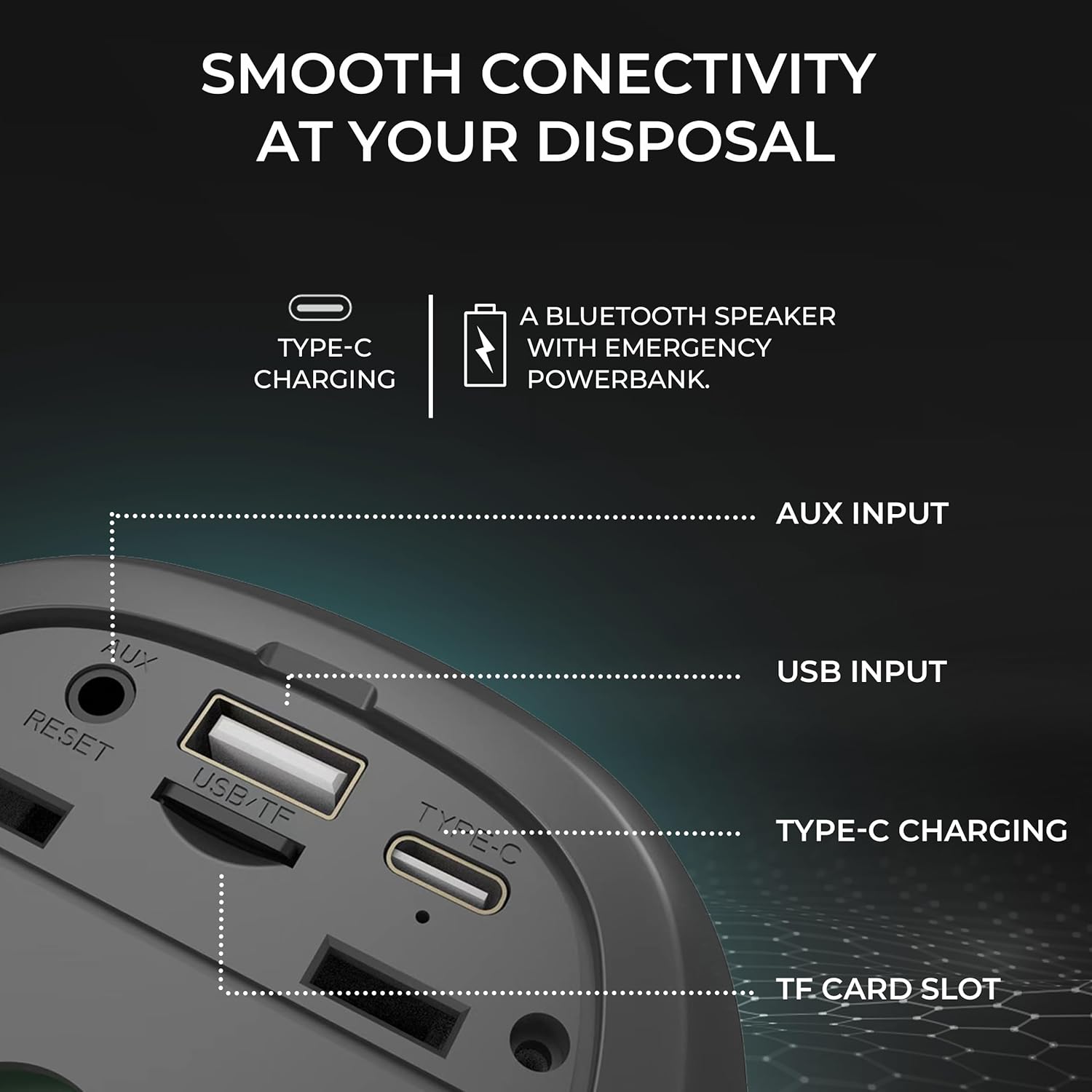
Obraz: Szczegółowy view of the speaker's input ports for various connectivity options.
- Bluetooth: Połącz się bezprzewodowo ze swoimi urządzeniami.
- Wejście AUX: Use the provided AUX cable to connect to devices without Bluetooth capabilities. Insert the 3.5mm jack into the AUX port on the speaker and your audio source.
- Wejście USB: Włóż dysk flash USB z dźwiękiem files into the USB port to play music directly.
- Gniazdo karty TF: Włóż kartę TF (MicroSD) z dźwiękiem files into the TF card slot to play music directly.
Ładowanie
The iGear Spectrum Mini speaker is powered by a built-in Lithium Ion battery. To charge the speaker:
- Connect the Type-C charging cable to the speaker's Type-C port.
- Connect the other end of the cable to a standard USB power source (e.g., wall adapter, computer USB port).
- Czas pełnego ładowania wynosi około 2 godzin.
- A fully charged speaker provides up to 12 hours of playtime, depending on volume and light usage.

Image: The speaker highlighting its 12-hour playtime capability.
Konserwacja
To ensure the longevity and optimal performance of your iGear Spectrum Mini speaker, follow these maintenance guidelines:
- Czyszczenie: Do przecierania powierzchni głośnika należy używać miękkiej, suchej ściereczki. Nie należy używać środków ściernych, alkoholu ani rozpuszczalników chemicznych.
- Składowanie: Przechowuj głośnik w chłodnym, suchym miejscu, z dala od bezpośredniego światła słonecznego i ekstremalnych temperatur.
- Narażenie na działanie wody: The product is not waterproof. Avoid exposing it to water or high humidity to prevent damage.
- Pielęgnacja baterii: Jeśli głośnik nie będzie używany przez dłuższy czas, należy go ładować co najmniej raz na trzy miesiące, aby zachować sprawność akumulatora.
Rozwiązywanie problemów
| Problem | Możliwe rozwiązanie |
|---|---|
| Głośnik się nie włącza | Upewnij się, że głośnik jest naładowany. Podłącz go do źródła zasilania za pomocą kabla typu C. |
| Brak dźwięku | Check volume levels on both the speaker and your connected device. Ensure the device is properly paired via Bluetooth or connected via AUX/USB/TF card. |
| Parowanie Bluetooth nie powiodło się | Ensure the speaker is in pairing mode (flashing LED). Turn off and on Bluetooth on your device. Move the speaker closer to your device. Disconnect from other Bluetooth devices. |
| Parowanie TWS nie powiodło się | Ensure both speakers are off and not connected to any device before initiating TWS pairing. Follow TWS pairing steps carefully. |
| Światła nie działają | Press the Light Mode button (💡) to cycle through modes or turn lights on. |
Specyfikacje
| Funkcja | Szczegół |
|---|---|
| Nazwa modelu | Spektrum Mini |
| Numer modelu przedmiotu | iG-1149 |
| Dźwięk Wattage | 15 watów |
| Technologia łączności | Bluetooth |
| Zasięg bezprzewodowej | Do 10 metrów |
| Typ baterii | Litowo-jonowy |
| Pauza w szkole | Do 12 godzin |
| Czas ładowania | Około 2 godzin |
| Port ładowania | Typ C |
| Metoda kontroli | Dotykać |
| Tworzywo | ABS + tkanina |
| Waga przedmiotu | 650 gram |
| Wymiary produktu | 10D x 10W x 12.3H centymetrów |
| Wodoodporny | NIE |
Gwarancja i wsparcie
The iGear Spectrum Mini Bluetooth Speaker comes with a 1 Year Carry-In Warranty. For warranty claims or technical support, please refer to the contact information provided on your warranty card or visit the official iGear webstrona.
Producent / Importer: iGear Tech Private Limited, Goregaon west, Mumbai 400063, Contact: 9327667193


