1. Wprowadzenie
This manual provides essential information for the safe and correct operation of your Vonyx VMM100 4-Channel DJ Mixer. Please read this manual thoroughly before using the device to ensure optimal performance and to prevent damage. Keep this manual for future reference.
2. Instrukcje bezpieczeństwa
- Upewnij się, że napięcie zasilaniatage matches the requirements specified for the device.
- Do not expose the device to rain or moisture to avoid electric shock.
- Unikaj umieszczania urządzenia w pobliżu źródeł ciepła lub w miejscu bezpośrednio nasłonecznionym.
- Nie otwierać casing; wewnątrz nie ma żadnych części, które mogłyby być naprawiane przez użytkownika. Wszelkie prace serwisowe należy zlecać wykwalifikowanemu personelowi.
- Odłączaj zasilacz od zasilania podczas burzy lub jeśli nie używasz urządzenia przez dłuższy czas.
- Trzymaj urządzenie poza zasięgiem dzieci.
3. Funkcje produktu
- Compact 4-channel analog mixer.
- Łączność Bluetooth do bezprzewodowego strumieniowania dźwięku.
- Integrated USB MP3 player with digital display.
- Adjustable delay effect with dedicated volume control.
- Effect send/return on channels 1 and 2.
- High and low tone controls for each channel.
- USB power supply (5V) for mobile use, compatible with power banks.
- Channels 1 and 2 feature +48V phantom power for condenser microphones.
- LED VU meter and peak indicators for signal monitoring.
- Includes USB power adapter and USB cable.
4. Zawartość opakowania
Sprawdź, czy po rozpakowaniu znajdują się wszystkie elementy:
- Vonyx VMM100 4-Channel DJ Mixer
- USB Power Adapter
- Kabel USB
- Instrukcja obsługi (ten dokument)
5. Sterowanie i funkcje
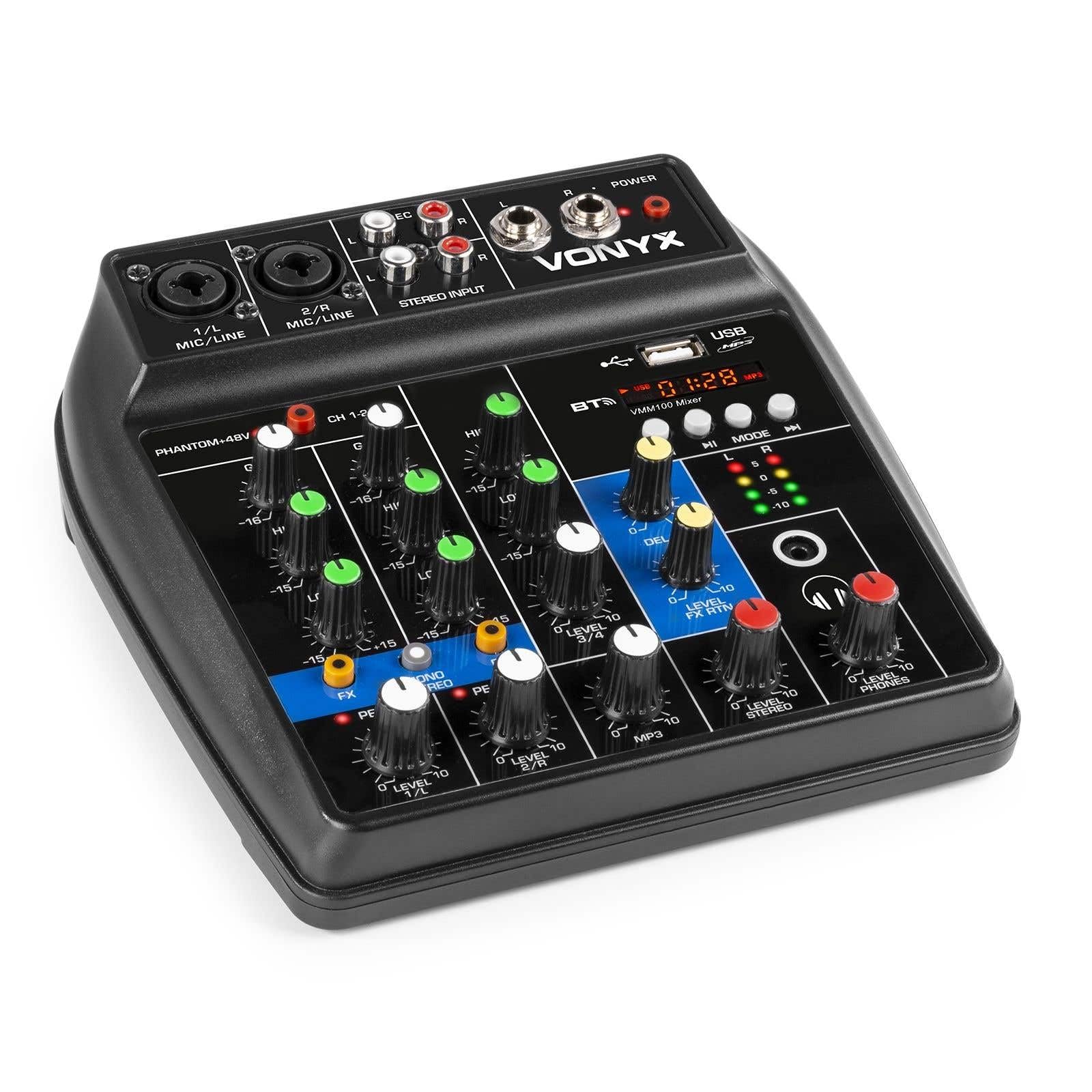
Rysunek 1: Ogólnie view of the Vonyx VMM100 mixer, highlighting the layout of all controls, inputs, and outputs.

Rysunek 2: Close-up of the mixer's control panel, showing individual channel controls, EQ, gain, and effect knobs.
5.1 Input Channels (1 & 2)
- Combi XLR / 6.3mm Jack: Connect microphones (XLR) or line-level instruments (6.3mm jack).
- Phantom +48V Switch: Aktywuje zasilanie fantomowe dla mikrofonów pojemnościowych na kanałach 1 i 2.
- Gałka GAIN: Adjusts the input sensitivity for the connected device.
- Gałka HIGH: Adjusts the high-frequency (treble) level for the channel.
- Gałka LOW: Adjusts the low-frequency (bass) level for the channel.
- Gałka efektów: Controls the amount of delay effect applied to the channel.
- Dioda szczytowa: Illuminates when the input signal is too high, indicating potential clipping. Adjust GAIN to prevent this.
- Pokrętło POZIOM: Reguluje ogólny poziom wyjściowy kanału.
5.2 Stereo Input (Channel 3)
- Wejścia RCA (L/P): Connect external stereo audio sources such as CD players or other line-level devices.
- Pokrętło POZIOM: Adjusts the output level of the stereo input.
5.3 MP3/Bluetooth Channel (Channel 4)

Rysunek 3: USB port with a USB drive, demonstrating media playback capability.

Rysunek 4: Bluetooth and USB player section, showing the display and control buttons.
- Port USB: Podłącz pamięć USB, aby odtwarzać pliki MP3.
- Wyświetlacz: Shows track information, playback time, and mode.
- Control Buttons (Play/Pause, Skip, Mode): Navigate tracks and switch between USB and Bluetooth modes.
- Bluetooth (BT) Indicator: Świeci się, gdy Bluetooth jest aktywny i sparowany.
- Pokrętło POZIOM: Adjusts the output level of the MP3/Bluetooth channel.
5.4 Sekcja główna
- DELAY Knob: Adjusts the overall intensity of the delay effect.
- LEVEL FX RTN Knob: Controls the return level of the delay effect.
- Pokrętło LEVEL STEREO: Master volume control for the main stereo output.
- LEVEL PHONES Knob: Reguluje głośność wyjścia słuchawkowego.
- VU Meter (LED): Displays the main output level.
- Main Output (6.3mm Jack L/R): Łączy się z amplifiers lub aktywne głośniki.
- Record Output (RCA L/R): Connects to recording devices.
- Wyjście słuchawkowe (gniazdo 6.3 mm): Connects stereo headphones.
- DIODA ZASILANIA: Indicates when the mixer is powered on.
5.5 Wejście zasilania

Rysunek 5: Strona view of the mixer, illustrating the 5V DC USB power input port.
- 5V DC USB Input: Connect the provided USB power adapter or a compatible USB power source (e.g., power bank) to power the mixer.
6. Konfiguracja
6.1 Połączenie zasilania
- Connect the supplied USB cable to the 5V DC USB input on the mixer.
- Connect the other end of the USB cable to the provided USB power adapter.
- Plug the USB power adapter into a suitable wall outlet. The POWER LED on the mixer will illuminate.
6.2 Podłączanie źródeł dźwięku
- Mikrofony/Instrumenty liniowe: Connect microphones via XLR or line-level instruments via 6.3mm jack to channels 1 and 2. If using condenser microphones, activate the +48V phantom power switch.
- Stereo Line Devices: Connect devices like CD players to the RCA inputs of channel 3.
- Dysk USB: Włóż dysk flash USB zawierający plik MP3 files into the USB port on channel 4.
6.3 Podłączanie wyjść
- Główne wyjście: Connect the 6.3mm jack main outputs (L/R) to your amplifier, głośniki aktywne lub system nagłośnieniowy.
- Słuchawki: Connect your headphones to the 6.3mm headphone jack.
- Urządzenie rejestrujące: Connect the RCA record outputs (L/R) to an external recording device if desired.
7. Instrukcja obsługi
7.1 Podstawowe mieszanie
- Ensure all LEVEL and GAIN knobs are set to their minimum positions before powering on.
- Power on the mixer and any connected audio equipment.
- Gradually increase the GAIN knob for each active input channel until the PEAK LED flashes only occasionally during the loudest parts of the signal.
- Adjust the HIGH and LOW EQ knobs for each channel to shape the tone as desired.
- Use the individual LEVEL knobs to balance the volume of each channel.
- Adjust the main STEREO LEVEL knob to control the overall output volume. Monitor the VU meter to avoid clipping.
- Adjust the PHONES LEVEL knob for comfortable headphone monitoring.
7.2 Obsługa Bluetooth
- Press the MODE button on the MP3/Bluetooth channel until the display shows "BT" or the Bluetooth indicator flashes.
- On your smartphone, tablet, or PC, search for Bluetooth devices and select "Vonyx VMM100".
- Once paired, the Bluetooth indicator will glow steadily. You can now stream audio wirelessly to the mixer.
- Use the playback controls on the mixer or your device to manage audio.
7.3 Odtwarzanie plików MP3 przez USB
- Włóż dysk flash USB zawierający plik MP3 files do portu USB.
- Press the MODE button on the MP3/Bluetooth channel until the display shows track information.
- Use the playback controls (Play/Pause, Skip) to navigate and play tracks.
7.4 Korzystanie z efektów
- Turn the FX knob on channels 1 and 2 to send a portion of that channel's signal to the internal delay effect.
- Adjust the main DELAY knob to control the overall intensity and characteristics of the delay.
- Use the LEVEL FX RTN knob to control how much of the processed effect signal is mixed back into the main output.
8. Nagrywanie
The VMM100 mixer allows for easy recording of your mix. Connect the RCA record outputs (L/R) to the input of a suitable recording device (e.g., computer audio interface, dedicated recorder). Ensure your recording software or device is configured to receive audio from the connected inputs. The signal sent to the record output is a stereo mix of all active channels, post-fader.
9. Konserwacja
- Czyszczenie: Do czyszczenia zewnętrznej części miksera należy używać miękkiej, suchej ściereczki. Nie należy używać środków czyszczących o właściwościach ściernych ani rozpuszczalników.
- Składowanie: Przechowywać mikser w chłodnym, suchym miejscu, z dala od bezpośredniego światła słonecznego i ekstremalnych temperatur.
- Obsługiwanie: Unikaj upuszczania miksera i narażania go na silne uderzenia.
10. Rozwiązywanie Problemów
| Problem | Możliwa przyczyna | Rozwiązanie |
|---|---|---|
| Brak zasilania | Zasilacz nie jest podłączony lub jest uszkodzony. | Check power connections. Try a different USB port or adapter. |
| Brak dźwięku | Incorrect cable connections; volume knobs too low; incorrect input selection. | Verify all audio cables are securely connected. Increase channel LEVEL and STEREO LEVEL knobs. Ensure correct input mode (e.g., USB/BT). |
| Zniekształcony dźwięk | Input GAIN too high; output level too high. | Reduce GAIN for the affected channel until the PEAK LED stops flashing excessively. Lower STEREO LEVEL. |
| Bluetooth nie łączy się | Mixer not in Bluetooth mode; device too far; previously paired device connected. | Ensure mixer is in BT mode. Move device closer. Disconnect from other Bluetooth devices. |
| Odtwarzanie USB nie działa | Dysk USB nie jest poprawnie sformatowany; nie jest obsługiwany file type; mixer not in USB mode. | Ensure USB drive is FAT32 formatted and contains MP3 files. Press MODE to select USB. |
11. Specyfikacje
- Wejścia:
- Channels 1 & 2: Combi XLR / 6.3mm Jack (Line or Microphone)
- Channel 3: RCA (Stereo)
- Channel 4: Bluetooth or USB MP3 Player
- Wyjścia:
- Main: 6.3mm Jack (Stereo)
- Record: RCA (Stereo)
- Headphone: 6.3mm Jack
- Zakres częstotliwości: 20 Hz - 20 000 Hz
- Korektor: 2-band (High, Low) per channel
- Moc fantomowa: +48V (Channels 1 & 2)
- Objętość połączeniatage: 5 V DC (przez USB)
- Wymiary (dł. x szer. x wys.): 18 x 19.5 x 5.8 cm (7.09 x 7.68 x 2.28 cala)
- Waga: 0.5 kg (1.1 funta)
- Tworzywo: Nylon
12. Gwarancja i wsparcie
Vonyx products are designed and manufactured to the highest quality standards. In the unlikely event of a problem with your product, please contact your retailer for warranty service. Please retain your proof of purchase. For technical support or further inquiries, refer to the official Vonyx webstronie lub skontaktuj się z działem obsługi klienta.


