1. Wprowadzenie
The OLIGHT Perun 2 Mini is a versatile, rechargeable headlamp designed for various activities requiring hands-free illumination. It features dual white and red LED light sources, multiple lighting modes, and a compact, durable design. This manual provides essential information for safe and effective use of your Perun 2 Mini.
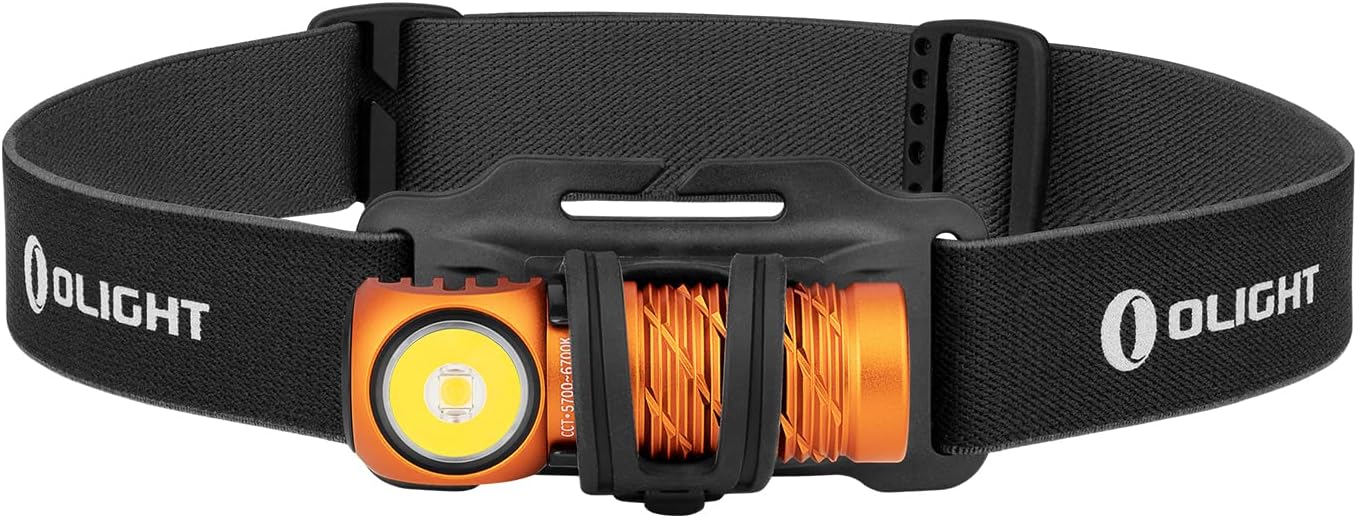
Image 1: The OLIGHT Perun 2 Mini Headlamp mounted on its adjustable headband.
2. Informacje dotyczące bezpieczeństwa
- Bezpieczeństwo oczu: Nie kieruj światła bezpośrednio w oczy. Silna wiązka światła może spowodować tymczasowe upośledzenie wzroku lub trwałe uszkodzenie oczu.
- Dzieci: Trzymać poza zasięgiem dzieci. Ten produkt nie jest zabawką.
- Ciepło: Naczelnyamp may become warm during prolonged use, especially on higher modes. Avoid direct contact with hot surfaces.
- Bateria: Use only the specified rechargeable battery. Do not attempt to disassemble or modify the battery.
- Wodoodporność: While IPX8 rated, ensure the charging port is clean and dry before charging to prevent damage.
3. Zawartość opakowania
Sprawdź, czy w przesyłce znajdują się wszystkie elementy:
- OLIGHT Perun 2 Mini Headlamp
- Akumulator (wstępnie zainstalowany)
- Headband with Silicone Mount
- MCC1A Magnetic Charging Cable
- Klips kieszonkowy
- Instrukcja obsługi

Image 2: Contents of the Perun 2 Mini package.
4. Koniec produktuview
The Perun 2 Mini features a compact body with a powerful LED, a magnetic tail cap for charging and attachment, and a side switch for operation. It can be used as a headlamp with the included headband or as a handheld flashlight.
Obraz 3: Przód view of the Perun 2 Mini, highlighting the LED and body design.
5. Konfiguracja
5.1 Pierwsze ładowanie
Przed pierwszym użyciem należy całkowicie naładować głowicę.amp. Connect the magnetic charging cable (MCC1A) to the magnetic tail cap of the headlamp and a USB power source. The indicator on the charging cable will show red during charging and turn green when fully charged.

Image 4: The Perun 2 Mini connected to its magnetic charging cable.
5.2 Mocowanie do opaski na głowę
Włóż głowicęamp into the silicone mount on the headband. Ensure it is securely seated. The headband is adjustable for a comfortable fit.
6. Instrukcja obsługi
6.1 Włączanie/wyłączanie zasilania i przełączanie trybów
- Włącz/Wyłącz: Aby włączyć lub wyłączyć światło, kliknij raz boczny przełącznik.
- Zmień jasność: When the light is on, press and hold the side switch to cycle through Low, Medium, and High modes. Release the switch at your desired brightness.
- Tryb księżyca: Gdy światło jest wyłączone, naciśnij i przytrzymaj boczny przełącznik przez około jedną sekundę, aby włączyć tryb Moonlight.
- Tryb turbo: Kliknij dwukrotnie przełącznik boczny, aby aktywować tryb Turbo. Kliknij dwukrotnie ponownie, aby powrócić do poprzedniego trybu.
- Tryb czerwonego światła: Triple click the side switch to activate Red light mode.
- Tryb SOS: From Red light mode, double click the side switch to activate SOS mode.
6.2 Regulacja kąta
Naczelnyamp can be rotated up to 180 degrees within its silicone mount, allowing you to direct the beam precisely where needed. This wide range of adjustment enhances visibility and helps avoid hazards.

Image 5: The Perun 2 Mini demonstrating its 180-degree adjustable angle.
6.3 Scenariusze użycia
The Perun 2 Mini is suitable for a wide range of activities, including camping, running, hiking, night fishing, auto repair, and as an emergency light during power outagt.j.

Obraz 6: Examples of the Perun 2 Mini in use for different activities.
7. Zarządzanie baterią
7.1 Ładowanie
The Perun 2 Mini utilizes a magnetic charging system for convenience. A full charge takes approximately 70 minutes, providing extended runtime.
7.2 Wskaźnik poziomu baterii
Naczelnyamp features a three-color battery indicator to show the remaining power at a glance:
- Zielony: Poziom naładowania baterii > 60%
- Pomarańczowy: Poziom naładowania baterii 60% ~ 10%
- Czerwony: Poziom naładowania baterii 10% ~ 5%
- Migające na czerwono: Poziom naładowania baterii < 5%

Image 7: The Perun 2 Mini's battery level indicator.
8. Konserwacja
- Czyszczenie: Clean the lens with a soft, clean cloth. For stubborn dirt, use a small amount of rubbing alcohol.
- Port ładowania: Keep the magnetic charging port clean and free of debris to ensure proper charging.
- Składowanie: Przechowuj głowicęamp in a cool, dry place. If storing for an extended period, charge the battery every few months to maintain its health.
9. Rozwiązywanie Problemów
- Światło się nie włącza: Ensure the battery is charged. Check for any physical damage.
- Światło jest słabe: Akumulator może być rozładowany. Naładuj głowicę.amp.
- Problemy z ładowaniem: Ensure the magnetic charging cable is properly connected and the charging port is clean. Try a different USB power source.
- Niespójne przełączanie trybów: Ensure the side switch is clean and free of obstructions.
10. Specyfikacje
| Funkcja | Szczegół |
|---|---|
| Marka | ŚWIATŁO |
| Model | Peru 2 mini |
| Kolor | Orange (Cool white) |
| Tworzywo | Aluminium |
| Typ źródła światła | PROWADZONY |
| Źródło zasilania | Akumulator do ponownego ładowania |
| Maksymalna jasność | 1100 lumenów |
| Maksymalna odległość wiązki | 150 metrów |
| Rozmiar produktu | Wymiary 2.06 x 2.2 x 6.43 cm |
| Waga produktu | 140 g (wraz z baterią) |
| Stopień wodoodporności | IPX8 |
| Odporność na uderzenia | 1.5 metrów |
| Cechy specjalne | SOS Mode, Angle Adjustable Strap |
11. Gwarancja i wsparcie
OLIGHT products are covered by a manufacturer's warranty. For detailed warranty information, product support, or service inquiries, please refer to the official OLIGHT webOdwiedź witrynę lub skontaktuj się z lokalnym dealerem. Zachowaj paragon zakupu na wypadek reklamacji.


