Miofive Dash Cam Dual

Instrukcja obsługi kamery samochodowej Miofive Dash Cam z przodu i z tyłu

Model: Dash Cam Dual

Wstęp

The Miofive Dash Cam Front and Rear system provides comprehensive video recording for your vehicle, featuring 4K resolution for the front camera and 2K for the rear. Designed for reliability and ease of use, this dual dash camera system incorporates advanced features such as 5G WiFi connectivity, built-in GPS, motion detection, and G-sensor technology, all powered by a durable super capacitor. This manual provides detailed instructions for setup, operation, maintenance, and troubleshooting to ensure optimal performance of your device.
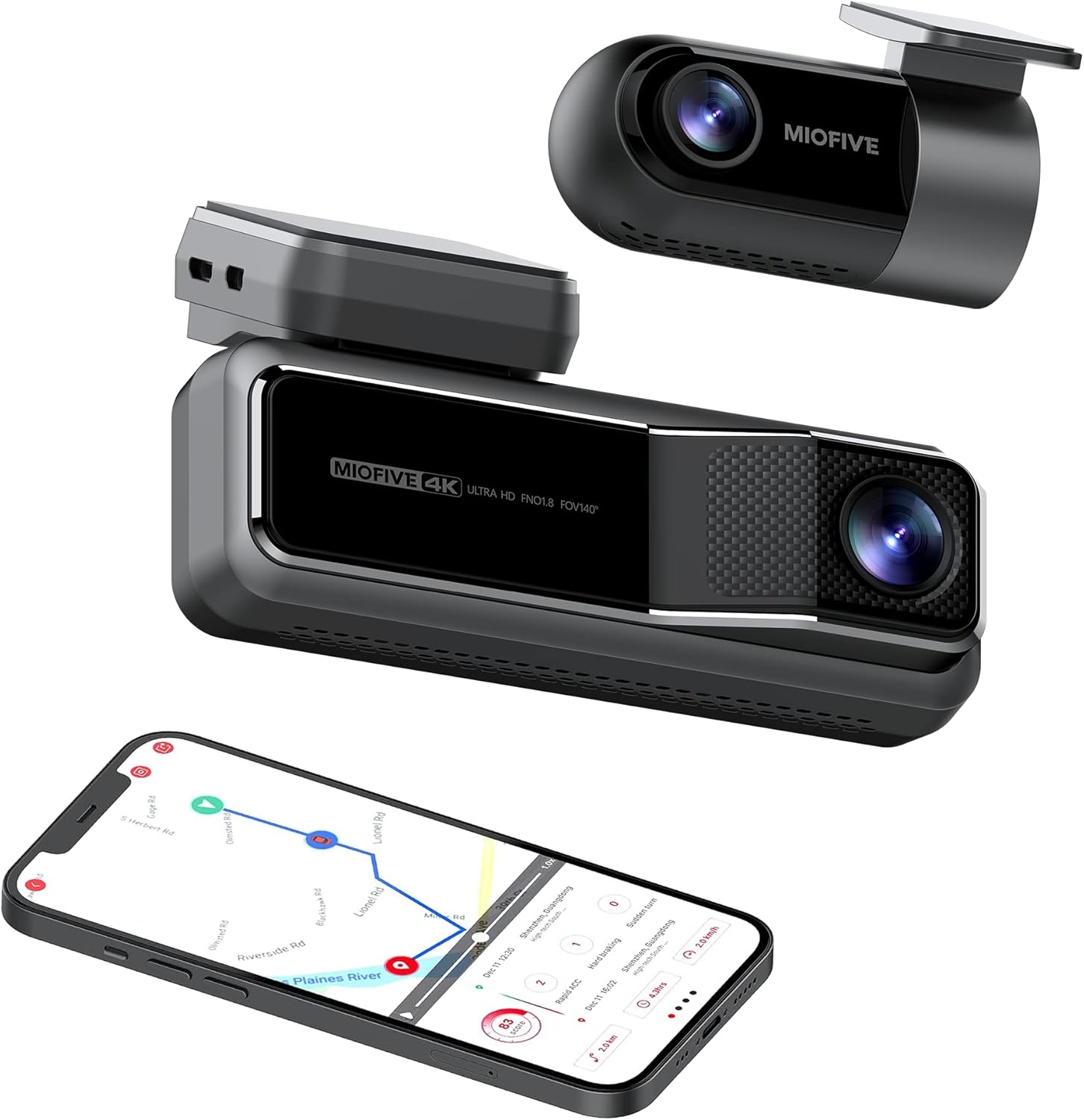
Miofive Dash Cam Front and Rear with smartphone showing map

The Miofive Dash Cam system, featuring both front and rear cameras, along with its companion mobile application.

Co jest w pudełku

Sprawdź, czy w przesyłce znajdują się wszystkie elementy wymienione poniżej:

Contents of the Miofive Dash Cam package laid out

All components included in the Miofive Dash Cam Front and Rear package.

Konfiguracja i instalacja

Montaż kamery samochodowej

  1. Wyczyść przednią szybę w miejscu, w którym zostanie zamontowana kamera samochodowa. Upewnij się, że jest wolna od kurzu i tłuszczu.
  2. Apply one of the static stickers to the cleaned area on the windshield. This helps protect your windshield and makes removal easier.
  3. Attach the main dash cam unit to the static sticker using the provided adhesive tape. Press firmly for 30 seconds to ensure a secure bond.
  4. Adjust the camera lens angle to ensure it captures the road ahead clearly, typically centered with the horizon.

Podłączanie zasilania

  1. Podłącz dołączoną ładowarkę samochodową do portu zasilania kamery samochodowej.
  2. Podłącz ładowarkę samochodową do gniazda zasilania 12 V w pojeździe (gniazdo zapalniczki).
  3. Route the power cable neatly along the edge of the windshield and dashboard using the crow bar to tuck it into crevices, ensuring it does not obstruct your view lub elementów sterujących pojazdem.
  4. For continuous parking monitoring, an optional hardwire kit (sold separately) is required to provide constant power to the dash cam. Refer to the hardwire kit's instructions for installation.

Podłączenie kamery tylnej

  1. Mount the rear camera on your rear windshield, typically at the top center, ensuring a clear view of the road behind. Use a static sticker and adhesive tape as with the front camera.
  2. Podłącz kabel kamery tylnej do kamery tylnej i poprowadź go do głównego urządzenia kamery samochodowej.
  3. Plug the rear camera cable into the designated rear camera input port on the main dash cam.
Diagram showing front and rear dash cam installation in a car

Illustration of the Miofive Dash Cam Front and Rear installation process.

Instrukcja obsługi

Włączanie/wyłączanie zasilania

The dash cam will automatically power on and begin recording when connected to your vehicle's power supply and the ignition is turned on. It will power off automatically when the vehicle's power is cut.

Podstawowe nagrywanie

Once powered on, the dash cam will automatically start loop recording. This means it continuously records video in segments, overwriting the oldest footage when the storage is full. Important footagMożna je zablokować, aby zapobiec nadpisaniu.

5G WiFi and App Control

The Miofive Dash Cam features built-in 5G WiFi for seamless connection to the Miofive mobile application. Download the Miofive app from your smartphone's app store. Once connected, you can:

Miofive App Support iconMiofive App interface on a smartphone

The Miofive App provides comprehensive control and access to your dash cam's features and recordings.

G-Sensor and Motion Detection

The built-in G-sensor automatically detects sudden impacts or collisions. When an event is detected, the dash cam will automatically lock the current video segment, preventing it from being overwritten by loop recording. This ensures critical evidence is preserved.

G-shock Sensor icon

The G-sensor ensures automatic recording and locking of footage podczas uderzeń.

Monitor parkowania

With the optional hardwire kit, the dash cam can monitor your vehicle even when parked. The 24-hour parking monitor and time-lapse recording features capture disturbances or continuous footage, providing security when you're away from your car.

Image showing a smartphone with a car icon and text 'Always On Guard' related to parking monitoring

The parking monitor feature provides continuous surveillance for your vehicle when parked.

Wizja nocna

Equipped with the Sony Starvis IMX415 sensor and High Dynamic Range (HDR) technology, the Miofive Dash Cam delivers clear and bright video quality in low-light conditions, enhancing visibility during nighttime driving or in dimly lit environments.

Comparison of Sony Starvis Night Vision versus Normal Dashcam Sensor

Enhanced night vision capabilities for clear recordings in low light.

AI Algorithm and Go Assist

The intelligent AI algorithm monitors road conditions and provides helpful alerts. The Go Assist feature can notify you of sudden turns, braking, and accelerations, and prompt you to proceed when the vehicle ahead moves, improving driving awareness.

AI Algorithm icon

AI algorithm for smart driving assistance and alerts.

Śledzenie GPS

Built-in GPS technology records your driving route, speed, and coordinates, providing detailed information for each journey. This data can be accessed and reviewed through the Miofive app.

Built-in GPS technology and AI algorithm features

Integrated GPS technology records essential driving data.

Konserwacja

Regular maintenance helps ensure the longevity and optimal performance of your Miofive Dash Cam:

Rozwiązywanie problemów

Typowe problemy i rozwiązania

Specyfikacje

FunkcjaSzczegół
MarkaMiofive
Nazwa modeluDash Cam Dual
Wymiary produktu2.87 x 5.98 x 6.94 cala
Waga przedmiotu1.81 funta
ProducentMIOFIVE Technology Limited Co., Ltd.
ProcesorNovatek Processor
Czujnik obrazuSony Starvis
Ekran2.2-calowy wyświetlacz IPS
Pole widzenia kamery140° w poziomie i pionie Viewkąty
OtwórF1.8
Image Resolution (Front)4K UHD (3840x2160) @30fps
Image Resolution (Rear)2K QHD (2560x1440) @30fps
SkładowanieWbudowana pamięć eMMC 128 GB
G-czujnikBuilt-in 6 Gyro sensor
Wi-Fi2.4 / 5 GHz
ZasilaczSuper kondensator
Moc wejściowa5V / 2.4A
Temperatura pracy-10°C do 45°C (14°F do 113°F)
Technologia łącznościWi-Fi
Typ serwisu pojazduMinivan, autobus, samochód, ciężarówka
Typ montażuMocowanie do przedniej szyby
KolorCzarny
Miofive Dash Cam Dual specifications diagram

Detailed specifications for the Miofive Dash Cam Dual.

Gwarancja i wsparcie

Miofive is committed to providing excellent customer service and support for its products:

W celu uzyskania pomocy prosimy o kontakt:

E-mail: support@miofive.com

Warranty and Service information with icons for money back, customer support, and warranty coverage

Miofive's commitment to customer satisfaction and product support.

Powiązane dokumenty - Dash Cam Dual

Przedview Instrukcja obsługi kamery samochodowej Miofive DASH CAM: Instalacja, funkcje i rozwiązywanie problemów
Kompleksowa instrukcja obsługi kamery samochodowej Miofive DASH CAM, szczegółowo opisująca kroki instalacji, korzystanie z aplikacji, funkcje urządzenia, rozwiązywanie typowych problemów, specyfikacje techniczne i ważne środki ostrożności.
Przedview Instrukcja obsługi kamery samochodowej MIOFIVE S1
Kompleksowa instrukcja obsługi kamery samochodowej MIOFIVE S1, obejmująca informacje na temat instalacji, konfiguracji, połączenia z aplikacją, funkcji, rozwiązywania problemów i specyfikacji.
Przedview MIOFIVE MINI 2 User Manual: Installation, Operation, and Specifications
Comprehensive user manual for the MIOFIVE MINI 2 dashcam, covering installation, app connection, features, specifications, safety precautions, and support.
Przedview Instrukcja obsługi kamery samochodowej MIOFIVE S1 E — przewodnik instalacji, obsługi i rozwiązywania problemów
Kompleksowa instrukcja obsługi kamery samochodowej MIOFIVE S1 E. Obejmuje ona instalację, połączenie z aplikacją, funkcje, rozwiązywanie problemów oraz specyfikacje zapewniające optymalne bezpieczeństwo jazdy i nagrywanie.
Przedview Szybki przewodnik użytkowania kamery samochodowej LAMTTO – konfiguracja i rozwiązywanie problemów
Ten przewodnik zawiera podstawowe instrukcje konfiguracji i odpowiedzi na często zadawane pytania dotyczące kamer samochodowych LAMTTO, obejmujące błędy pamięci, problemy z zasilaniem, dostęp do interfejsu konfiguracyjnego, problemy z nagrywaniem i łącznością Wi-Fi. Dowiedz się, jak uruchomić kamerę samochodową LAMTTO.
Przedview Instrukcja obsługi kamery samochodowej QOZ 4K: Instalacja, konfiguracja i rozwiązywanie problemów
Kompleksowa instrukcja obsługi kamery samochodowej QOZ 4K. Dowiedz się, jak zainstalować, podłączyć, skonfigurować ustawienia i rozwiązać typowe problemy z kamerą samochodową.