1. Wprowadzenie
The Prolink GK-5001M is an advanced multi-device wireless keyboard designed for versatility and comfort. Featuring both 2.4GHz wireless and Bluetooth 5.1 connectivity, it allows seamless switching between multiple devices. Its anti-bacterial surface provides enhanced hygiene, making it suitable for various environments. The ergonomic and compact design ensures comfortable use whether for office work, gaming, or general computing.

2. Konfiguracja
2.1 Zawartość opakowania
- Prolink GK-5001M Wireless Keyboard
- Odbiornik USB (2.4 GHz)
- AA Battery (Pre-installed or included)
- Instrukcja obsługi
2.2 Instalacja baterii
The keyboard operates on one AA battery. If not pre-installed, locate the battery compartment on the underside of the keyboard, open the cover, insert the AA battery ensuring correct polarity (+/-), and close the cover securely.
2.3 Włączanie/wyłączanie
Locate the power switch on the keyboard (usually on the top edge or underside). Slide the switch to the 'ON' position to power on the keyboard. Slide it to 'OFF' when not in use to conserve battery life.
2.4 Łączenie się z urządzeniami
The GK-5001M supports dual-mode connectivity: 2.4GHz wireless via USB receiver and Bluetooth 5.1.

2.4.1 Połączenie bezprzewodowe 2.4 GHz
- Znajdź odbiornik USB, który zazwyczaj znajduje się w schowku klawiatury.
- Podłącz odbiornik USB do wolnego portu USB w komputerze lub urządzeniu.
- Turn on the keyboard. It should automatically connect to the receiver. The indicator light will confirm connection.
2.4.2 Bluetooth 5.1 Connection (BT1 / BT2)
The keyboard can connect to two separate Bluetooth devices.
- Włącz klawiaturę.
- Naciśnij i przytrzymaj Fn + BT1 or Fn + BT2 key combination for 3-5 seconds until the corresponding Bluetooth indicator light blinks rapidly. This indicates pairing mode.
- Na swoim urządzeniu (komputerze, tablecie, smartfonie) włącz Bluetooth i wyszukaj nowe urządzenia.
- Select "Prolink GK-5001M" from the list of available devices.
- Follow any on-screen prompts to complete the pairing process. The indicator light will become solid when connected.
- Repeat for the second Bluetooth channel if connecting another device.

3. Obsługa klawiatury
3.1 Przełączanie między urządzeniami
To switch between connected devices, simply press the corresponding function key:
- Naciskać Fn + 2.4G aby przełączyć się na urządzenie podłączone poprzez odbiornik USB.
- Naciskać Fn + BT1 aby przełączyć się na pierwsze urządzenie połączone przez Bluetooth.
- Naciskać Fn + BT2 aby przełączyć się na drugie urządzenie połączone przez Bluetooth.
3.2 Klawisze multimedialne i funkcyjne
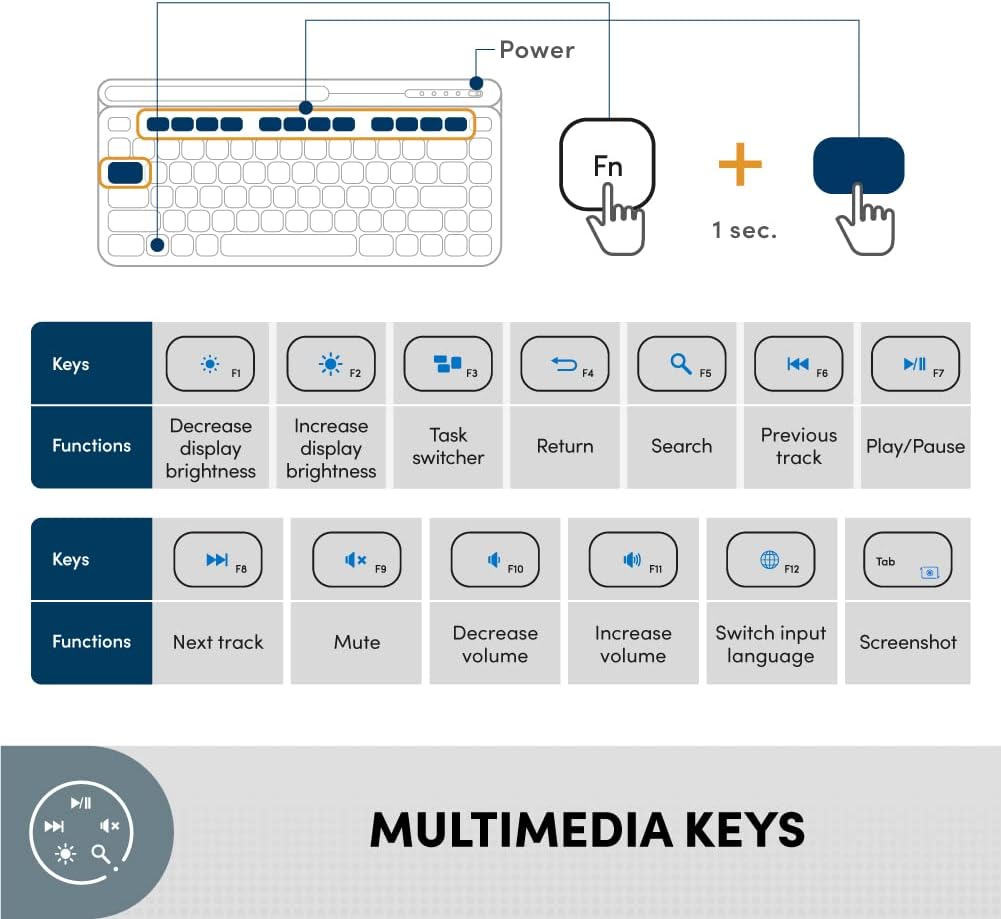
The GK-5001M features dedicated multimedia and function keys accessible via the Fn key. Press and hold the Fn key, then press the desired function key (F1-F12) to activate its secondary function.

| Kombinacja klawiszy | Funkcjonować |
|---|---|
| Fn+F1 | Zmniejsz jasność wyświetlacza |
| Fn+F2 | Zwiększ jasność wyświetlacza |
| Fn+F3 | Task switcher |
| Fn+F4 | Powrót |
| Fn+F5 | Szukaj |
| Fn+F6 | Poprzedni utwór |
| Fn+F7 | Odtwórz/Pauza |
| Fn+F8 | Następny utwór |
| Fn+F9 | Niemy |
| Fn+F10 | Zmniejsz głośność |
| Fn+F11 | Zwiększ głośność |
| Fn+F12 | Zmień język wprowadzania |
| Fn + Tab | Zrzut ekranu |
3.3 Zgodność z systemem operacyjnym
The Prolink GK-5001M keyboard is designed for wide compatibility across various operating systems:
- Windows (e.g., Windows 10)
- macOS
- Android
- iPadOS/iOS

3.4 Zasięg bezprzewodowy
The keyboard offers a long-range wireless connectivity of up to 10 meters, providing flexibility in your workspace.

4. Konserwacja
4.1 Anti-Bacterial Feature
The Prolink GK-5001M keyboard is designed with an anti-bacterial surface that effectively suppresses the growth of common bacteria. This feature is tested and proven based on the ISO 22196 international testing standard, contributing to a more hygienic user experience.

4.2 Czyszczenie i pielęgnacja
- To clean the keyboard, power it off and disconnect it from your device.
- Delikatnie użyj miękkiej, niestrzępiącej się szmatki dampspłukać wodą lub łagodnym, nieściernym roztworem czyszczącym.
- Unikaj nadmiernej wilgoci i nie rozpylaj środków czyszczących bezpośrednio na klawiaturę.
- Do not use harsh chemicals, solvents, or abrasive materials, as these may damage the surface or anti-bacterial coating.
4.3 Wymiana baterii
When the keyboard's performance degrades or the indicator light signals low battery, replace the AA battery. Follow the instructions in Section 2.2 for battery installation.
5. Rozwiązywanie Problemów
If you encounter issues with your Prolink GK-5001M keyboard, please refer to the following common solutions:
| Problem | Możliwa przyczyna | Rozwiązanie |
|---|---|---|
| Klawiatura nie odpowiada | Low battery; Keyboard off; Connection issue (2.4GHz/Bluetooth) | Replace battery; Turn keyboard on; Re-plug USB receiver; Re-pair Bluetooth device. |
| Opóźnienie lub przerywane połączenie | Zakłócenia; Odległość od odbiornika/urządzenia; Niski poziom naładowania baterii | Move closer to device; Ensure no large metal objects are between keyboard and receiver; Replace battery. |
| Nie można sparować przez Bluetooth | Keyboard not in pairing mode; Device Bluetooth off; Already connected to max devices | Ensure keyboard is in pairing mode (blinking light); Turn on device Bluetooth; Disconnect from another device if necessary. |
| Klawisze multimedialne nie działają | Fn key not pressed; OS compatibility issue | Ensure you are holding the Fn key while pressing the function key; Check OS settings for media key support. |
6. Specyfikacje
Detailed technical specifications for the Prolink GK-5001M Wireless Keyboard:
| Funkcja | Szczegół |
|---|---|
| Marka | Prolink |
| Numer modelu | GK-5001M-PNK |
| Technologia łączności | Łączność bezprzewodowa 2.4 GHz, Bluetooth 5.1 |
| Obsługa wielu urządzeń | Yes (1 x 2.4GHz, 2 x Bluetooth) |
| Kolor | Różowy |
| Wymiary (dł. x szer. x wys.) | Wymiary 31.2 x 10.2 x 3.8 cm |
| Waga przedmiotu | 540 gramów |
| Źródło zasilania | 1 bateria AA |
| Zgodność z systemem operacyjnym | Windows, macOS, Android, iPadOS/iOS |
| Cechy specjalne | Anti-Bacterial (ISO 22196), Ergonomic, Portable, Integrated Tablet/Phone Stand |
| Zasięg bezprzewodowej | Do 10 metrów |
7. Gwarancja i wsparcie
7.1 Gwarancja producenta
The Prolink GK-5001M keyboard comes with a 1-letnia gwarancja producenta od daty zakupu. Zachowaj dowód zakupu na wypadek roszczeń gwarancyjnych.
7.2 Wsparcie techniczne
For technical assistance or support inquiries, please contact Prolink customer service:
- E-mail: wsparcie@prolink2u.com
- Telefon: (65) 6357 0666


