1. Wprowadzenie
This manual provides essential information for setting up, operating, and maintaining your realme C30 smartphone. Please read it carefully to ensure optimal performance and longevity of your device.

Image: realme C30 smartphone in Lake Blue, showcasing its rear design and camera.
2. Co znajduje się w pudełku
Sprawdź, czy w przesyłce znajdują się wszystkie elementy:
- smartfon realme C30
- Adapter
- Kabel USB
- Wysuwacz tacy na kartę SIM
- Szybka ładowarka samochodowa
3. Urządzenie ponadview
Charakterystyka fizyczna
- Wymiary: 1.97 x 3.31 x 6.65 cala
- Waga przedmiotu: 6 uncji
- Kolor: Jezioro Błękitne
Główne cechy
- Wyświetlacz: 6.5" HD+ Fullscreen with 88.7% Screen-to-body Ratio, 120Hz Touch Sampling Rate, 16.7M Screen Colors
- Edytor: Unisoc T612 Octa-core, 12nm, up to 1.82GHz, ARM Mali-G57 GPU
- BARAN: 2 GB (Note: Some variants may have 4GB RAM)
- Składowanie: 32 GB
- Kamera tylna: 8MP AI Camera with f/2.0 aperture, 4P lens
- Przednia kamera: 5MP
- Bateria: 5000mAh (Typical) Massive Battery, 4890mAh (Minimum)
- System operacyjny: realme UI R Edition Based on Android 11
Układ urządzenia
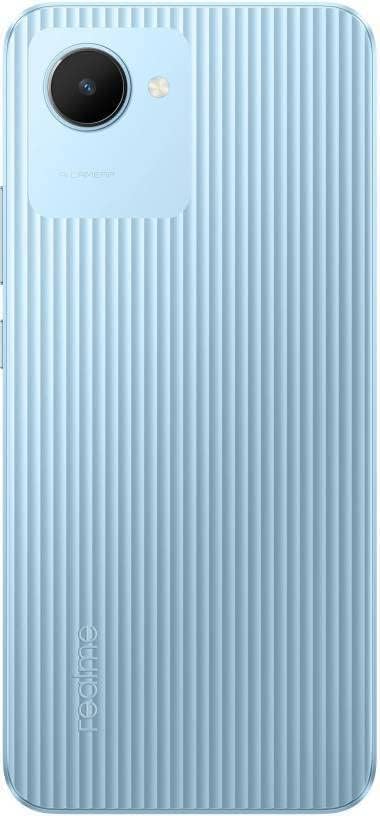
Obraz: Tył view of the realme C30, highlighting the single camera and textured back panel.

Image: Top and bottom edges of the realme C30, showing the 3.5mm headset jack, Micro USB port, and speaker grille.

Obraz: Bok views of the realme C30, illustrating the power button, volume rockers, and SIM tray slot.
4. Konfiguracja
4.1. Instalacja karty SIM i karty Micro SD
- Locate the SIM tray slot on the side of your device.
- Włóż narzędzie do wyjmowania tacki karty SIM do małego otworu obok tacki.
- Delikatnie naciśnij, aż tacka wysunie się.
- Place your Nano SIM cards (supports Dual SIM) and Micro SD card into the designated slots on the tray.
- Ostrożnie włóż tacę z powrotem do urządzenia.
4.2. Pierwsze włączenie i konfiguracja
- Naciśnij i przytrzymaj przycisk zasilania, aż pojawi się logo realme.
- Postępuj zgodnie z instrukcjami wyświetlanymi na ekranie, aby wybrać preferowany język i region.
- Połącz się z siecią Wi-Fi, aby kontynuować konfigurację i pobrać niezbędne aktualizacje.
- Review i zaakceptuj Umowę licencyjną użytkownika końcowego oraz Politykę prywatności.
- Zaloguj się za pomocą konta Google lub utwórz nowe.
- Set up your preferred screen lock method (PIN, Password, Pattern, Face recognition, or Fingerprints).
- Choose your display mode (Light or Dark).
- Complete the remaining setup steps to access your device's home screen.
5. Obsługa urządzenia
5.1. Podstawowa nawigacja
Navigate your device using intuitive touch gestures. Swipe up, down, left, or right to move between screens and menus. Tap to select items, and long-press for additional options.
5.2. Zarządzanie baterią
Your realme C30 is equipped with a 5000mAh massive battery for extended usage. To optimize battery life:
- Włączać Ultra Saving Mode from the Quick Settings panel for prolonged standby time at low power levels.
- Dostosuj ustawienia jasności i czasu wygaszania ekranu.
- Close background applications when not in use.
5.3. Korzystanie z aparatu
Launch the Camera app to capture photos and videos. The 8MP AI rear camera and 5MP front camera offer various modes and features.
- Stuknij przycisk migawki, aby zrobić zdjęcie.
- Przełączanie między trybami zdjęć i wideo.
- Wykorzystaj funkcje sztucznej inteligencji, aby poprawić jakość obrazu.
5.4. Łączność
Twoje urządzenie obsługuje różne opcje łączności:
- 4G LTE: Enjoy fast mobile data speeds. (Note: Not for USA Market. Supports Latin Europe bands.)
- Wi-Fi: Połącz się z siecią bezprzewodową, aby uzyskać dostęp do Internetu.
- Bluetooth: Pair with compatible accessories like headphones or speakers.
- GPS/GLONASS/GALILEO: For accurate location services.
- Mikro USB: Do ładowania i przesyłania danych.
- Gniazdo słuchawkowe 3.5 mm: Do przewodowych akcesoriów audio.
6. Konserwacja
6.1. Ładowanie
Use the provided 10W charging adapter and USB cable to charge your device. Connect the Micro USB end to your phone and the adapter to a power outlet.
6.2. Aktualizacje oprogramowania
Aktualizuj oprogramowanie swojego urządzenia, aby zapewnić optymalną wydajność i bezpieczeństwo. Przejdź do Settings > About phone > realme UI version aby sprawdzić dostępność aktualizacji i je zainstalować.
6.3. Czyszczenie
Gently wipe your device with a soft, lint-free cloth. Avoid using harsh chemicals or abrasive materials that could damage the screen or body.
7. Rozwiązywanie Problemów
7.1. Urządzenie się nie włącza
- Upewnij się, że bateria jest naładowana. Podłącz urządzenie do ładowarki na co najmniej 15 minut przed próbą włączenia.
- Aby wymusić ponowne uruchomienie, naciśnij i przytrzymaj przycisk zasilania przez 10–15 sekund.
7.2. Apps Freezing or Crashing
- Zamknij problematyczną aplikację i otwórz ją ponownie.
- Wyczyść pamięć podręczną i dane aplikacji za pomocą Ustawienia > Aplikacje > [Nazwa aplikacji] > Pamięć.
- Ensure your device's software and all apps are updated to their latest versions.
7.3. Krótki czas pracy baterii
- Zmniejsz jasność ekranu i ustaw krótszy czas wygaszania ekranu.
- Wyłącz Wi-Fi, Bluetooth i GPS, gdy z nich nie korzystasz.
- Identify and close power-consuming background apps.
- Enable Ultra Saving Mode for critical situations.
8. Specyfikacje
| Funkcja | Specyfikacja |
|---|---|
| Nazwa modelu | RMX3511 |
| Wymiary produktu | 1.97 x 3.31 x 6.65 cala |
| Waga przedmiotu | 6 uncji |
| System operacyjny | realme UI R Edition Based on Android 11 |
| Prędkość procesora | 1820 MHz (1.82GHz) |
| BARAN | 2 GB (Note: Some variants may have 4GB) |
| Pojemność pamięci masowej | 32 GB |
| Rozmiar ekranu | 6.5 cali |
| Rezolucja | 1280 x 720 (HD+) |
| Pojemność baterii | 5000 mlnampgodzina (mAh) |
| Czas rozmów telefonicznych | 45.3 godzin |
| Kamera tylna | Aparat 8MP AI |
| Przednia kamera | 5MP |
| Cechy specjalne | 4K Video Recording, Dual SIM, Fast Charging Support |
| Technologie łączności | USB, Cellular (LTE) |
| Gniazdo audio | 3.5 mm |
9. Gwarancja i wsparcie
For warranty information and customer support, please refer to the documentation included with your product or visit the official realme webstrona. Można także odwiedzić Sklep realme na Amazon Aby uzyskać dodatkowe informacje o produkcie i zasoby pomocy.


