1. Wprowadzenie
The Deity TC-1 KIT Wireless Timecode Box is a professional solution for synchronizing audio and video across multiple devices. This kit includes three TC-1 units, offering advanced features such as long-range wireless control, frame-accurate timecode generation, and versatile mounting options. Designed for filmmakers and audio professionals, the TC-1 simplifies post-production workflows by ensuring precise timecode synchronization.

Image: The Deity TC-1 KIT, showcasing three timecode boxes and various cables and mounting accessories.
2. Co znajduje się w pudełku
Sprawdź, czy w przesyłce znajdują się wszystkie elementy:
- 3x Deity TC-1 Wireless Timecode Boxes
- 3x Deity C15 TRS to BNC Cables (for timecode output)
- 1x Deity C13 TRS to TRS Cable
- 1x USB-C to USB-A Charging Cable (3-way splitter for simultaneous charging)
- 1x adapter USB-C do USB-A
- 3x Cold Shoe Mounts
- Hook-n-loop pads
- Instrukcja obsługi (ten dokument)

Image: A visual representation of all components included in the Deity TC-1 KIT.
3. Komponenty i elementy sterujące produktu
Familiarize yourself with the key parts and controls of the Deity TC-1 unit:

Image: Labeled diagram illustrating the various ports, buttons, and indicators on the Deity TC-1 timecode box.
- Wyświetlacz OLED: Shows timecode, battery status, and operational modes.
- Function Wheel: Służy do poruszania się po menu i zmieniania ustawień.
- Przycisk zasilania/wstecz: Powers the unit on/off and navigates back in menus.
- Port ładowania USB-C: Do ładowania wewnętrznego akumulatora.
- Locking 3.5mm Timecode Port (I/O): Connects to cameras or audio recorders for timecode input/output.
- Wbudowany mikrofon: Scratch microphone for reference audio.
- Zdejmowana stopka zimna: For attaching to cameras or rigs.
- Wskaźniki LED: Power, Sync, and Bluetooth status.
4. Przewodnik konfiguracji
4.1 Charging the TC-1
Before initial use, fully charge all TC-1 units. Connect the provided USB-C charging cable to the USB-C port on each TC-1 unit and to a USB power source. The Power LED will indicate charging status.

Image: The USB-C charging port and 3.5mm timecode port on the Deity TC-1.
4.2 Mounting the TC-1
The TC-1 offers multiple mounting options:
- Mocowanie zimnej stopki: Attach the removable cold shoe mount to the bottom of the TC-1, then slide it onto a camera's cold shoe or a rig.
- 1/4" or 3/8" Threaded Mount: Beneath the cold shoe mount, there are standard threaded mounts for direct attachment to tripods, arms, or other accessories.
- Hook-n-loop Pads: Use the included hook-n-loop pads for flexible attachment to various surfaces.

Image: The removable cold shoe mount and threaded attachment point on the Deity TC-1.
4.3 Pierwsze włączenie i ustawienia podstawowe
- Naciśnij i przytrzymaj Przycisk zasilania/wstecz to turn on the TC-1.
- The OLED display will show the current timecode and battery status.
- Użyj Function Wheel aby poruszać się po opcjach menu.
- Adjust settings such as frame rate, timecode mode (e.g., Free Run, Record Run), and output level as required for your production.
5. Instrukcja obsługi
5.1 Timecode Synchronization
The TC-1 offers multiple methods for precise timecode synchronization:
- Bit Connectify™ Wireless Control: Control up to 20 TC-1 units from a master unit up to 250 feet away. This proprietary technology ensures robust and long-range synchronization.
- Secondary RF Chip: For closer range synchronization (up to 30 feet) between TC-1 devices, a secondary RF chip provides reliable connectivity.
- Bluetooth 5.0 & Sidus Audio™ App: Connect your TC-1 units to a smartphone or laptop via Bluetooth and use the Sidus Audio™ app for comprehensive control, monitoring, and simultaneous syncing of all units.

Image: The Sidus Audio app controlling Deity TC-1 units, showing settings for timecode and frame rate.
To sync, designate one TC-1 as the master and the others as slaves. Initiate the sync process via the master unit's menu or the Sidus Audio™ app. The Sync LED will confirm successful synchronization.
5.2 Connecting to Devices (Cameras/Recorders)
Use the provided C15 TRS to BNC cables or other compatible 3.5mm TC cables to connect the TC-1 to your recording equipment. The locking 3.5mm port ensures a secure connection during operation.

Image: A Deity TC-1 connected to a recording device, displaying active timecode.
5.3 Using the Built-In Scratch Microphone
For cameras or action cameras that only feature a stereo mic input, the TC-1's built-in scratch microphone can provide a reference audio track. This is useful for quickly aligning audio in post-production, especially when a dedicated audio recorder is not used.
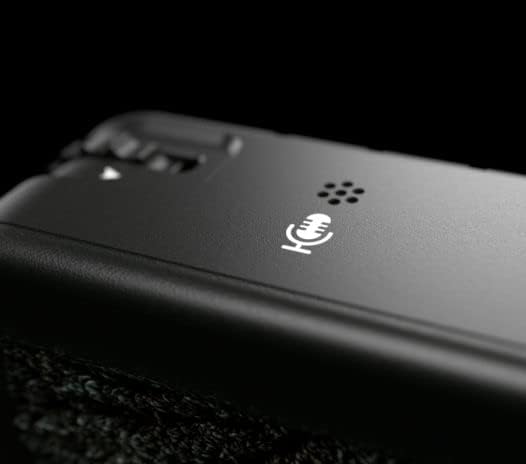
Image: The built-in scratch microphone on the Deity TC-1 unit.
6. Konserwacja
- Czyszczenie: Use a soft, dry cloth to clean the exterior of the TC-1 units. Avoid using harsh chemicals or abrasive materials.
- Składowanie: Przechowuj urządzenia w chłodnym, suchym miejscu, z dala od bezpośredniego światła słonecznego i ekstremalnych temperatur.
- Pielęgnacja baterii: For optimal battery life, avoid fully discharging the units frequently. If storing for extended periods, charge the batteries to approximately 50%.
- Aktualizacje oprogramowania układowego: Periodically check the Deity website or the Sidus Audio™ app for firmware updates to ensure optimal performance and access to new features.
7. Rozwiązywanie Problemów
| Problem | Możliwa przyczyna | Rozwiązanie |
|---|---|---|
| Urządzenie nie włącza się. | Niski poziom naładowania baterii lub jej rozładowanie. | Charge the unit using the provided USB-C cable. |
| Timecode not syncing. | Units out of range; incorrect master/slave setup; interference. | Ensure units are within range (250ft for Bit Connectify, 30ft for RF). Verify master/slave settings. Check for sources of wireless interference. |
| Timecode drift. | Prolonged operation without re-sync; extreme temperature changes. | Re-sync units periodically, especially after long takes or significant environmental changes. The TC-1 is designed for minimal drift (less than 1 frame in 72 hours). |
| Kontrola aplikacji nie działa. | Bluetooth not enabled; app not updated; unit not discoverable. | Ensure Bluetooth is active on your device and the TC-1. Update the Sidus Audio™ app. Restart the TC-1 unit. |
| No timecode output to camera/recorder. | Incorrect cable; incorrect output settings on TC-1; camera input misconfigured. | Verify cable connection and type. Check TC-1 output settings. Ensure camera/recorder is set to receive external timecode. |
8. Specyfikacje
| Funkcja | Szczegół |
|---|---|
| Model | Deity TC-1 |
| Dokładność kodu czasowego | ±0.5ppm (less than 1 frame drift in 72 hours) |
| Wireless Control Range (Bit Connectify™) | Do 250 stóp (76 metrów) |
| Wireless Sync Range (TC-1 to TC-1 RF) | Do 30 stóp (9 metrów) |
| Wersja Bluetooth | 5.0 |
| Kanały | 8 |
| Timecode Connection | Locking 3.5mm TRS (I/O) |
| Port ładowania | USB-C |
| Opcje montażu | Removable Cold Shoe, 1/4" and 3/8" Threaded Mounts, Hook-n-loop |
| Wbudowany mikrofon | Yes (Scratch Mic) |
| Wymiary opakowania | 9.49 x 7.68 x 2.64 cala |
| Waga przedmiotu (na jednostkę) | Approximately 0.43 pounds (1.3 pounds / 3 units) |
| Producent | Bóstwo |
9. Gwarancja i wsparcie
For detailed warranty information, technical support, and service inquiries, please refer to the official Deity webOdwiedź stronę internetową lub skontaktuj się bezpośrednio z działem obsługi klienta. Zachowaj dowód zakupu na wypadek reklamacji.
Deity Official Webstrona: www.deitymic.com


