Wstęp
This manual provides detailed instructions for the installation, operation, and maintenance of your Blaupunkt MEMPHIS440BT 6.2" In-Dash Touch Screen DVD Receiver. Please read this manual thoroughly before using the product to ensure proper functionality and to prevent damage.
Produkt ponadview
The Blaupunkt MEMPHIS440BT is a versatile in-dash multimedia receiver featuring a 6.2-inch touch screen display. It supports DVD/CD playback, Bluetooth connectivity for hands-free calling and audio streaming, USB and SD card media playback, and AM/FM radio. The unit is designed to be the central entertainment system in your vehicle.

Obraz: Przód view of the Blaupunkt MEMPHIS440BT in-dash receiver with its remote control. The receiver features a 6.2-inch touch screen displaying various function icons like Radio, Disc, USB, SD, and Bluetooth. The remote control has numerous buttons for navigation and media control.
Informacje dotyczące bezpieczeństwa
- Always operate the vehicle safely. Do not operate the unit's functions that distract you from safe driving.
- Ensure proper wiring connections to prevent short circuits and electrical hazards.
- Jeśli nie jesteś pewien któregokolwiek kroku, skonsultuj się ze specjalistą w sprawie instalacji.
- Nie wystawiaj urządzenia na działanie wilgoci i ekstremalnych temperatur.
Konfiguracja i instalacja
Zawartość opakowania
- Blaupunkt MEMPHIS440BT DVD Receiver
- Zdalne sterowanie
- Wiązka przewodów
- Sprzęt montażowy
- Instrukcja obsługi (ten dokument)
Schemat okablowania
Refer to the detailed wiring diagram provided in the separate installation guide for specific connections. Ensure all connections are secure and correctly matched to your vehicle's electrical system.
Obraz: Bok view of the Blaupunkt MEMPHIS440BT receiver, illustrating the various ports and connections on the rear and side panels, including the USB and Mini SD slots on the front left side.
Montaż urządzenia
- Wyjmij istniejące radio samochodowe z deski rozdzielczej.
- Connect the wiring harness to the vehicle's wiring and the MEMPHIS440BT.
- Slide the MEMPHIS440BT into the dashboard opening until it clicks into place.
- Secure the unit using the provided mounting screws.
Instrukcja obsługi
Włączanie/wyłączanie zasilania
Naciśnij MOC button (usually a knob on the left side) to turn the unit on or off. Hold for 2 seconds to power off.
Interfejs ekranu dotykowego
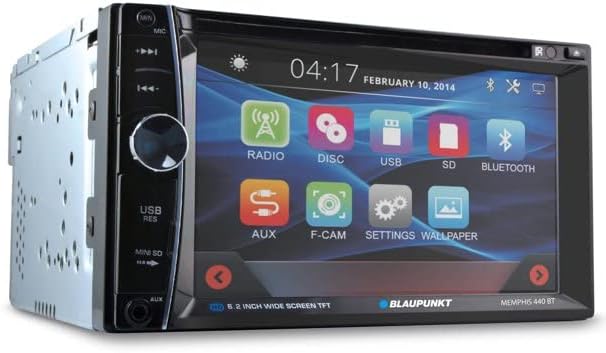
The 6.2-inch touch screen allows for intuitive control of all functions. Tap icons to select modes (Radio, Disc, USB, SD, Bluetooth, AUX, F-CAM, Settings, Wallpaper).

Obraz: kątowy przód view of the Blaupunkt MEMPHIS440BT receiver, highlighting the touch screen interface with its main menu icons and the physical control knob on the left side.
Parowanie Bluetooth
- W menu głównym dotknij przycisku Bluetooth ikona.
- Włącz Bluetooth w swoim urządzeniu mobilnym i wyszukaj dostępne urządzenia.
- Select "MEMPHIS440BT" from the list.
- Jeśli zostaniesz o to poproszony, wprowadź domyślny kod PIN „0000”.
- Po sparowaniu możesz wykonywać i odbierać połączenia oraz przesyłać strumieniowo dźwięk.
Media Playback (DVD/CD/USB/SD)
- DVD/CD: Insert a disc into the slot. The unit will automatically switch to Disc mode.
- USB: Insert a USB drive into the USB port. Tap the USB icon to access files.
- SD: Insert a miniSD card into the SD card slot. Tap the SD icon to access files.

Obraz: Zbliżenie view of the USB port and Mini SD card slot located on the front left side of the Blaupunkt MEMPHIS440BT receiver, beneath a protective flap.
Obsługa radia
- Kliknij Radio icon to enter radio mode.
- Use the touch screen controls to scan for stations, tune manually, or select preset stations.
- To save a station, tune to the desired frequency, then press and hold a preset button on the screen.
Konserwacja
- Czyszczenie: Use a soft, dry cloth to clean the touch screen and unit exterior. Do not use abrasive cleaners or solvents.
- Pielęgnacja dysków: Trzymaj płyty za krawędzie. Utrzymuj je w czystości i bez zarysowań.
- Aktualizacje oprogramowania układowego: Check the official Blaupunkt webOdwiedzaj witrynę okresowo, aby sprawdzić, czy są dostępne aktualizacje oprogramowania sprzętowego.
Rozwiązywanie problemów
| Problem | Możliwa przyczyna | Rozwiązanie |
|---|---|---|
| Brak zasilania | Nieprawidłowe okablowanie; przepalony bezpiecznik | Sprawdź połączenia zasilania i uziemienia. W razie potrzeby wymień bezpiecznik. |
| Brak dźwięku | Głośność jest zbyt niska; Wyciszenie włączone; Problem z okablowaniem głośników | Zwiększ głośność; Wyłącz wyciszenie; Sprawdź połączenia głośników. |
| Bluetooth nie łączy się | Device not in pairing mode; Incorrect PIN | Ensure device is discoverable; Re-enter PIN "0000". |
| Błąd dysku | Brudna lub porysowana płyta; Nieprawidłowy format płyty | Clean disc; Try a different disc; Ensure disc is compatible. |
Specyfikacje
- Rozmiar ekranu: 6.2 cali
- Typ wyświetlacza: Ekran dotykowy LCD
- Typ nośnika: DVD, CD, USB, SD
- Łączność: Bluetooth
- Numer modelu przedmiotu: MEMPHIS440BT
- Waga przedmiotu: 4.25 funta
- Wymiary opakowania: 9.69 x 9.17 x 6.85 cala
- Producent: Blaupunkt
Gwarancja i wsparcie
Aby uzyskać informacje dotyczące gwarancji i pomocy technicznej, zapoznaj się z kartą gwarancyjną dołączoną do produktu lub odwiedź oficjalną stronę internetową firmy Blaupunkt webZachowaj paragon jako dowód zakupu na wypadek reklamacji.
Blaupunkt Official Webstrona: www.blaupunkt.com


