1. Wprowadzenie
The LogiLink 4K 2x2 port bidirectional HDMI switch allows you to connect two (2) HDMI sources, such as a video camera, Blu-ray player, satellite receiver, digital video recorder, set-top boxes, or game consoles, to two (2) HDMI-compatible displays. This switch can simultaneously route one of the two HDMI input signals to two (2) UHD displays. The integrated Downscaler function supports displaying 4K content on Full HD screens, and both 4K and Full HD screens can operate simultaneously. This smart switch ensures no compromise on image and sound quality. 4K/UHD image signals are transmitted without loss, with HDCP 2.2/1.4, HDR, and 3D support. Audio transmission in LPCM 7.1, DTS, Dolby Digital, DTS-HD Master Audio, and Dolby TrueHD meets all your audio needs.
2. Funkcje produktu
- Allows switching between two HDMI signal sources to two displays/TVs simultaneously.
- Compliant with HDMI 2.0, offering a bandwidth of 6 Gbit/s at 600 MHz per line (18 Gbit/s total).
- Connections: 2 x HDMI A inputs, 5V DC power input; Outputs: 2 x HDMI A.
- Supports Ultra HD 4K/60 Hz YUV 4:4:4 and Full 3D.
- Supports 36-bit Deep Color (12 bits per channel).
- Supports EDID Pass-Through.
- Supports HDCP 1.4/2.2, HDR, and Downscaler functionality.
- Supports uncompressed audio like LPCM 7.1.
- Supports compressed audio data such as DTS, Dolby Digital (including DTS-HD Master Audio and Dolby TrueHD).
- Trwały metalowy casing, dimensions: 11.6 x 5.2 x 2.3 cm.
3. Zawartość opakowania
Proszę sprawdzić, czy w paczce znajdują się następujące elementy:
- LogiLink HD0039 2x2 Port Bidirectional HDMI Switch
- Zasilacz 5V DC
- Instrukcja obsługi
4. Urządzenie ponadview
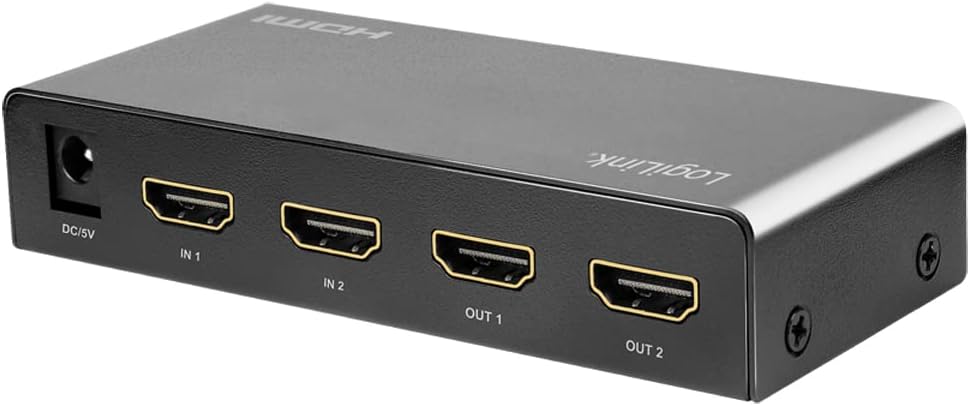


5. Instrukcje konfiguracji
- Wyłącz urządzenia: Before making any connections, ensure all HDMI source devices (e.g., Blu-ray player, game console) and display devices (e.g., TV, monitor) are powered off.
- Podłącz źródła HDMI: Connect your HDMI source devices to the HDMI IN 1 and HDMI IN 2 ports on the LogiLink HD0039 switch using high-quality HDMI cables.
- Podłącz wyświetlacze HDMI: Connect your HDMI display devices to the HDMI OUT 1 and HDMI OUT 2 ports on the switch using high-quality HDMI cables.
- Podłącz zasilacz: Insert the 5V DC power adapter into the DC 5V port on the switch, then plug the adapter into a power outlet. The power LED on the switch should illuminate.
- Włącz urządzenia: Power on your display devices first, then power on your HDMI source devices.
- Select Input/Output: Use the 'SOURCE' button on the front panel to select the desired input source (IN 1 or IN 2) and the 'SWITCH' button to toggle between output configurations.
6. Instrukcja obsługi
The LogiLink HD0039 switch offers flexible control for managing your HDMI signals.
6.1. Przełączanie wejść
- Naciśnij ŹRÓDŁO button on the front panel to cycle between HDMI IN 1 and HDMI IN 2. The corresponding LED indicator (IN 1 or IN 2) will light up to show the currently selected input.
6.2. Switching Outputs
- Naciśnij PRZEŁĄCZNIK button on the front panel to control which output ports receive the selected input signal. This switch allows you to send the selected input to OUT 1, OUT 2, or both simultaneously.
6.3. HDMI Version Selection
- A small switch labeled 1.4 / 2.0 is located on the front panel. This allows you to manually select the HDMI version. For 4K/60Hz content and HDR, ensure this switch is set to 2.0. For compatibility with older devices, you may switch to 1.4 jeśli to konieczne.
6.4. Wybór trybu audio
- Ten AUDIO button allows you to select the audio mode. Refer to the LED indicators (HIGH/LOW) for the current audio setting. This feature can be used to optimize audio output for different display capabilities.
7. Konserwacja
- Czyszczenie: Do czyszczenia urządzenia należy używać miękkiej, suchej ściereczki. Nie należy używać środków czyszczących w płynie ani aerozolu.
- Wentylacja: Upewnij się, że urządzenie znajduje się w dobrze wentylowanym miejscu, aby zapobiec przegrzaniu. Nie blokuj otworów wentylacyjnych.
- Środowisko: Keep the device away from excessive heat, humidity, dust, and direct sunlight.
- Moc: Always use the provided 5V DC power adapter. Disconnect the power adapter if the device will not be used for an extended period.
8. Rozwiązywanie Problemów
| Problem | Możliwa przyczyna | Rozwiązanie |
|---|---|---|
| Brak obrazu na wyświetlaczu. |
|
|
| Słaba jakość obrazu lub migotanie. |
|
|
| Bez dźwięku. |
|
|
| 4K content not displaying correctly on Full HD screen. | Downscaler not active or issue. | Ensure the Downscaler function is enabled (it is integrated and should work automatically). If issues persist, try restarting all devices. |
9. Specyfikacje
| Funkcja | Specyfikacja |
|---|---|
| Marka | LogiLink |
| Numer modelu | HD0039 |
| Kolor | Czarny |
| Typ złącza | HDMI |
| Liczba portów | 2 wejść, 2 wyjścia |
| Kompatybilne urządzenia | Camera, Blu-ray Player, DVD Player, Television |
| Standardowy HDMI | HDMI 2.0 (backward compatible with 1.4) |
| Przepustowość łącza | 18 Gbit/s (6 Gbit/s per line at 600 MHz) |
| Wsparcie rozdzielczości | Up to 4K/60 Hz YUV 4:4:4, Full 3D |
| Głębia koloru | 36-bitowy głęboki kolor (12 bitów na kanał) |
| Wsparcie HDCP | HDCP 1.4 / 2.2 |
| Obsługa HDR | Tak |
| Wsparcie EDID | Przejście EDID |
| Wsparcie audio | LPCM 7.1, DTS, Dolby Digital, DTS-HD Master Audio, Dolby TrueHD |
| Downscaler Function | Integrated (4K to Full HD) |
| Zasilacz | 5V prądu stałego |
| Casing Materiał | Metal |
| Wymiary (dł. x szer. x wys.) | Wymiary 11.6 x 5.2 x 2.3 cm |
| Producent | 2direct GmbH |
| Kraj pochodzenia | Chiny |
10. Gwarancja i wsparcie
Produkty LogiLink zostały zaprojektowane z myślą o niezawodności i wydajności. Szczegółowe informacje dotyczące gwarancji można znaleźć w karcie gwarancyjnej dołączonej do produktu lub na oficjalnej stronie LogiLink. website. For technical support or assistance, please contact your retailer or LogiLink customer service.
Spare parts availability and software update guarantees are not available for this product.


