1. Wprowadzenie
This manual provides detailed instructions for the assembly, operation, and maintenance of your JONSBO MOD3 Open Type ATX Mid Tower Gaming Computer Case. Designed for E-sports enthusiasts, the MOD3 chassis offers an open structure for optimal cooling and component visibility. Please read this manual thoroughly before beginning assembly to ensure proper installation and safe usage.

Image 1.1: JONSBO MOD3 MechWarrior branding banner. This banner image features the 'MECHWARRIOR JONSBO MOD 3' branding, highlighting key features like E-sports style, 360 water cooler support, E-ATX motherboard compatibility, 5V ARGB lighting, and 49mm cable management space.
2. Funkcje
The JONSBO MOD3 case is engineered with a focus on performance and aesthetics, offering a unique open design and robust construction.
- Projekt: Open Type ATX Mid Tower with a distinctive mecha-inspired aesthetic.
- Tworzywo: Constructed from 2.5+2.0 Aluminum-magnesium alloy for durability, featuring 4.0mm tempered glass side panels.
- Oświetlenie: Integrated 5V Addressable RGB (ARGB) lighting effect on the front panel for customizable illumination.
- Zarządzanie kablami: Provides 49mm of space behind the backplane for efficient cable routing.
- Obsługa płyt głównych: Compatible with EATX (XL-ATX), ATX, MATX, and ITX motherboards.
- Gniazda rozszerzeń: Features 7 expansion slots for various add-on cards.
- Zatoki napędowe: Supports 2x 2.5" SSDs and 1x 3.5" HDD, or 3x 2.5" SSDs.
- Przednie I / O: Includes 2x USB 3.0 ports, 1x Audio output, and 1x Microphone input.
- Wsparcie chłodzenia:
- Top: Up to 3x 120mm fans (optional).
- Front: Up to 3x 120mm fans (optional).
- CPU Cooler Height: Maximum 170mm.
- Liquid Cooler: Supports 240mm or 360mm radiators.
- Długość GPU: Maksymalnie 400 mm.
- Wsparcie zasilacza: Standard ATX PS2 power supplies, maximum 195mm length.
- Wymiary: 9.13 x 25.47 x 24.41 cala (232 x 647 x 620 mm).
- Waga: 8 kg (17.64 funta).

Image 2.1: JONSBO MOD3 mecha chassis design explanation. This image explains the JONSBO MOD3's mecha chassis design, emphasizing its open structure for high-end configurations, heat dissipation, vivid display of internal hardware, and personalized trend host customization.
Video 2.1: JONSBO MOD3 Open Type ATX Mid Tower Gaming Computer Case Overview. This official product video from Jonsbo showcases the MOD3 Open Type ATX Mid Tower Gaming Computer Case, highlighting its unique design, customizable RGB lighting, and structural features. It provides a dynamic overview of the case's aesthetics and build quality.
3. Przewodnik konfiguracji
Follow these steps for proper assembly of your JONSBO MOD3 computer case and components.
3.1. Lista kontrolna komponentów
Before starting, ensure you have all necessary components:
- JONSBO MOD3 Case
- Motherboard (EATX, ATX, MATX, or ITX)
- CPU and CPU Cooler (Max. 170mm height)
- Graphics Card (Max. 400mm length)
- Power Supply Unit (Standard ATX PS2, Max. 195mm length)
- Storage Drives (2.5" SSDs, 3.5" HDDs)
- RAM modules
- Optional: Case fans (120mm), Liquid cooling radiator (240/360mm)
- Zestaw śrubokrętów
3.2. Przygotowanie sprawy
The JONSBO MOD3 features a full structure detachable design for ease of assembly.
- Carefully remove the tempered glass side panels by unscrewing the 18 knurled alloy screws. Store them safely to prevent damage.
- Identify the main component areas: motherboard tray, GPU area, power supply area, and drive bays.

Image 3.1: JONSBO MOD3 full structure detachable design diagram. This detailed diagram showcases the full structure detachable design of the JONSBO MOD3, indicating areas for motherboard, GPU, power supply, and drive bays, along with overall dimensions and cooling options.
3.3. Instalacja płyty głównej
- Install the CPU, CPU cooler (if air-cooled), and RAM onto your motherboard before placing it in the case.
- Align the motherboard with the standoffs on the motherboard tray. Ensure the I/O shield is correctly positioned.
- Przymocuj płytę główną odpowiednimi śrubami.
3.4. Instalacja zasilania
- Locate the power supply mounting area.
- Slide the power supply into position and secure it with screws from the rear of the case.
- Route the necessary power cables through the cable management cutouts.
3.5. Instalacja napędu
- Install 2.5" SSDs and/or 3.5" HDDs into the designated drive bays. The case supports 2x 2.5" SSDs + 1x 3.5" HDD, or 3x 2.5" SSDs.
- Secure the drives with screws.
3.6. Instalacja GPU
- Zdejmij niezbędne osłony gniazd rozszerzeń.
- Insert your graphics card into the PCIe slot on the motherboard.
- Zabezpiecz GPU śrubami. Obudowa obsługuje GPU o długości do 400 mm.
3.7. Instalacja układu chłodzenia
The MOD3 case supports various cooling configurations:
- Fani: Optional 120mm fans can be installed at the top (up to 3) and front (up to 3) of the case.
- Chłodzenie cieczą: Radiators up to 240mm or 360mm can be installed. Refer to your liquid cooler's manual for specific mounting instructions.
3.8. Zarządzanie kablami
Utilize the 49mm cable management space behind the motherboard tray to route and organize all power and data cables. This improves airflow and maintains a clean aesthetic.

Image 3.2: JONSBO MOD3 gaming computer case with internal components and RGB lighting. This image displays the JONSBO MOD3 open-type ATX mid-tower gaming computer case, fully assembled with internal components such as a motherboard, GPU, power supply, and cooling fans, all illuminated with vibrant RGB lighting. The case features a distinctive mecha-inspired design with tempered glass side panels, showcasing the hardware within.
4. Instrukcja obsługi
4.1. Włączanie/wyłączanie zasilania
Once all components are installed and connected, press the power button located on the front I/O panel to turn on your system. Press it again to turn off, or use your operating system's shutdown function.
4.2. Wejście/wyjście na panelu przednim
Panel przedni zapewnia wygodny dostęp do:
- Przycisk zasilania: For system power control.
- Porty USB 3.0 (x2): Do szybkiego przesyłu danych przy użyciu kompatybilnych urządzeń.
- Wyjście audio: Do słuchawek lub głośników.
- Wejście mikrofonowe: Do podłączenia mikrofonu.
4.3. Sterowanie oświetleniem ARGB
The JONSBO MOD3 features 5V ARGB lighting on the front panel. This lighting can typically be controlled via your motherboard's RGB software (if compatible) or a dedicated controller (if included with your system build). Refer to your motherboard's manual for ARGB software instructions.

Image 4.1: JONSBO MOD3 front panel features and knurled screws. This image highlights the front panel features of the JONSBO MOD3, including the 5V ARGB light effect, power button, USB 3.0 ports, audio input/output, and the 18 knurled alloy screws used for securing panels.
5. Konserwacja
Regular maintenance helps ensure the longevity and optimal performance of your computer case.
5.1. Czyszczenie
- Zewnętrzny: Użyj miękkiego, damp cloth to wipe down the aluminum-magnesium alloy surfaces. Avoid abrasive cleaners.
- Szkło hartowane: Clean with a glass cleaner and a microfiber cloth to avoid streaks.
- Wnętrze: Periodically use compressed air to remove dust buildup from fans, radiators, and internal components. Ensure the system is powered off and unplugged before cleaning the interior.
5.2. Ogólna opieka
- Unikać wystawiania obudowy na bezpośrednie działanie promieni słonecznych lub umieszczania jej w pobliżu źródeł ciepła.
- Ensure adequate ventilation around the case to maintain optimal airflow.
- Handle the tempered glass panels with care to prevent chipping or breakage.
6. Rozwiązywanie Problemów
W tej sekcji omówiono typowe problemy, na które możesz natrafić.
- System się nie włącza:
- Check if the power supply is switched on and properly connected to the wall outlet.
- Sprawdź, czy kabel przycisku zasilania obudowy jest prawidłowo podłączony do złącza na przednim panelu płyty głównej.
- Ensure all power cables to the motherboard and components are securely seated.
- Brak wyjścia wyświetlacza:
- Confirm that your monitor cable is connected to the graphics card, not the motherboard's integrated graphics port (unless using integrated graphics).
- Ponownie włóż kartę graficzną do gniazda PCIe.
- Check power connections to the graphics card.
- Oświetlenie ARGB nie działa:
- Ensure the 5V ARGB cable from the case is connected to the correct 5V ARGB header on your motherboard (not 12V RGB).
- Sprawdź, czy oprogramowanie RGB Twojej płyty głównej jest prawidłowo zainstalowane i skonfigurowane.
- Nadmierny hałas:
- Check all fans (CPU, GPU, case) for obstructions or loose mounting.
- Ensure cables are not interfering with fan blades.
- Clean any dust buildup from fans and filters.
7. Specyfikacje
| Funkcja | Specyfikacja |
|---|---|
| Nazwa modelu | MOD3 |
| Typ sprawy | Mid Tower |
| Zgodność płyty głównej | EATX (XL-ATX), ATX, MATX, ITX |
| Tworzywo | Aluminum-magnesium alloy, Tempered Glass |
| Gniazda rozszerzeń | 7 |
| Zatoki napędowe | 2x 2.5" SSD + 1x 3.5" HDD OR 3x 2.5" SSD |
| Przednie porty we / wy | 2x USB 3.0, 1x Audio, 1x Mic |
| Maksymalna długość GPU | 400mm |
| Maksymalna wysokość chłodnicy procesora | 170mm |
| Wsparcie PSU | Standard ATX PS2 (Max. 195mm) |
| Wsparcie fanów (góra) | 3x 120mm (optional) |
| Wspornik wentylatora (przód) | 3x 120mm (optional) |
| Wsparcie płynnego chłodzenia | 240mm / 360mm |
| Przestrzeń do zarządzania kablami | 49mm |
| Wymiary produktu (dł. x szer. x wys.) | 9.13 x 25.47 x 24.41 cala (232 x 647 x 620 mm) |
| Masa netto | 8 kg (17.64 funta) |
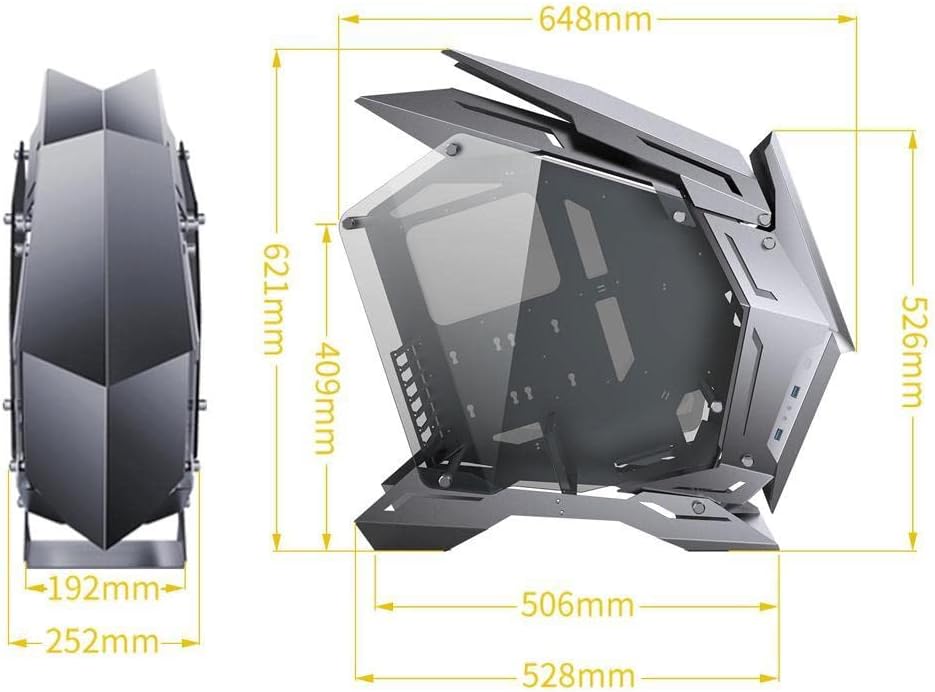
Image 7.1: JONSBO MOD3 computer case dimensions diagram. This technical diagram illustrates the precise dimensions of the JONSBO MOD3 computer case, including height, width, and depth measurements in millimeters, crucial for planning component compatibility and placement.
8. Gwarancja i wsparcie
Jonsbo products are manufactured to high-quality standards. For warranty information and technical support, please refer to the official Jonsbo webOdwiedź witrynę lub skontaktuj się z lokalnym sprzedawcą. Zachowaj dowód zakupu na wypadek reklamacji.
Aby uzyskać dalszą pomoc, możesz odwiedzić stronę Sklep Jonsbo na Amazonie.


