Wstęp
The Donner NEOTRACK-LX is a versatile RGB USB condenser microphone designed for high-quality audio capture across various platforms including PC, PS4, and Mac. Featuring a cardioid pickup pattern, quick mute function, mic monitoring, and gain control, it is ideal for streaming, podcasts, Twitch, YouTube, and Discord. Its plug-and-play design ensures ease of use without requiring additional drivers.
Cechy
- Oświetlenie RGB: Dynamic dream lights with colorful ambient effects.
- Wzór odbioru kardioidalnego: Koncentruje się na dźwięku bezpośrednio przed mikrofonem, redukując hałas tła.
- Instant Touch Mute: Capacitive touch button on top for quick muting.
- Monitorowanie słuchawek: 3.5mm jack for real-time audio monitoring.
- Gain Control: Adjustable knob for microphone input sensitivity.
- Łączność USB: Simple plug-and-play operation via USB-C.
- Szeroka kompatybilność: Works with PC, PS4, and Mac.
- Exceptional Anti-Vibration: Stable metal base and design to minimize vibrations.
Zawartość opakowania
Proszę zaznaczyć pole dotyczące następujących elementów:
- Donner NEOTRACK-LX USB Condenser Microphone
- Detachable Metal Base
- Kabel USB-C do USB-A
- Przejściówka USB-C na USB-A
- Lightning to USB-A Adapter
- Instrukcja obsługi

Image: The Donner NEOTRACK-LX microphone with its stand, USB-C to USB-A cable, USB-C to USB-A adapter, and Lightning to USB-A adapter.
Organizować coś
- Złóż mikrofon: Attach the microphone to its metal base by aligning the mounting points and securing it. The microphone can also be mounted on a standard 5/8-inch threaded boom arm.
- Połącz z urządzeniem:
- For PC/Mac: Connect the USB-C end of the provided cable to the microphone and the USB-A end to an available USB port on your computer.
- For PS4: Connect the USB-C end of the provided cable to the microphone and the USB-A end to an available USB port on your PS4 console.
- For compatible mobile devices (e.g., tablets, smartphones): Use the appropriate USB-C or Lightning adapter with the USB-A cable to connect the microphone.

Image: The microphone demonstrating compatibility with PC, laptop, tablets, and smartphones via USB-A, USB-C, and Lightning connections.
- Rozpoznawanie systemu: The microphone is plug-and-play and should be automatically recognized by your operating system (Windows, macOS) or console (PS4). No additional drivers are typically required.
- Wybierz jako urządzenie wejściowe: Go to your device's sound settings and select the "Donner NEOTRACK-LX" as your default input (microphone) device.
Obsługa mikrofonu
- Regulacja wzmocnienia: The gain knob on the back of the microphone controls the input sensitivity. Turn it clockwise to increase sensitivity (for quieter sources) and counter-clockwise to decrease sensitivity (for louder sources). Adjust this to prevent audio clipping or ensure sufficient volume.
- Regulacja głośności słuchawek: The volume knob on the front of the microphone controls the output volume for the connected headphones. Plug your 3.5mm headphones into the jack on the back of the microphone for real-time monitoring.

Image: A close-up of the microphone showing the headphone jack and USB port, with a headphone cable connected.
- Instant Mute Function: Tap the top of the microphone to instantly mute or unmute. When muted, the RGB lights will turn off, indicating that the microphone is not picking up sound.

Image: A hand touching the top of the microphone to activate the mute function, showing the RGB lights turning off when muted.
- Oświetlenie RGB: The microphone features dynamic RGB lighting that cycles through various colors automatically. This provides an aesthetic enhancement to your setup. The lights cannot be manually changed or turned off, except by muting the microphone.
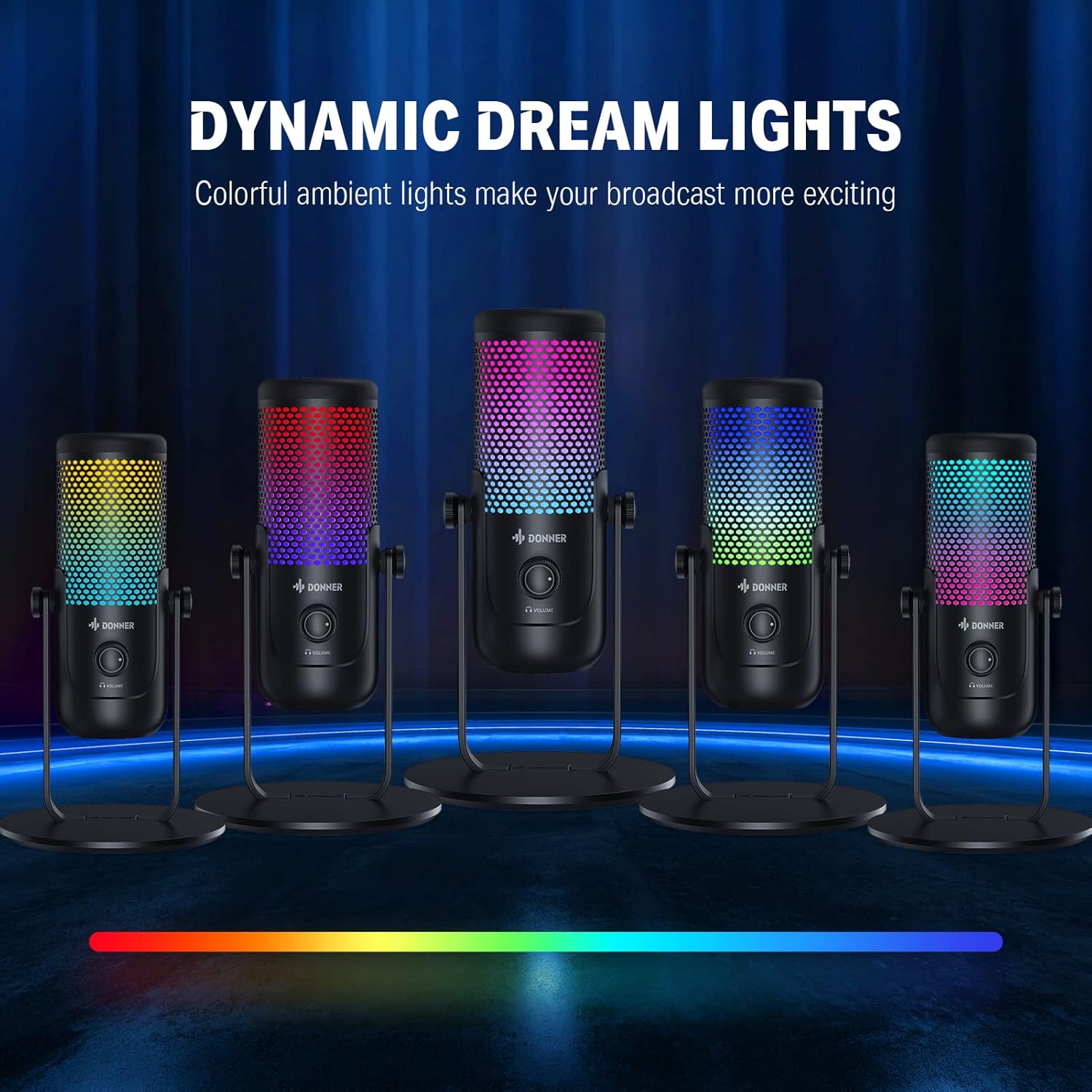
Image: Multiple Donner NEOTRACK-LX microphones showcasing the dynamic dream lights in different color combinations.
Konserwacja
- Czyszczenie: Do czyszczenia zewnętrznej części mikrofonu używaj miękkiej, suchej ściereczki. Unikaj stosowania silnych środków chemicznych i materiałów ściernych.
- Składowanie: Przechowuj mikrofon w chłodnym, suchym miejscu, z dala od bezpośredniego światła słonecznego i ekstremalnych temperatur.
- Obsługiwanie: Handle the microphone with care to avoid dropping it or subjecting it to strong impacts, which could damage internal components.
Rozwiązywanie problemów
| Problem | Możliwa przyczyna | Rozwiązanie |
|---|---|---|
| Brak dźwięku z mikrofonu | Mikrofon nie jest prawidłowo podłączony Wybrano nieprawidłowe urządzenie wejściowe Mikrofon jest wyciszony Gain is too low | Sprawdź, czy kabel USB jest podłączony prawidłowo. Check system sound settings and select "Donner NEOTRACK-LX" as input. Tap the top of the microphone to unmute (RGB lights should turn on). Increase the gain knob on the microphone's back. |
| Zniekształcony lub niewyraźny dźwięk | Gain is too high Mikrofon zbyt blisko źródła dźwięku Hałas środowiskowy | Decrease the gain knob. Maintain an appropriate distance from the microphone (e.g., 6-12 inches). Upewnij się, że znajdujesz się w cichym otoczeniu. |
| RGB lights are off | Mikrofon jest wyciszony Microphone not powered | Tap the top of the microphone to unmute. Ensure the microphone is properly connected to a powered USB port. |
| Brak dźwięku ze słuchawek | Headphones not properly connected Głośność słuchawek jest zbyt niska | Sprawdź, czy słuchawki są prawidłowo podłączone do gniazda 3.5 mm. Increase the headphone volume knob on the microphone's front. |
Specyfikacje
- Typ mikrofonu: Skraplacz
- Wzór biegunowy: Kardioidalny
- Łączność: USB (USB-C port on microphone)
- Sampstawka: 24-bity / 96 kHz

Image: The microphone with a graphic overlay indicating its 24-bit 96kHz sample rate capability.
- Wyjście słuchawkowe: Gniazdo 3.5 mm
- Sterownica: Gain Knob, Headphone Volume Knob, Capacitive Mute Button
- Oświetlenie: Dynamiczne RGB
- Zgodność: PC, PS4, Mac, compatible mobile devices
- Producent: Donner
Gwarancja i wsparcie
Donner products are designed for reliability and performance. For warranty information, technical support, or service inquiries, please refer to the official Donner webOdwiedź stronę internetową lub skontaktuj się bezpośrednio z działem obsługi klienta. Zachowaj paragon jako dowód zakupu na wypadek ewentualnych roszczeń gwarancyjnych.
Aby uzyskać dalszą pomoc, odwiedź stronę: Donner Official Store on Amazon


