1. Wprowadzenie
Welcome to the user manual for your new Avtex W195TS Smart TV. This television is specifically designed for mobile living, offering versatile power options (12V, 24V, and 240V) and a range of smart features, including Wi-Fi, Bluetooth, and an integrated Freesat satellite decoder. This manual provides essential information for setting up, operating, maintaining, and troubleshooting your device to ensure optimal performance and enjoyment.
2. Informacje dotyczące bezpieczeństwa
Przed użyciem telewizora prosimy o dokładne zapoznanie się ze wszystkimi instrukcjami bezpieczeństwa. Zachowaj tę instrukcję na przyszłość.
- Zasilanie: Zapewnij prawidłową objętośćtage is used (12V, 24V DC or 240V AC). Do not overload power outlets.
- Wentylacja: Nie blokuj otworów wentylacyjnych. Pozostaw odpowiednią ilość miejsca wokół telewizora, aby zapewnić prawidłowy przepływ powietrza.
- Woda i wilgoć: Nie wystawiaj telewizora na działanie deszczu ani wilgoci. Nie umieszczaj na telewizorze przedmiotów wypełnionych płynami.
- Czyszczenie: Odłącz telewizor od zasilania przed czyszczeniem. Użyj miękkiej, suchej ściereczki. Nie używaj środków czyszczących w płynie ani w aerozolu.
- Umieszczenie: Place the TV on a stable, flat surface or mount securely to a wall/bracket. Avoid direct sunlight or heat sources.
- Serwisowanie: Nie próbuj samodzielnie naprawiać tego produktu. Wszelkie czynności serwisowe należy powierzyć wykwalifikowanemu personelowi serwisowemu.
3. Zawartość opakowania
Before setup, please check that all items are present in the box:
- Telewizor Smart TV Avtex W195TS
- Pilot z bateriami
- Kabel zasilający 12 V/24 V DC
- Zasilacz sieciowy 240 V AC
- Table Stand (if applicable)
- Instrukcja obsługi (ten dokument)
4. Koniec produktuview
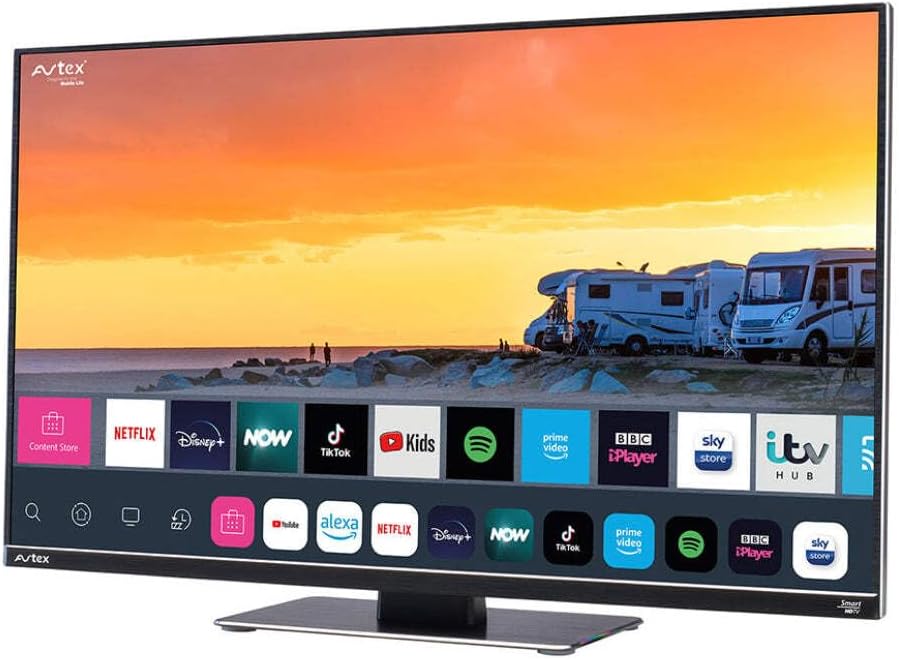
Figure 4.1: Avtex W195TS Smart TV Front View
This image shows the Avtex W195TS Smart TV from a slight angle, highlighting its slim design and the vibrant display. The screen shows a user interface with icons for popular streaming services like Netflix, Disney+, Now, TikTok, Kids, Spotify, Prime Video, BBC iPlayer, Sky Store, and ITV Hub. The background on the screen depicts a scenic view of motorhomes parked near a beach at sunset. The Avtex logo is visible on the top left and bottom left of the TV frame.
4.1. Porty i połączenia
- Porty HDMI: Do podłączania urządzeń zewnętrznych, takich jak odtwarzacze Blu-ray, konsole do gier i dekodery.
- Porty USB (2): Do odtwarzania multimediów z dysków USB lub podłączania akcesoriów USB.
- Wejście antenowe: For connecting a terrestrial TV antenna.
- Wejście satelitarne: For connecting a satellite dish for Freesat or other satellite services.
- Wejście zasilania prądem stałym: For 12V/24V DC power connection.
- Wejście zasilania prądem zmiennym: For 240V AC power connection via adapter.
- Port Ethernet: Do przewodowego połączenia sieciowego.
- Wyjście audio: Do podłączania zewnętrznych systemów audio lub słuchawek.
5. Konfiguracja
5.1. Installing the Stand (Optional)
- Ostrożnie połóż telewizor ekranem do dołu na miękkiej i czystej powierzchni, aby zapobiec uszkodzeniu ekranu.
- Dopasuj podstawę do otworów montażowych znajdujących się na spodzie telewizora.
- Zabezpiecz stojak za pomocą dołączonych śrub.
5.2. Podłączenie zasilania
The Avtex W195TS supports multiple power inputs:
- 12V/24V prądu stałego: Connect the supplied 12V/24V DC power cable to the DC input on the TV and to your vehicle's 12V or 24V power outlet.
- 240 V AC: Connect the supplied 240V AC power adapter to the AC input on the TV, then plug the adapter into a standard 240V AC wall socket.
Notatka: Do not connect both DC and AC power simultaneously.
5.3. Połączenie antenowe/satelitarne
- Terrestrial TV: Connect your aerial cable to the 'ANTENNA IN' port.
- Satellite TV (Freesat): Connect your satellite dish cable to the 'SATELLITE IN' port.
5.4. Pierwsze włączenie i pierwsza konfiguracja
- Connect the TV to power and press the power button on the remote control or TV.
- The First-Time Setup Wizard will appear. Follow the on-screen prompts to select your language, country, and time zone.
- Perform an automatic channel scan for both terrestrial and satellite channels.
- Połącz się z siecią Wi-Fi, wybierając nazwę sieci i podając hasło.
6. Obsługa
6.1. Funkcje pilota
Zapoznaj się z przyciskami pilota, aby łatwiej poruszać się po telewizorze i sterować jego funkcjami.
- Przycisk zasilania: Włącza/wyłącza telewizor.
- Przycisk źródła: Selects input sources (HDMI, USB, TV, Satellite).
- Głośność +/-: Dostosowuje poziom głośności.
- Kanał +/-: Zmienia kanały telewizyjne.
- Przyciski nawigacyjne (góra/dół/lewo/prawo/OK): Do nawigacji po menu i dokonywania wyborów.
- Smart Hub/Home Button: Umożliwia dostęp do interfejsu Smart TV.
- Przyciski aplikacji: Dedicated buttons for popular streaming apps (if available).
6.2. Funkcje Smart TV
Your Avtex W195TS is equipped with smart TV capabilities:
- Sklep z aplikacjami: Download and install various applications for streaming, news, and entertainment.
- Usługi przesyłania strumieniowego: Access pre-installed or downloaded apps like Netflix, Disney+, Prime Video, BBC iPlayer, etc. (subscription may be required).
- Web Przeglądarka: Przeglądaj Internet bezpośrednio na ekranie telewizora.
- Dublowanie ekranu: Connect your smartphone or tablet to display content on the TV screen (compatibility may vary).
6.3. Łączność Bluetooth
Pair Bluetooth devices such as headphones or external speakers for enhanced audio experience.
- Go to the TV's settings menu.
- Select 'Bluetooth' or 'Connected Devices'.
- Enable Bluetooth and put your device into pairing mode.
- Wybierz urządzenie z listy, aby je sparować.
6.4. Media Playback via USB
Insert a USB drive into one of the USB ports to view photos, play videos, or listen to music.
- The TV will usually prompt you to open the media player.
- Poruszaj się po swoim fileza pomocą pilota.
7. Konserwacja
7.1. Czyszczenie telewizora
- Ekran: Delikatnie przetrzyj ekran miękką, niepozostawiającą włókien ściereczką. W przypadku uporczywych zabrudzeń delikatnie przetrzyjampPrzetrzyj ściereczkę wodą lub specjalnym środkiem czyszczącym przeznaczonym do czyszczenia ekranów (nie spryskuj bezpośrednio ekranu).
- Casing: Do czyszczenia telewizora należy używać miękkiej, suchej ściereczki.asing. Unikaj środków czyszczących o właściwościach ściernych i rozpuszczalników.
7.2. Aktualizacje oprogramowania
Periodically check for software updates to ensure your TV has the latest features and bug fixes. Updates can usually be found in the TV's settings menu under 'System' or 'Software Update'.
8. Rozwiązywanie Problemów
If you encounter issues with your Avtex W195TS, refer to the following common problems and solutions:
| Problem | Możliwa przyczyna | Rozwiązanie |
|---|---|---|
| Brak zasilania | Kabel zasilający nie jest podłączony; brak prądu w gniazdku. | Check power cable connection; test outlet with another device; ensure correct voltage (12 V/24 V/240 V). |
| Brak obrazu, ale dźwięk jest obecny | Wybrano niewłaściwe źródło sygnału wejściowego; uszkodzony kabel. | Press the 'Source' button on the remote to select the correct input; check HDMI/antenna cables. |
| Brak dźwięku, ale obraz jest | Głośność wyciszona lub zbyt niska; problem z zewnętrznym systemem audio. | Wyłącz dźwięk lub zwiększ poziom głośności; sprawdź połączenia z zewnętrznymi urządzeniami audio. |
| Nie można połączyć się z siecią Wi-Fi | Nieprawidłowe hasło; problem z routerem; telewizor zbyt daleko od routera. | Re-enter Wi-Fi password; restart router; move TV closer to router or use an extender. |
| Pilot nie działa | Wyczerpane baterie, przeszkody, problemy z parowaniem. | Replace batteries; remove obstructions; re-pair remote if it's a Bluetooth remote. |
9. Specyfikacje
| Funkcja | Specyfikacja |
|---|---|
| Marka | Avtex |
| Numer modelu | AVTEX W195TS |
| Rozmiar ekranu | 19.5 cali |
| Rezolucja | 1080p (Pełna rozdzielczość HD) |
| Proporcje obrazu | 16:9 |
| Technologia łączności | Bluetooth, HDMI, Wi-Fi |
| Łączna liczba portów USB | 2 |
| Tomtage | 12 woltów, 24 woltów, 240 woltów |
| Waga przedmiotu | 2.5 kilograma |
| Rok modelowy | 2018 |
10. Gwarancja i wsparcie
Your Avtex W195TS Smart TV comes with a manufacturer's warranty. Please refer to the warranty card included in your product packaging for specific terms and conditions, including warranty period and coverage details. Keep your proof of purchase for warranty claims.
For technical support, troubleshooting assistance beyond this manual, or warranty inquiries, please contact Avtex customer service through their official website or the contact information provided with your product. When contacting support, please have your model number (AVTEX W195TS) and serial number ready.


