1. Wprowadzenie
This manual provides comprehensive instructions for the setup, operation, maintenance, and troubleshooting of your SteelSeries Arctis Nova 3 Multi-Platform Gaming Headset. Please read this manual thoroughly before using the product to ensure optimal performance and longevity.
The Arctis Nova 3 headset features the custom-designed Nova Acoustic System with High Fidelity Drivers, 360° Spatial Audio, and a 10-band Parametric EQ. It includes an AI-powered noise-cancelling ClearCast Gen 2 microphone and dynamic RGB lighting. Designed for multi-platform compatibility, it connects via USB-C to PC, PlayStation, Xbox Series X|S, Switch, and mobile devices.
2. Koniec produktuview
2.1 Zawartość opakowania
- Słuchawki gamingowe SteelSeries Arctis Nova 3
- Kabel USB-C do USB-C
- Kabel przejściowy z USB-C na USB-A
- Kabel audio USB-C na 3.5 mm
- Dokumentacja (niniejszy podręcznik)
2.2 Elementy zestawu słuchawkowego
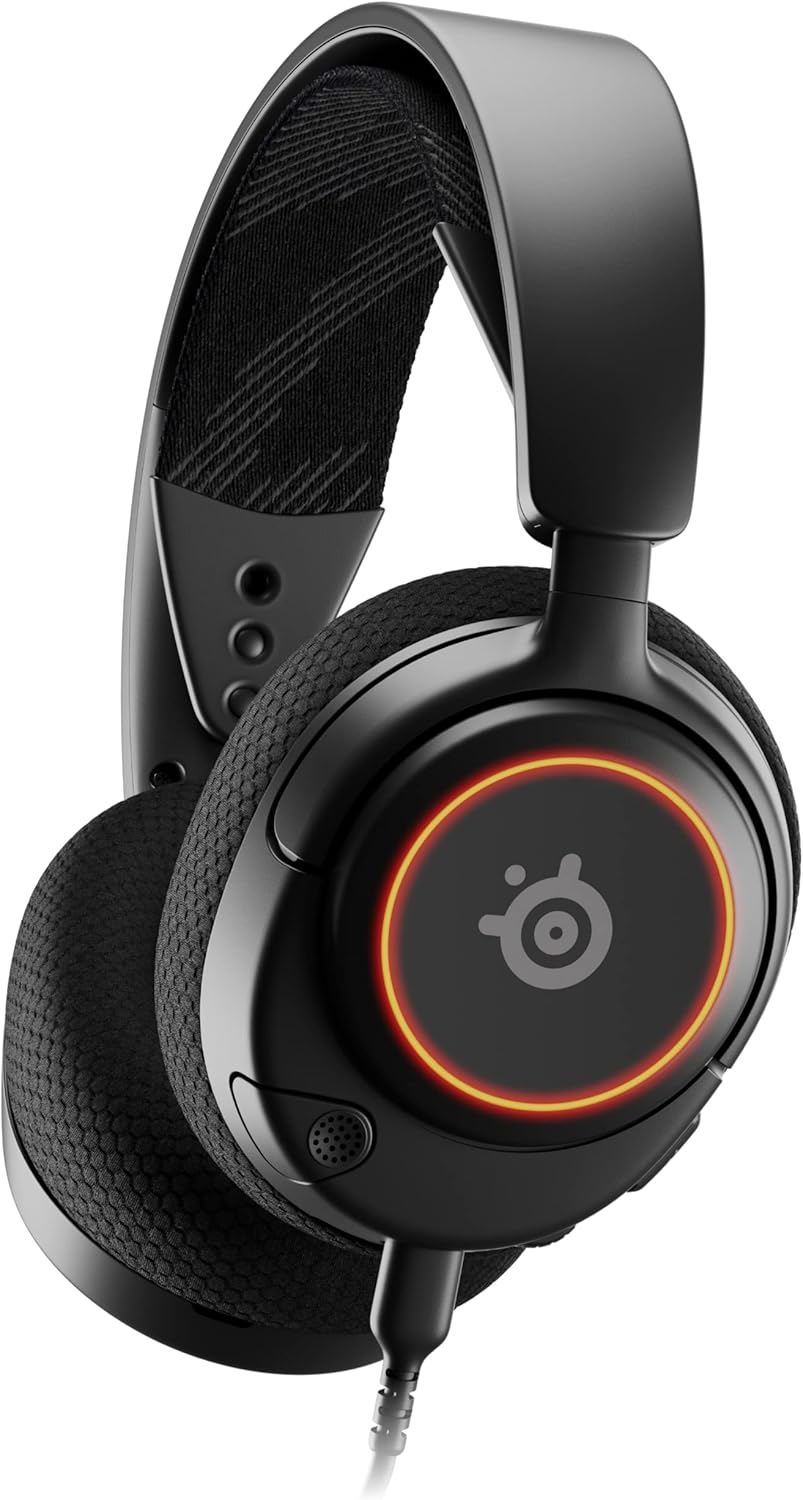
Rysunek 1: Przód view of the Arctis Nova 3 headset.

Rysunek 2: Key features of the Arctis Nova 3, including ComfortMAX System, 360° Spatial Audio, Dual-Zone RGB, Nova Acoustic System, ClearCast Gen 2 AI-Powered Noise-Cancelling Mic, and Multi-Platform Support.
- ComfortMAX System: Features height-adjusting, rotating earcups with AirWeave Memory Foam cushions and a stretchy band for comfortable wear.
- ClearCast Gen 2 Mic: AI-powered noise-cancelling microphone, fully retractable into the earcup.
- Dual-Zone RGB Lighting: Customizable 16.8 million color options on the earcups.
- Nova Acoustic System: Custom-designed with High Fidelity Drivers for superior sound.
- Sterownica: Volume wheel and microphone mute switch located on the earcup.
- Port łączności: USB-C port for various cable connections.
3. Konfiguracja
3.1 Podłączanie zestawu słuchawkowego
The Arctis Nova 3 offers versatile connectivity options:
- Połączenie USB-C: Use the provided USB-C to USB-C cable to connect directly to devices with a USB-C port (e.g., PC, PlayStation 5, Nintendo Switch, mobile devices).
- Połączenie USB-A: For devices with only USB-A ports, use the USB-C to USB-A adapter cable. Connect the USB-C end to the headset and the USB-A end to your device.
- Złącze audio 3.5 mm: For devices requiring a 3.5mm audio jack (e.g., Xbox controllers, older consoles, some mobile devices), use the USB-C to 3.5mm audio cable. Connect the USB-C end to the headset and the 3.5mm jack to your device.
Wideo 1: Produkt ponadview demonstrating various connectivity options and features of the Arctis Nova 3 headset.
Wideo 2: 360 stopni view of the Arctis Nova 3 Black headset, showcasinoglądając jego konstrukcję i funkcje z każdej strony.
3.2 Dopasowanie dopasowania
The ComfortMAX System allows for personalized fit:
- Regulacja pałąka: The elastic suspension band can be adjusted to different lengths using the three holes on each side of the headband, ensuring a comfortable fit that distributes weight evenly.
- Obrót nauszników: The earcups can rotate 90 degrees, allowing the headset to lay flat for storage or comfortable resting around the neck.

Rysunek 3: The adjustable headband and rotating earcups of the Arctis Nova 3 for a personalized and comfortable fit.

Rysunek 4: The super lightweight design (253g) of the Arctis Nova 3 with memory foam earcup cushions for extended comfort.
4. Instrukcja obsługi
4.1 Sterowanie dźwiękiem
- Koło głośności: Rotate the wheel on the left earcup up or down to adjust the headset's audio volume.
- Przełącznik wyciszania mikrofonu: Slide the switch on the left earcup to mute or unmute the ClearCast Gen 2 microphone. An orange indicator will be visible when muted.
4.2 Korzystanie z mikrofonu
- Wysuń/Wsuń: The ClearCast Gen 2 microphone is fully retractable. Gently pull it out from the left earcup for use and push it back in for storage.
- Pozycjonowanie: Aby uzyskać optymalną czystość głosu, umieść mikrofon w odległości około 1–2 cm od ust.

Rysunek 5: The ClearCast Gen 2 mic, which silences background noise and fully retracts into the earcup.
4.3 RGB Lighting Customization (PC Only)
Dynamic RGB lighting can be customized via the SteelSeries Engine software on PC. This allows for 16.8 million color options and reactive lighting effects.

Rysunek 6: Customizable PrismSync RGB lighting with 16.8 million colors on the Arctis Nova 3 headset.
5. Konserwacja
- Czyszczenie: Do czyszczenia zestawu słuchawkowego używaj miękkiej, suchej ściereczki. Unikaj środków czyszczących o właściwościach ściernych i rozpuszczalników.
- Składowanie: Przechowuj zestaw słuchawkowy w chłodnym, suchym miejscu, z dala od bezpośredniego światła słonecznego i ekstremalnych temperatur.
- Pielęgnacja kabli: Aby zapobiec uszkodzeniom, należy unikać ostrego zginania i nadmiernego ciągnięcia kabli.
6. Rozwiązywanie Problemów
| Problem | Możliwa przyczyna | Rozwiązanie |
|---|---|---|
| Brak dźwięku z zestawu słuchawkowego | Incorrect connection, low volume, muted device. | Ensure cables are securely connected. Check headset volume wheel and device audio settings. Confirm device is not muted. |
| Mikrofon nie działa | Microphone muted, incorrect input device selected, mic not extended. | Check microphone mute switch (orange indicator means muted). Ensure microphone is fully extended. Verify correct input device is selected in your system's sound settings. |
| RGB lighting not working (PC) | Software issue, incorrect USB connection. | Ensure SteelSeries Engine software is installed and updated. Confirm headset is connected via USB-C or USB-A (RGB not supported via 3.5mm). |
| Dyskomfort podczas użytkowania | Niewłaściwe dopasowanie. | Adjust the elastic headband and earcup positions for optimal comfort. |
7. Specyfikacje
| Funkcja | Szczegół |
|---|---|
| Nazwa modelu | SteelSeries Arctis Nova 3 Multi-Platform Gaming Headset |
| Numer modelu | 61631 |
| Technologia łączności | USB-C (includes USB-A and 3.5mm adapters) |
| Typ sterownika audio | Dynamic Driver (Nova Acoustic System) |
| Odpowiedź częstotliwościowa | 20-22000 XNUMX Hz |
| Impedancja | 36 omy |
| Mikrofon | ClearCast Gen 2 AI-Powered Noise-Cancelling, Retractable |
| Dźwięk przestrzenny | 360° Spatial Audio (compatible with Tempest 3D Audio for PS5 / Microsoft Spatial Sound) |
| Waga | 8.3 uncji (około 235 g) |
| Wymiary (dł. x szer. x wys.) | 7.32 x 6.82 x 3.47 cala |
| Tworzywo | Foam, Aluminum |
| Oświetlenie RGB | Dynamic 16.8 million color options (PrismSync RGB) |
| Kompatybilne urządzenia | PC, PlayStation 5|4, Xbox Series X|S, Switch, Mobile |
8. Gwarancja i wsparcie
For warranty information and technical support, please visit the official SteelSeries webOdwiedź witrynę lub skontaktuj się z działem obsługi klienta. Zachowaj dowód zakupu na wypadek reklamacji.
Official SteelSeries Webstrona: SteelSeries Store on Amazon


