Wstęp
This instruction manual provides detailed guidance for the installation, operation, and maintenance of the Futaba T10PX Large Steering Wheel Kit. This accessory is designed to enhance the ergonomic feel and control precision of your Futaba T10PX radio transmitter, offering a more comfortable and responsive driving experience for remote-controlled vehicles.
Konfiguracja i instalacja
Follow these steps to correctly install the Large Steering Wheel Kit onto your Futaba T10PX transmitter.
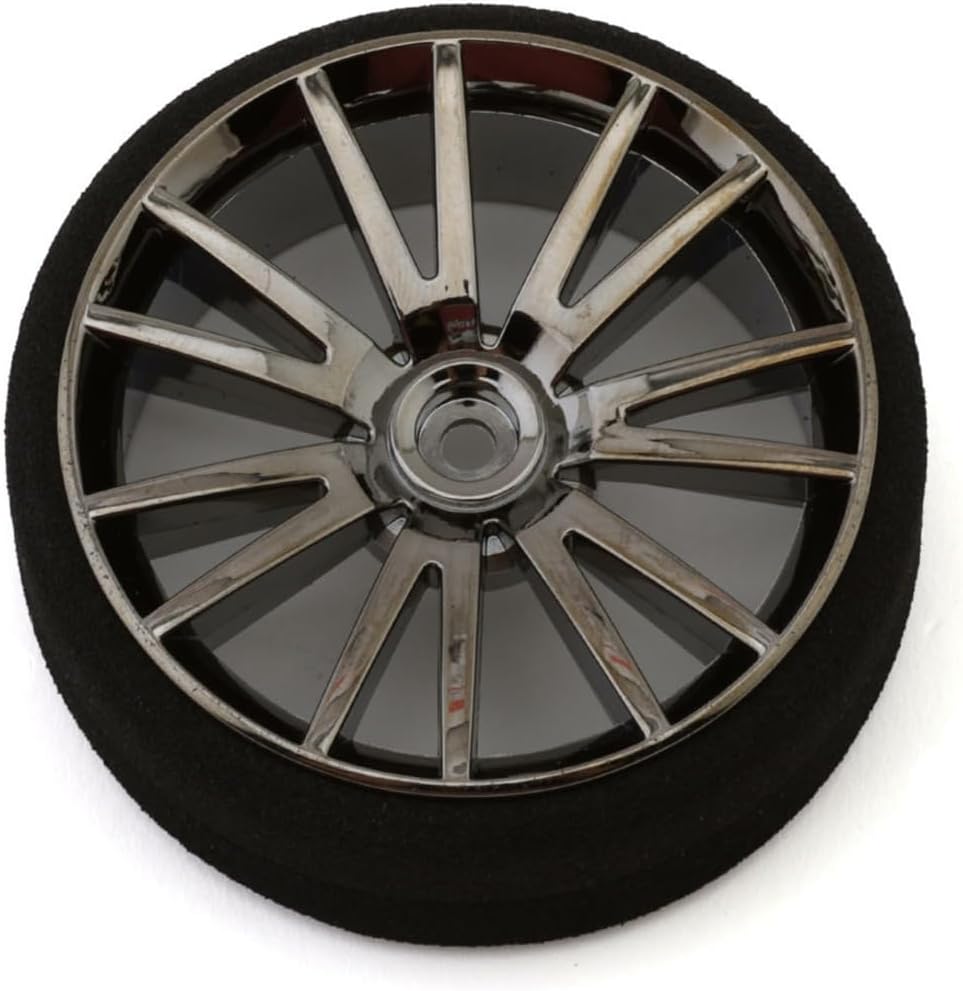
Figure 1: Futaba T10PX Large Steering Wheel Kit component. This image displays the primary component of the Futaba T10PX Large Steering Wheel Kit, featuring a multi-spoke chrome-finished wheel attached to a black foam grip. This component replaces the standard steering wheel on the Futaba T10PX transmitter to provide enhanced control.
- Przygotowanie: Ensure your Futaba T10PX transmitter is powered off before beginning installation. Place the transmitter on a clean, stable surface.
- Usuń oryginalną kierownicę: Carefully locate the screw or mechanism securing the standard steering wheel on your T10PX transmitter. Use an appropriate screwdriver (not included) to loosen and remove it. Gently pull the original steering wheel off the transmitter shaft.
- Install Large Steering Wheel: Align the shaft opening of the new Large Steering Wheel Kit component (as shown in Figure 1) with the transmitter's steering shaft. Push the new wheel firmly onto the shaft until it is fully seated.
- Secure the New Wheel: Reinsert the screw or engage the securing mechanism to fasten the Large Steering Wheel. Tighten it sufficiently to ensure the wheel is secure but do not overtighten, which could damage the shaft or wheel.
- Sprawdź instalację: Gently rotate the new steering wheel to ensure it moves freely and smoothly without any binding or excessive play.
Obsługa zestawu
Once installed, the Large Steering Wheel operates identically to the standard wheel but offers enhanced ergonomics and potentially finer control due to its larger diameter.
- Ergonomia: The larger diameter and comfortable foam grip are designed to reduce hand fatigue during extended use and provide a more natural steering motion.
- Precyzja: The increased leverage provided by the larger wheel can allow for more precise and subtle steering inputs, which can be beneficial in competitive racing or demanding driving conditions.
- Kalibrowanie: No specific calibration is required for the steering wheel itself, as it is a mechanical replacement. Any steering calibration should be performed within your T10PX transmitter's settings as per its own instruction manual.
Konserwacja
Proper maintenance ensures the longevity and optimal performance of your Large Steering Wheel Kit.
- Czyszczenie: Use a soft, dry cloth to wipe down the chrome wheel and foam grip. For stubborn dirt on the foam, a slightly damp cloth with mild soap can be used, but ensure it is thoroughly dried afterward. Avoid harsh chemicals or abrasive cleaners.
- Kontrola: Periodically inspect the steering wheel for any signs of wear, damage, or looseness. Ensure the securing screw remains tight.
- Składowanie: When not in use, store your T10PX transmitter with the installed steering wheel in a clean, dry environment, away from direct sunlight and extreme temperatures.
Rozwiązywanie problemów
This section addresses common issues you might encounter with the Large Steering Wheel Kit.
| Problem | Możliwa przyczyna | Rozwiązanie |
|---|---|---|
| Steering wheel feels loose after installation. | Securing screw is not tightened sufficiently. | Ensure the securing screw is properly tightened. Do not overtighten. |
| Steering wheel does not rotate smoothly. | Incorrect alignment during installation or debris on the shaft. | Remove the wheel, inspect the transmitter shaft and wheel opening for debris, clean if necessary, and re-install ensuring proper alignment. |
| Foam grip feels sticky or degraded. | Exposure to harsh chemicals, oils, or prolonged direct sunlight. | Clean with a mild soap solution and dry thoroughly. Avoid exposure to damaging substances. If severely degraded, consider replacement. |
Specyfikacje
- Wymiary produktu (dł. x szer. x wys.): 8.89 x 6.35 x 2.92 cm (3.5 x 2.5 x 1.15 cala)
- Waga produktu: 22.68 gramów (0.8 uncji)
- Materiał główny: Aluminum (for the wheel structure)
- Wymagane baterie: No (for the kit itself)
- Zgodność: Nadajnik Futaba T10PX
Informacje o gwarancji
Specific warranty details for the Futaba T10PX Large Steering Wheel Kit are not provided in this manual. For information regarding warranty coverage, terms, and conditions, please refer to the documentation included with your original Futaba T10PX transmitter or contact Futaba customer support directly. Alternatively, you may consult the retailer from whom you purchased this kit.
Obsługa klienta
If you encounter any issues or have questions not covered in this manual, please contact Futaba customer support for assistance. You can typically find contact information on the official Futaba website or through the original product packaging of your T10PX transmitter. For purchase-related inquiries, please contact the seller, RCprofi, directly.
Note: Always refer to the official Futaba T10PX transmitter manual for detailed operational and safety guidelines related to the transmitter itself.


