1. Koniec produktuview
The Hikvision DS-KIS202T is a 7-inch analog video door phone kit designed for residential use. This kit includes an outdoor unit (DS-KB2411T-IM) and an indoor monitor (DS-KH2220), providing secure and convenient communication with visitors. It supports hands-free video intercom, remote unlocking, and monitoring of the external camera.
Główne cechy obejmują:
- 7-inch TFT LCD color display for clear video.
- Hands-free video intercom communication.
- Support for up to three indoor stations simultaneously.
- Monitoring of the outdoor unit and external analog cameras.
- Remote unlock function.
- Outdoor unit with self-adaptive IR supplement for night vision.
- Easy installation with a 4-wire connection.

Figure 1: Hikvision DS-KIS202T Video Door Phone Kit, featuring the indoor monitor displaying a family and the sleek outdoor unit.
2. Zawartość opakowania
Przed instalacją należy sprawdzić, czy wszystkie komponenty są obecne:
- 1 x DS-KH2220 Indoor Monitor (7-inch)
- 1 x DS-KB2411T-IM Outdoor Unit
- 1 x 5-meter 4-wire cable
- Akcesoria montażowe (śruby, kołki rozporowe)
- Instrukcja obsługi (ten dokument)
3. Konfiguracja i instalacja
This section provides general guidelines for installing your Hikvision DS-KIS202T video door phone. Professional installation is recommended.
3.1 Środki ostrożności
- Przed instalacją upewnij się, że zasilanie jest odłączone.
- Avoid installing the outdoor unit in direct sunlight or heavy rain.
- Do not expose the indoor monitor to high humidity or extreme temperatures.
- Use only the specified power adapter (12 VDC).
3.2 Identyfikacja komponentów

Figure 2: The Hikvision DS-KIS202T indoor monitor and outdoor unit, illustrating their relative sizes and placement near a door.
- Outdoor Unit (DS-KB2411T-IM): Equipped with a camera, microphone, speaker, call button, and IR illuminator.
- Indoor Monitor (DS-KH2220): Features a 7-inch display, physical buttons for operation, microphone, and speaker.
3.3 Schemat okablowania (połączenie 4-żyłowe)
The system uses a 4-wire interface for connection between the outdoor unit and the indoor monitor. These wires typically include:
- Video Input Channel
- Audio Input/Output Channel
- Power Supply Channel (12 VDC)
- Kanał naziemny
Connect the corresponding terminals on both units using the provided 4-wire cable. Ensure correct polarity for power connections.
Warning: Incorrect wiring can damage the device. Refer to the detailed wiring diagram in the full technical manual if available.
3.4 Montaż jednostek
- Jednostka zewnętrzna: Mount the outdoor unit at a height that allows the camera to capture visitors' faces clearly (typically 1.4 to 1.6 meters from the ground). Use the provided screws and wall plugs.
- Monitor wewnętrzny: Mount the indoor monitor in a convenient location inside your home, away from direct heat sources or moisture.
4. Instrukcja obsługi
4.1 Odbieranie połączenia
When a visitor presses the call button on the outdoor unit, the indoor monitor will ring and display the visitor's video feed. You can then:
- Odpowiedź: Press the "Answer" button (usually represented by a phone icon) on the indoor monitor to initiate hands-free two-way communication.
- Ignorować: The call will automatically end after a set period if not answered.
4.2 Komunikacja dwukierunkowa
Once a call is answered, you can speak with the visitor through the integrated microphone and speaker on both units. The system supports noise suppression and acoustic echo cancellation for clear audio.
4.3 Zdalne odblokowanie
During a call or while monitoring, press the "Unlock" button (often represented by a key icon) on the indoor monitor to remotely open an electronically controlled door lock (if connected to the outdoor unit's unlock control terminals).
4.4 Monitorowanie jednostki zewnętrznej
Możesz ręcznie view the live video feed from the outdoor unit at any time without a visitor pressing the call button. Press the "Monitor" button (usually an eye icon) on the indoor monitor to activate this function.
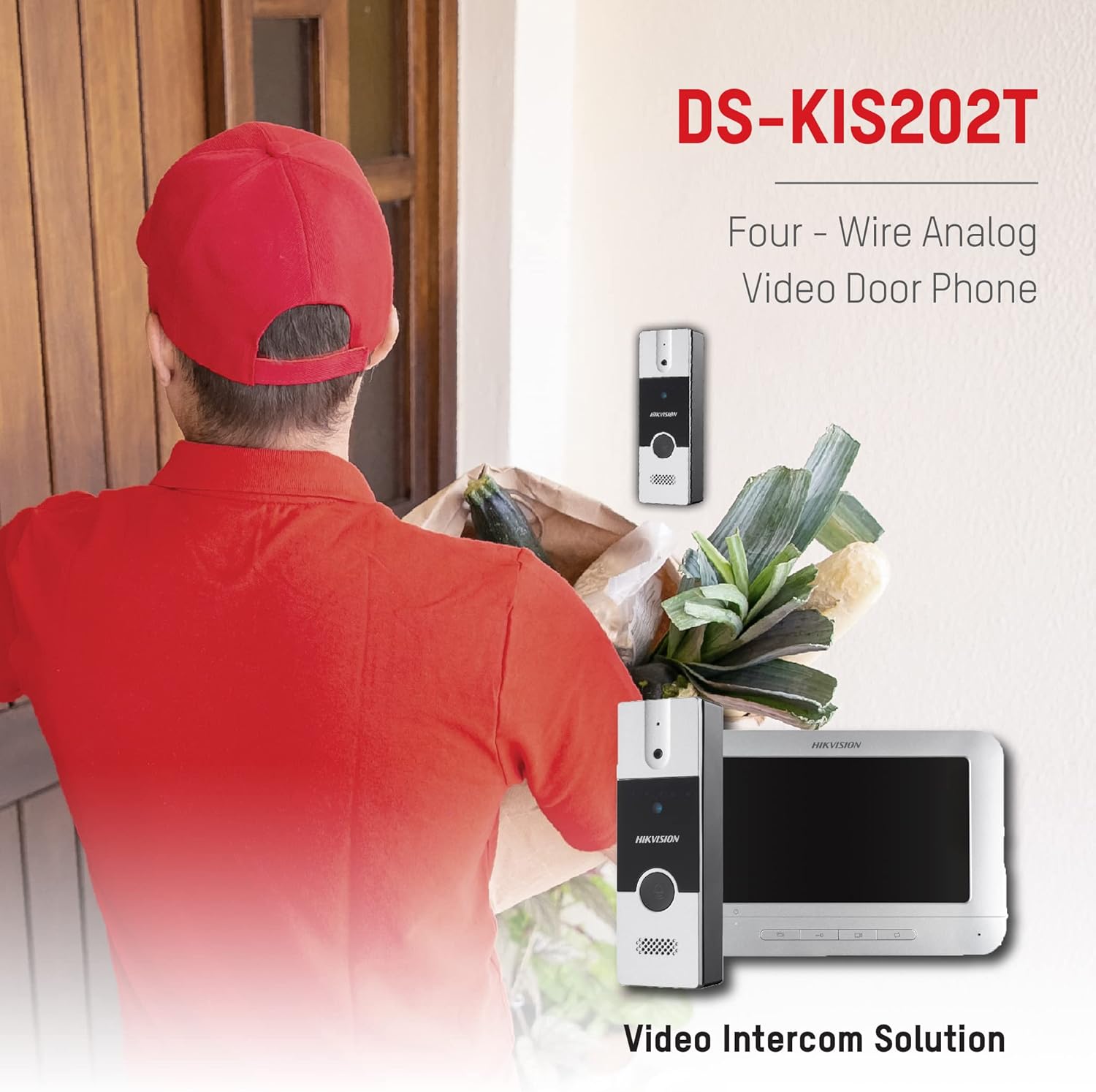
Figure 3: The Hikvision DS-KIS202T in operation, showing a delivery person at the door and the corresponding view na monitorze wewnętrznym.
4.5 Intercom Between Indoor Stations
If multiple indoor monitors are installed, they can communicate with each other. Refer to the specific instructions for initiating an intercom call between indoor stations.
5. Konserwacja
- Czyszczenie: Do czyszczenia monitora wewnętrznego i jednostki zewnętrznej należy używać miękkiej, suchej ściereczki. Nie należy używać środków czyszczących o właściwościach ściernych ani rozpuszczalników.
- Warunki środowiskowe: Ensure the units operate within the specified temperature and humidity ranges (-10°C to +55°C, 10% to 90% humidity).
- Kontrola kabla: Periodically check all wiring for signs of wear or damage.
- Aktualizacje oprogramowania układowego: Sprawdź oficjalną stronę Hikvision webodwiedź tę witrynę, aby sprawdzić, czy są dostępne aktualizacje oprogramowania sprzętowego, które poprawią wydajność i bezpieczeństwo.
6. Rozwiązywanie Problemów
| Problem | Możliwa przyczyna | Rozwiązanie |
|---|---|---|
| Brak obrazu na monitorze wewnętrznym. |
|
|
| Brak dźwięku podczas interkomu. |
|
|
| Zdalne odblokowanie nie działa. |
|
|
| Outdoor unit not ringing indoor monitor. |
|
|
7. Specyfikacje
7.1 Indoor Monitor (DS-KH2220)
- Ekran wyświetlacza: Kolorowy wyświetlacz LCD TFT o przekątnej 7 cala
- Rozdzielczość wyświetlacza: 800x480
- Metoda działania: Przycisk fizyczny
- Wejście audio: Wbudowany mikrofon dookólny
- Wyjście audio: Wbudowany głośnik
- Jakość dźwięku: Noise Suppression and Acoustic Echo Cancellation
- Interfejs 4-Wire: 4 interfaces (1-ch video input, 1-ch audio input/output, 1-ch power supply, 1-ch ground)
- Zasilanie: 12 V prądu stałego
- Pobór mocy: Max. 5W
- Temperatura pracy: -10°C do +55°C (14°F do 131°F)
- Wilgotność robocza: od 10% do 90%
- Wymiary (wys. x szer. x gł.): Wymiary: 133mm x 197mm x 14mm
7.2 Outdoor Unit (DS-KB2411T-IM)
- Kamera: 1/4" CMOS
- Rezolucja: 720x576
- Szybkość klatek wideo: PAL: 25 kl./s
- Wejście audio: Wbudowany mikrofon dookólny
- Wyjście audio: Wbudowany głośnik
- Jakość dźwięku: Noise Suppression and Acoustic Echo Cancellation
- Tryb oświetlenia: Self-adaptive IR Supplement
- Przycisk dzwonienia: One-touch call
- Unlock Control: Utrzymany
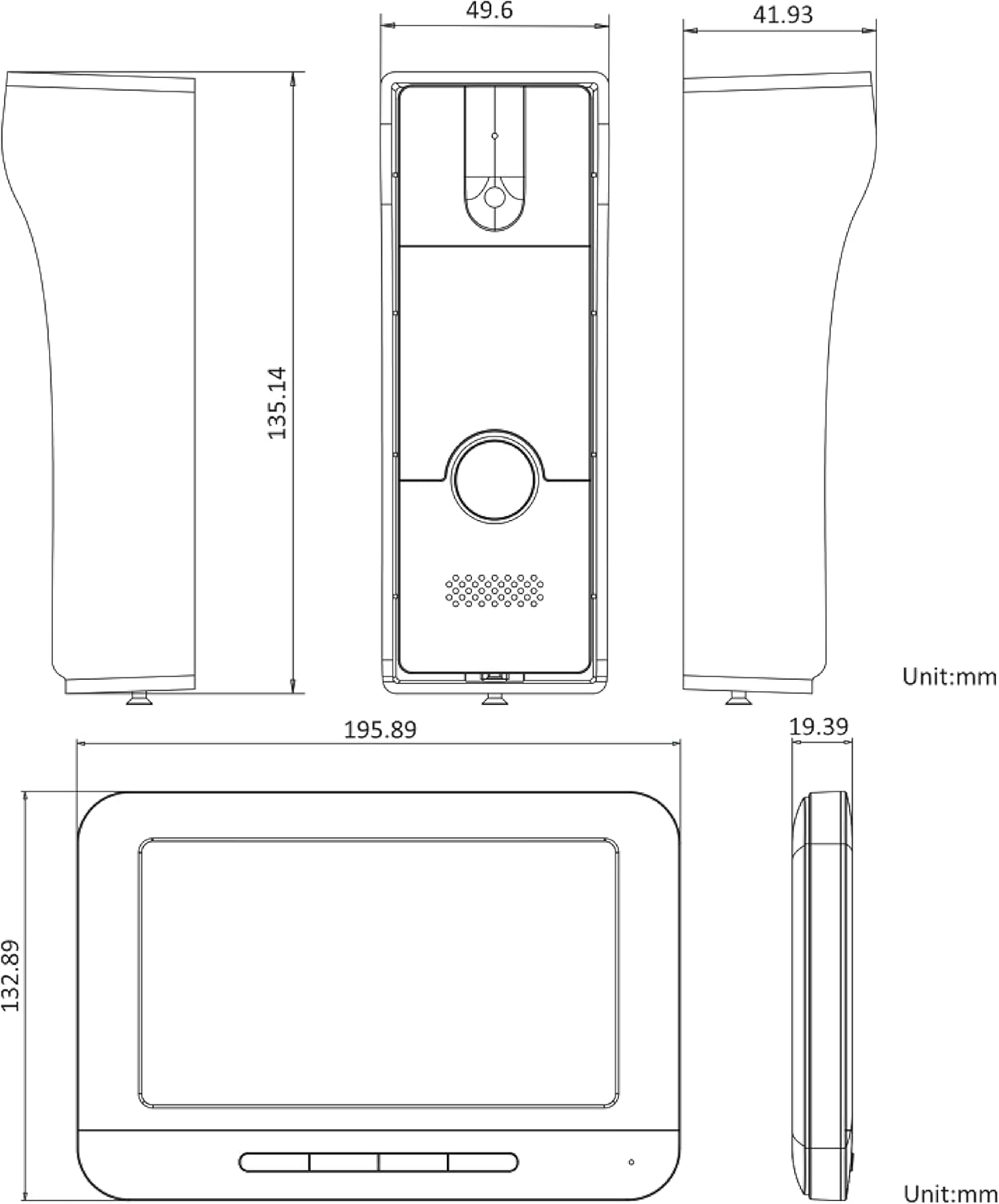
Figure 4: Detailed technical drawing showing the dimensions of both the indoor monitor and the outdoor unit of the Hikvision DS-KIS202T system.
8. Gwarancja i wsparcie
Hikvision products typically come with a limited manufacturer's warranty. Please refer to the warranty card included with your product or visit the official Hikvision webAby zapoznać się ze szczegółowymi warunkami gwarancji obowiązującymi w Twoim regionie, odwiedź naszą witrynę.
For technical support, troubleshooting assistance, or service inquiries, please contact your local Hikvision dealer or authorized service center. You may also find additional resources, FAQs, and support documentation on the official Hikvision support webstrona.
When contacting support, please have your product model number (DS-KIS202T) and serial number ready.


