1. Wprowadzenie
Dziękujemy za zakupasing the Karlsson Bamboo Mini Cube Alarm Clock. This compact and stylish alarm clock features a digital display, time and temperature functions, and an adjustable alarm volume. Please read this manual carefully before using the product to ensure proper operation and to maximize its lifespan.
2. Informacje dotyczące bezpieczeństwa
- Nie wystawiaj urządzenia na działanie ekstremalnych temperatur, bezpośredniego światła słonecznego i wysokiej wilgotności.
- Unikaj upuszczania i narażania urządzenia na silne uderzenia.
- Nie próbuj samodzielnie demontować ani naprawiać urządzenia. Wszelkie czynności serwisowe zlecaj wykwalifikowanemu personelowi.
- Use only the specified power source (3 AAA batteries or compatible power cable).
- Przechowywać w miejscu niedostępnym dla dzieci.
3. Zawartość opakowania
- Karlsson Bamboo Mini Cube Alarm Clock
- Instrukcja obsługi
Note: 3 AAA batteries and a power cable are not included and must be purchased separately.
4. Koniec produktuview
Zapoznaj się z głównymi elementami swojego budzika.

Rycina 4.1: Przód view of the Karlsson Bamboo Mini Cube Alarm Clock displaying the time.
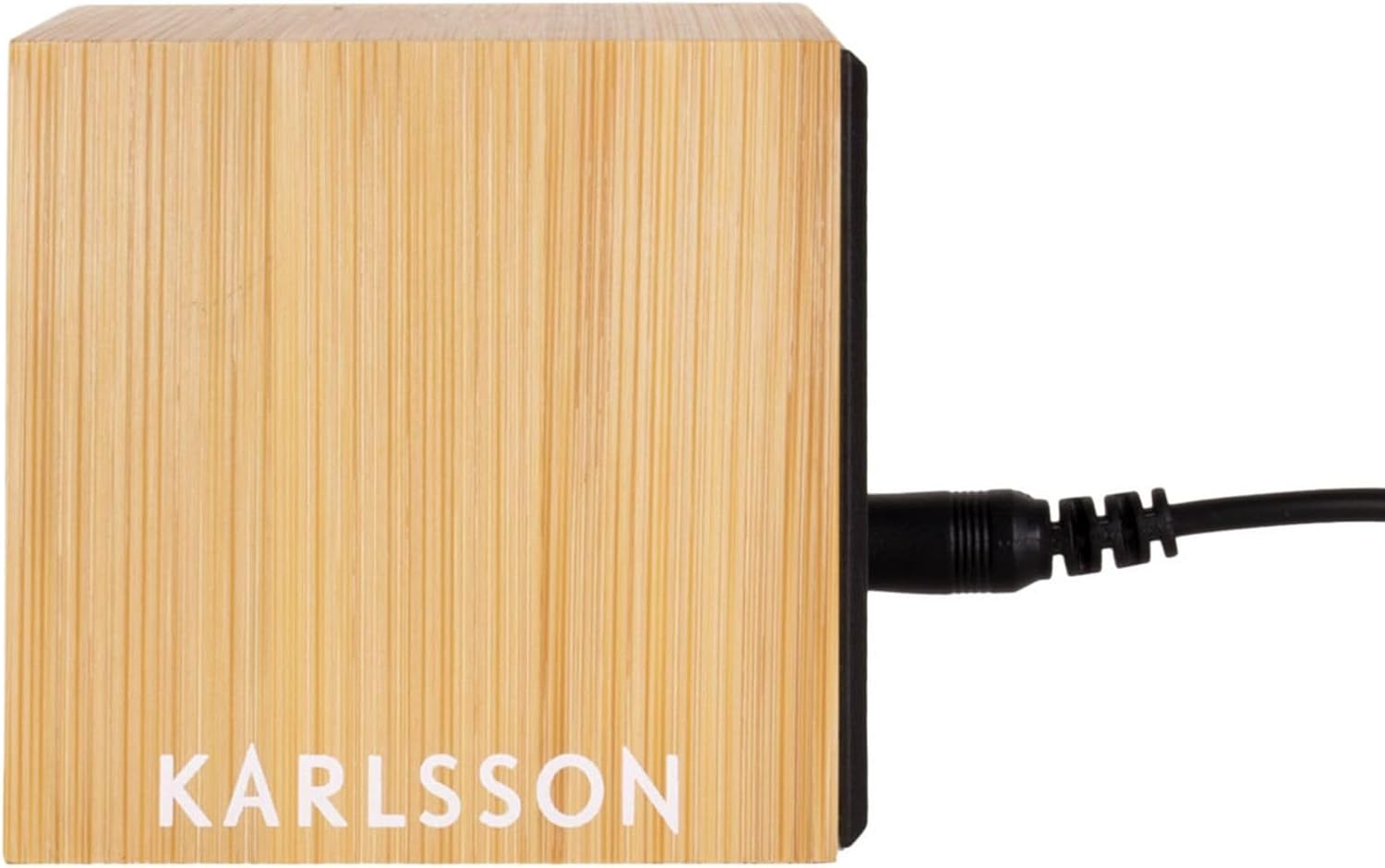
Rysunek 4.2: Tył view of the alarm clock, showing the power input port.
The clock features a light brown bamboo casing with a black digital display. Control buttons are typically located on the back or bottom of the unit for setting time, alarm, and other functions.
5. Konfiguracja
5.1. Włączanie urządzenia
The alarm clock can be powered by 3 AAA batteries or via a compatible power cable (not included).
5.1.1. Instalacja baterii
- Znajdź pokrywę komory baterii z tyłu lub na spodzie zegara.
- Zdejmij pokrywę.
- Włóż 3 nowe baterie AAA, zwracając uwagę na prawidłową biegunowość (+ i -).
- Dokładnie załóż pokrywę komory baterii.
5.1.2. Power Cable Connection (Optional)
- Locate the power input port on the back of the clock (refer to Figure 4.2).
- Connect a compatible power cable (e.g., USB cable with appropriate adapter) to the port.
- Podłącz drugi koniec kabla do źródła zasilania.
Note: Using the power cable may provide a continuous display, while battery power might activate the display only when sound is detected or a button is pressed to conserve energy.
6. Instrukcja obsługi
The clock typically has buttons for SET, UP, and DOWN, or similar controls.
6.1. Ustawianie czasu
- Naciśnij USTAWIĆ button (or equivalent) to enter time setting mode. The hour digits will typically flash.
- Użyj UP I W DÓŁ przyciski do regulacji godziny.
- Naciskać USTAWIĆ again to move to the minute setting. The minute digits will flash.
- Użyj UP I W DÓŁ przyciski, aby ustawić minuty.
- Naciskać USTAWIĆ jeszcze raz, aby potwierdzić i wyjść z trybu ustawiania czasu.
6.2. Ustawianie alarmu
- Naciśnij ALARM przycisk (lub naciśnij USTAWIĆ multiple times until alarm icon flashes). The alarm hour digits will flash.
- Użyj UP I W DÓŁ przyciski umożliwiające ustawienie żądanej godziny alarmu.
- Naciskać ALARM (Lub USTAWIĆ) again to move to the alarm minute setting.
- Użyj UP I W DÓŁ przyciski umożliwiające ustawienie żądanych minut alarmu.
- Naciskać ALARM (Lub USTAWIĆ) potwierdzać.
- To activate/deactivate the alarm, look for a dedicated alarm ON/OFF switch or a specific button press sequence (e.g., short press of ALARM button). An alarm icon will typically appear on the display when active.
6.3. Wyświetlacz temperatury
The clock automatically displays the ambient temperature. This display may alternate with the time display or be shown simultaneously, depending on the model. No user input is typically required for this function.
6.4. Regulacja głośności alarmu
Some models allow adjustment of the alarm volume. Look for dedicated volume buttons (Objętość + / TOM-) or a setting within the alarm setup menu. Consult the specific button labels on your device.
7. Konserwacja
- Czyść powierzchnię zegara miękką, suchą ściereczką. Nie używaj środków czyszczących ani rozpuszczalników o działaniu ściernym.
- If using batteries, replace them promptly when the display dims or functions become erratic. Remove batteries if the clock will not be used for an extended period to prevent leakage.
8. Rozwiązywanie Problemów
| Problem | Możliwa przyczyna | Rozwiązanie |
|---|---|---|
| Wyświetlacz jest pusty lub przyciemniony. | Low batteries or no power connection. | Wymień baterie lub podłącz do źródła zasilania. |
| Alarm nie włącza się. | Alarm nie został aktywowany lub został nieprawidłowo ustawiony. | Ensure alarm is ON and set to the correct time. Check alarm volume. |
| Czas jest nieprawidłowy. | Nie ustawiono czasu lub nastąpiła przerwa w dostawie prądu. | Reset the time according to Section 6.1. |
| Odczyt temperatury wydaje się niedokładny. | Device placed near heat source/vent or in direct sunlight. | Przenieś zegar w miejsce o stabilnej temperaturze otoczenia. |
9. Specyfikacje
- Marka: Karlsson
- Numer modelu: PTG-KA5723
- Kolor: White (Note: Product description states Light Brown, but specifications list White. User should refer to product packaging for exact color.)
- Wymiary produktu (dł. x szer. x wys.): 16 x 3.81 x 12.19 cm (6.3 x 1.5 x 4.8 cala)
- Tworzywo: Wood (Bamboo)
- Cechy: Calendar display, Alarm
- Waga przedmiotu: 420 gramów (0.93 funta)
- Typ wyświetlacza: Cyfrowy
- Źródło zasilania: Battery Powered (3 AAA batteries, not included), optional power cable
10. Gwarancja i wsparcie
For warranty information and customer support, please refer to the documentation provided with your purchase or contact the retailer where the product was acquired. You may also visit the official Karlsson webAby uzyskać dalszą pomoc, odwiedź naszą witrynę.


