1. Wprowadzenie
This manual provides essential information for the safe and efficient use of your new Hyundai 43-inch 4K Ultra HD Smart LED TV, model UHDHY43WSR4BYI5. Please read these instructions thoroughly before operating the television and retain them for future reference. This guide covers setup, operation, maintenance, and troubleshooting to ensure you get the best experience from your device.

Image: Hyundai 43-inch 4K Smart LED TV front view z WebInterfejs systemu operacyjnego.
2. Informacje dotyczące bezpieczeństwa
Aby zmniejszyć ryzyko porażenia prądem, pożaru lub uszkodzenia telewizora, zawsze należy przestrzegać poniższych podstawowych środków ostrożności:
- Źródło zasilania: Podłączaj telewizor wyłącznie do gniazdka sieciowego o odpowiedniej głośności.tage jak wskazano na etykiecie produktu.
- Wentylacja: Ensure adequate ventilation around the TV. Do not block ventilation openings or place the TV on soft surfaces that may block airflow.
- Woda i wilgoć: Nie wystawiaj telewizora na działanie deszczu ani wilgoci. Nie stawiaj na nim przedmiotów wypełnionych płynami, takich jak wazony.
- Czyszczenie: Odłącz telewizor od zasilania przed czyszczeniem. Użyj miękkiej, suchej ściereczki. Nie używaj środków czyszczących w płynie ani w aerozolu.
- Umieszczenie: Ustaw telewizor na stabilnej, równej powierzchni. Unikaj umieszczania go w bezpośrednim świetle słonecznym lub w pobliżu źródeł ciepła.
- Dzieci: Pilnuj, aby dzieci nie wspinały się na telewizor ani meble, na których stoi telewizor.
3. Zawartość opakowania
Sprawdź, czy w opakowaniu znajdują się wszystkie elementy:
- 1 x Hyundai 43-inch LED TV
- 1 x Remote Control (Magic Remote)
- 1 x Instrukcja obsługi
- 1 x Karta gwarancyjna
- 1 x Pair of Table Stand
- 1 x zestaw do montażu na ścianie
4. Konfiguracja fizyczna
4.1. Montaż telewizora
Your TV supports both table-top placement and wall mounting. Choose the method that best suits your environment.
Montaż stojaka na stół:
- Ostrożnie połóż telewizor ekranem do dołu na miękkiej i czystej powierzchni, aby zapobiec uszkodzeniu ekranu.
- Attach the provided table stands to the designated slots on the bottom of the TV using the screws included in the kit. Ensure they are securely fastened.
- Ustaw telewizor na stabilnej i równej powierzchni.
Instalacja na ścianie:
Use the included wall mount kit. Follow the instructions provided with the wall mount kit for safe and secure installation. It is recommended to have professional assistance for wall mounting.

Image: Diagram illustrating the dimensions of the Hyundai 43-inch Smart LED TV, showing width, height, and depth with stand. Also indicates screen size and weights.
4.2. Podłączanie kabli
Connect the power cord to the TV and then to a wall outlet. Connect your external devices (e.g., set-top box, gaming console, Blu-ray player) to the appropriate ports.
- HDMI: For high-definition audio and video. Your TV has multiple HDMI ports.
- USB: For connecting USB storage devices for media playback. Your TV has 2 USB ports.
- Wejście RF: Do podłączenia anteny lub telewizji kablowej.
- Ethernet (RJ45): Do przewodowego połączenia internetowego.
- Wejście AV: Do podłączania starszych urządzeń za pomocą kabli kompozytowych wideo i stereofonicznych audio.
- Optyczny: Do cyfrowego wyjścia audio do soundbara lub systemu kina domowego.

Obraz: Tył view of the Hyundai 43-inch Smart LED TV, showing the mounting points and general layout of the back panel.
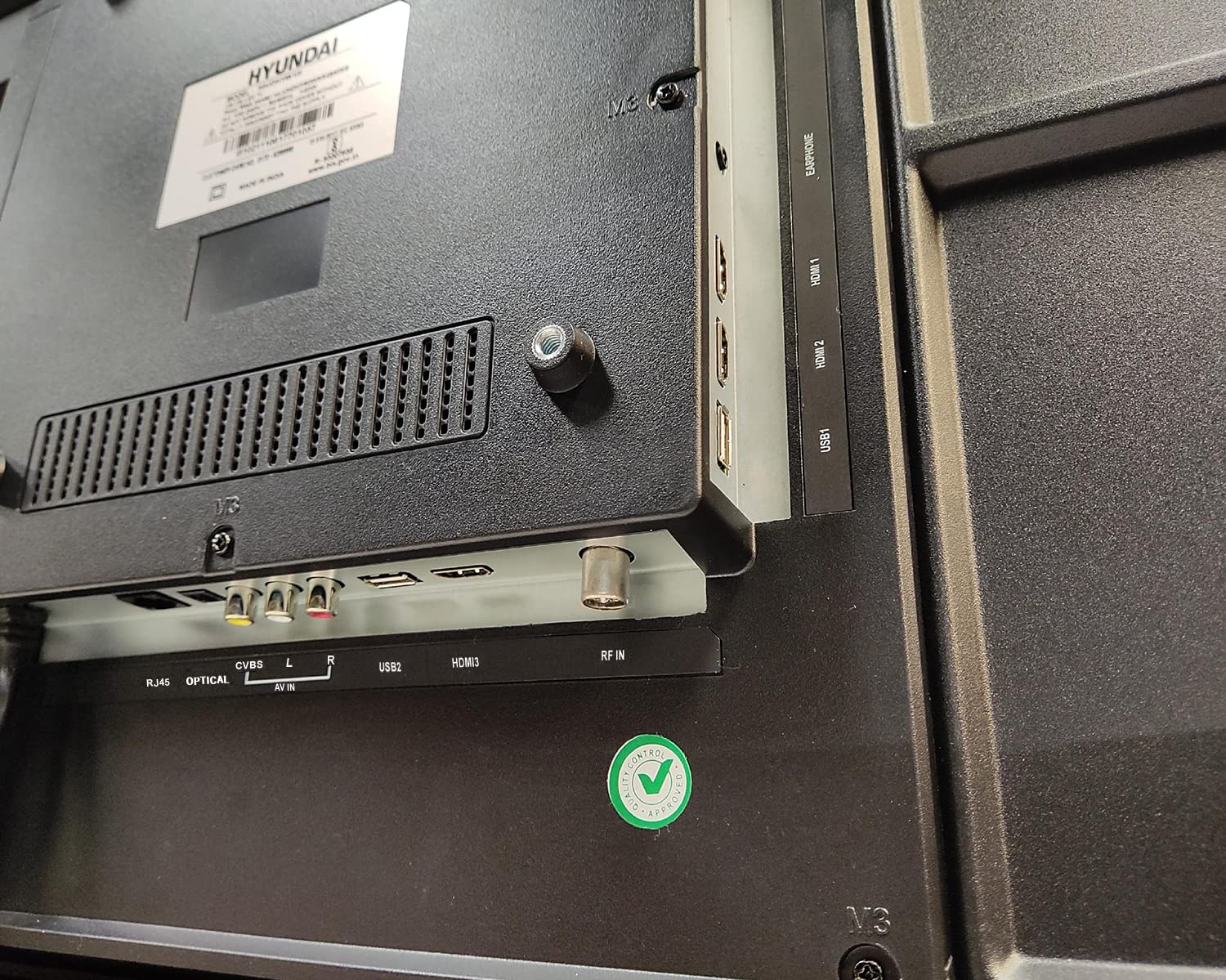
Obraz: Zbliżenie view of the connectivity ports on the rear of the Hyundai 43-inch Smart LED TV, including HDMI, USB, RF IN, AV IN, Optical, and RJ45 Ethernet.
5. Initial Power On & Basic Operation
5.1. Pierwsza konfiguracja
After connecting the power, press the power button on the remote control or the TV. The TV will guide you through the initial setup process, which includes:
- Wybór języka
- Wybór kraju/regionu
- Połączenie sieciowe (Wi-Fi lub Ethernet)
- Skanowanie kanałów (dla telewizji antenowej/kablowej)
- Akceptuję regulamin
5.2. Korzystanie z pilota Magic Remote
Your Hyundai TV comes with a Magic Remote, offering intuitive control through pointing, clicking, scrolling, and voice commands.

Image: Diagram detailing the features of the Hyundai Magic Remote, including Air Mouse, Single Click Access, Scroll wheel, Voice Control, Universal Control, and Hot Keys for Netflix and Prime Video.
- Mysz powietrzna: Aby przesunąć kursor, skieruj pilota na ekran.
- Kółko przewijania: Use the wheel to scroll through menus and web pages, or zoom in/out.
- Sterowanie głosowe: Press the microphone button and speak your commands to search for content or control the TV.
- Klawisze skrótu: Dedicated buttons for popular streaming services like Netflix and Prime Video for quick access.
- Sterowanie uniwersalne: The Magic Remote can control compatible external devices such as set-top boxes and sound systems.

Image: Front and angled side view of the Hyundai Magic Remote, showcasinze względu na ergonomiczną konstrukcję i układ przycisków.
6. Funkcje Smart TV (WebSystem operacyjny)
Your Hyundai TV is powered by WebOS, offering a user-friendly interface and access to a wide range of smart features.
6.1. Łączenie się z Internetem
For smart features, connect your TV to the internet:
- Wi-Fi: Go to Settings > Network > Wi-Fi Connection, select your network, and enter the password. The TV supports 5 GHz / 2.4 GHz Dual Band Wi-Fi.
- Ethernet: Connect an Ethernet cable from your router to the RJ45 port on the TV.
6.2. Żeglujący WebOS and Apps
Ten WebOS launcher bar provides quick access to installed applications, inputs, and settings. Use the Magic Remote to navigate.
- Zainstalowane aplikacje: Enjoy popular streaming services like Netflix, Prime Video, Disney+ Hotstar, YouTube, ZEE5, SonyLIV, Voot, ALT Balaji, and Hungama.
- Content Store: Download additional applications from the WebOS Content Store.
- Sztuczna inteligencja ThinQ: Utilize AI features for personalized recommendations and smart home integration.
- Magic Mobile Connection: Easily connect your smartphone to the TV for content sharing.
- Kontrola udziału: Share content from your mobile device to the TV.
- Miracast: Wirelessly mirror your compatible device's screen to the TV.

Image: Hyundai 43-inch Smart TV displaying WebOS home screen with various smart features like ThinQ AI, 4K Upscaling, HDR10, Magic Remote, MEMC, Miracast, Bezel-less design, Dual Band Wi-Fi, Dolby Audio, Bluetooth 5.0, Real Cinema Experience, and Alexa.

Obraz: widok z góry view of the Hyundai 43-inch Smart TV screen showing popular streaming app logos including Netflix, Disney+ Hotstar, Prime Video, ZEE5, SonyLIV, Voot, YouTube, ALT Balaji, and Hungama.
7. Konserwacja
7.1. Czyszczenie telewizora
Zawsze odłączaj telewizor od zasilania przed czyszczeniem.
- Ekran: Delikatnie przetrzyj ekran miękką, niepozostawiającą włókien ściereczką. W przypadku uporczywych zabrudzeń delikatnie przetrzyj.ampNasącz ściereczkę wodą lub specjalnym płynem do czyszczenia ekranów (upewnij się, że jest bezpieczny dla ekranów LED) i ostrożnie wytrzyj. Nie spryskuj ekranu płynem bezpośrednio.
- Ciało: Przetrzyj ramę i tylny panel telewizora miękką, suchą ściereczką. Unikaj stosowania środków czyszczących o właściwościach ściernych i rozpuszczalników.
7.2. Aktualizacje oprogramowania
Your TV may receive software updates to improve performance and add new features. It is recommended to keep your TV connected to the internet to receive these updates automatically or check for them manually in the settings menu.
8. Rozwiązywanie Problemów
Jeśli masz problemy z telewizorem, zapoznaj się z poniższymi typowymi problemami i ich rozwiązaniami:
| Problem | Możliwe rozwiązanie |
|---|---|
| Brak zasilania | Check if the power cord is securely plugged into both the TV and the wall outlet. Ensure the outlet is working. Try a different power outlet. |
| Brak obrazu i dźwięku | Verify that the correct input source is selected. Check all cable connections (HDMI, AV, etc.). Ensure external devices are powered on. |
| Pilot nie działa | Check the batteries and replace them if necessary. Ensure there are no obstructions between the remote and the TV. Re-pair the Magic Remote if it has become disconnected. |
| Problemy z połączeniem Wi-Fi | Restart your router and modem. Check the Wi-Fi password. Ensure the TV is within range of your Wi-Fi router. Try a wired Ethernet connection. |
| Funkcje inteligentne nie reagują | Check your internet connection. Restart the TV by unplugging it for a few minutes and plugging it back in. Ensure the TV's software is up to date. |
Jeśli po wypróbowaniu tych rozwiązań problem nadal występuje, skontaktuj się z obsługą klienta.
9. Specyfikacje
Key technical specifications for the Hyundai UHDHY43WSR4BYI5 TV:
- Model: UHDHY43WSR4BYI5
- Rozmiar ekranu: 109 cm (43 cala)
- Rezolucja: 4K Ultra HD (3840 x 2160 pikseli)
- Technologia wyświetlania: LED, typ wyświetlacza A+
- System operacyjny: WebOS
- Edytor: ARM CA55 1.1 GHz Quad Core Processor
- BARAN: 1.5 GB
- ROM: 8 GB
- Częstotliwość odświeżania: 60 Hz
- Wyjście audio: 20 Watts Box Speakers, Dolby Ultra Surround
- Łączność: Wi-Fi (Dual Band 5 GHz / 2.4 GHz), Bluetooth 5.0, HDMI (multiple), USB (2 ports), Ethernet (RJ45), Headphone, AV In, Optical
- Cechy szczególne: Simplink (HDMI CEC), Magic Mobile Connection, Share Control, ThinQ AI, Magic Remote with Voice Control and Air Mouse, HDR10, 4K Upscaling, MEMC, Miracast, Bezel-less design, Alexa built-in.
- Wymiary produktu (DxSxW): 96.2 x 56.7 x 9 cm (bez podstawki)
- Waga przedmiotu: 6.7 kg (without stand), 6.8 kg (with table stand)
- Źródło zasilania: Prąd zmienny 130 V, 108 W
- Viewkąt ing: 178 stopni
10. Gwarancja i wsparcie
Your Hyundai 43-inch 4K Ultra HD Smart LED TV comes with a 1-letnia gwarancja od daty zakupu. Zachowaj paragon i kartę gwarancyjną na wypadek roszczeń gwarancyjnych.
For technical support, service requests, or further assistance, please contact Goldenarch Consumer Electronics Pvt. Ltd., the manufacturer, at smiles@Hyundaice.in or call 0172 52-99-999.