1. Wprowadzenie
Dziękujemy za zakupasing the Paladone Minecraft Glitter Flow Lamp. This product is designed to provide ambient mood lighting with a unique glitter flow effect, featuring iconic Minecraft characters. Please read this manual thoroughly before use to ensure proper operation and safety.
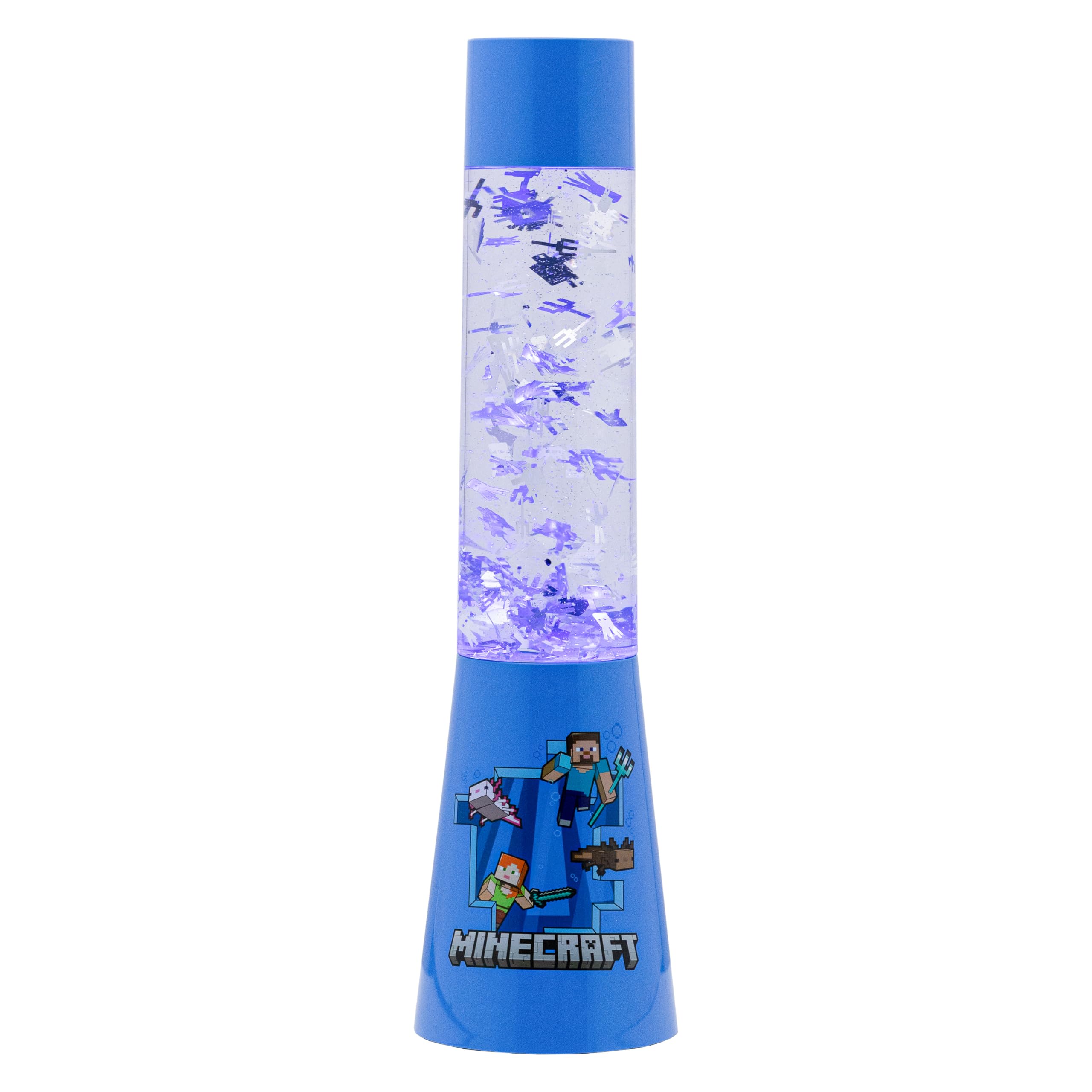
Image 1: The Paladone Minecraft Glitter Flow Lamp, featuring a green base with a Creeper face and a clear tube filled with glitter.
2. Informacje dotyczące bezpieczeństwa
- Keep this product out of reach of small children and pets.
- Nie otwieraj lamp unit or attempt to consume the liquid contents. In case of accidental ingestion or contact with skin/eyes, seek immediate medical attention.
- Use only 3 AAA batteries (not included) or a compatible USB power source (USB cable not included). Ensure correct battery polarity.
- Unikaj narażania lamp to extreme temperatures, direct sunlight, or high humidity.
- Nie zanurzaj lamp w wodzie lub innym płynie.
- Zużyte baterie należy utylizować zgodnie z lokalnymi przepisami.
3. Zawartość opakowania
Proszę zaznaczyć pole dotyczące następujących elementów:
- 1 x Paladone Minecraft Glitter Flow Lamp Jednostka
- 1 x Instruction Leaflet
Note: 3 AAA batteries and a USB power cable are NOT included and must be purchased separately.
4. Konfiguracja
4.1 Powering the Lamp
The Minecraft Glitter Flow Lamp can be powered by either 3 AAA batteries or a USB cable.
Montaż baterii:
- Locate the battery compartment on the bottom of the lamp.
- Za pomocą małego śrubokręta otwórz pokrywę komory baterii.
- Włóż 3 nowe baterie AAA, zwracając uwagę na prawidłową biegunowość (+/-), zgodnie ze wskazaniami wewnątrz komory.
- Załóż pokrywę komory baterii i zabezpiecz ją śrubą.
Opcja zasilania przez USB:
- Connect a compatible USB cable (not included) to the USB port on the back of the lamp.
- Plug the other end of the USB cable into a suitable USB power source (e.g., computer, USB wall adapter).
4.2 Umieszczenie
Umieść lamp on a stable, flat, and level surface to ensure proper glitter flow and prevent accidental tipping. Avoid placing it near edges where it could fall.
Image 2: The Minecraft Glitter Flow Lamp positioned on a bedside table, providing ambient blue lighting.
5. Instrukcja obsługi
5.1 Włączanie/wyłączanie zasilania
Aby obrócić lamp on, locate the power button on the back of the base and press it once. The lamp will illuminate and the glitter will begin to flow.
Aby obrócić lamp wyłączony, naciśnij ponownie przycisk zasilania.
5.2 Funkcja timera
To jestamp features a convenient 15-minute timer function.
- Z lamp already on, press the power button a second time to activate the timer.
- Lamp will remain lit for approximately 15 minutes and then automatically turn off.
- To manually turn off the lamp while the timer is active, press the power button a third time.
Image 3: The Minecraft Glitter Flow Lamp operating in a dimly lit room, showcasing the dynamic glitter movement and blue illumination.
Rysunek 4: Szczegółowy view of the glitter particles suspended and flowing within the liquid of the lamp.
5.3 Oficjalny film o produkcie
Video 1: An official product video demonstrating the glitter flow effect of the Minecraft Flow Lamp.
6. Konserwacja
6.1 Czyszczenie
Aby wyczyścić lamp, gently wipe the exterior with a soft, dry cloth. Do not use abrasive cleaners, solvents, or harsh chemicals, as these may damage the finish or the plastic components.
6.2 Wymiana baterii
When the light dims or the lamp stops functioning, it is time to replace the batteries. Follow the battery installation steps in Section 4.1, ensuring to replace all 3 AAA batteries simultaneously with new ones.
7. Rozwiązywanie Problemów
7.1 Łamp Nie włącza się
- Sprawdź baterie: Ensure 3 fresh AAA batteries are correctly installed with the proper polarity.
- Sprawdź połączenie USB: If using USB power, verify that the USB cable is securely connected to both the lamp and a functional power source.
7.2 Glitter Not Flowing Properly
- Pozioma powierzchnia: Upewnij się, że lamp is placed on a completely flat and level surface. Tilting can affect glitter movement.
- Temperatura: Pozwól lamp to reach room temperature. Extreme cold can temporarily affect the liquid's viscosity and glitter movement.
8. Specyfikacje
| Nazwa modelu: | Minecraft Glitter Flow Lamp, Night Light Mood Lighting |
| Numer części: | PP10069MCF |
| Wymiary: | 4.06" gł. x 4.06" szer. x 13.9" wys. |
| Waga przedmiotu: | 910 gramów (2.01 funta) |
| Źródło zasilania: | Battery Powered (3 AAA, not included) or USB (cable not included) |
| Tworzywo: | Plastikowy |
| Typ źródła światła: | Fluorescencyjny |
| Jasność: | 50 lumenów |
| Metoda sterowania: | Dotykać |
9. Gwarancja i pomoc techniczna
This product comes with a standard manufacturer's warranty. For detailed warranty information, please refer to the packaging or contact Paladone customer support.
If you experience any issues or have questions about your Paladone Minecraft Glitter Flow Lamp, please visit our official webodwiedź naszą stronę lub skontaktuj się z naszym działem obsługi klienta, aby uzyskać pomoc.


