1. Wprowadzenie
The MARKLIFE P11 Label Maker is a mini thermal wireless inkless sticker printer designed for efficient organization in various environments. It connects via Bluetooth to your smartphone, allowing for easy label creation and printing without the need for ink or toner. Its compact and portable design makes it suitable for home, kitchen, office, and classroom use.
Główne cechy:
- Fashion & Portable Design: Print labels directly from your smartphone via Bluetooth, eliminating the need for a traditional keyboard and screen. Smaller, lighter, and more convenient.
- Uniwersalne zastosowanie: Ideal for organizing home, office, and classroom. Print labels for kitchen jars, cables, storage rooms, and even commodity prices.
- Design Your Own Labels: Customize labels using the mobile app with options for text, small pictures, dates, borders, stickers, lines, icons, QR codes, barcodes, graffiti, and serial numbers. Supports 9 languages and 15 font options.
- Multiple Styles of Label Tapes: Compatible with various tape styles including white, color, fruit, cherry blossoms, cable labels, and transparent labels. Tapes are long-lasting, waterproof, wipeable, tear-resistant, and self-adhesive.
- Oszczędź czas i pieniądze: Thermal printing requires no ink or toner. Features 1-second instant printing, 3 times faster than traditional label printers. Rechargeable with automatic off for power saving.

The MARKLIFE P11 Label Maker Machine, showcasing its compact design and various label tape options.
2. Co znajduje się w pudełku
Upon unboxing your MARKLIFE P11 Label Maker, you should find the following components:
- Maszyna do produkcji etykiet MARKLIFE P11
- Labels (pre-installed or included as separate rolls)
- Kabel ładujący USB-C
- Instrukcja obsługi

The compact MARKLIFE P11 compared to a traditional label maker, highlighting its modern design.
3. Przewodnik konfiguracji
3.1 Włączanie
To power on the device, long press the power button located on the front of the label maker until the indicator light turns green.
3.2 Ładowanie papieru etykietowego
- Open the label compartment by gently pushing the top cover.
- Insert the label roll with the printing side facing up, ensuring it feeds smoothly into the printer mechanism.
- Zamknij górną pokrywę, aż zatrzaśnie się na swoim miejscu.
- Quickly press the power button twice to automatically adjust the paper to the correct printing position.

The thermal printing technology of the P11, which requires no ink.
3.3 Pobieranie aplikacji i połączenie Bluetooth
The MARKLIFE P11 operates via a dedicated mobile application. Follow these steps to connect:
- Download the "Marklife" app from your smartphone's app store (available on App Store and Google Play).
- Sprawdź, czy Bluetooth w Twoim telefonie jest włączony.
- Open the Marklife app. Click on the "Unlink" or "Connect" option within the app to search for nearby devices.
- Select your P11 device (e.g., "P11_XXXX_BLE") from the list to establish a Bluetooth connection. The app will indicate when the connection is successful.
Video: Step-by-step guide on how to use the P11 label machine, including app connection and basic operation.
4. Instrukcja obsługi
4.1 Tworzenie i drukowanie etykiet
- Once connected, select "Create Label" in the app.
- Choose a template or start with a blank label.
- Double-click the text area to input your desired text. You can adjust font, size, alignment, and add various elements like pictures, borders, stickers, dates, QR codes, and barcodes.
- Review your label design in the preview tryb.
- Wybierz liczbę kopii, które chcesz wydrukować.
- Tap the "Print" button. The label maker will quickly print your labels.
- Tear off the printed label from the dispenser.
Video: Demonstration of the Marklife P11 label maker in use, showing the app interface and printing process.
Wideo: Szybki przeglądview of the P11 label maker's printing capabilities and speed.
4.2 Label Properties and Applications
The MARKLIFE P11 uses durable labels with excellent properties:
- Wodoodporny: Labels resist water damage, making them suitable for kitchen or bathroom items.
- Odporne na olej: Labels maintain integrity even when exposed to oils.
- Odporny na zarysowania: Designed to withstand minor abrasions.
- Brak pozostałości: Etykiety można usunąć bez pozostawiania śladów kleju.

Demonstration of label durability: waterproof, oil-proof, scratch-resistant, and residue-free removal.
Scenariusze zastosowań:
- Kuchnia: Label spice jars, food containers, and pantry items.
- Biuro: Zorganizować files, documents, cables, and stationery.
- Dom: Label storage bins, personal items, and children's belongings.
- Prezenty: Create personalized tags for presents.
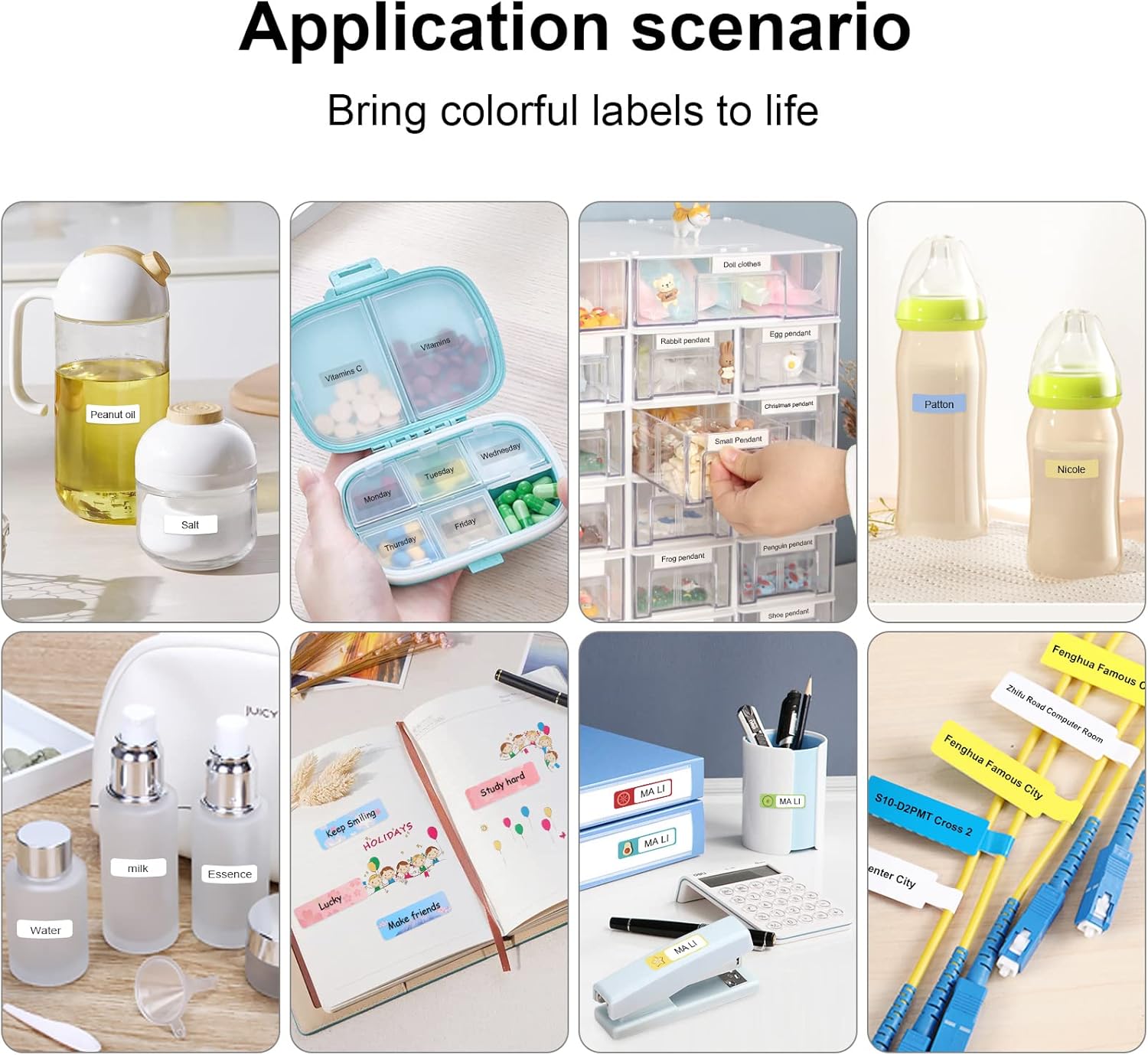
Examples of label maker use in different settings, from kitchen organization to baby item labeling.

Office organization made easy with the P11 label maker. Example of a label with a barcode: 6953124066961

Personalized gift labeling for various occasions.

Home organization with labels for pantry items and personal storage.
5. Konserwacja
To ensure the longevity and optimal performance of your MARKLIFE P11 Label Maker, follow these maintenance tips:
- Czyszczenie głowicy drukującej: Regularnie czyść głowicę drukującą termiczną delikatnie przecierając ją wacikiem bawełnianym.ampPrzemyć alkoholem izopropylowym. Przed czyszczeniem upewnić się, że urządzenie jest wyłączone i ostygło.
- Storing Labels: Przechowuj rolki etykiet w chłodnym, suchym miejscu, z dala od bezpośredniego światła słonecznego i ekstremalnych temperatur, aby zapobiec ich degradacji.
- Pielęgnacja baterii: Regularnie ładuj urządzenie, nawet jeśli nie jest używane często, aby utrzymać baterię w dobrym stanie. Unikaj całkowitego rozładowywania baterii przez dłuższy czas.
- Ogólne sprzątanie: Wipe the exterior of the label maker with a soft, dry cloth. Avoid using harsh chemicals or abrasive materials.
6. Rozwiązywanie Problemów
If you encounter issues with your MARKLIFE P11 Label Maker, try the following solutions:
- Urządzenie nie łączy się przez Bluetooth:
- Sprawdź, czy drukarka etykiet jest włączona i całkowicie naładowana.
- Turn your phone's Bluetooth off and on again.
- Restart the Marklife app.
- If previously paired with another device, ensure it's disconnected.
- Poor Print Quality (Faint or Incomplete Prints):
- Check if the label roll is inserted correctly and is not jammed.
- Wyczyść głowicę drukującą zgodnie z opisem w rozdziale Konserwacja.
- Ensure the label tape is suitable for thermal printing and is not expired or damaged.
- Adjust the print density setting in the Marklife app.
- Zakleszczenie papieru:
- Wyłącz urządzenie.
- Open the label compartment and carefully remove any jammed paper or debris.
- Reinsert the label roll and close the cover. Power on and press the feed button twice to re-position.
- Awaria lub zawieszanie się aplikacji:
- Zamknij i ponownie otwórz aplikację.
- Upewnij się, że Twoja aplikacja jest zaktualizowana do najnowszej wersji.
- Jeśli problemy nadal występują, wyczyść pamięć podręczną aplikacji lub zainstaluj ją ponownie.
7. Specyfikacje
| Funkcja | Szczegół |
|---|---|
| Marka | MARKLIFE |
| Nazwa modelu | P11 |
| Technologia łączności | Bluetooth |
| Technologia druku | Termiczny |
| Funkcja specjalna | Przenośny |
| Kolor | Różowy |
| Wyjście drukarki | Monochromia |
| Maksymalna prędkość druku monochromatycznego | 30 stron na milion |
| Waga przedmiotu | 270 gramów (9.5 uncji) |
| Wymiary produktu | 2" gł. x 2" szer. x 2" wys. |
| Kompatybilne urządzenia | Smartfony |
| Metoda kontroli | Aplikacja, dotyk |
| Rezolucja | 600x600 |
| Maksymalny rozmiar nośnika | 12x40cm |
8. Gwarancja i wsparcie
8.1 Informacje o gwarancji
The MARKLIFE P11 Label Maker Machine comes with a Limited Warranty. Please refer to the warranty card included in your product packaging for specific terms and conditions, including coverage duration and claim procedures.
8.2 Obsługa klienta
For any technical assistance, troubleshooting not covered in this manual, or warranty inquiries, please contact MARKLIFE customer support. Contact details can typically be found on the official MARKLIFE webmiejscu lub na opakowaniu produktu.


