1. Wprowadzenie
This manual provides detailed instructions for the proper use and maintenance of your Cellularline Task Dual-Mode Headset. Please read this manual thoroughly before using the product to ensure optimal performance and longevity.
The Cellularline Task headset is designed for versatility, offering both wired and wireless (Bluetooth) connectivity. It features a detachable microphone, making it suitable for smart working, remote learning, and music listening.
2. Koniec produktuview
The Cellularline Task headset combines comfort with functionality, featuring over-ear cushions and intuitive controls. Its dual-mode capability allows seamless switching between wired and Bluetooth connections.

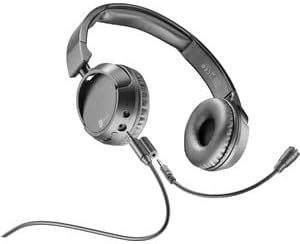
Rysunek 2.1: Cellularline Task Dual-Mode Headset with detachable microphone connected.
Główne cechy:
- Dual-mode stereo headset (wired and Bluetooth).
- Wireless communication technology compatible with various devices (iPhone, Samsung, Huawei, Xiaomi, etc.).
- Modern design with comfortable over-ear cushions.
- Adaptable and removable microphone, ideal for video calls and audio recording.
- Volume limitation feature for hearing protection.
- Up to 18 hours of continuous music playback or talk time.
3. Konfiguracja
3.1 Zawartość opakowania
Before proceeding, ensure your package contains the following items:
- Cellularline Task Headset
- Odłączany mikrofon
- Kabel ładujący (USB)
- Kabel audio (gniazdo 3.5 mm)
- Instrukcja obsługi (ten dokument)
3.2 Ładowanie zestawu słuchawkowego
Before first use, fully charge the headset. Connect the provided USB charging cable to the charging port on the headset and to a compatible USB power source. The LED indicator will show charging status and turn off or change color when fully charged.
3.3 Podłączanie odłączanego mikrofonu
The microphone can be easily attached or detached based on your usage needs.
- Znajdź port wejściowy mikrofonu na lewej słuchawce zestawu słuchawkowego.
- Align the 3.5mm jack of the detachable microphone with the port.
- Gently push the microphone jack into the port until it is securely seated.
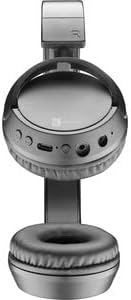
Rysunek 3.1: Headset with the detachable microphone removed, showing the input port.
3.4 Połączenie przewodowe
Aby używać zestawu słuchawkowego w trybie przewodowym:
- Upewnij się, że zestaw słuchawkowy jest wyłączony.
- Podłącz jeden koniec kabla audio 3.5 mm do portu wejściowego audio w zestawie słuchawkowym.
- Connect the other end of the 3.5mm audio cable to the audio output jack of your device (e.g., computer, smartphone, tablet).
- The headset will function as a wired headset, drawing power from the connected device if needed, or using its own battery for active features.

Rysunek 3.2: Headset connected via 3.5mm audio cable, demonstrating wired mode.
3.5 parowanie Bluetooth
To connect your headset wirelessly via Bluetooth:
- Włączanie: Press and hold the Power button on the headset until the LED indicator flashes, indicating pairing mode.
- Aktywuj Bluetooth: Na swoim urządzeniu (smartfonie, tablecie, komputerze) przejdź do ustawień Bluetooth i upewnij się, że funkcja Bluetooth jest włączona.
- Szukaj Urządzenia: Urządzenie rozpocznie skanowanie w poszukiwaniu dostępnych urządzeń Bluetooth.
- Wybierz zestaw słuchawkowy: From the list of found devices, select "Cellularline Task" (or similar name).
- Potwierdź połączenie: Once connected, the LED indicator on the headset will change to a steady light or flash slowly, and your device will confirm the connection.
The headset is compatible with iPhone, Samsung, Huawei, Xiaomi, and other Bluetooth-enabled devices.
4. Instrukcja obsługi
4.1 Włączanie/wyłączanie zasilania
- Włączanie: Naciśnij i przytrzymaj przycisk zasilania przez około 3 sekundy, aż zaświeci się kontrolka LED.
- Wyłączone: Naciśnij i przytrzymaj przycisk zasilania przez około 5 sekundy, aż wskaźnik LED zgaśnie.
4.2 Regulacja głośności
The headset features tactile controls for volume adjustment.
Rysunek 4.1: Z bliska view of the earcup showing control buttons for volume and playback.
- Zwiększ głośność: Naciśnij przycisk '+'.
- Zmniejsz głośność: Naciśnij przycisk '-'.
The headset includes a volume limitation feature to protect your hearing.
4.3 Zarządzanie połączeniami
When connected via Bluetooth, you can manage calls directly from the headset:
- Odbierz połączenie: Naciśnij raz przycisk wielofunkcyjny (zazwyczaj przycisk zasilania lub specjalny przycisk połączenia).
- Zakończ połączenie: Naciśnij przycisk wielofunkcyjny jeden raz podczas połączenia.
- Odrzuć połączenie: Press and hold the Multi-function button for 2 seconds when an incoming call rings.
4.4 Odtwarzanie muzyki
When connected via Bluetooth, control your music playback:
- Odtwórz/Pauza: Naciśnij raz przycisk wielofunkcyjny.
- Następny utwór: Naciśnij i przytrzymaj przycisk „+”.
- Poprzedni utwór: Naciśnij i przytrzymaj przycisk „-”.
4.5 Korzystanie z mikrofonu
The detachable microphone is designed for clear voice capture during calls or recordings.
- Ensure the microphone is securely attached (refer to Section 3.3).
- Position the microphone appropriately for optimal voice pickup.
- When using the headset in wired mode, the microphone functionality will depend on the connected device's compatibility with 4-pole 3.5mm jacks.
5. Konserwacja
5.1 Czyszczenie
- Do czyszczenia zestawu słuchawkowego należy używać miękkiej, suchej ściereczki.
- Nie należy używać środków czyszczących o działaniu ściernym, rozpuszczalników ani silnych środków chemicznych.
- Unikaj dostania się wilgoci do otworów.
5.2 Przechowywanie
- Przechowuj zestaw słuchawkowy w chłodnym, suchym miejscu, z dala od bezpośredniego światła słonecznego i ekstremalnych temperatur.
- If storing for an extended period, ensure the battery is partially charged (around 50%) to maintain battery health.
5.3 Pielęgnacja baterii
- Unikaj częstego całkowitego rozładowywania akumulatora.
- Nie wystawiaj baterii na działanie wysokich temperatur.
- If the headset will not be used for a long time, charge it every few months to prevent deep discharge.
6. Rozwiązywanie Problemów
Zestaw słuchawkowy 6.1 nie włącza się
- Upewnij się, że zestaw słuchawkowy jest w pełni naładowany. Podłącz go do źródła zasilania i odczekaj kilka minut przed ponownym włączeniem.
- Wypróbuj inny kabel ładujący lub zasilacz.
6.2 Brak dźwięku lub niski poziom głośności
- Check the volume levels on both the headset and the connected device.
- Jeśli używasz technologii Bluetooth, upewnij się, że zestaw słuchawkowy jest prawidłowo sparowany i podłączony.
- If using wired mode, ensure the 3.5mm audio cable is fully inserted into both the headset and the device.
- Przetestuj przy użyciu innego źródła dźwięku lub urządzenia.
6.3 Problemy z parowaniem Bluetooth
- Sprawdź, czy zestaw słuchawkowy jest w trybie parowania (dioda LED miga).
- Wyłącz i włącz ponownie Bluetooth w swoim urządzeniu.
- Forget the headset from your device's Bluetooth list and attempt to pair again.
- Ensure the headset is within the effective range of your device (typically 10 meters).
6.4 Mikrofon nie działa
- Sprawdź, czy odłączany mikrofon jest solidnie przymocowany do zestawu słuchawkowego.
- Check microphone settings on your connected device to ensure the headset's microphone is selected as the input device.
- Przetestuj mikrofon za pomocą innej aplikacji lub urządzenia.
- Ensure the microphone is not muted on your device or via any headset controls (if applicable).
7. Specyfikacje
| Marka | Linia komórkowa |
| Nazwa modelu | BTHEADBTASKK |
| Technologia łączności | Wireless (Bluetooth), Wired (3.5mm jack) |
| Technologia komunikacji bezprzewodowej | Bluetooth |
| Współczynnik kształtu | Nauszne |
| Cechy specjalne | Fast Charging, Volume Control, Included Microphone |
| Czas na zabawę | Do 18 godzin |
| Czas rozmowy | 18 godziny |
| Kompatybilne urządzenia | Laptop, Tablet, Mobile Phone, Universal |
| Typ sterowania | Sterowanie dotykowe, pilot zdalnego sterowania |
| Tworzywo | Plastik, Guma |
| Kolor | Czarny |
8. Gwarancja i wsparcie
Cellularline products are designed and manufactured to the highest quality standards. For information regarding warranty coverage, please refer to the warranty card included with your product or visit the official Cellularline webstrona.
If you encounter any issues not covered in this manual or require further assistance, please contact Cellularline customer support through their official webstronę internetową lub dane kontaktowe znajdujące się na opakowaniu produktu.
Webstrona: www.cellline.com


