1. Wprowadzenie
This manual provides instructions for the installation, operation, and maintenance of your KuWFi 8-Port Gigabit PoE Ethernet Switch. This device is designed to provide power and data connectivity for various network devices, such as IP cameras and wireless access points, through a single Ethernet cable.
Główne cechy:
- 8 x 10/100/1000 Mbps Power over Ethernet (PoE) ports.
- 2 x 10/100/1000 Mbps SFP (Small Form-Factor Pluggable) uplink ports.
- 48V PoE output, compliant with IEEE 802.3af standard.
- Automatic detection of PoE requirements, speed, duplex, and cable type (Auto Uplink).
- Trwały metalowy casing for enhanced reliability.
- Plug and Play functionality for easy setup.
2. Zawartość opakowania
Sprawdź, czy w przesyłce znajdują się wszystkie elementy:
- KuWFi 8-Port Gigabit PoE Ethernet Switch
- Linia energetyczna
- Instrukcja obsługi (ten dokument)
3. Koniec produktuview
The KuWFi Gigabit PoE Ethernet Switch features 8 PoE-enabled RJ45 ports and 2 Gigabit SFP uplink ports. It is designed for expanding network connectivity and powering compatible devices.

Rycina 3.1: Przód view of the KuWFi 8-Port Gigabit PoE Ethernet Switch, highlighting the 8 PoE RJ45 ports and 2 Uplink SFP ports.

Figure 3.2: Port configuration diagram showing 8 Gigabit PoE ports and 2 Gigabit SFP ports.
Wskaźniki LED:
- Dioda LED zasilania: Wskazuje stan zasilania przełącznika.
- PoE Port LEDs (1-8): Indicate data activity and PoE status for each respective port.
- Uplink Port LEDs (9-10): Indicate data activity for the SFP uplink ports.
VLAN Switch:
The switch includes a physical VLAN (Virtual Local Area Network) switch. When enabled, this feature isolates the PoE ports from each other, enhancing security and preventing broadcast storms. The uplink ports remain connected to all PoE ports. When disabled, all ports operate as a standard switch.

Figure 3.3: Front panel detail showing the VLAN On/Off switch.
4. Konfiguracja i instalacja
Follow these steps to set up your KuWFi PoE Ethernet Switch:
- Umieszczenie: Place the switch on a stable, flat surface or mount it in a suitable location. Ensure adequate ventilation around the device.
- Podłączenie zasilania: Connect the provided power line to the power input port on the switch and then to a standard electrical outlet. The Power LED should illuminate.
- Połączenie uplinkowe: Connect your router, NVR, or main network device to one of the 2 Gigabit SFP uplink ports using an appropriate SFP module and fiber cable, or an RJ45 Ethernet cable if using a compatible SFP-to-RJ45 module.
- Połączenie urządzenia PoE: Connect your PoE-compatible devices (e.g., IP cameras, wireless access points) to the 8 PoE RJ45 ports using standard Cat-5 or Cat-6 Ethernet cables. The switch will automatically detect and provide power to these devices.
- VLAN Configuration (Optional): If network segmentation is desired, set the VLAN switch to the 'ON' position. This will isolate the PoE ports from each other while maintaining connectivity to the uplink ports.

Rysunek 4.1: Example connection diagram for the KuWFi switch.

Figure 4.2: The switch expanding network ports for various devices.
5. Obsługa przełącznika
Once connected, the KuWFi PoE Ethernet Switch operates automatically. It is a plug-and-play device that requires no complex configuration for basic network extension and PoE functionality.
Funkcjonalność PoE:
The switch automatically detects and supplies power to IEEE 802.3af compliant devices connected to its PoE ports. If a non-PoE device is connected, only data transmission will occur, without power being supplied, protecting your equipment.
Prędkość gigabitowa:
All ports support Gigabit Ethernet (10/100/1000 Mbps) for high-speed data transfer, ensuring efficient performance for connected devices.
Scenariusze zastosowań:

Figure 5.1: The switch is suitable for home, gaming, and business environments.
6. Konserwacja
To ensure optimal performance and longevity of your KuWFi PoE Ethernet Switch, follow these maintenance guidelines:
- Czyszczenie: Regularnie czyść zewnętrzną część przełącznika miękką, suchą ściereczką. Nie używaj środków czyszczących w płynie ani aerozolu.
- Wentylacja: Upewnij się, że otwory wentylacyjne nie są zablokowane. Prawidłowy przepływ powietrza zapobiega przegrzaniu.
- Środowisko: Używaj przełącznika w określonym zakresie temperatury i wilgotności. Unikaj narażenia na bezpośrednie działanie promieni słonecznych, nadmierne ciepło i wilgoć.
- Zarządzanie kablami: Utrzymuj kable sieciowe w porządku, bez zagięć i nadmiernego zginania, aby zapobiec degradacji sygnału.
7. Rozwiązywanie Problemów
If you encounter issues with your KuWFi PoE Ethernet Switch, refer to the following common troubleshooting steps:
- Brak zasilania:
- Check if the power cable is securely connected to both the switch and the power outlet.
- Sprawdź, czy gniazdko elektryczne jest sprawne.
- Ensure the Power LED on the switch is illuminated.
- Brak połączenia sieciowego:
- Ensure Ethernet cables are securely connected to both the switch and the connected devices.
- Check the Link/Act LEDs on the switch ports for activity. If no LED is lit, try a different cable or port.
- Verify that the connected devices (router, NVR, IP camera) are powered on and functioning correctly.
- Urządzenie PoE nie włącza się:
- Confirm that the connected device is PoE-compatible (IEEE 802.3af standard).
- Try connecting the device to a different PoE port on the switch.
- Ensure the total power consumption of all connected PoE devices does not exceed the switch's power budget.
- Niska prędkość sieci:
- Verify that all connected devices and cables support Gigabit Ethernet (1000 Mbps).
- Check for network congestion or issues with the uplink connection.
8. Specyfikacje
| Funkcja | Szczegół |
|---|---|
| Numer modelu | KF-08G20GB-US |
| Porty | 8 x 10/100/1000 Mbps PoE RJ45 Ports, 2 x 10/100/1000 Mbps SFP Uplink Ports |
| Standard PoE | IEEE 802.3af |
| Objętość wyjścia PoEtage | 48 wolty |
| Szybkość przesyłu danych | 1 gigabitów na sekundę |
| Materiał obudowy | Metal |
| Wymiary (dł. x szer. x wys.) | 10.47 x 6.57 x 2.28 cala (wymiary opakowania) |
| Waga przedmiotu | 2.18 funta |
| Producent | KuWFi |
| Kompatybilne urządzenia | IP Cameras, Wireless Access Points, IP Phones, etc. |
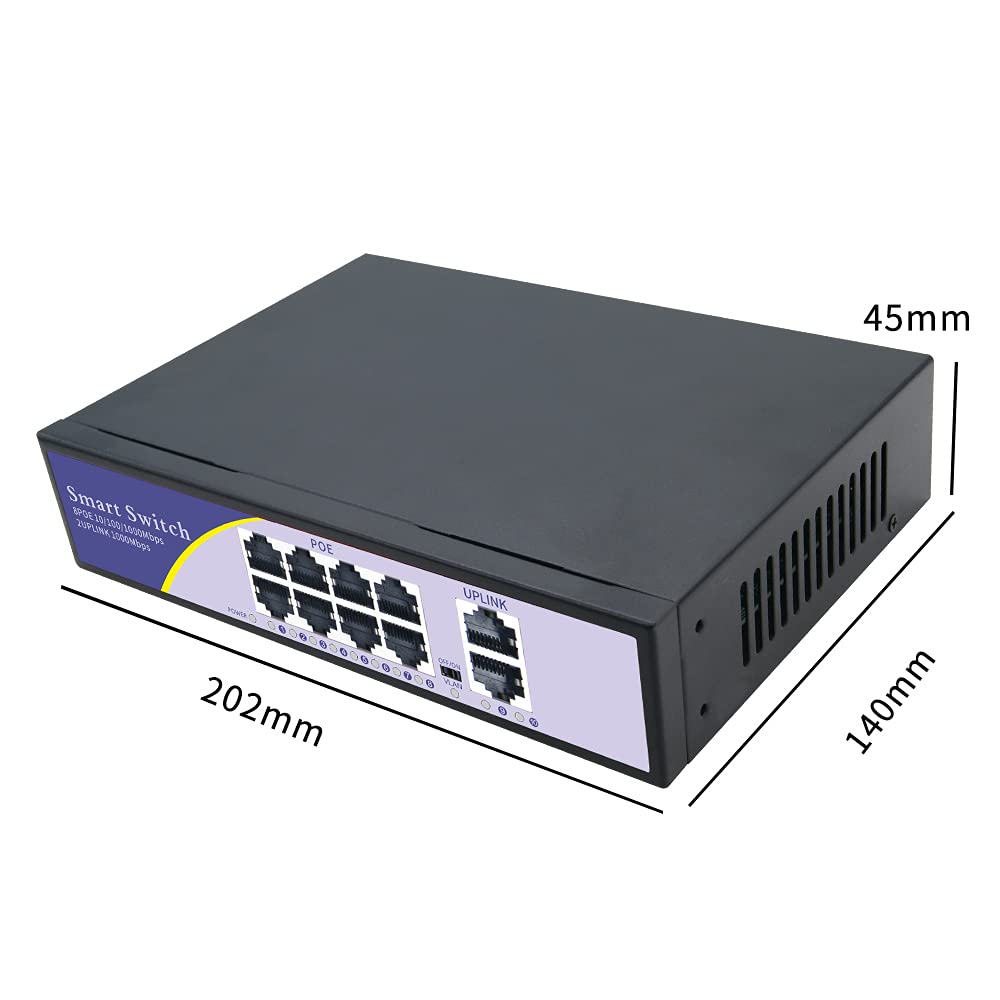
Figure 8.1: Physical dimensions of the switch.
9. Gwarancja i wsparcie
Gwarancja:
Your KuWFi 8-Port Gigabit PoE Ethernet Switch is covered by a 12-miesięczna gwarancja from the date of purchase. This warranty covers product quality issues and ensures a prompt technical solution or device replacement if necessary.
Obsługa klienta:
For any questions, technical assistance, or warranty claims, please contact our dedicated support team:
E-mail: support@kuwfi.com
Our team is committed to providing timely and effective support.


