Wstęp
This manual provides instructions for the MageGee Typewriter Mechanical Gaming Keyboard. It covers setup, operation, maintenance, and troubleshooting to ensure optimal performance and longevity of your device. Please read this manual thoroughly before using the keyboard.
Zawartość opakowania
- MageGee Typewriter Mechanical Gaming Keyboard
- Magnetyczna Podkładka Pod Nadgarstek
- Kabel USB
- Instrukcja obsługi (ten dokument)
Organizować coś
1. Podłączanie klawiatury
- Locate the USB cable provided with your keyboard.
- Connect the USB Type-A end of the cable to an available USB port on your computer (PC, Laptop, or Mac).
- Connect the other end of the USB cable to the port on the keyboard.
- The keyboard is plug-and-play; no additional drivers or software are required for basic functionality. Your operating system should automatically detect and configure the device.
2. Attaching the Wrist Rest
If your model includes a magnetic wrist rest, align it with the front edge of the keyboard. The magnets will help secure it in place, providing ergonomic support during use.
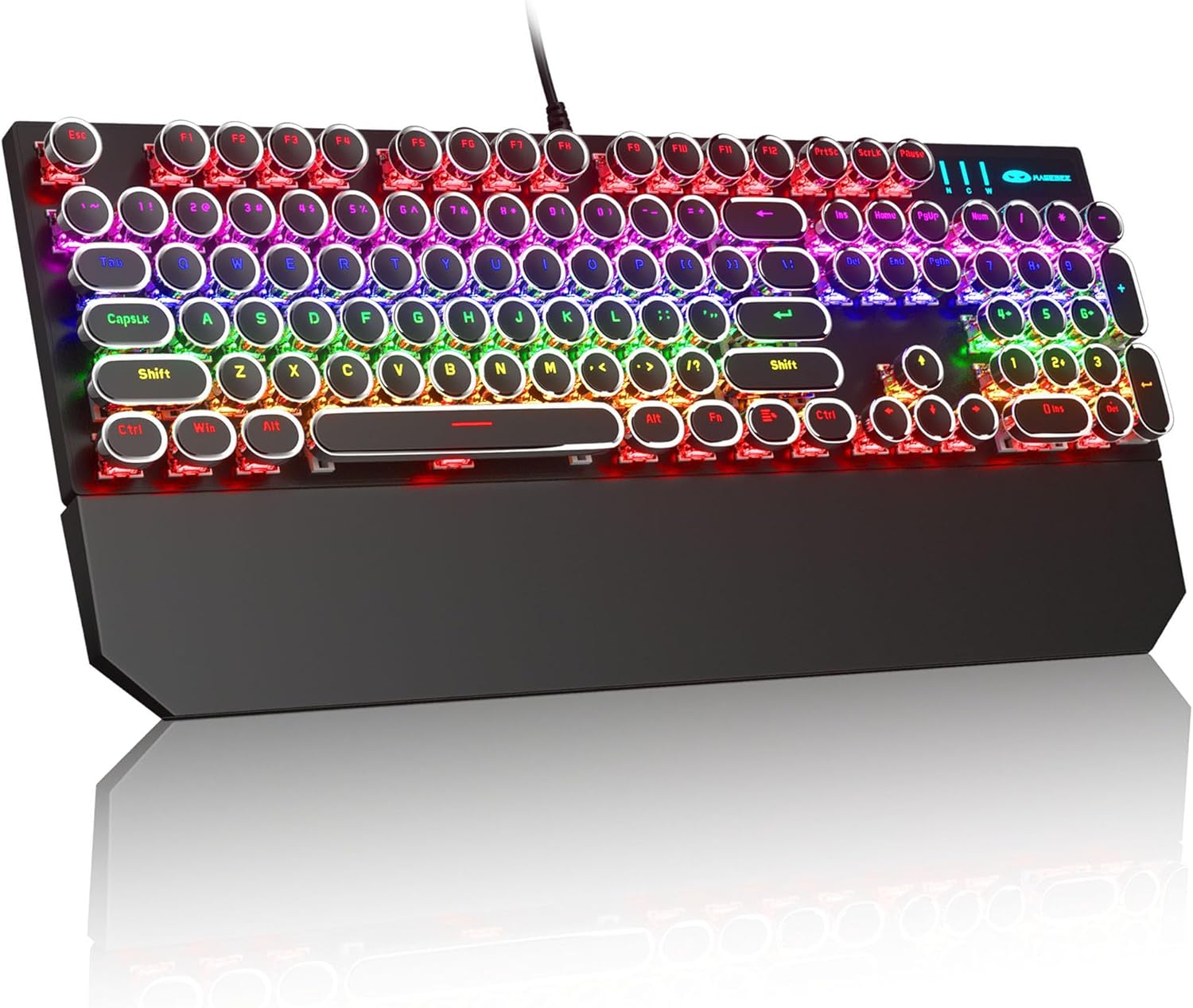
Image: The MageGee Typewriter Mechanical Gaming Keyboard connected via USB, with its magnetic wrist rest attached. The keyboard features retro round keycaps and vibrant RGB backlighting.
Instrukcja obsługi
Układ klawiatury
The MageGee Typewriter Mechanical Gaming Keyboard features a full-size 104-key layout, including a numeric keypad and dedicated function keys (F1-F12).

Obraz: widok z góry view of the keyboard, highlighting the full 104-key layout and the LED backlighting effect.
Kontrola podświetlenia
The keyboard features multiple RGB rainbow backlit modes. Use the following key combinations to adjust the lighting effects:
- Fn + Ins: Cycle through various backlight modes.
- Fn + Dom: Dostosuj jasność podświetlenia.
- Fn + PgUp: Zwiększ prędkość podświetlenia.
- Fn + PgDn: Zmniejsz prędkość podświetlenia.
- Fn + Del: Change backlight color (if applicable to the current mode).
- Fn + koniec: Turn backlight on/off.

Obraz: Zbliżenie view of the keyboard's keys, illustrating the RGB backlighting and the visible blue mechanical switches beneath the round keycaps.
Klawisze multimedialne i funkcyjne
The F1-F12 keys can be used in conjunction with the Fn key to access multimedia and system functions. Specific functions may vary slightly depending on your operating system.
| Kombinacja klawiszy | Funkcjonować |
|---|---|
| Fn+F1 | Odtwarzacz multimedialny |
| Fn+F2 | Zmniejsz głośność |
| Fn+F3 | Zwiększ głośność |
| Fn+F4 | Niemy |
| Fn+F5 | Zatrzymywać się |
| Fn+F6 | Poprzedni utwór |
| Fn+F7 | Odtwórz/Pauza |
| Fn+F8 | Następny utwór |
| Fn+F9 | |
| Fn+F10 | Web Przeglądarka |
| Fn+F11 | Mój komputer |
| Fn+F12 | Kalkulator |
Konserwacja
Czyszczenie klawiatury
- Przed czyszczeniem odłącz klawiaturę od komputera.
- Użyj miękkiej, niestrzępiącej się ściereczki, lekko wyczyśćampPrzetrzyj klawisze i powierzchnię klawiatury wodą lub łagodnym środkiem czyszczącym.
- Do usuwania kurzu i zanieczyszczeń spomiędzy klawiszy należy użyć sprężonego powietrza.
- Unikaj stosowania silnych środków chemicznych, ściernych środków czyszczących lub spryskiwania klawiatury płynami bezpośrednio.
Opieka ogólna
- Avoid exposing the keyboard to extreme temperatures, humidity, or direct sunlight.
- Do not drop the keyboard or subject it to strong impacts.
- Keep liquids away from the keyboard to prevent damage.
Rozwiązywanie problemów
Klawiatura nie odpowiada
- Sprawdź, czy kabel USB jest prawidłowo podłączony do klawiatury i komputera.
- Spróbuj podłączyć klawiaturę do innego portu USB w komputerze.
- Przetestuj klawiaturę na innym komputerze, aby wykluczyć problem związany z danym komputerem.
- Uruchom ponownie komputer.
Podświetlenie nie działa lub jest nieprawidłowe
- Ensure the backlight is not turned off (Fn + End).
- Adjust backlight brightness (Fn + Home).
- Cycle through different backlight modes (Fn + Ins) to see if the issue persists across all modes.
Keys Not Registering or Double Typing
- Clean the affected key(s) using compressed air to remove any debris.
- If the issue persists, it may indicate a hardware fault. Contact customer support for assistance.
Specyfikacje
| Funkcja | Szczegół |
|---|---|
| Model | Typewriter Mechanical Gaming Keyboard |
| Łączność | Przewodowy USB 2.0 |
| Typ klucza | Mechanical (Blue Switch) |
| Klawisze | Retro Round, Double-shot injection molded |
| Podświetlenie | RGB Rainbow Backlit |
| Układ | 104-Key Full-Size, Anti-ghosting |
| Zgodność | Windows (2000, XP, ME, Vista, 7, 8), Linux, Mac |
| Wymiary (dł. x szer. x wys.) | 17.1 x 4.9 x 1.3 cala (434 mm x 130 mm x 37 mm) |
| Waga przedmiotu | 1.99 funta |
| Tworzywo | Aluminum alloy metal panel |

Image: A diagram illustrating the physical dimensions of the keyboard and its detachable wrist rest.
Gwarancja i wsparcie
Informacje o gwarancji
MageGee products are designed for quality and reliability. This product comes with a standard manufacturer's warranty against defects in materials and workmanship. Please refer to the product packaging or the official MageGee webSzczegółowe warunki gwarancji i jej czas trwania można znaleźć na stronie.
Obsługa klienta
If you encounter any issues or have questions regarding your MageGee Typewriter Mechanical Gaming Keyboard, please contact our customer support team:
- E-mail: support@magegee.com
- Webstrona: www.magee.com
When contacting support, please provide your product model and a detailed description of the issue.


